Process Lens PL Service Manual_EN.pdf - 第100页
3 Replacing spare parts 10 0 Se rv ic e Ma nu al P ro ce ss L en s PL - 0 3/ 20 25 Fig.137: Cover ► Remove the two screws fastening the cover (1) and remove the cover. Fig.138: Fiber optic sensors The individual fiber…
3 Replacing spare parts
Service Manual Process Lens PL - 03/2025 99
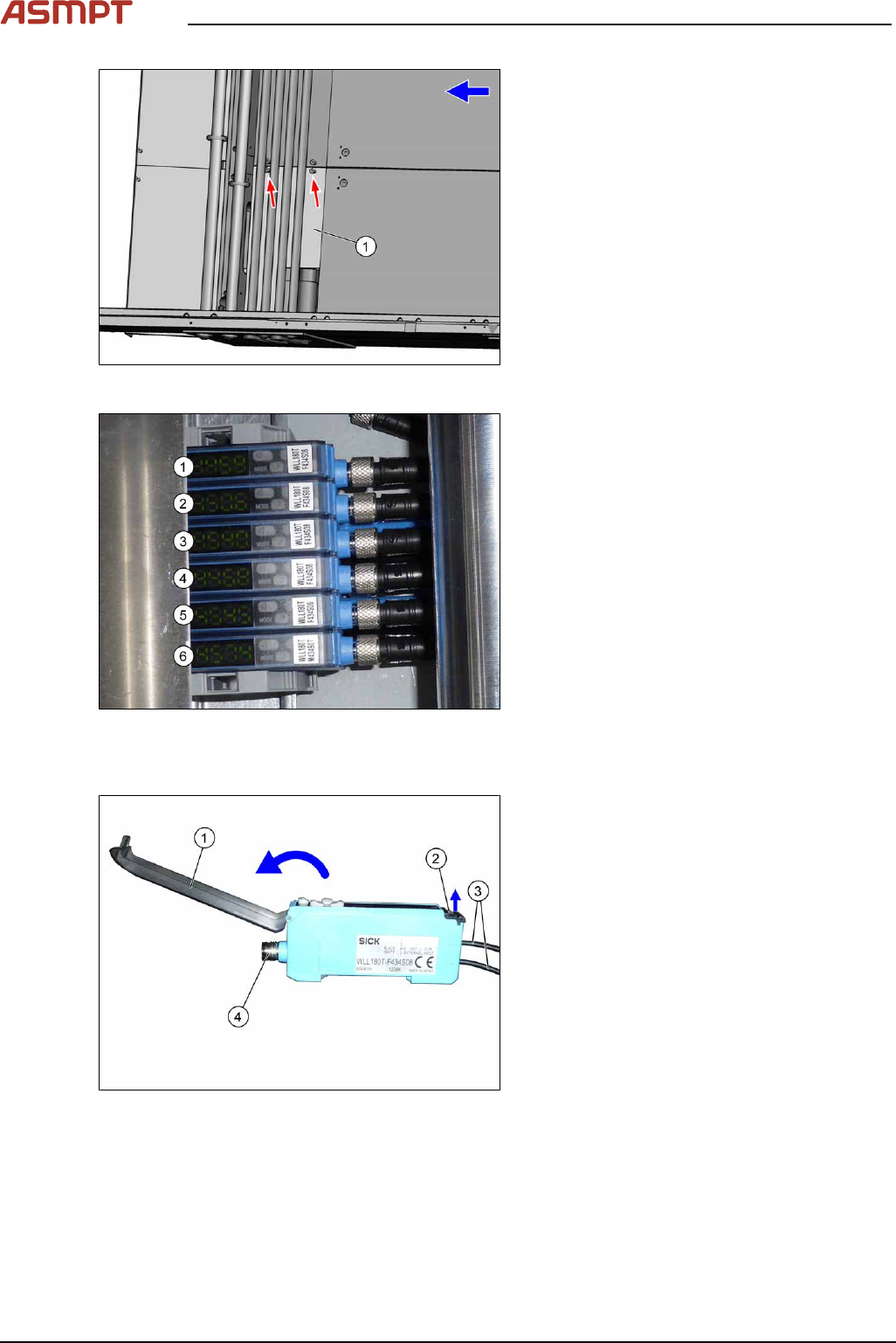
Conveyor track Designation Description
Track 1 1 (slave) Output area
2 (slave) Inspection area
3 (slave) Input area
Track 2 4 (slave) Output area
5 (slave) Inspection area
6 (master) Input area
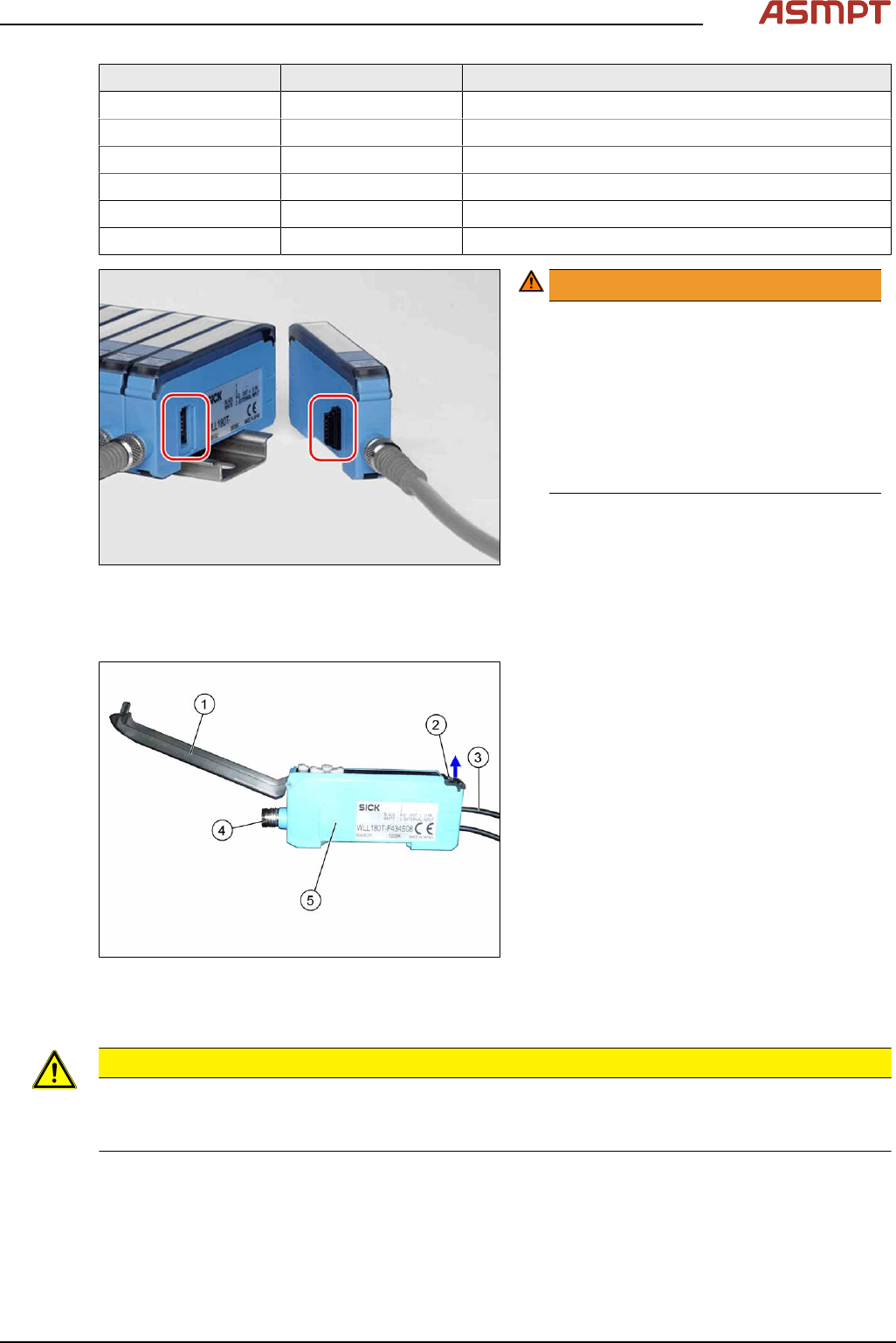
Fig.135: Plug-and-socket connections
WARNING!
The adjacent fiber optic sensors are
connected via plug-and-socket con-
nections on the side.
Before dismantling the fiber optic sensors
always separate them a bit.
Do not lift the fiber optic sensors off
without separating them first. If you do so,
you may damage the plug-and-socket
connection.
.
Each sensor has two fiber optic cables connected (transmitter/receiver), which belong to the same
conveyor belt (segment).
Fig.136: Fiber optic sensor
1. Cover
2. Locking the fiber optic cables
top = open
bottom = closed
3. Fiber optic cable
Top: input (from receiver)
Bottom: output (to transmitter)
4. Electrical connection
5. Electrical connection to neighboring fiber
optic sensor (under the plastic cover)
Removal
CAUTION
Do not bend fiber optic cables
► Make sure you do not bend the fiber optic cables. Otherwise the cable will become cloudy and
no longer transmit the signal properly.
► Use the software or manually move the conveyor rail into a position which allows you best
access.
To move the conveyor side wall manually, pull the toothed belt of the width adjustment unit.
► Switch off the machine, disconnect it from the power supply and secure it to prevent unauthorized
reactivation.
3 Replacing spare parts
100 Service Manual Process Lens PL - 03/2025
Fig.137: Cover
► Remove the two screws fastening the
cover(1) and remove the cover.
Fig.138: Fiber optic sensors
The individual fiber optic sensors are connected
to one another via a small terminal strip.
Dismantle the fiber optic sensors one after one
beginning with (6) (track2) until you have
reached the fiber optic sensor to be replaced.
Perform the following tasks at each fiber optic
sensor:
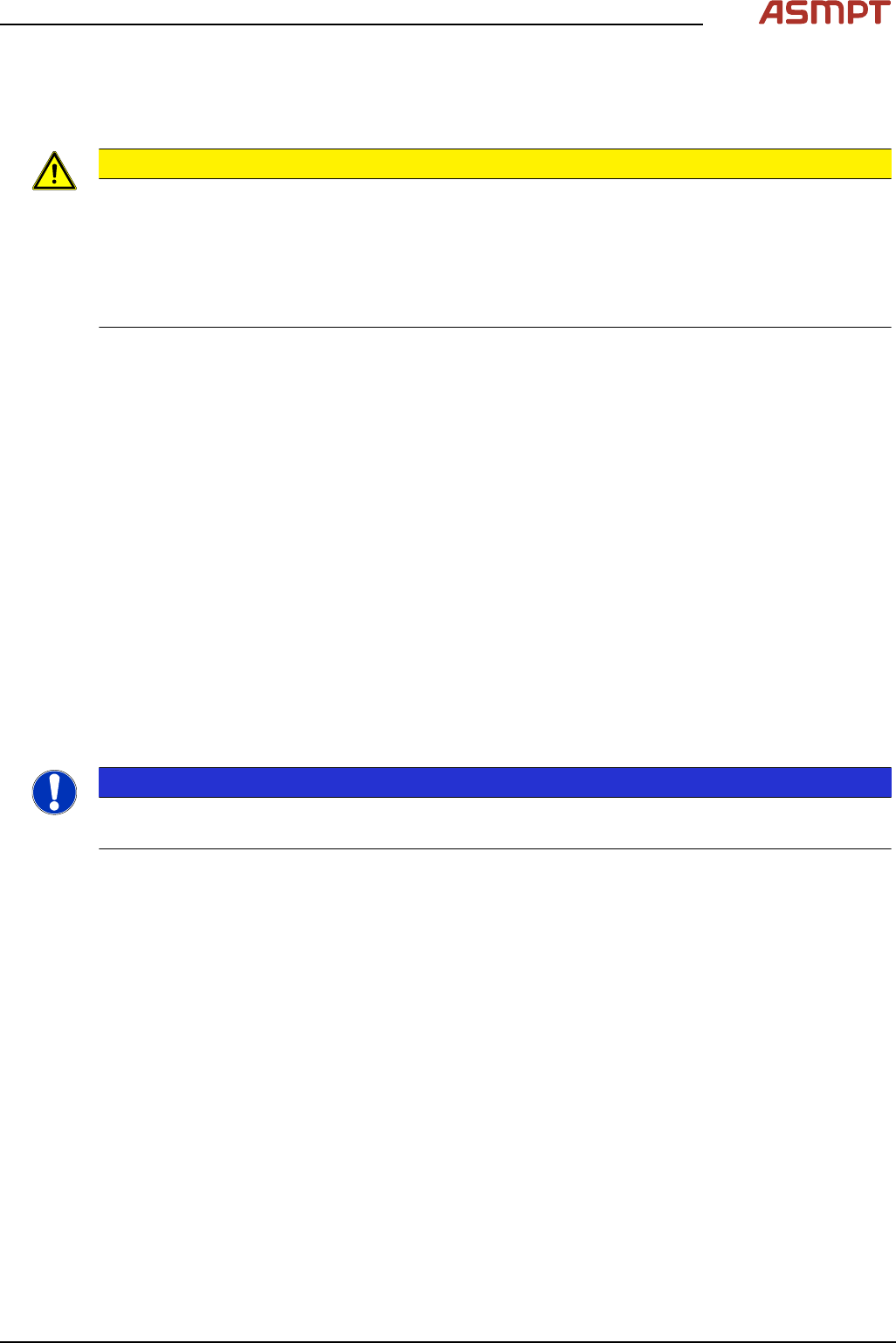
Dismantling a fibre optic sensor
Fig.139: Fiber optic sensor
► Open the cover(1) on the fiber optic
sensor.
► Open the lock(2) on the fiber optic
cables(3) and then pull off the fiber optic
cables. You might like to mark their posi-
tions to make clear assignment easier
later on.
► Disconnect from the power supply(4). You
may want to mark the position, to make
clear assignment easier later on.
► Pull the fiber optic sensor slightly away from the other fiber optic sensors, to loosen the electrical
connection to the neighboring fiber optic sensor.
Now you can pull the sensor up and off the strip.
► Repeat these steps if needed for any other fiber optic sensors.
3 Replacing spare parts
Service Manual Process Lens PL - 03/2025 101
Installation
► Follow the removal instructions in reverse order for installation. Also observe the following
instructions:
CAUTION
Installation instructions
► On the fiber optic sensor, remove the plastic cover above the side plug-and-socket connections,
if needed.
► Check the setting on the fiber optic sensor and correct if necessary (see following section).
New fiber optic sensors are preset.
► Teach the PCB sensors.
Setting the fiber optic sensor
The brightness of the sensors changes according to the positions of the conveyor sides. For this
reason, the sensors are automatically recalibrated after each automatic adjustment of the conveyor
sides.
If the conveyor sides are manually adjusted, there will be no automatic calibration. In this case cali-
bration needs to be manually triggered in the Service menu. Without this calibration the station soft-
ware will show boards which are not physically present.
You can check the correct calibration on the sensor modules.
●
Red display: current signal strength of receiver
●
Green display: reference value of receiver
A board is recognized if the value in the red display is smaller than the value in the green display.
Without a board, the value of the green display must be 10 to 20% smaller than the value of the red
display.
During calibration, the reference value (green display) is automatically set to a lower value than the
current signal strength (red display). It is assumed that there is no board in the sensor range at this
moment.
The absolute sensor value is not significant. This can vary between sensor modules.
NOTICE
No board in conveyor
When calibrating the light barriers make sure that there is no board in the conveyor.