Process Lens PL Service Manual_EN.pdf - 第164页
4 Machine - Calibrations 16 4 Se rv ic e Ma nu al P ro ce ss L en s PL - 0 3/ 20 25 Fig.258: Messages ► Click GRR Setting (1) . ► Pop up menu will appear, click Ok (2) . Fig.259: Messages ► Enter No. of Board (1) …
4 Machine - Calibrations
Service Manual Process Lens PL - 03/2025 163
4.7 GR&R Test
After completing the calibrations, perform a GR&R to check that the Process Lens PL is ready for
measurements.
What is GR&R?
Performing the GR&R procedure on a pasted or a simulated pasted board such as the CeTaq glass
target allows us to check that the Process Lens PL is:
1. measuring precisely with little variation.
2. of many dimensionally diverse targets.
3. when measured repeatedly.
What value does the Process Lens PL need to achieve?
The %GR&R of the Volume(%), Area(%), Height(mm), Offset X and Offset Y(mm) reported at the end
of the procedure should be less than 10%, a value which indicate that the variations in the measure-
ments attributed to the Process Lens PL is much smaller that the variations of all the parts measured.
A %GR&R of greater than 10% is an indication that there is an issue in achieving precision and the
root cause of measurement variation needs to be corrected.
What is needed?
●
Use a CeTaq glass board (with simulated paste deposits).
●
A working recipe of the board without bad marks.
Pre-condition before GRR test is carried out.
Recipe of CeTaq glass board is created including.
1. Fiducal teached and verified.
2. Bare Board Teach is teached and verified.
Conducting the test
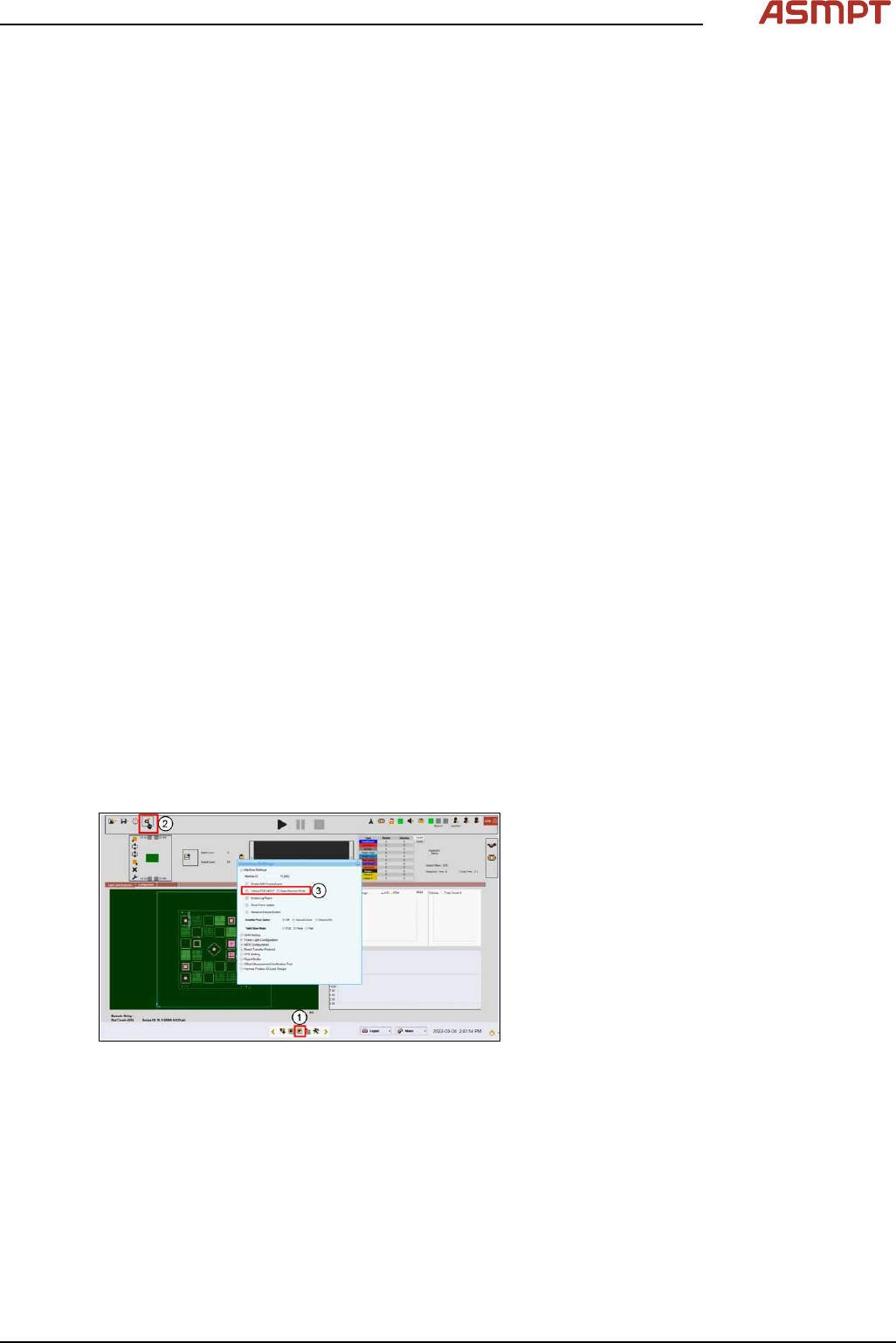
Fig.257: Inspection page
► Insert CeTaq glass board into machine
and convey into inspection area.
► Click Inspection page(1).
► Click Common Setting(2).
► Ensure Without PCB IN/OUT(3) is
checked.
4 Machine - Calibrations
164 Service Manual Process Lens PL - 03/2025
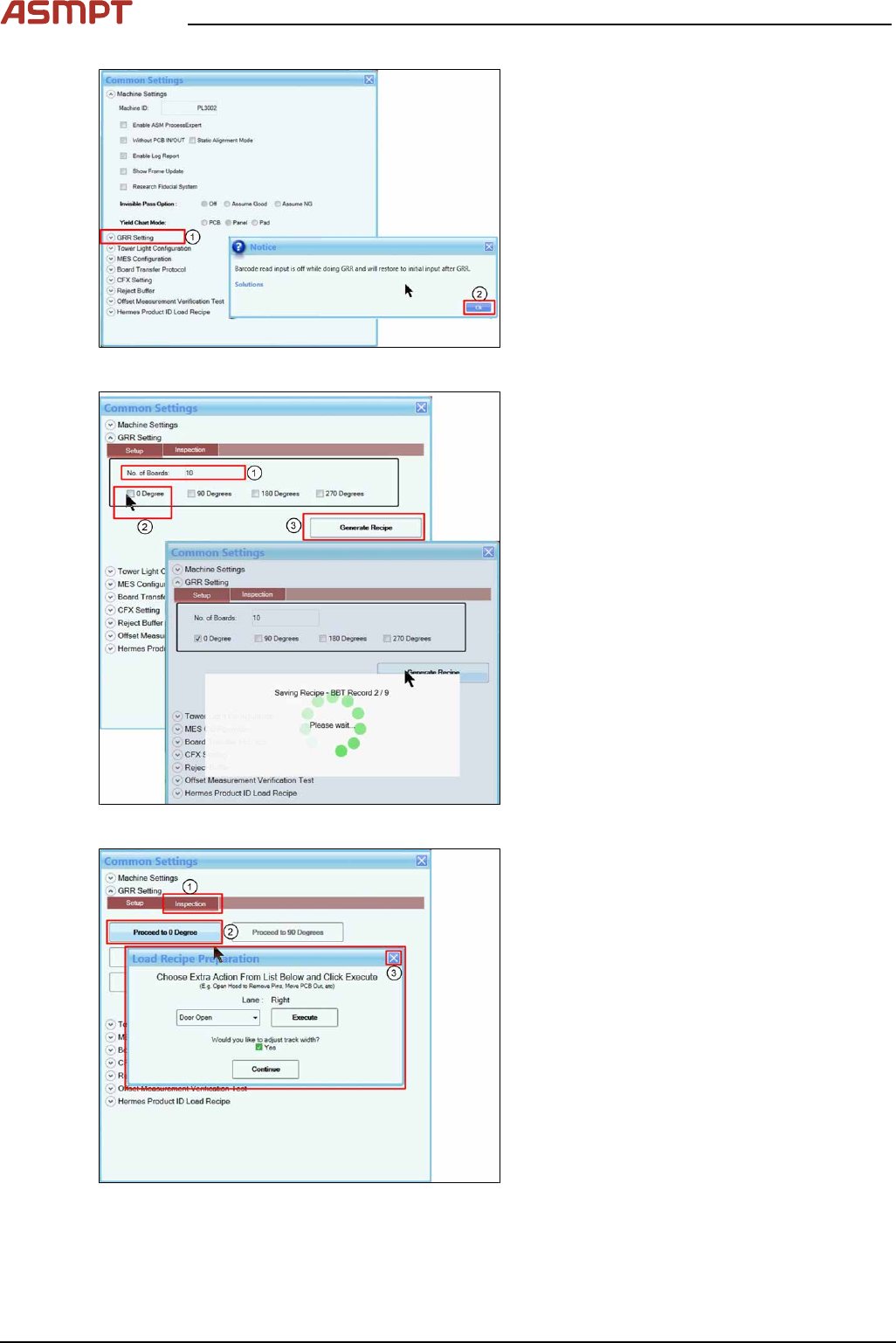
Fig.258: Messages
► Click GRR Setting(1).
► Pop up menu will appear, click Ok(2).
Fig.259: Messages
► Enter No. of Board(1).
► Select 0 Degree(2).
► Click Generate Recipe(3). This will take
some time.
Fig.260: Messages
► Click Inspection(1).
► Click Proceed to 0 Degree(2).
► Close the window(3), GRR will start.
4 Machine - Calibrations
Service Manual Process Lens PL - 03/2025 165
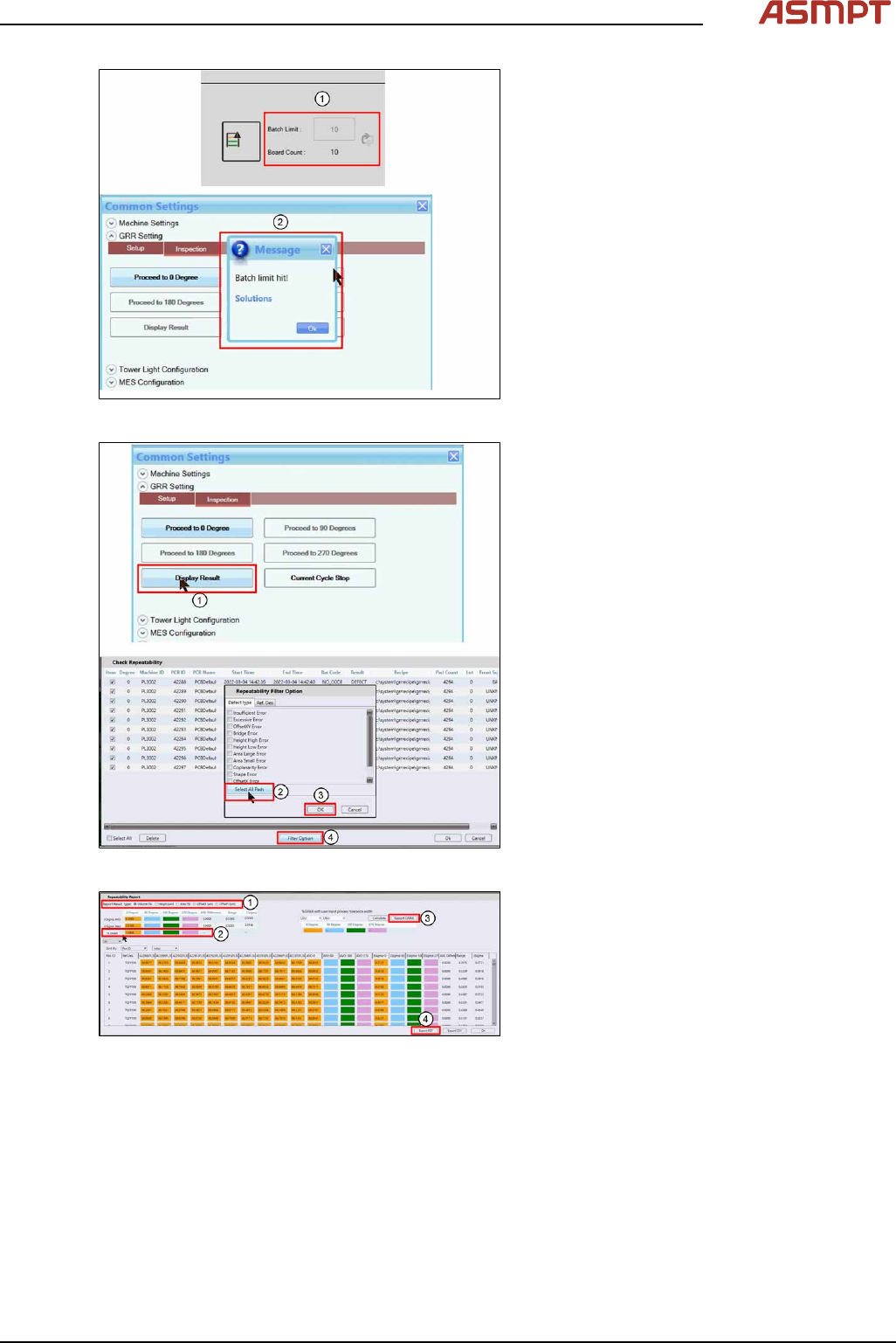
Fig.261: Messages
► Inspection will stop when Board Count
reach Board Limit set(1).
► A pop-up message(2) will appear, click
Ok to close.
Fig.262: Messages
► Click Display Result(1).
► Click Filter Option(4).
► Click Select All Pads(2).
► Click Ok(3) to all message boxes to gen-
erate the Repeatability Report.
Fig.263: Reports
► Examine each of the 5 measurement vari-
ables (1).
► Check that all the %GR&R are less than
10%. (2)
e.g. Volume(%) repeatability for all the dif-
ferent orientations are less than 10%
which is good.
► Click Report GR&R (3) to produce a
report.
► Click Export PDF (4) to export the GR&R
results.
Repeat for all measured variables. Keep
the report as proof of GR&R capability.