Process Lens PL Service Manual_EN.pdf - 第81页
3 Replacing spare parts Se rv ic e Ma nu al P ro ce ss L en s PL - 0 3/ 20 25 81 Setting the belt tension The precalculated values for setting the belt tension can be found in the following chapters. In addition, the val…
3 Replacing spare parts
80 Service Manual Process Lens PL - 03/2025
3.5.1.5 Conveyor belt, belt drive and hexagonal shaft
Replacing the toothed belt (conveyor belt)
Parts
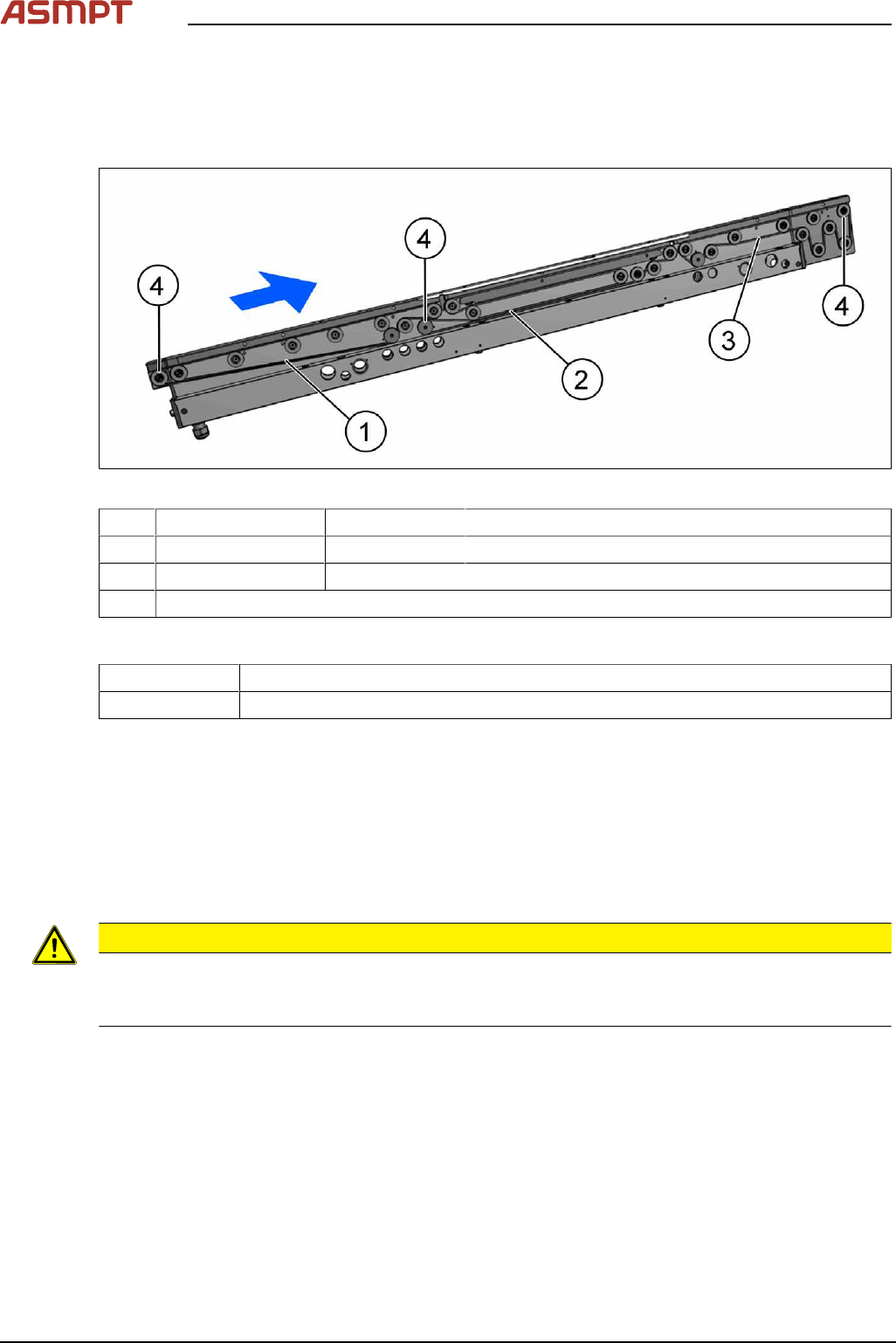
Fig.106: Toothed belt (conveyor belt) and movable idler pulleys
1 Input area 03210790-xx Belt L=897mm
2 Inspection area 03121442-xx Synchronous belt L=1506mm
3 Output area 03121441xx Belt L=843mm
4 Movable idler pulleys (see Replacing the idler pulley (conveyor belt))
Equipment and tools
00326015‑xx Belt tension measuring device
00353832-xx Allen key set
Removal
► Use the software or manually move the conveyor rail into a position which allows you best
access.
To move the conveyor side wall manually, pull the toothed belt of the width adjustment unit.
► Switch off the machine, disconnect it from the power supply and secure it to prevent unauthorized
reactivation.
► Loosen the movable idler pulley.
CAUTION
Loosen the movable idler pulley only as far as necessary!
► Do not remove the movable idler pulley. Otherwise the T slot nut on the inner side will fall into
the conveyor rail.
► Carefully unthread the belt drive.
Installation
► Check the new toothed belt before fitting it. Hold it up high. It should hang loose and should not
twist.
► Follow the removal instructions in reverse order for further installation. Also observe the following
instructions:
●
Do not bend or damage the toothed belt.
●
Make sure that the toothed belt is positioned accurately in the guidance on the motor shaft / belt
drive.
●
When you tighten the idler pulley, set the tension of the toothed belt (see below).
3 Replacing spare parts
Service Manual Process Lens PL - 03/2025 81
Setting the belt tension
The precalculated values for setting the belt tension can be found in the following chapters.
In addition, the value for any section of the conveyor belt can be calculated using a formula (see Cal-
culating the belt tension).
Setting the tension of the conveyor toothed belt
Equipment and tools
00326015‑xx Belt tension measuring device
00353832-xx Allen key set
Overview of measuring points and values
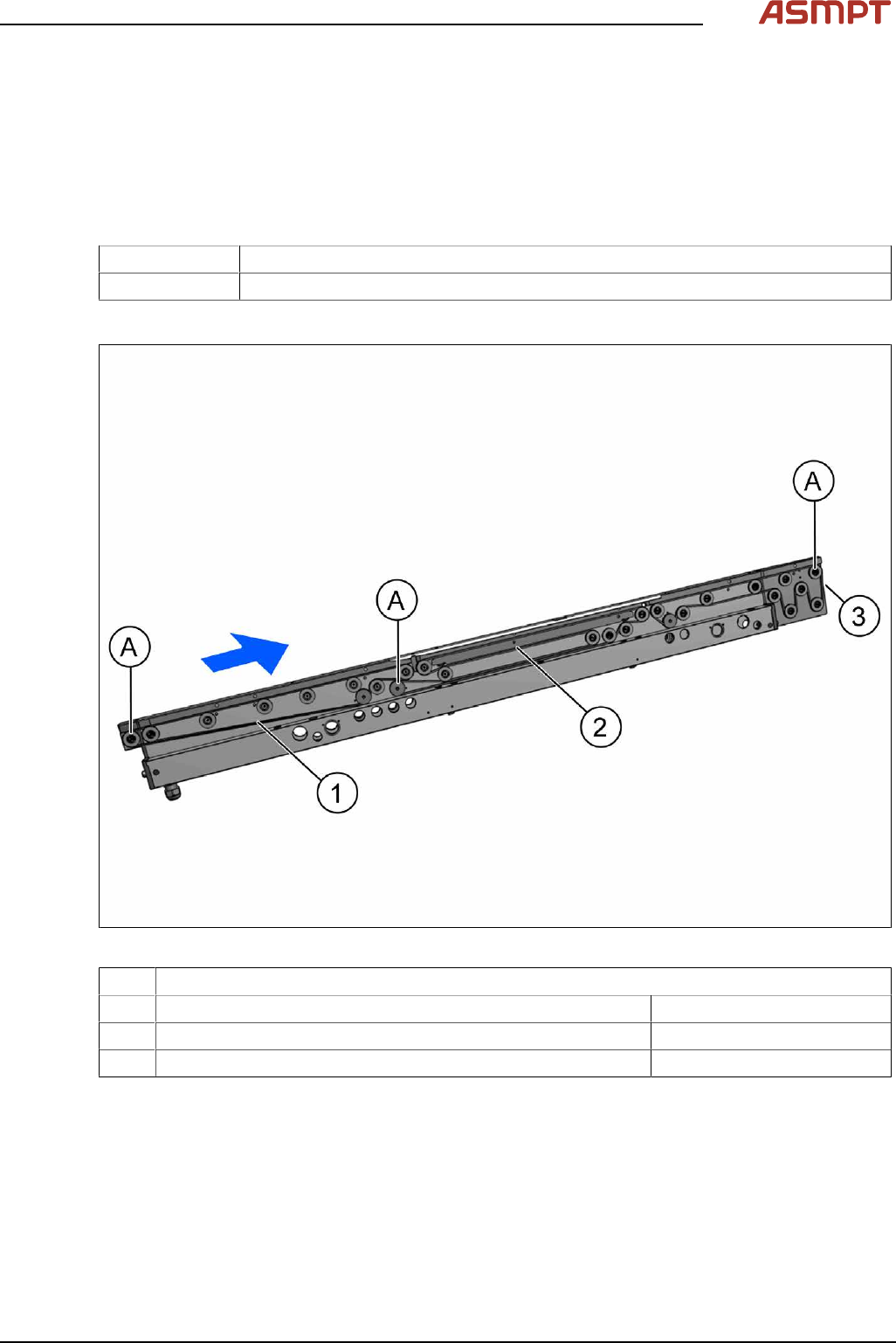
Fig.107: Measuring points
A Movable idler pulleys
1 Measuring point on the toothed belt in the input area 45 +/- 4.5 Hz
2 Measuring point on the toothed belt in the Inspection area 62 +/- 5 Hz
3 Measuring point on the toothed belt in output area 279 +/- 27 Hz
Adjustment
► Use the software or manually move the conveyor rail into a position which allows you best
access.
To move the conveyor side wall manually, pull the toothed belt of the width adjustment unit.
► Switch off the machine, disconnect it from the power supply and secure it to prevent unauthorized
reactivation.
► Check the belt tension at the relevant measuring point.
► If the belt tension is not correct, adjust the movable idler pulley.
3 Replacing spare parts
82 Service Manual Process Lens PL - 03/2025
CAUTION
Do not let the T groove nut fall into the conveyor rail!
► Do not remove the movable idler pulley completely, to make sure that the grooved nut does not
fall into the conveyor rail.
► Repeat the measurement four times.
Calculating the belt tension
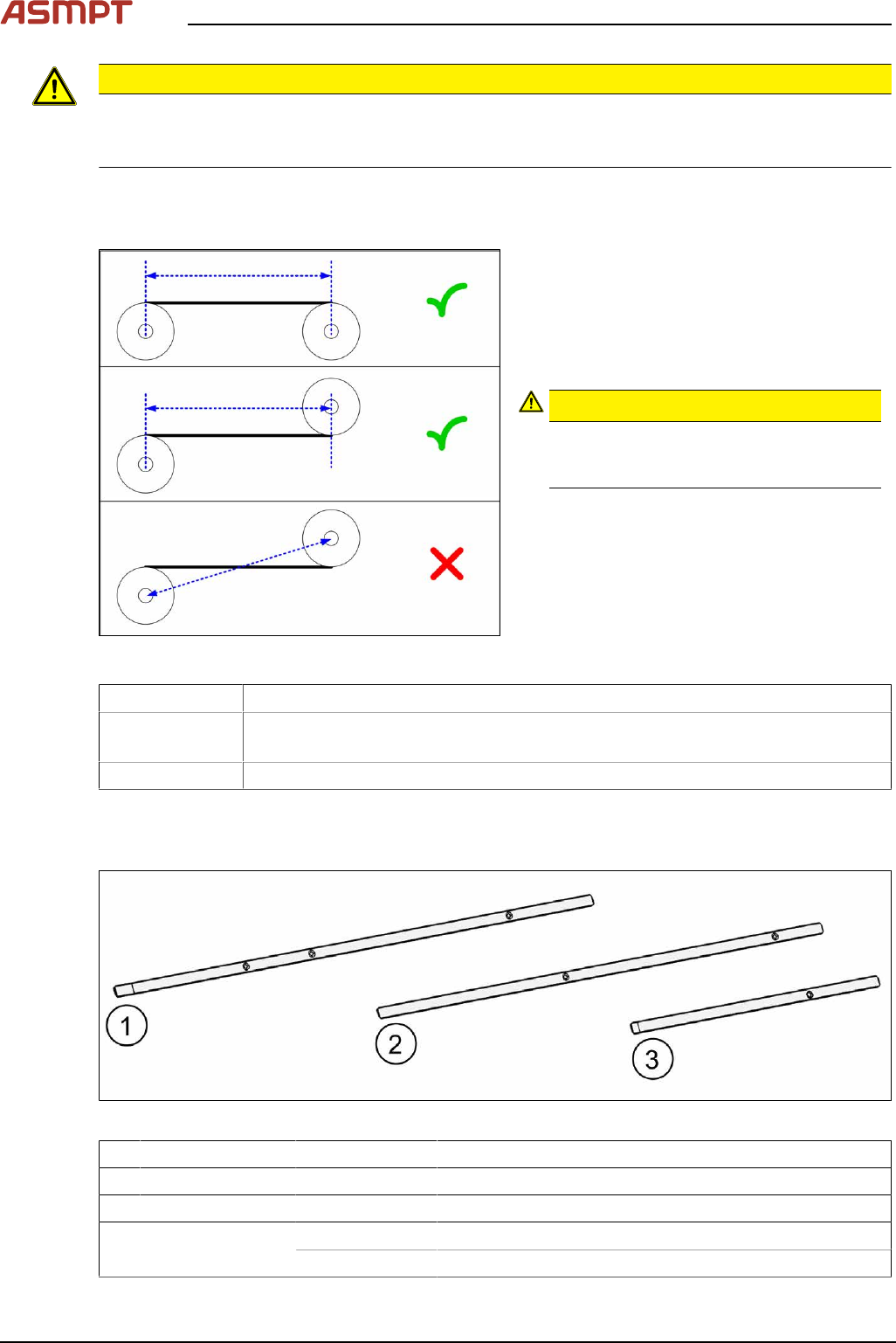
Fig.108: Measuring the distance
► Define the two idler pulleys between which
you want to set the belt tension. If pos-
sible, do not use the movable idler pulleys.
► Measure the distance between the two
idler pulleys parallel to the conveyor
belt. (See diagram)
CAUTION!
Note that it is not always possible to
simply measure the distance between the
idler pulleys from center to center.
.
► Calculate the belt tension using the follow-
ing formula:
(15000 / idler pulley spacing [mm]) [Hz]
The permissible tolerance is always plus/minus
10% of the calculated value.
Example Distance between the idler pulleys: 235mm
Calculation 15000 / 235 = 64 (rounded, exactly 63.829…)
10 % von 63.829… = 6 (rounded, exactly 6.3829…)
Result → Belt tension: 64 +/- 6 Hz
Replacing the side sheet metal plates
Parts
Fig.109: Side sheet metal plates
1 Input area 03132184Sxx Side sheet metal plate 7x1x399,25 EB BB RC
2 Inspection area 03132182Sxx Side sheet metal plate 7x1x370,5 EB BB RC
3 Output area 03132183Sxx Side sheet metal plate 7x1x205,5 AB RC
Each included in scope
of delivery:
03154789-xx Tape double-sided B = 6 + 1mm
03154790-xx Tape double-sided B = 6 + 1mm, electrically conductive