DECAN_S2_Admin(Eng_Ver4.5).pdf - 第237页
7-72 Advanced Chip Shooter DECAN S2 Admi nistra t or’s Guide 7.1.4.2. Lead Group Set the lead group for User IC. Up to 16 lead groups can be set. Figure7.26 S creen sho wing “Lead Group” se t ting in th e dialog box f or…

7-71
Part Registration
<LAND>
Selected when recognizing the lead shapes as follows.
<ROOF>
Selected when recognizing the lead shapes as follows.
<INSERT>
Selected when recognizing the lead shape of the Insert part.
<FORK>
Selected when recognizing the lead shapes as follows.
<TWIN>
Selected when recognizing the lead shapes as follows.
<CIRCLE>
Selected when recognizing the lead shapes as follows.
Memo Set the lead group so that the pitch between the lead groups is greater
than the pitch between leads.
7-72
Advanced Chip Shooter DECAN S2 Administrator’s Guide
7.1.4.2. Lead Group
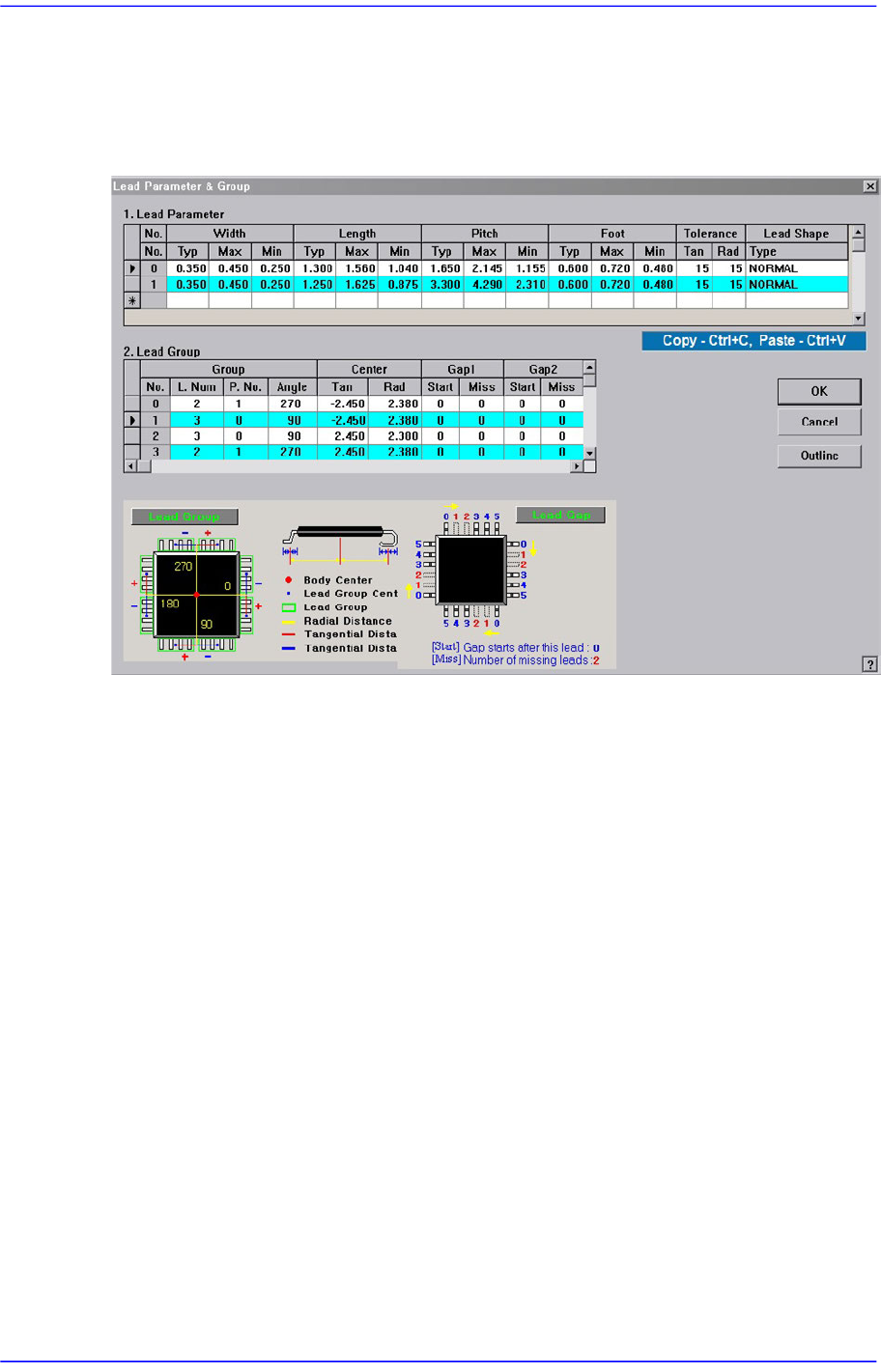
Set the lead group for User IC. Up to 16 lead groups can be set.
Figure7.26 Screen showing “Lead Group” setting in the dialog box for “User IC Lead Parameter
& Group”
<Lead Group> group
Set the lead group.
<Group No.> column
Displays the lead group number. Applicable range is 0 –15.
<Group L. Num> column
Set the number of leads the lead group has.
<Group P. No.> column
Set the lead parameter number referenced by the lead group. Applicable range is 0
–7.
<Group Angle> column
Set on which side of the component the lead group exists. 0, 90, 180, and 270 in
the above figure denotes the angles.
<Center Tan> column
Set the distance from the component origin point (component center in general) to
the center of the lead group along the tangential line.
<Center Rad> column
Set the distance from the component origin point (component center in general) to
the center of the lead group along the tangential line.

7-73
Part Registration
<Gap1 Start> column
Set the first empty lead in the lead group.
There are no leads after the lead on the starting number.
<Gap1 Miss> column
Set the first empty lead in the lead group.
As many leads as the number of miss are missing.
<Gap2 Start> column
Set the second empty lead in the lead group.
There are no leads after the lead on the starting number.
<Gap2 Miss> column
Set the second empty lead in the lead group.
As many leads as the number of miss are missing.
<Gap3 Start> column
Set the third empty lead in the lead group.
Set the third empty lead in the lead group.
<Gap3 Miss> column
Set the third empty lead in the lead group.
As many leads as the number of miss are missing.
<Gap4 Start> column
Set the fourth empty lead in the lead group.
There are no leads after the lead on the starting number.
<Gap4 Miss> column
Set the fourth empty lead in the lead group.
As many leads as the number of miss are missing.