DECAN_S2_Admin(Eng_Ver4.5).pdf - 第497页
15-46 Advanced Chip Shooter DECAN S2 Admi nistra t or’s Guide <T ransporter> button In the in-line s ystem composed of several machines, this fu nction allows reduction of the time t aken for the next mac hine t …

15-45
System Setup
Fiducial Mark Dialog Box automatically.
This dialog box does not appear when adjusting the fiducial mark in the Step Dialog
Box, but appears only when placing the part in the Product menu.
If this function is selected, when the fiducial mark recognition fails during part
placement, the message “Do you want to retry after adjusting the fiducial position
again?” appears in the error message window at the bottom of the MMI screen.
However, when this function is not selected, if the fiducial mark recognition fails, this
dialog box does not appear, and only an error message is displayed in the error
message window at the bottom of the MMI screen. This function is selected by
default.
<Use Light Saver function> check box
Used for selecting the function of turning off the lighting of the fiducial camera after
elapse of a certain period of time when the equipment is in idle condition. An edit box
at the right side is activated when this check box is selected. Here, input the waiting
time for the MMI program to turn off the lighting of the camera in idle condition.
<Use Air Saver function> check box
Used for selecting the function of turning off the vacuum after elapse of a certain
period of time when the equipment is in idle condition. An edit box at the right side is
activated when this check box is selected. Here, input the waiting time for the MMI
program to turn off the vacuum in idle condition.
<Gamma Data Generation> Check Box
This function is selected when using the gamma interface applied by Samsung
Electronics.
<Buzzer On at error State> combo box
A buzzer sounds when an error occurs during the operation of the equipment. At this
time, selecting the method of the sounding buzzer is possible.
Silence: Do not sound buzzer.
Always: Always sound buzzer.
Machine: Able to setup the buzzer sound differently according to the status of
warning error.
<Tray Pallet Change Speed> combo box
When installation of parts is performed with many pallets in fast (fastest) speed, make
the next pallet standby at working position unless vision fail occurs after picking up a
part in a pallet. From the equipment which it sees it is a function which it does not
support.
<NCS> Button
Used to change a job without stopping the machine. For more details regarding this,
contact us.
15-46
Advanced Chip Shooter DECAN S2 Administrator’s Guide
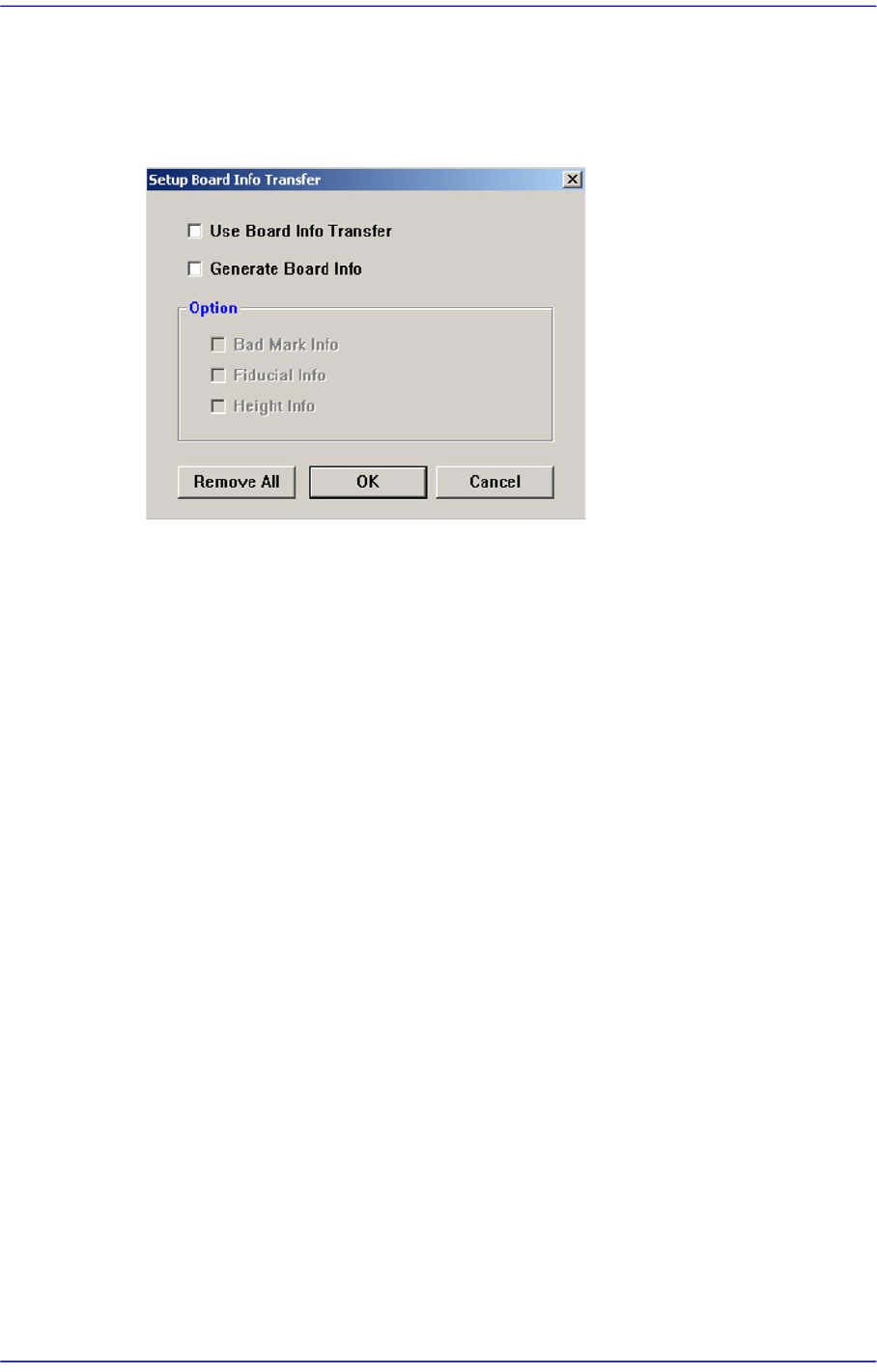
<Transporter> button
In the in-line system composed of several machines, this function allows reduction of
the time taken for the next machine to recognize the board information recognized and
transmitted by the previous machine, from the first to the last machine.
<Use Board Info Transfer> check box
In order to use the board information transmitted from the previous machine,
select this check box. Then select the board information to be used from the
enabled <Option Slave> group.
<Generate Board Info> check box
In order to set the board information to be transmitted to the next machine, select
this check box. Then select the board information to be created from the enabled
<Option Slave> group.
<Option(Master / Slave Mode)> group
<Bad Mark Info> check box
In order to transmit bad mark information to the next machine, select this
check box. Once this information has been transmitted to the next machine,
the next machine performs work without recognizing the bad marks.
<Fiducial Info> check box
For array PCBs, select this check box in order to transmit fiducial mark
information on each array to the next machine. Once this information has been
transmitted to the next machine, the next machine performs work recognizing
only the global fiducial mark of the array PCB.
<Height Info> check box
If there is a height sensor, it is possible to measure the height of the upper
surface of the PCB. Select this box in order to transmit information regarding
the height of the upper surface of the PCB to the next machine.
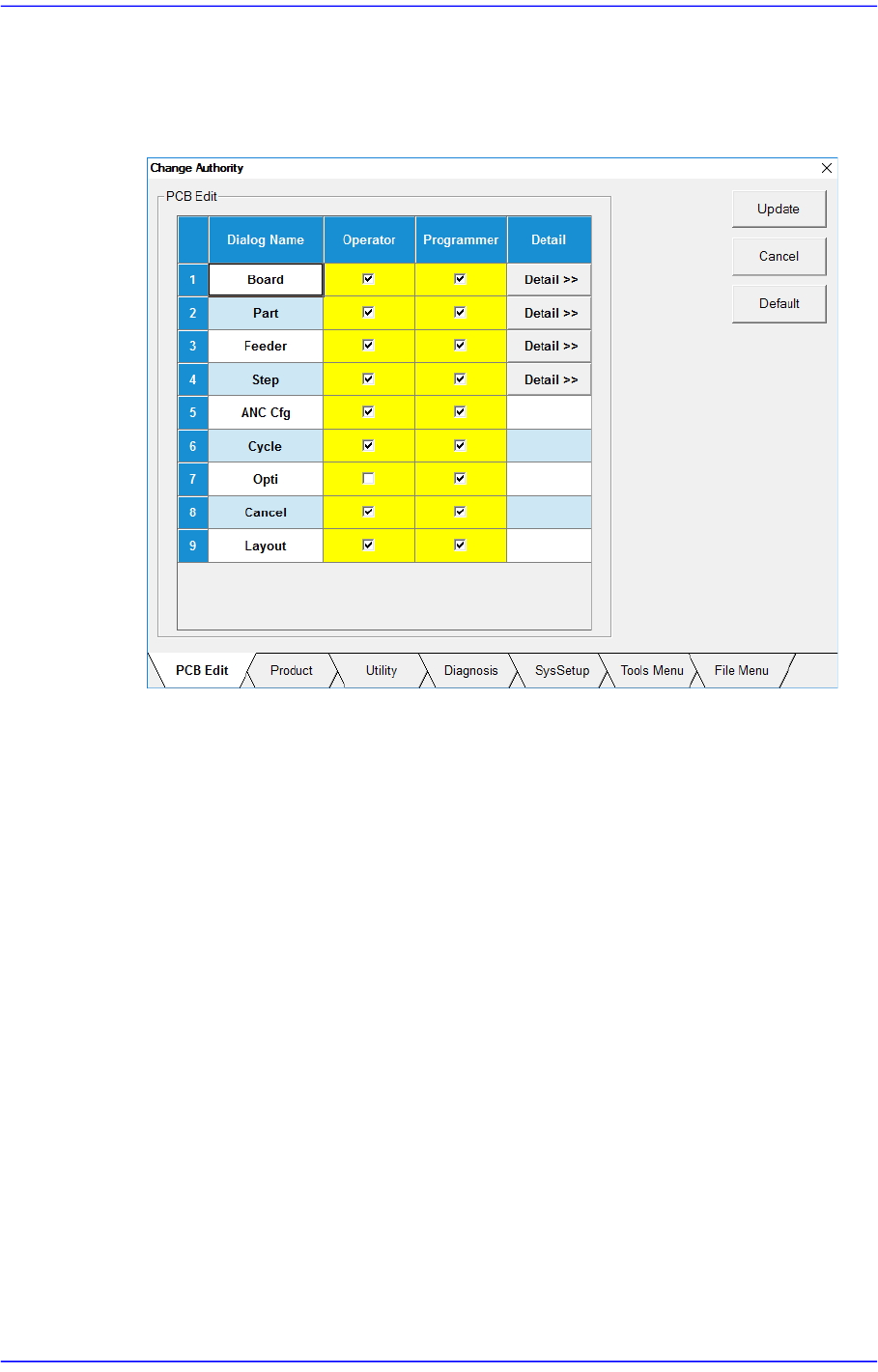
<Change Authority> Button
15-47
System Setup
Sets the authorization level of a user. The currently applied authorization level setup
function is used by default. However, if an operator plays the role of a programmer, it
is possible to perform setup to allow the operator to use some functions used with the
authorization level of the programmer.
<Update> Button
Saves the setup and closes the dialog box.
<Cancel> Button
Neglects the setup and closes the dialog box.
<Default> Button
Recovers the setup to the default (recommended) setup in the machine.
<PCB Edit> Tab
Sets the authorization level for the submenus of the <PCB Edit> menu.
<Product> Tab
Sets the authorization level for the submenus of <Product> menu.
<Utility> Tab
Sets the authorization level for the submenus of <Utility> menu.
<Diagnosis> Tab
Sets the authorization level for the submenus of the <Diagnosis> menu.
<SysSetup> Tab
Sets the authorization level for the submenus of <Sys.Setup> menu..