DECAN_S2_Admin(Eng_Ver4.5).pdf - 第468页
15-17 System Setup 15.3.2. <Tray Feeder> Tab dialog Sets the tray feeder related data. Selecting this button will display following dialog box. Figure15.8 “A ccessory” dialog box “Tray Feeder” Tab dialog <Sele…

15-16
Advanced Chip Shooter DECAN S2 Administrator’s Guide
<Update> button
Transmits the change data to the equipment and closes the dialog box.
<Cancel> button
Ignores the change data and closes the dialog box.
15-17
System Setup
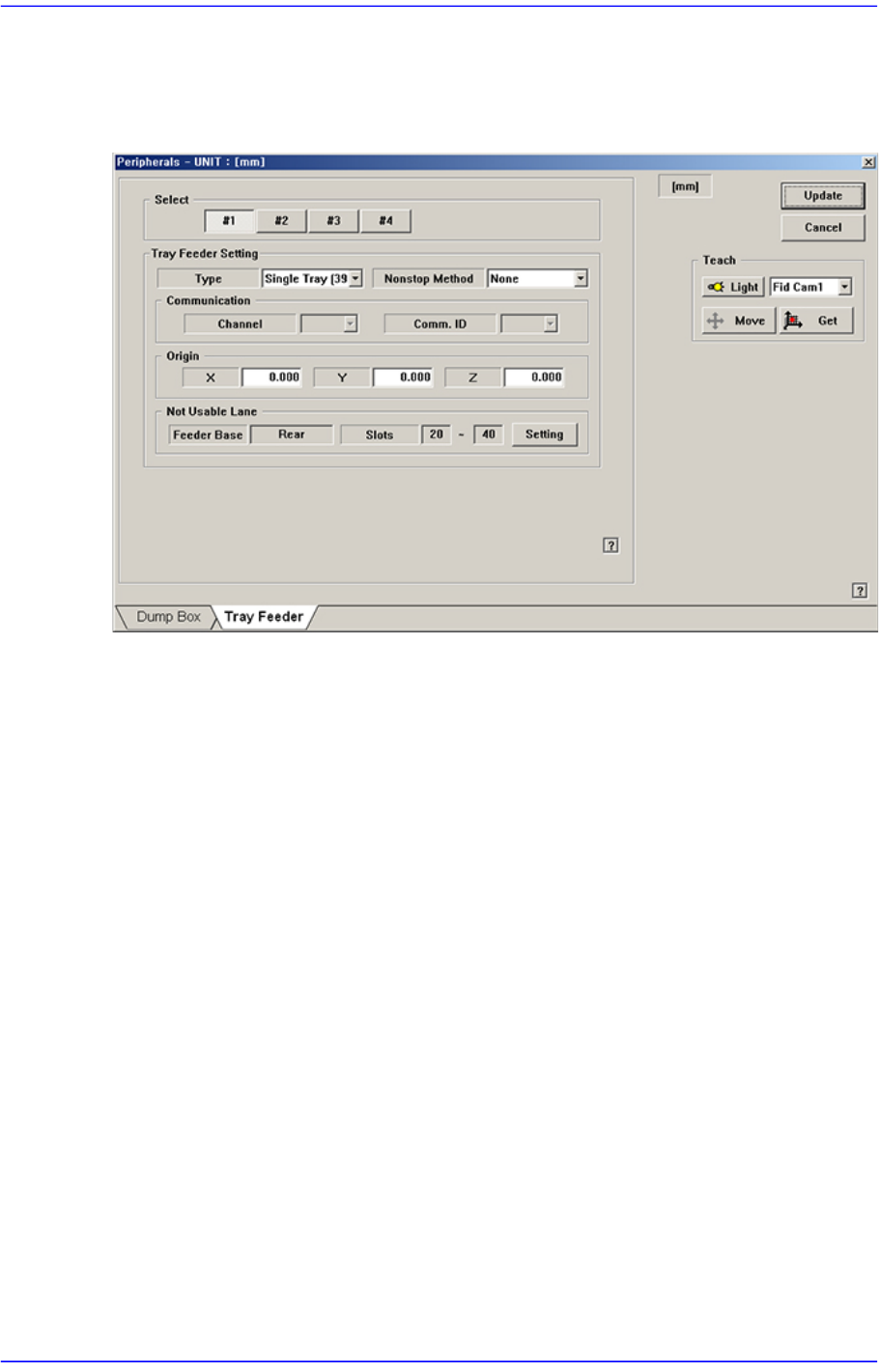
15.3.2. <Tray Feeder> Tab dialog
Sets the tray feeder related data. Selecting this button will display following dialog box.
Figure15.8 “Accessory” dialog box “Tray Feeder” Tab dialog
<Select> option button
Selects the tray feeder unit. Available tray feeder units are No. 1 to No.4 tray feeder
units.
That is, a total of 4 tray feeders can be installed. (Maximum 2 trays can be installed for
the type of trays that can communicate with the equipment.)
<Tray Feeder Setting> group
Selects the type of the set tray feeder unit. Available type is as follows.
<Type> combo box
Selects the type of the set tray feeder unit. Available type is as follows:
NONE: Means that no tray is installed.
Single Tray[39321]: Refers to the tray installed on the feeder base.
<Nonstop Method> combo box
Determines whether to use the non-stop function.
Note: The nonstop function is not used.
Master/Slave: One rack is used as master and another rack is used as slave.
Master/Master: One rack is used until the parts are exhausted, and then
another rack is used.
<Communication> group

15-18
Advanced Chip Shooter DECAN S2 Administrator’s Guide
Set the data related to RS-232C communication.
<Channel> combo box
Select the RS-232C communication channel. 2 channels are available for the
machine. Perform setup so that it may not be duplicated.
<Comm. ID> combo box
Select the communication ID. The used ID is 1 –3. Since only ID 1 is
supported, set the ID to ID 1.
<Origin> group
Setup origin of the selected ‘Tray Feeder Unit’. This origin is the offset value from
the origin of the equipment.
<Not Usable Lane> group
Sets the feeder base unit and slot occupied by the corresponding tray when using the
selected tray feeder unit.
<Feeder Base> combo box
Selects the feeder base. The selectable feeder base is front (Front Feeder Base or
Rear Feeder Base).
<Lane> edit box
Sets the slot the feeder base.
<Update> button
Transmits the change data to the equipment and closes the dialog box.
<Cancel> button
Ignores the change data and closes the dialog box.