OM-1012-001.pdf - 第112页
5.2 Program Change Tg0869-PM-OM (2) Press the [TRA Y] key at the “FEEDER (B) OFFSET” display (Fig. A62). The display (Fig. A63) appears on the screen. Fig. A64 (3) Press the [STEP X] key . ([STEP 1] to [STEP 20]) The dis…
5.2 Program Change
Tg0869-PM-OM
5.2.4 FEEDER (B) OFFSET Display
Operation Procedure
Refer to “3. FEEDER (A) OFFSET and FEEDER (B) OFFSET Displays of
Section 5 in Volume 2” in the main machine instruction manual for details.
Set the offset data on the main machine side.
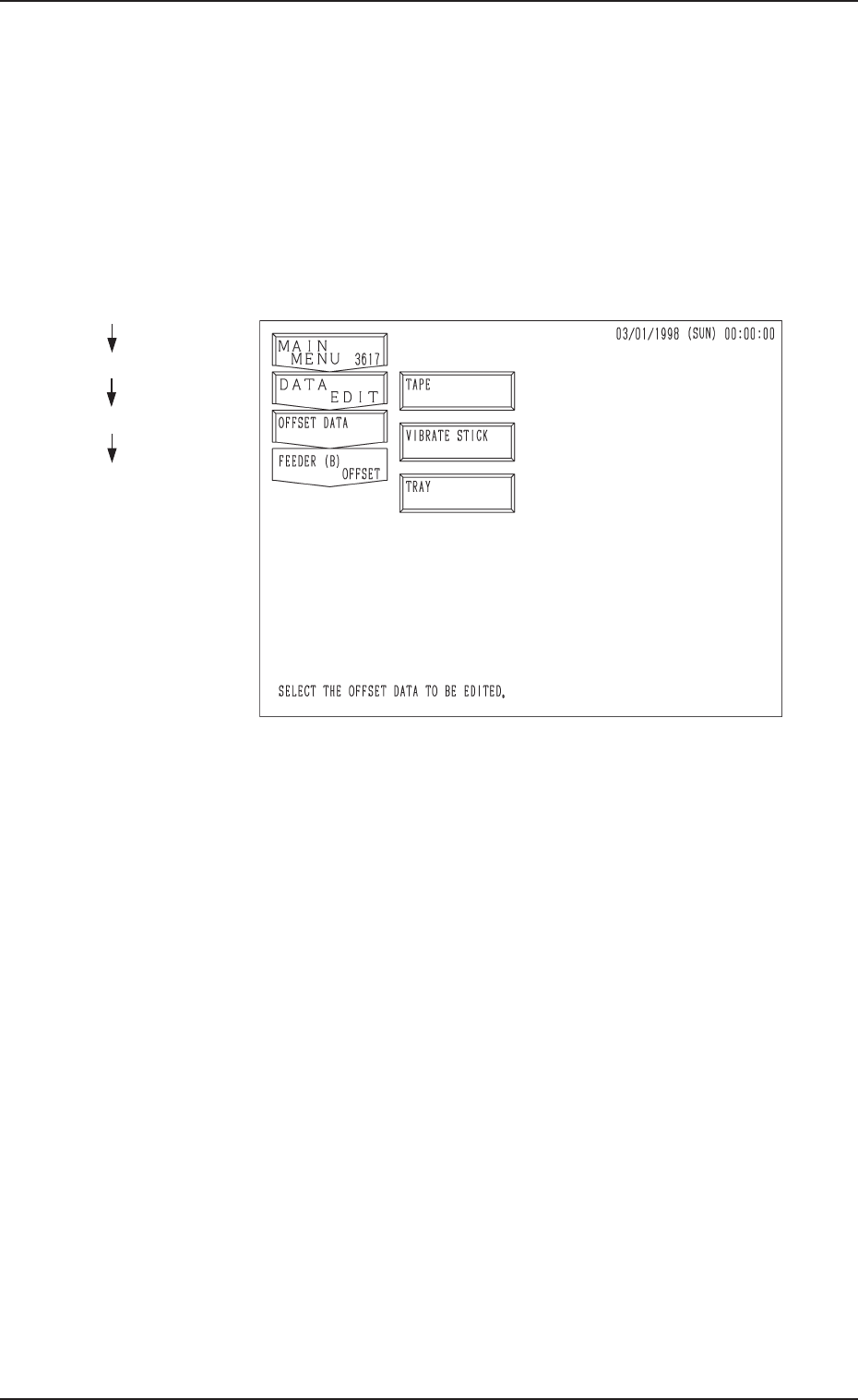
(1) When the [FEEDER (B) OFFSET] key is pressed at the
“OFFSET DATA” display, the following display appears
on the screen.
Fig. A62
Hierarchical Sequence
(Display)
“MAIN MENU”
“DATA EDIT”
“OFFSET DATA”
“FEEDER (B) OFFSET”
0305-001 Chapter 1 2-32
5.2 Program Change
Tg0869-PM-OM
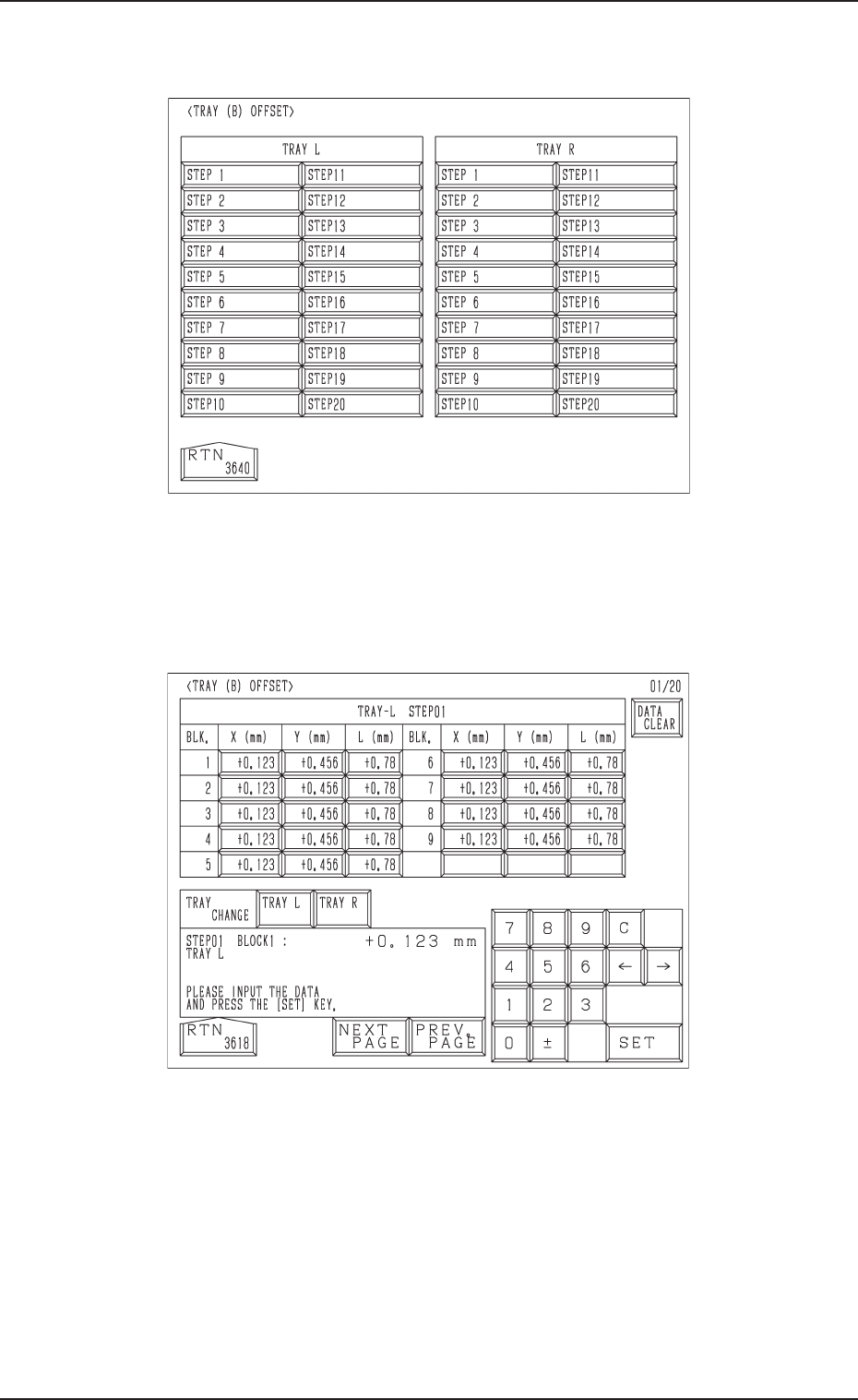
(2) Press the [TRAY] key at the “FEEDER (B) OFFSET” display (Fig. A62).
The display (Fig. A63) appears on the screen.
Fig. A64
(3) Press the [STEP X] key. ([STEP 1] to [STEP 20])
The display (Fig. A64) appears on the screen.
(4) Enter various offset parameters.
Fig. A63
0305-001 Chapter 1 2-33
6. Start Procedure of Automatic Operation
• The tray feeders are not equipped with any [START] button to start the auto-
matic operation.
The [START] button of the main machine is commonly used for the feeders.
Refer to “6. Starting, Emergency Stop, and Temporary Stop (Pause) Opera-
tions for Automatic Operation (“PLACE” Mode) of Section 2 in Volume 1”
in the main machine instruction manual for details.
6.1 General Start Procedure
(1) Perform the following operations.
• Preparation of Pattern Program
(Refer to “5.1 Preparation (Outline) for Pattern Program of Section 2 in
Chapter 1” for details.)
• Program Change Operation
(Refer to “5.2 Program Change of Section 2 in Chapter 1” for details.)
(2) Confirm that the upper and lower doors are closed.
(3) Confirm that the LEDs (-HD503 and -HD504) of the [U READY] and [L
READY] are “ON”.
If the LEDs are “OFF”, press the [READY] button.
(4) Check the surroundings of the machine and confirm safety before start-
ing the automatic operation.
Check carefully that there is no person around
the moving mechanisms of the machine.
(Especially, the other side of machine opera-
tion)
Make sure that no objects remain within the
moving mechanisms of the machine.
(Tools and Parts)
(5) Press the [START] button of the main machine.
To stop the machine immediately in an emer-
gency, press one of the [EMERGENCY STOP]
buttons.
Refer to “6.8.3 Emergency Stop Procedure of
Section 2 in Volume 1” in the main machine
instruction manual for details.
Refer to “7.5.2 Reset and Start Procedure from
Emergency Stop of Section 2 in Volume 1” in
the main machine instruction manual for de-
tails.
6. Start Procedure of Automatic Operation
0305-001 Chapter 1 2-34 Tg0869-PM-OM
CAUTION
CAUTION