OM-1012-001.pdf - 第80页
0305-001 Chapter 1 2-1 Tg0869-PM-OM Section 2 Before Automatic Operation
P.C.B.
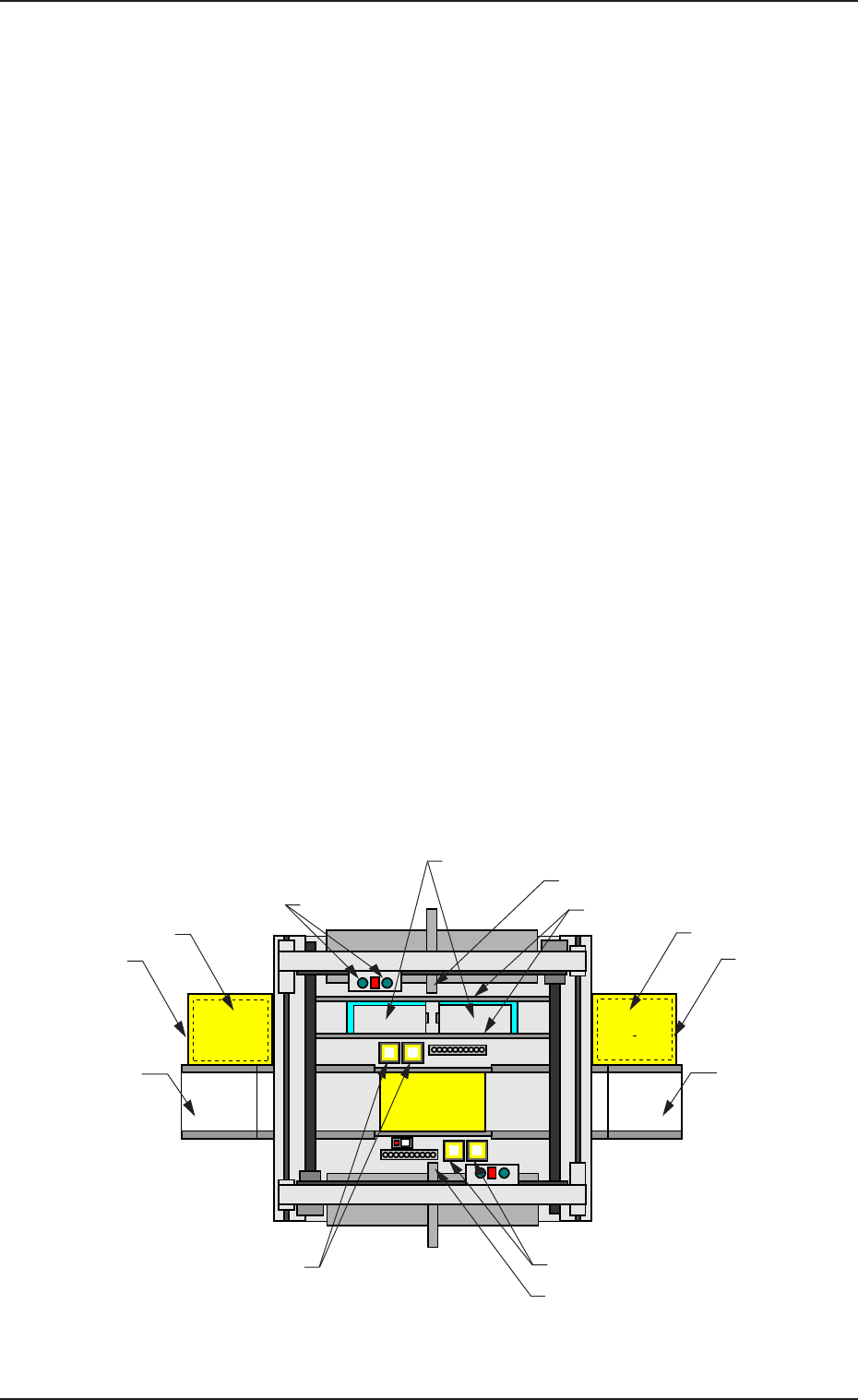
6. Scope of Actions
(1) A tray (a pallet) is pulled out from the magazine stored in the elevator
section onto the traverses by the tray traverse of the main machine ac-
cording to the pattern program data.
(2) The placement heads of the main machine pick up components from the
tray pulled out onto the traverses.
(3) The images of the picked components (the components picked up by the
placement heads) are captured and recognized by the component cam-
eras to detect the deviation in the pick-up position. The detected devia-
tion is corrected and the components are placed accurately on the speci-
fied positions.
When a pick-up error or a recognition error is detected during the com-
ponent recognition, the machine performs the discharge operation of the
rejected component.
(4) The tray on the traverses is stored in the elevator and the subsequent tray
is pulled out onto the traverses according to the pattern program data.
When the subsequently placed component originates from the same tray,
the tray stays on the traverses.
(5) Steps (2) through (4) are repeated.
When the tray (specified in the pattern program data) becomes empty of
components, the error message “Material Shortage Error” appears on the
operation monitor.
In this case, press the [RTN] key to open the “COMPONENT REPLEN-
ISHMENT” display.
The related step No. flickers.
Beam A Side
Beam B Side
(Front Side of Machine)
Fig. A10 Appearance
6. Scope of Actions
Multi-Layer Tray
Feeder
FP-5022R
ER Conveyor
(Option)
Component Storage Box
Elevator Section
EL Conveyor
(Option)
Multi-Layer Tray
Feeder
FP-5022L
Placement Head
Tray
(Pallet)
Traverses
Elevator Section
Component Recognition Camera
Component Recognition Camera
Component Storage Box
0305-001 Chapter 1 1-12 Tg0869-PM-OM

0305-001 Chapter 1 2-1
Tg0869-PM-OM
Section 2
Before Automatic Operation
1. Precautionary Items
1.1 Touch Screen
• The touch screen is constructed of a liquid crystal display (resolution: 320 ×
240 dots) and a touch screen.
The touch screen senses the placement of a user’s finger. To enter data or
select various data, press your finger slightly against the touch-sensitive re-
gions of the touch screen.
• The touch screen is made of glass.
Do not apply strong pressure to the touch screen. Try not to touch the screen
except for input operations.
The touch screen reacts to the force of 0.98 N (100 gf) or less.
Do not press the screen with an excessive force.
The surface of the touch screen is fragile. Do
not rub the surface not touch it with a pen, a
screwdriver, etc.
The device is not a water-proof and encapsu-
lated type.
Avoid dust, water droplet, oil droplet, and metal
pieces.
Especially, when metal pieces or combustible
material are mixed into the machine, it may
lead to fire ignition.
• A high-voltage current is flowing in some internal sections.
Do not detach nor disassemble the touch
screen to avoid any electric shock.
• Cleaning of Touch Screen
Turn off the operation power before the touch
screen is cleaned.
Cleaning the screen while it is active may cause
adverse reaction of the screen, resulting in data cor-
ruption.
When the surface of the touch screen is stained, wipe off dust and dirt with a
dry cloth.
If the surface still remains dirty, soak the cloth in diluted neutral detergent
(2%), wring it hard, then wipe off the dust and dirt.
Do not use alcohol or benzene to clean the
touch screen.
Otherwise, the surface of the touch screen may melt
or get cloudy.
1. Precautionary Items
0305-001 Chapter 1 2-2 Tg0869-PM-OM
CAUTION
CAUTION
CAUTION
CAUTION
CAUTION