CP-842E-842ME System Reference-SYS-CP842-10E.pdf - 第118页
Machine System >> Maintenance Mode 4-82 SYS-CP842-1.0E 4.4.2 Entering Maintenance Mode Procedure 1 Open the front safety doors and turn th e Maintenance key to the ON pos ition. 2 In the [Main] screen, select [Main…
Machine System >> Maintenance Mode
SYS-CP842-1.0E 4-81
4.4 Maintenance Mode
Maintenance mode overrides the safety devices on the machine to allow for machine
adjustments. A maintenance key is necessary to use maintenance mode.
4.4.1 Maintenance Mode Operation
The following operations are possible with the safety doors open when using Mainte-
nance Mode.
• Calibration data measurements (limited use)
• Position (limited use)
• I/O check
• Inching
DANGER
Maintenance mode overrides the safety devices on the machine. Take
extreme care when operating the machine with the safety doors open.
DANGER
Maintenance Mode and the Maintenance key should only be used by
experienced maintenance personnel.
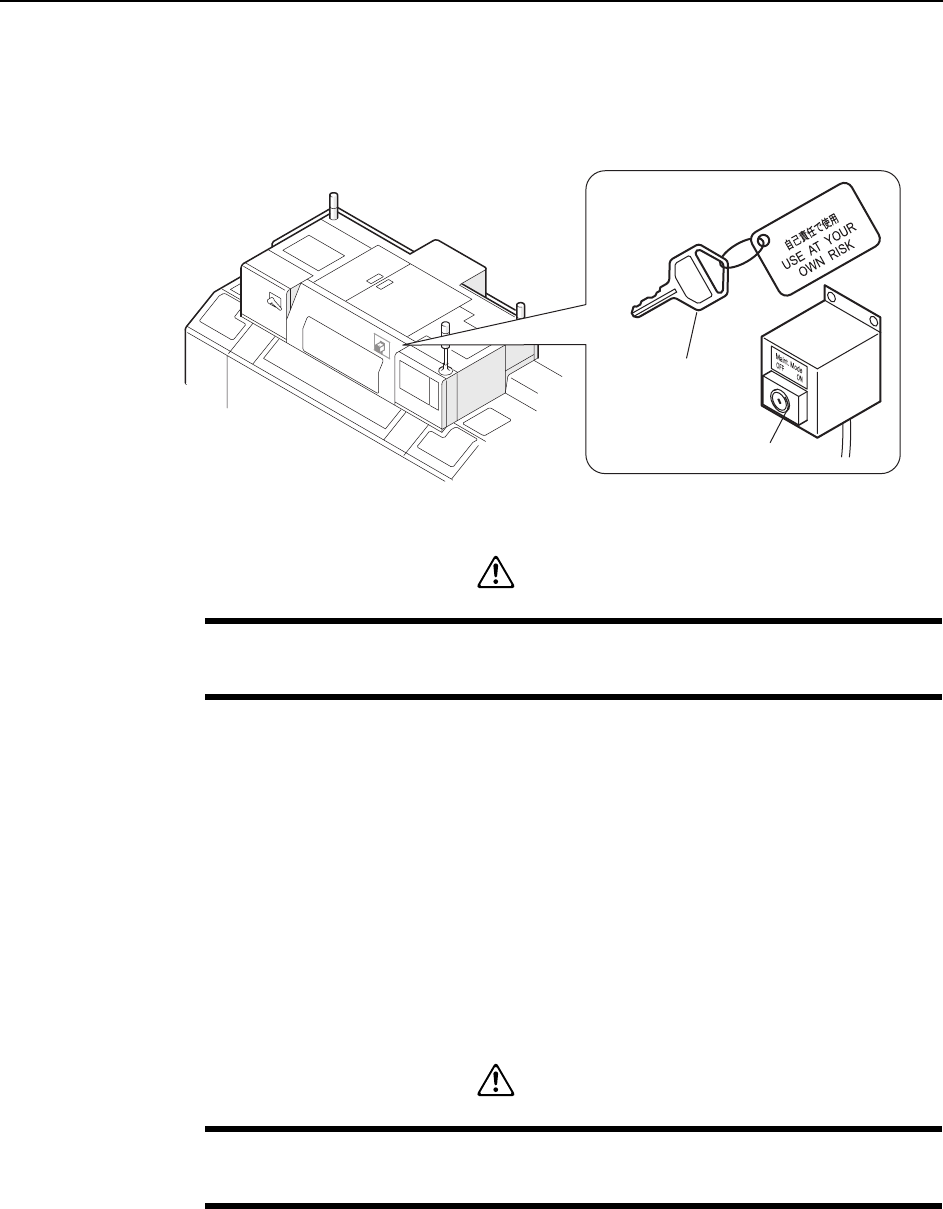
C76M1030
Maintenance switch
Maintenance key
Machine System >> Maintenance Mode
4-82
SYS-CP842-1.0E
4.4.2 Entering Maintenance Mode
Procedure
1 Open the front safety doors and turn the Maintenance key to the ON position.
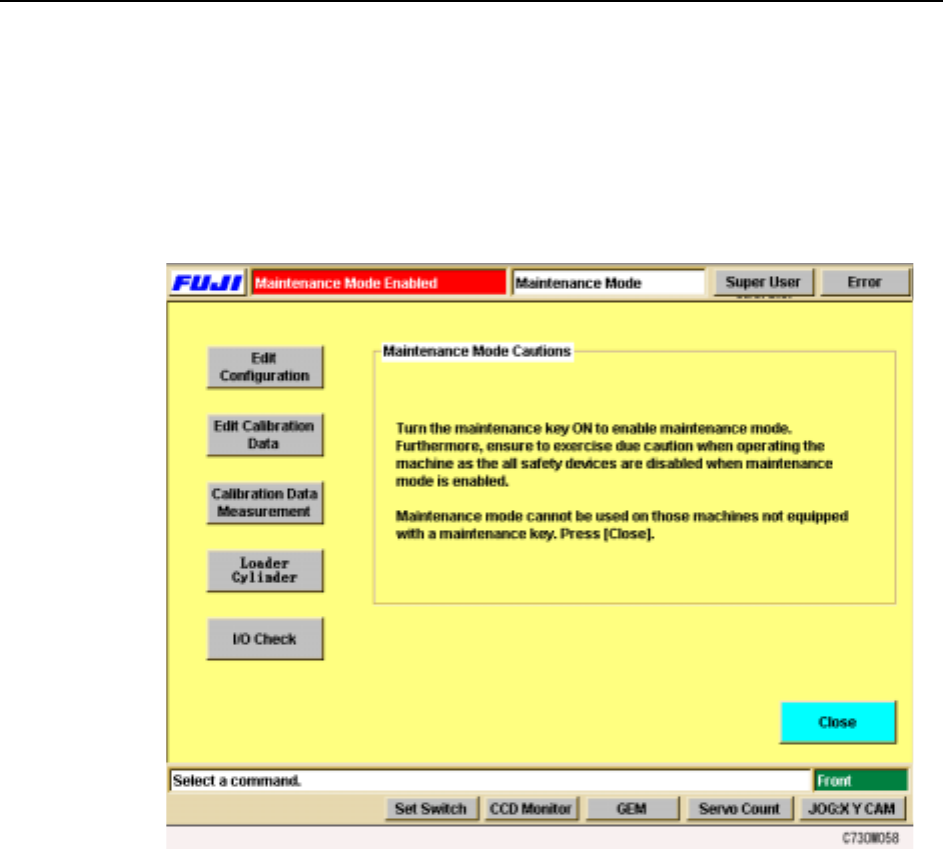
2 In the [Main] screen, select [Maintenance] then [Maintenance Mode]. The
[Maintenance Mode] screen displays.
Note: During Maintenance Mode, “Maintenance Mode” displays and flashes in the
production program name area.
3 Select the necessary maintenance operation command from [Edit Configura-
tion], [Edit Calibration Data], [Calibration Data Measurement], [Loader Cylin-
der] and [I/O Check] and perform the adjustment or maintenance.
4 When finished, press the [Close] button and the [Maintenance] screen returns.
Machine System >> Maintenance Mode
SYS-CP842-1.0E 4-83
4.4.3 Maintenance Mode Status
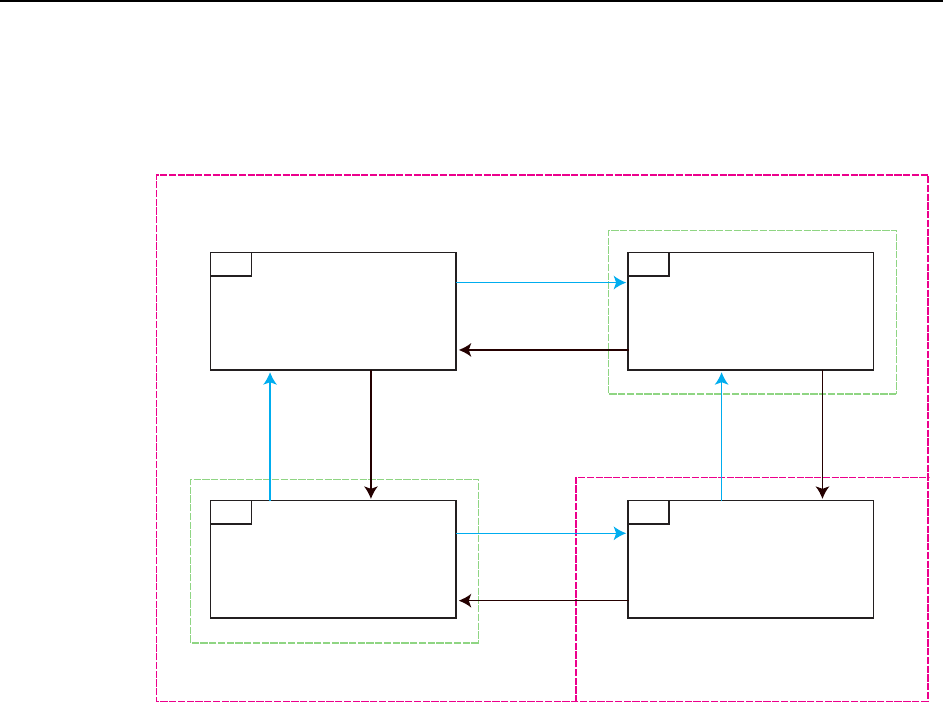
Movement between Standard Mode and Maintenance Mode occurs as shown in the fig-
ure below.
1 Standard Mode (Status “1”):
Operation commands other than Maintenance Mode commands are performed.
The Maintenance Key is set to OFF and the [Maintenance Mode] screen is not
displayed.
2 The Maintenance key is set to ON but the [Maintenance Mode] screen is not
displayed (Status “2”):
An error occurs. At this stage, the error cannot be cleared. Either move the
Maintenance key to OFF and return to Standard Mode (Status “1”) or clear the
error after displaying the [Maintenance Mode] screen (Status “4”).
3 The [Maintenance Mode] screen is displayed but the Maintenance key is set to
OFF (Status “3”):
An error occurs. At this stage, the error cannot be cleared. Move the Mainte-
nance key to ON and switch to Maintenance mode (Status “4”) or leave the
Maintenance key set to OFF, close the [Maintenance Mode] screen, return to
Standard Mode (Status “1”) and clear the error.
4 Maintenance Mode (Status “4”)
Maintenance Mode operations can be performed.
1RGTCVKQP2CPGN0QTOCN
/CKPVGPCPEG-G[1HH
1RGTCVKQP2CPGN0QTOCN
/CKPVGPCPEG-G[1P
1RGTCVKQP2CPGN/CKPVGPCPEG/QFG
/CKPVGPCPEG-G[1HH
1RGTCVKQP2CPGN/CKPVGPCPEG/QFG
/CKPVGPCPEG-G[1P
5VCPFCTF/QFG
/CKPVGPCPEG/QFG
'TTQT5VCVWU
'TTQT5VCVWU
/CKPVGPCPEG-G[
1HH
/CKPVGPCPEG-G[
1P
/CKPVGPCPEG-G[
1HH
/CKPVGPCPEG-G[
1P
/CKPVGPCPEG/QFG5ETGGP
1RGP
/CKPVGPCPEG/QFG5ETGGP
%NQUG
/CKPVGPCPEG/QFG5ETGGP
1RGP
/CKPVGPCPEG/QFG5ETGGP
%NQUG
%1/