CP-842E-842ME System Reference-SYS-CP842-10E.pdf - 第133页
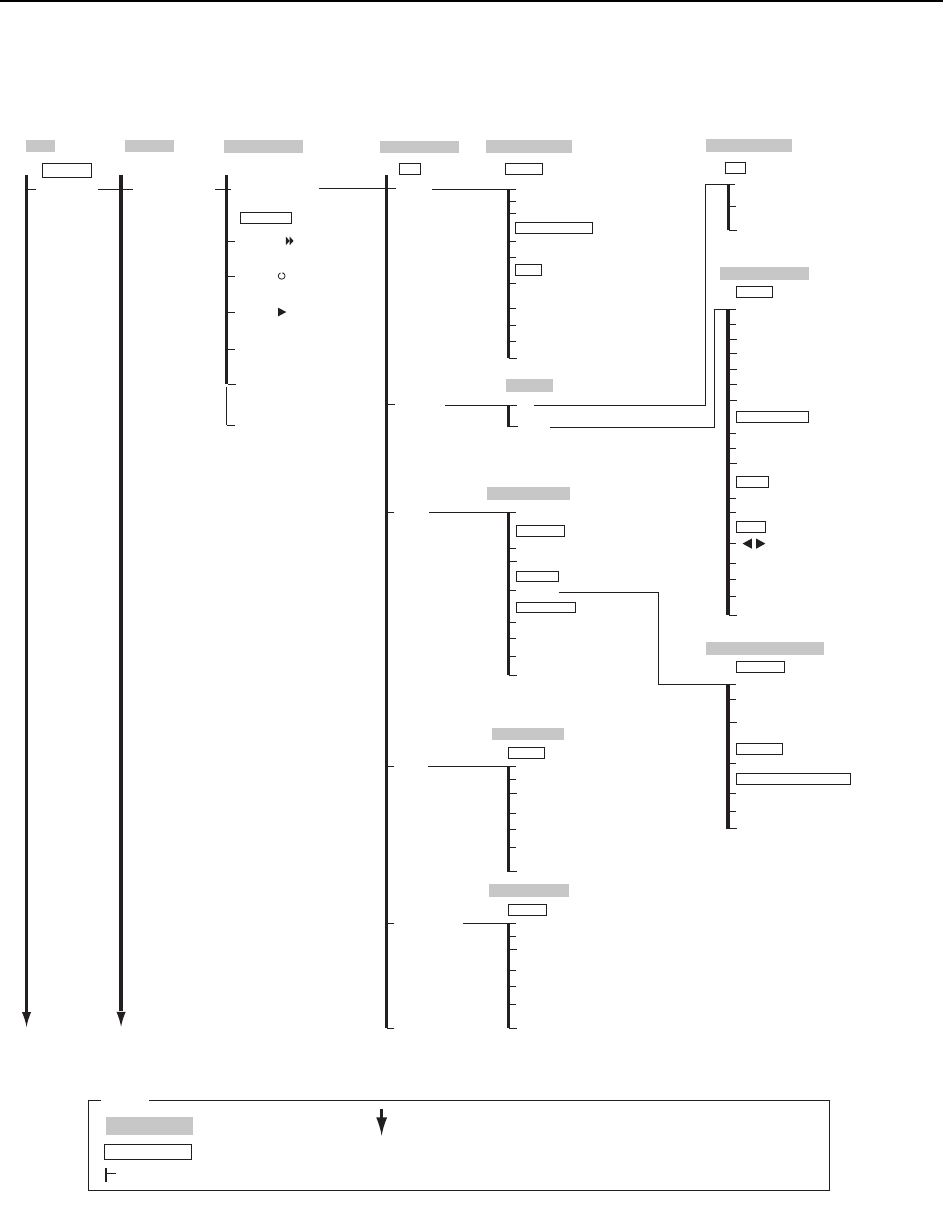
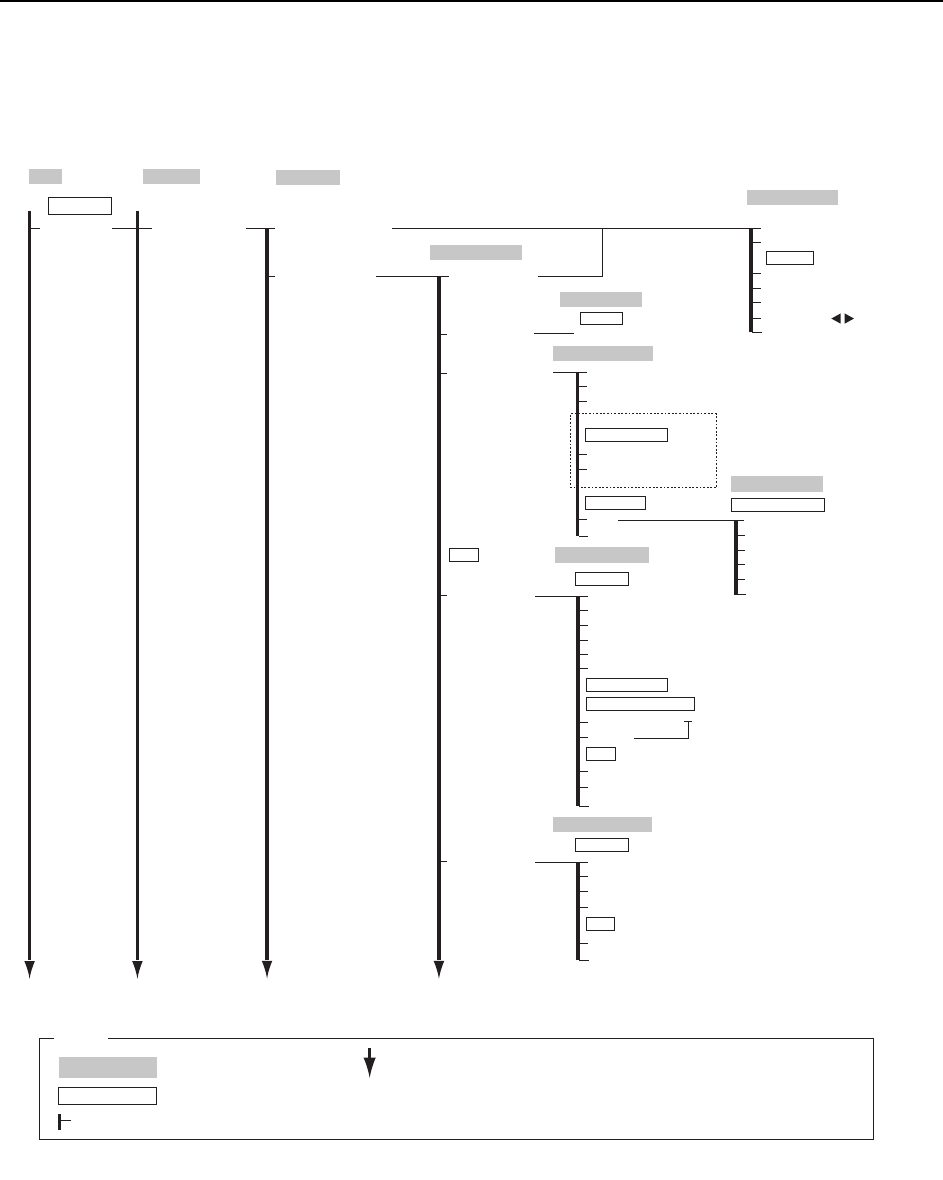
Commands >> Command Hierarchy SYS-CP842-1.0E 5-5 Program Editor Sequence number 5VCTVKPI5GSWGPEG Reference Search → Virtual Keyboard Sequence number → Numeric Keypad ZOOM + ZOOM - Move Cursor Move Close Select Mod…
Commands >> Command Hierarchy
5-4
SYS-CP842-1.0E
Program Editor
Program
Simulation
Simulation
Production Program
Set
Body Data Editor
Body
Element
X length
→
Numeric Keypad
Body Length X
→
Numeric Keypad
Body Length Y
→
Numeric Keypad
Part height
→
Numeric Keypad
Close
Check tolerance values
Detection Tolerance
→
Numeric Keypad
Lead
Size Data
Edit Acquire Image
Pickup Data Editor
Edit
Pickup Offset
Pickup Data
Y length
→
Numeric Keypad
Vision Type
→
To Vision Type Editor
Element
→
To Question
Lead
→
To Lead Data Editor
Pickup
Acquire New Image
→
[START button]
Save Image
Close
Question
OK
Cancel
Part supply direction Lead
→
Numeric Keypad
Details
Pickup Tolerance
X
→
Numeric Keypad
Y
→
Numeric Keypad
Q
→
Numeric Keypad
Close
X
→
Numeric Keypad
Z
→
Numeric Keypad
Lead Data Editor
Lead Data
Lead
Detection Point
→
Numeric Keypad
Vision Type
→
To Vision Type Editor
Element
→
To Question
Body
→
To Body Data Editor
Close
Check limit
→
Numeric Keypad
Brightness
→
Numeric Keypad
Vision Type Editor
Basic Data
Vision Type
Close
Vision type
→
Numeric Keypad
Body
→
To Body Data Editor
Element
→
To Question
Lead
→
To Lead Data Editor
Close
Camera type
→
Numeric Keypad
Lighting
→
Numeric Keypad
Pickup Data Editor Details
Pickup Nozzle
Pickup Check
Maximum Nozzle Diameter
®
Numeric Keypad
Setup
→
Numeric Keypad
Pickup Position Auto Compensation
On
Off
Close
Minimum Nozzle Diameter
®
Numeric Keypad
Backlight diameter
®
Numeric Keypad
Element Data Editor
Lead Data
Length
→
Numeric Keypad
Lead tolerance value
㐽ߓࠆ
Width
→
Numeric Keypad
Pitch
→
Numeric Keypad
Length
→
Numeric Keypad
Width
→
Numeric Keypad
Deviation
→
Numeric Keypad
Position
X
→
Numeric Keypad
Y
→
Numeric Keypad
Element
Count
→
Numeric Keypad
Side number
→
Numeric Keypad
P pattern
→
Numeric Keypad
Result
→
Numeric Keypad
Main
C73SC002c-3
Program
Changeover
Repeat
Step
Interval Timer
→
Numeric Keypad
Continuous
Close
Operation Mode
[START button]
Vision Type
→
To Vision Type Editor
Body
→
To Body Data Editor
Lead
→
To Lead Data Editor
Production
Operation Mode
: Command name
: Screen name
Production
: Command group
L
: Continued on the next page
: Press to scroll upwards
Legend
M
: Press to scroll downwards
( )
: General description
[ ]
: Push button
→
: Displays separate dialog box
Commands >> Command Hierarchy
SYS-CP842-1.0E 5-5
Program Editor Sequence number
5VCTVKPI5GSWGPEG
Reference Search
→ Virtual Keyboard
Sequence number
→ Numeric Keypad
ZOOM +
ZOOM -
Move Cursor
Move
Close
Select Mode
2TQITCO
6GUV2TQFWEV
Sequence Search
6GUV
Board Information
Production Program
Panel Thickness → Numeric Keypad
Sequence Data Editor
Board Data Editor
Sequence Data Editor
Y-coordinate
→ Numeric Keypad
X-coordinate
→ Numeric Keypad
Setup
Q-rotation → Numeric Keypad
Yes
No
Close
Board Data
Pickup Location
Apply for multi-boards
Mark
F Mark
F Mark Data Editor
BS Mark Data Editor
Static
Shape
Y
X
Reading Deviation
Pitch
Reading area
Size A
Size B
Size C
Close
Read Limit / Result
Mark reading tolerance values
Result
Mark Data
Numeric Keypad
BS Mark
Color
Size X
Size Y
Brightness
Close
Result
Mark Data
***
/CKP
C73SC002c-4
2TQITCO
%JCPIGQXGT
Group → Numeric Keypad
Stage
→ Numeric Keypad
Subslot
→ Numeric Keypad
Cancel
Slot → Numeric Keypad
OK
Specify the slot position
5GV5NQV2QUKVKQP
<For multi-board programs>
Production
Operation Mode
: Command name
: Screen name
Production
: Command group
L
: Continued on the next page
: Press to scroll upwards
Legend
M
: Press to scroll downwards
( )
: General description
[ ]
: Push button
→
: Displays separate dialog box
Commands >> Command Hierarchy
5-6
SYS-CP842-1.0E
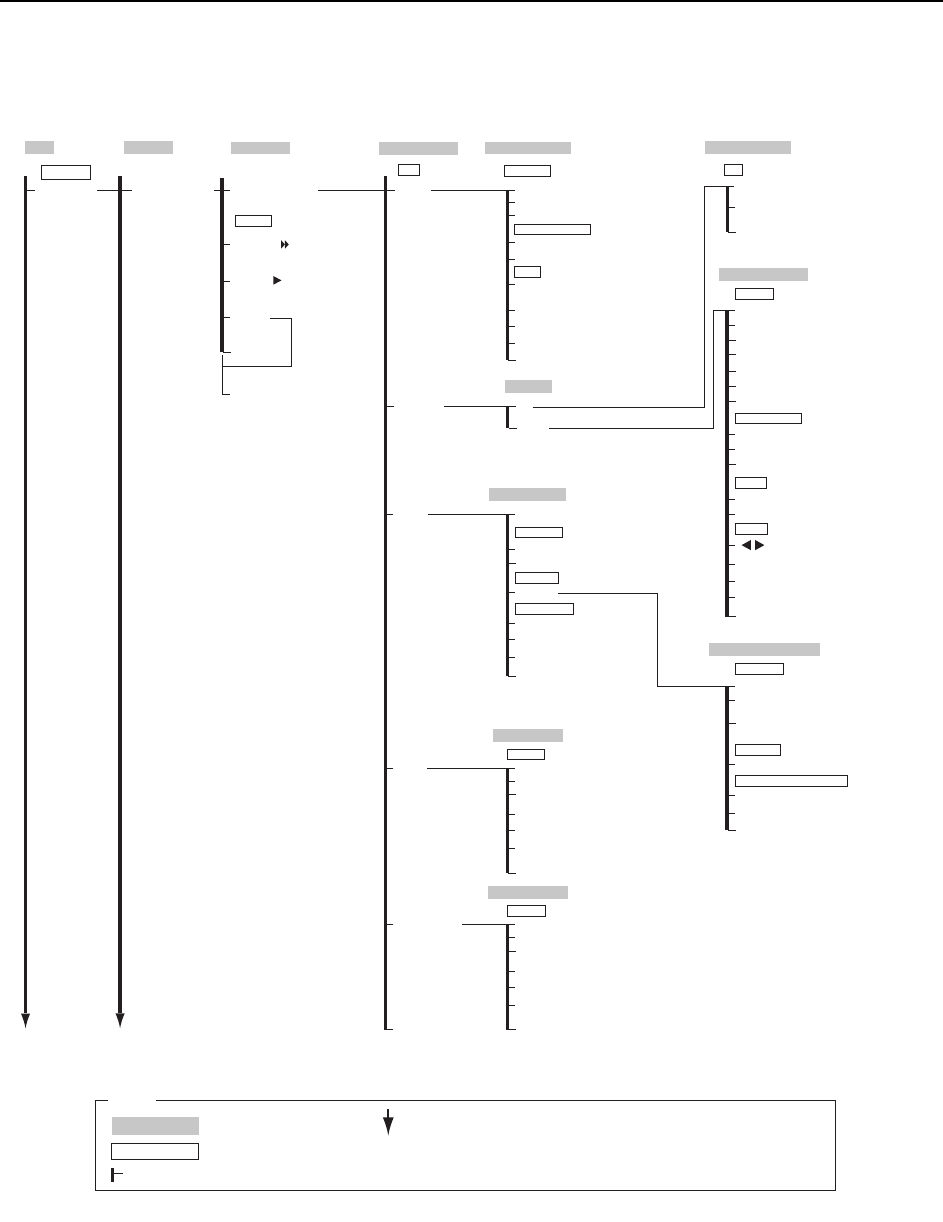
2TQITCO'FKVQT
Program
6GUV2TQFWEV
6GUV
Production Program
Set
Body Data Editor
Body
Element
X length
→
Numeric Keypad
Body Length X
→
Numeric Keypad
Body Length Y
→
Numeric Keypad
Part height
→
Numeric Keypad
Close
Check tolerance values
Detection Tolerance
→
Numeric Keypad
Lead
Size Data
Edit Acquire Image
Pickup Data Editor
Edit
Pickup Offset
Pickup Data
Y length
→
Numeric Keypad
Vision Type
→
To Vision Type Editor
Element
→
To Question
Lead
→
To Lead Data Editor
Pickup
Acquire New Image
→
[START button]
Save Image
Close
Question
OK
Cancel
Part supply direction Lead
→
Numeric Keypad
Details
Pickup Tolerance
X
→
Numeric Keypad
Y
→
Numeric Keypad
Q
→
Numeric Keypad
Close
X
→
Numeric Keypad
Z
→
Numeric Keypad
Lead Data Editor
Lead Data
Lead
Detection Point
→
Numeric Keypad
Vision Type
→
To Vision Type Editor
Element
→
To Question
Body
→
To Body Data Editor
Close
Check limit
→
Numeric Keypad
Brightness
→
Numeric Keypad
Vision Type Editor
Basic Data
ࡆ࡚ࠫࡦ࠲ࠗࡊ
㐽ߓࠆ
Vision type
→
Numeric Keypad
Body
→
To Body Data Editor
Element
→
To Question
Lead
→
To Lead Data Editor
Close
Camera type
→
Numeric Keypad
Lighting
→
Numeric Keypad
Pickup Data Editor Details
Pickup Nozzle
Pickup Check
Maximum Nozzle Diameter
→
Numeric Keypad
Setup
→
Numeric Keypad
Pickup Position Auto Compensation
On
Off
Close
Minimum Nozzle Diameter
→
Numeric Keypad
Backlight diameter
→
Numeric Keypad
Element Data Editor
Lead Data
Length
→
Numeric Keypad
Lead tolerance value
Close
Width
→
Numeric Keypad
Pitch
→
Numeric Keypad
Length
→
Numeric Keypad
Width
→
Numeric Keypad
Deviation
→
Numeric Keypad
Position
X
→
Numeric Keypad
Y
→
Numeric Keypad
Element
Count
→
Numeric Keypad
Side number
→
Numeric Keypad
P pattern
→
Numeric Keypad
Result
→
Numeric Keypad
Main
C73SC002c-5
Program
Changeover
Vision Type
→
To Vision Type Editor
Body
→
To Body Data Editor
Lead
→
To Lead Data Editor
Step
7PNQCF
%QPVKPWQWU
Close
േࡕ࠼
[START button]
Production
Operation Mode
: Command name
: Screen name
Production
: Command group
L
: Continued on the next page
: Press to scroll upwards
Legend
M
: Press to scroll downwards
( )
: General description
[ ]
: Push button
→
: Displays separate dialog box