CP-842E-842ME System Reference-SYS-CP842-10E.pdf - 第217页
Index SYS-CP842-1.0E Index-1 Index A advance pick-up ................. . 3-13 Automatic Conveyor Wid th Change Function .......... ............... 4-33 Automatic Panel Conveyance ....... 4-31 Automatic Skipping of Boar d…
System Installation
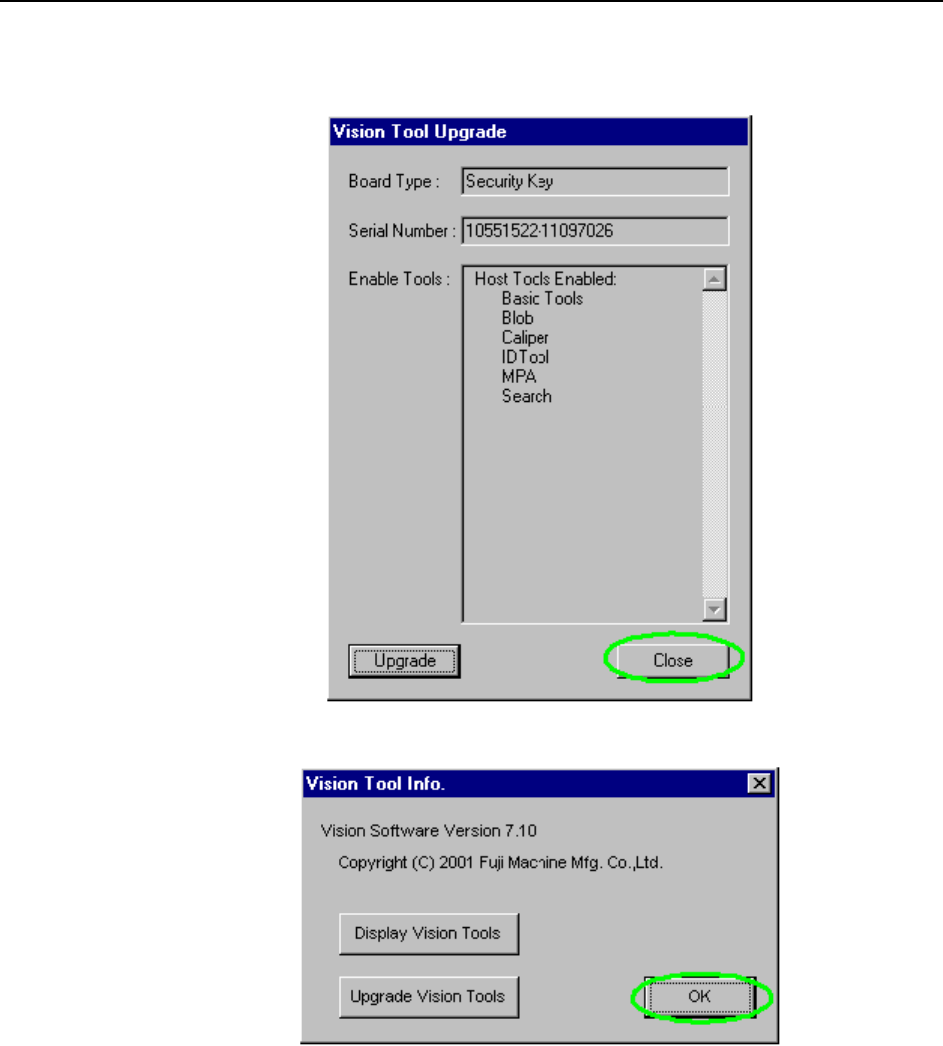
and Upgrade >> Installing the ID Tool License
7-10
SYS-CP842-1.0E
6 Close the dialog box.
7 Remove the CD.

Index
SYS-CP842-1.0E Index-1
Index
A
advance pick-up .................. 3-13
Automatic Conveyor Width Change
Function ......................... 4-33
Automatic Panel Conveyance ....... 4-31
Automatic Skipping of Boards ..... 4-40
B
Barcode Reader Adjustment ........ 4-89
BIOS Settings ..................... 7-1
board ............................ 3-13
C
Camera Monitor Settings .......... 4-42
Changeover ....................... 4-22
Changing the Axis Group and the Rapid
Inching Speed .................... 4-37
Changing the Conveyor Width ...... 4-33
Changing the Recovery Limit ...... 4-14
Changing the Recovery Limit Reference
.................................. 4-14
Changing the Starting Sequence ... 4-38
Changing User Settings ........... 4-79
Clearing All Panels from the Machine
.................................. 4-32
Clearing an Error ................. 4-4
Commands .......................... 5-1
CYCLE STOP button ................ 3-10
D
Delayed Continuous ............... 4-13
Delayed Stop ..................... 4-11
device (feeder) pallet (CP-842ME Option)
.................................. 3-13
Device Change .................... 4-22
Display During Production ........ 4-29
Displaying the Software Versions . 4-77
E
Editing Production Programs ...... 4-47
Editing Production Programs On the Machine
.................................. 4-46
EMERGENCY STOP button ............ 3-10
F
Flush Out .........................4-32
Forcing the Machine to Skip a Board
(Manual Skip) .....................4-40
Fujitrax-Profiler Settings ........4-89
G
global skip mark ..................3-13
Global Skip Marks .................4-39
I
I/O Map ............................6-1
Idle ...............................4-7
Idle operation with loading ........4-7
Idle operation without pickup ......4-7
Immediate Continuous ..............4-12
Immediate Stop ....................4-10
in/out lifter .....................3-13
in-/out-carrier ...................3-13
Inching ...........................4-36
inching ...........................3-13
Installing the ID Tool License Upgrade CD
....................................7-8
J
Joint .............................4-22
Joint Resupply ....................4-22
L
Loading and Unloading Device Pallets (CP-
842ME Option) .....................4-21
Loading and Unloading Panels ......4-31
Loading and Unloading Panels Manually
...................................4-31
M
machine configuration data ........3-14
Maintenance Mode ..................4-81
multiboard panel ..................3-14
N
Next-Stage Follow-Up Control ......4-35
nozzle holder .....................3-14

Index
Index-2
SYS-CP842-1.0E
P
Pallet Change Unit (PCU) ......... 3-14
Panel ID Read Function (Option) .. 4-84
Parts Error Handling .............. 4-9
Pass .............................. 4-7
Performing a Manual Device Check . 4-23
Performing a Nozzle Check ........ 4-15
Power Off button (touch screen command
that displays when the EMERGENCY STOP
button is pushed) ................ 3-10
POWER ON lamp ..................... 3-9
Production ........................ 4-7
production program ............... 3-14
R
Reading Trigger Sensor Adjustment 4-91
READY ON button .................. 3-10
recovery ......................... 3-14
S
Selecting a Production Program .... 4-5
Setting the Device Table Mode .... 4-22
Setting the Operation Mode ........ 4-7
Setting the Production Mode ....... 4-8
Setting the Production Quantity .. 4-28
Setting Up a New User ............ 4-78
Shutting Down ..................... 4-3
Side 1/2 ENABLE/LOCK switch ...... 3-10
Simulation Command ............... 4-46
skip mark ........................ 3-14
Skipping a Nozzle Manually ....... 4-18
Skipping a Panel ................. 4-38
Skipping Nozzles Automatically ... 4-19
Specifying an Automatic Device Check 4-23
Specifying Nozzle Tolerance Values at the
Machine ........................... 4-17
Specifying Pick-up Offsets at the Machine
................................... 4-26
Specifying the Next Device Trigger 4-24
START button ...................... 3-10
Starting the Machine ............... 4-2
Stopping After All Panels are Complete
................................... 4-30
Stopping After the Current Panel .. 4-30
Stopping and Restarting the Machine 4-28
Stopping the Machine in an Emergency 4-3
Supply Unit Functions ............. 4-21
System Installation ................ 7-1
SYSTEM ON button ................... 3-9
System Upgrades .................... 7-7
T
Test Placement Command ............ 4-47
Touch Screen ...................... 3-11
touch screen ...................... 3-14
Troubleshooting ................... 4-35
U
Using the Data Manager ............ 4-80
V
virtual keyboard .................. 3-14
Vision System ..................... 4-41
W
Whats New About the Machine System . 3-2
Wire Frame ........................ 4-46
X
XY-table .......................... 3-14