4OM-1429-008_w.pdf - 第157页
2-24 0712-002 3.2 List of Machine Information Machine Information Codes Display Field A (Scope of Machine Information) Display Field B (Details of Machine Information) 809301 Conveyor upper cover opening and closing Inpu…
2-230712-002
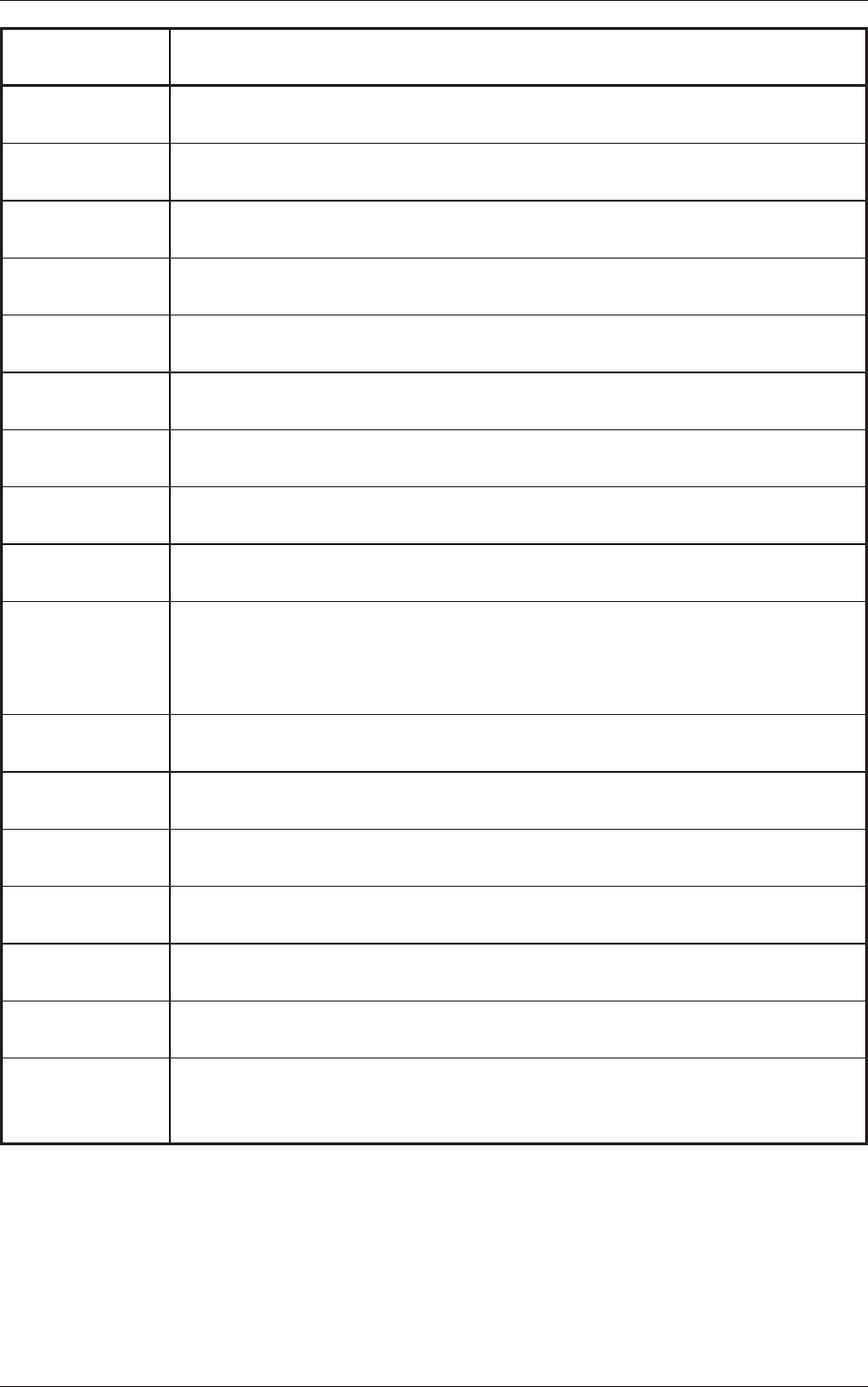
3.2 List of Machine Information
Machine
Information Codes
Display Field A (Scope of Machine Information)
Display Field B (Details of Machine Information)
803016 FAN Stop Warning
The upper mount (right front) cooling fan stopped.(M114)
803017 FAN Stop Warning
The upper mount (right rear) cooling fan stopped.(M115)
803018 FAN Stop Warning
The CPU2 control box (right) cooling fan stopped.(M118)
803019 FAN Stop Warning
The conveyor multi-axis amplifier (right) cooling fan stopped.(M124)
8030
1a FAN Stop Warning
The ceiling (rear) cooling fan stopped.(M101)
80301b
FAN Stop Warning
The ceiling (front) cooling fan stopped.(M102)
80301c F
AN Stop Warning
The electrical system box power supply cooling fan (left) stopped.(M121)
80301d FAN Stop W
arning
The electrical system box power supply cooling fan (right) stopped.(M123)
80301e FAN Stop Warning
The conveyor multi-axis amplifi
er cooling fan stopped.(M112)
804001 Warning of Specifi
ed Test Mode
"Enable" is set for the [Backup Base Axis
Aging] in the Test Mode. Be sure to
check that there is no backup pin and jig under the chute because the backup
base will move up and down.
809001 Internal Exception Notice
CPU2 V
ector 0 exception has been disregarded.
809002 Internal Exception Notice
CPU2 spurious exception has been disregarded.
809003 Internal Exception Notice
CPU2 undefined exception has been disregarded.
809004
Internal Exception Notice
CPU3 undefined exception has been disregarded.
809005 Internal Exception Notice
EB005 SYSFAIL
exception has been disregarded.
809101 Cutting tape Preliminary announcement
Please cut a tape in a predetermined position.
809201 Library tape width check
The tape width in library and the feeder are not in agreement. Please check the
library and feeder.
2-240712-002
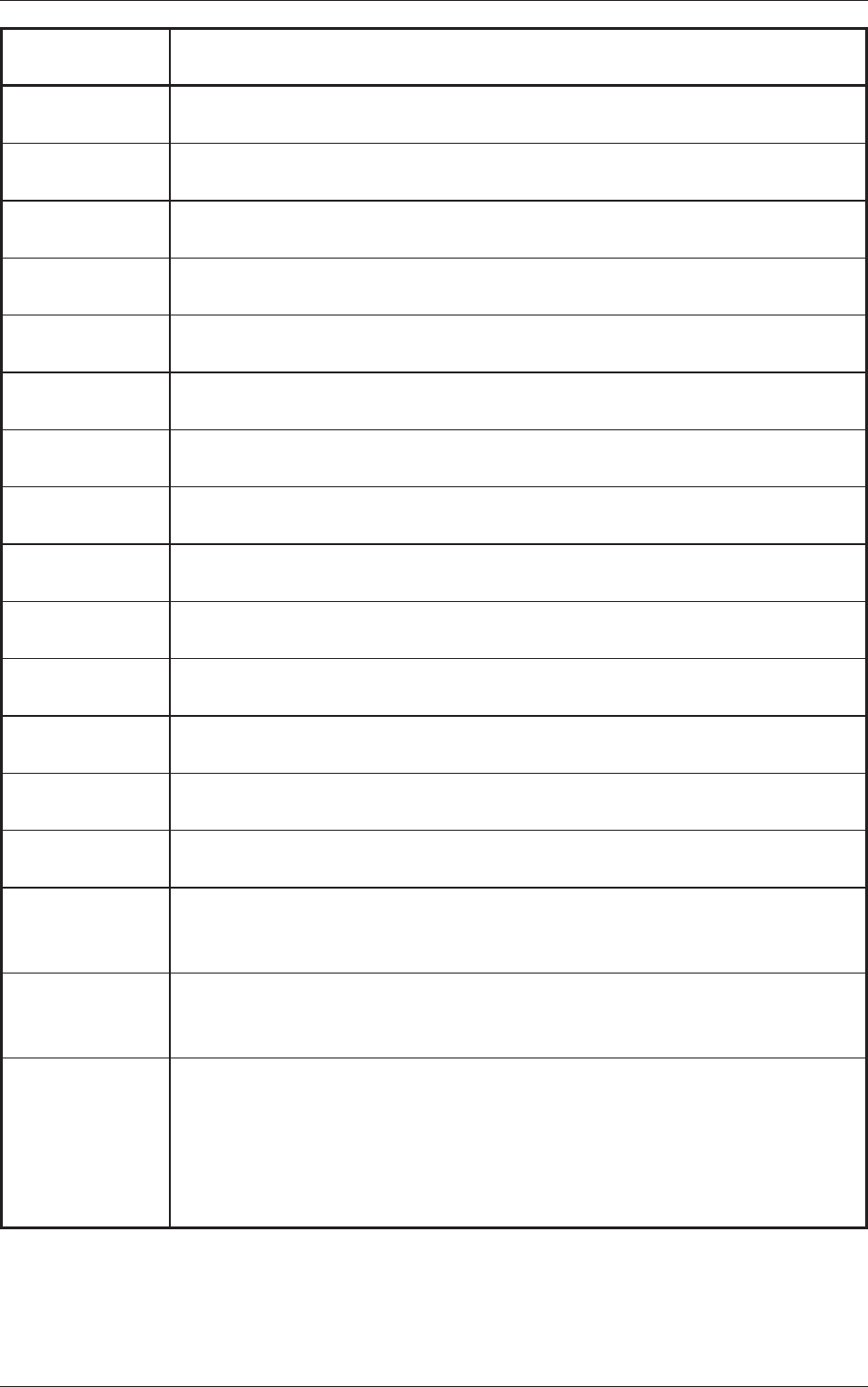
3.2 List of Machine Information
Machine
Information Codes
Display Field A (Scope of Machine Information)
Display Field B (Details of Machine Information)
809301 Conveyor upper cover opening and closing
Input conveyor upper cover opened.
809302 Conveyor upper cover opening and closing
Input conveyor upper cover closed.
809303 Conveyor upper cover opening and closing
Output conveyor upper cover opened.
809304 Conveyor upper cover opening and closing
Output conveyor upper cover closed.
809305 Conveyor upper cover opening and closing
Input machine conveyor upper cover opened.
809306 Conveyor upper cover opening and closing
Input machine conveyor upper cover closed.
809307 Conveyor upper cover opening and closing
Output machine conveyor upper cover opened.
809308 Conveyor upper cover opening and closing
Output machine conveyor upper cover closed.
809401 P.C.B existence
The P.C.B which carried out manual bypass to the input conveyor was detected.
809402 P.C.B existence
The P.C.B on a output conveyor was removed.
809501 Conveyor forbidden operation signal detected
The input conveyor changed into the forbidden state of operation.
809502 Conveyor forbidden operation signal detected
The forbidden operation state of the input conveyor of was canceled.
809503 Conveyor forbidden operation signal detected
The output conveyor changed into the forbidden state of operation.
809504 Conveyor forbidden operation signal detected
The forbidden operation state of the output conveyor of was canceled.
809701 P.C.B Stopper
It is set as "not use" of a positioning stopper in the system data. Please confirm
whether there is a stopper.
809702 P.C.B Stopper
It is set as "not use" of a positioning stopper in the system data. Please confirm
whether there is a stopper
.
809801 Feeder alternate condition is disable.
Original and alternated feeders have had pickup errors and they are under
disabled status. After finding the cause of pickup errors, go to the main menu,
then [OPERA
TION], [Altn Mode], select feeder lane number, enable feeder(s)
to clear disabled status, go back to the main menu and press the start button to
resume.
2-250707-001
4. "ERROR" Windows
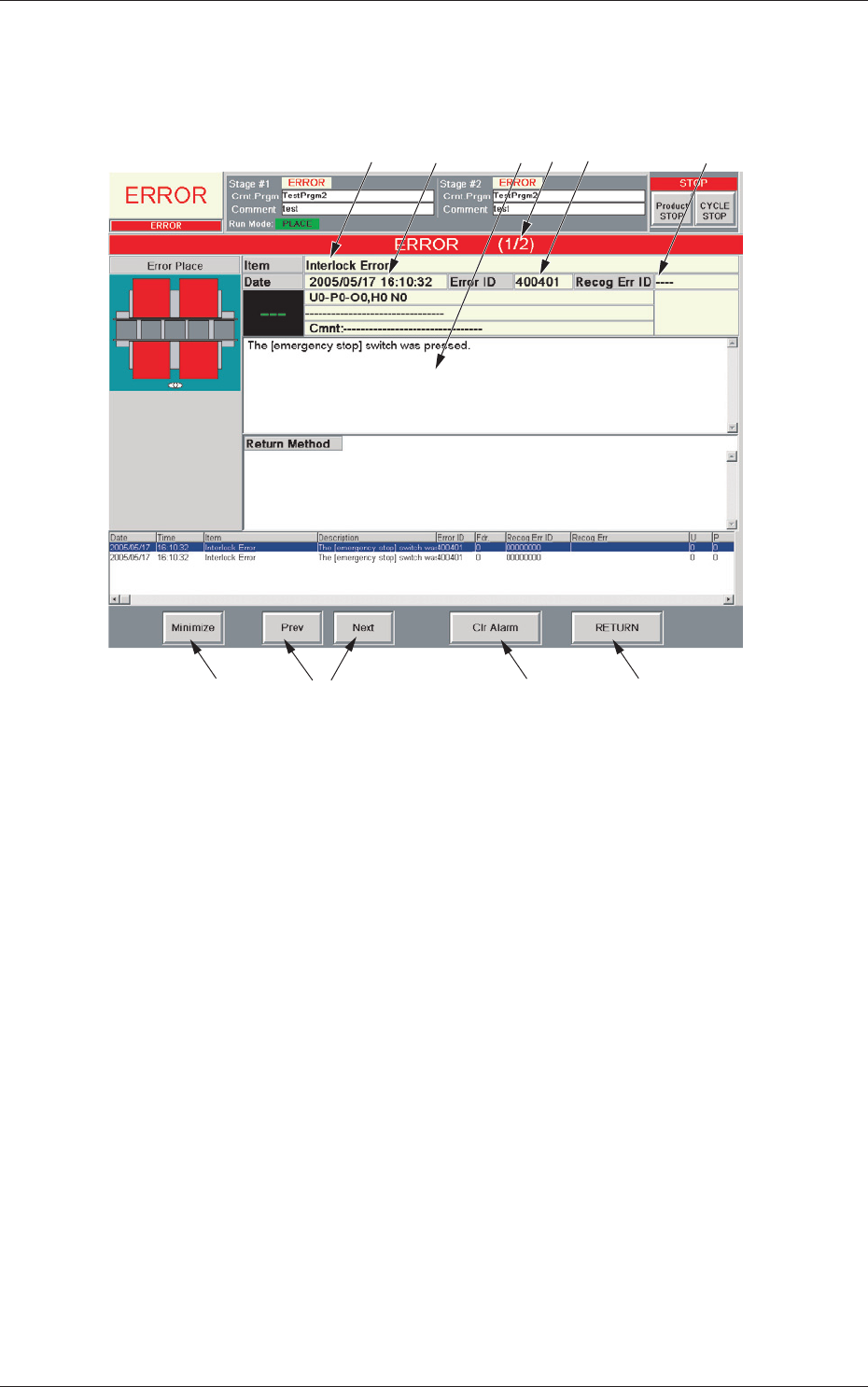
When the machine detects an error, the following "ERROR" window opens.
[6]
[1]
[9]
[8]
[10]
[3] [5]
[4]
[2]
[7]
Fig. 4B4 Example of "ERROR" Window
[1] Error ID
Displayed is a string of alphanumeric characters (6 characters) that
identifi es an error.
When an error has occurred, use the error ID as an index and refer to
"Chapter 3 Troubleshooting from Error IDs" (Vol. 4) for details.
[2] Recog Err ID
Displayed is a string of alphanumeric characters (8 characters) that
identifi
es an error.
When an error has occurred, use the error ID as an index and refer to
"Chapter 4 Troubleshooting from Recognition Error IDs" (Vol. 4) for
details.
[3] Item
Displayed is a name of the classified element that caused an error.
[4] Description
Displayed are the contents of the error and Return Method (Remedial
Procedure).
4. "ERROR" Windows