Vermes MDS 358X user Manual.pdf - 第151页
Error Me ssag es 140 VTK - TR -BA- 072e - 1 - User Manua l MDS 358X S eries 11 Error Messag es The follow ing pages li st all t h e error mes sages y ou could encounter when usin g thi s system. The table i n pa ragraph …

Maintenance
VTK-TR-BA-072e-1 - User Manual MDS 358X Series
139
10.2.4 Exchange of the Tappet, the Tappet Sealing and the Nozzle Insert
For the necessary steps of de-/mounting the tappet/tappet sealing/nozzle insert, please see the
chapter about cleaning (see chapter 9, page 120). Before disassembling the system, perform the
cleaning procedure explained in the same chapter. There you will also find the necessary
information of how to clean the tappet/tappet sealing/nozzle insert.
INFORMATION
Perform the adjust after exchanging parts
Before you start the dispensing process, do not forget to perform the adjust after each exchange
or remounting of the nozzle fixation nut. For details of the adjust process, see paragraph 6.5,
page 57.
Error Messages
140
VTK-TR-BA-072e-1 - User Manual MDS 358X Series
11 Error Messages
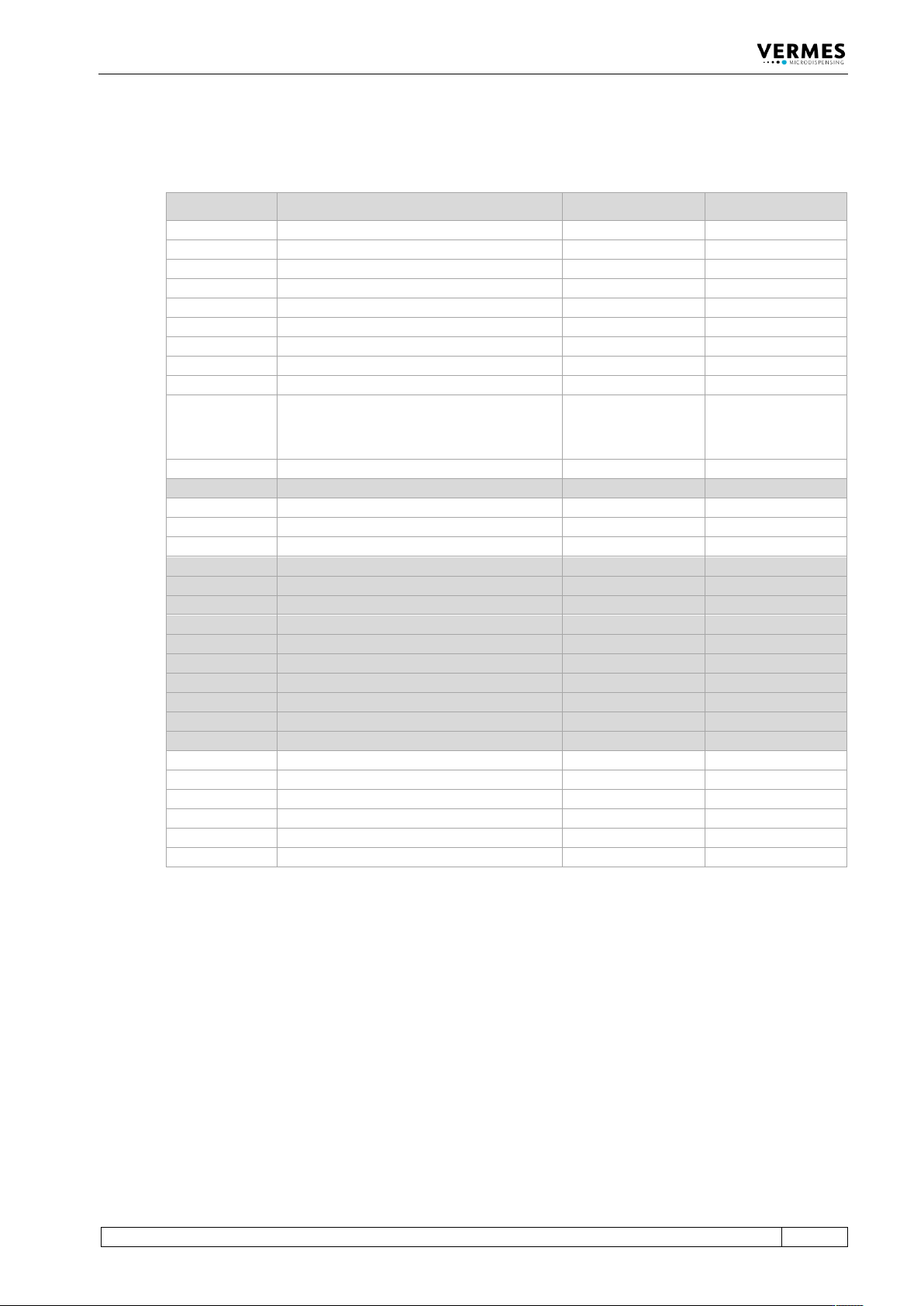
The following pages list all the error messages you could encounter when using this system. The
table in paragraph 11.1, page 141 will give you a quick overview. In paragraph 11.2, page 142
every error message is explained in detail.
In case of an error, an error message is shown in the display and the red attention LED is switched
“ON“. This information can also be obtained via pin 13 of the PLC interface (see paragraph 8.2.1
"Pin Functions", page 113). Press [enter] to clear the display. If this does not work, switch “OFF”
the control unit. Check the system for potential problems (e.g. loose cables) and re-start the
system.
If the error still occurs, please contact the Technical Support at VERMES Microdispensing or your
local supplier (see Page 7).
INFORMATION
Storing error messages
After the re-start, the error message can only be found in the submenu “Error” (see
paragraph 4.5.4 "Submenu “Status”", page 34).
INFORMATION
Valve status depending on error
If the valve is open or closed after an error message, depends on the respective error. In
paragraph 11.2, page 142 it is mentioned for each error.
Error Messages
VTK-TR-BA-072e-1 - User Manual MDS 358X Series
141
11.1 Table of Error Messages
The following table lists all error messages with their error code and when they might appear.
Error Code Error Message Related to When?
101
101 wrong valve
Valve
Start-up
102
102 wrong piezo type
Valve
Start-up
104
104 sensor communication error
Valve
Operation
190
190 incorrect valve data
Valve
Start-up, Operation
191
191 nozzle/tappet error > enter
Valve
Start-up
199
199 valve error escape for auxi.
Valve
Start-up
301
301 no valve present error
Valve
Start-up
302
302 actuator connection error
Valve
Operation
303
303 adjust error press enter
MDC
HW adjust
501 / -
501 valve defect error
or
maintenance needed
Valve
Start-up, Operation
502
502 MDV temp.high please wait
Valve
Start-up, Operation
601
601 USART buffer overflow
RS-232C
Operation
701
701 valve driver defect
MDC
Start-up, Operation
702
702 WD timeout press enter
MDC
Start-up, Operation
703
703 RS powsupply press enter
MDC
Start-up, Operation
810
810 communication error
MDC
Start-up, Operation
820
820 incorrect heater data
Heater
Start-up, Operation
830
830 wrong heater
Heater
Operation
840
840 heater unplugged
Heater
Operation
850
850 MDC not calibrated!
MDC
Start-up
855
855 incorrect bus data
MDC
Operation
860
860 incorrect cooler data
MDC
Operation
870
870 wrong cooler
Cooling
Start-up, Operation
875
875 cooler wrong PT100-signal
MDC
Start-up, Operation
880
880 cooler unplugged
Cooling
Operation
901
901 RAM-data error press enter
MDC Data
Start-up, Operation
902
902 EEPROM not formatted > enter
MDC Data
Start-up, Operation
903
903 EEPROM write error > enter
MDC Data
Operation
904
904 setup save error > enter
MDC Data
Operation
905
905 setup load error > enter
MDC Data
Operation
999
999 error in errorlist
MDC Data
Operation