Vermes MDS 358X user Manual.pdf - 第160页
Error Me ssag es VTK - TR -BA- 072e - 1 - User Manua l MDS 358X S eries 149 703 703 RS P ower Supply This error m essage ap pears, if a prob lem wit h the p ower supply forces a re - start of the system. If th is happ en…
Error Messages
148
VTK-TR-BA-072e-1 - User Manual MDS 358X Series
601 601 USART Buffer Overflow
This problem sometimes occurs during data transmission via serial interface. The buffer is full
and the MDC is unable to handle more inflowing data. The message “601 USART Buffer
Overflow” is returned via serial interface. LEDs are not lit.
Error code display:
No error message
Error code status menu:
601 USART Buffer Overflow
Error message monitor:
601 USART Buffer Overflow
Error handling:
• Interrupt data transmission
• Send data again
Valve:
Valve remains unchanged.
701 701 Valve Driver Defect
A hardware failure of the valve control is probable (e.g. short circuit in the connection of the
piezoelectric element). This problem is possible during startup of the MDC and also with
system in operation.
Error code display:
701 Valve Driver Defect
Error code status menu:
701 Valve Driver Defect
Error handling:
• Switch OFF the MDC immediately. Inspect the actuator
cable connection. Worn, kinked or charred cables must
be exchanged.
• The MDC must be returned to the manufacturer. The
valve has to be checked (if that is not possible, it has to
be send as well).
Valve:
Valve is open
702 702 Watchdog TimeOut
Abnormal end (crash) of the MDC.
Error code display:
702 Watchdog TimeOut pr. Enter
Error code status menu:
702 Watchdog TimeOut
Error handling:
• Press [enter]-key to acknowledge error message. The
MDC restarts
Valve:
Valve still open (start-up of the MDC)
Error Messages
VTK-TR-BA-072e-1 - User Manual MDS 358X Series
149
703 703 RS Power Supply
This error message appears, if a problem with the power supply forces a re-start of the system.
If this happens more than once, you need to change your dispensing parameters, since your
current settings use too much power over time.
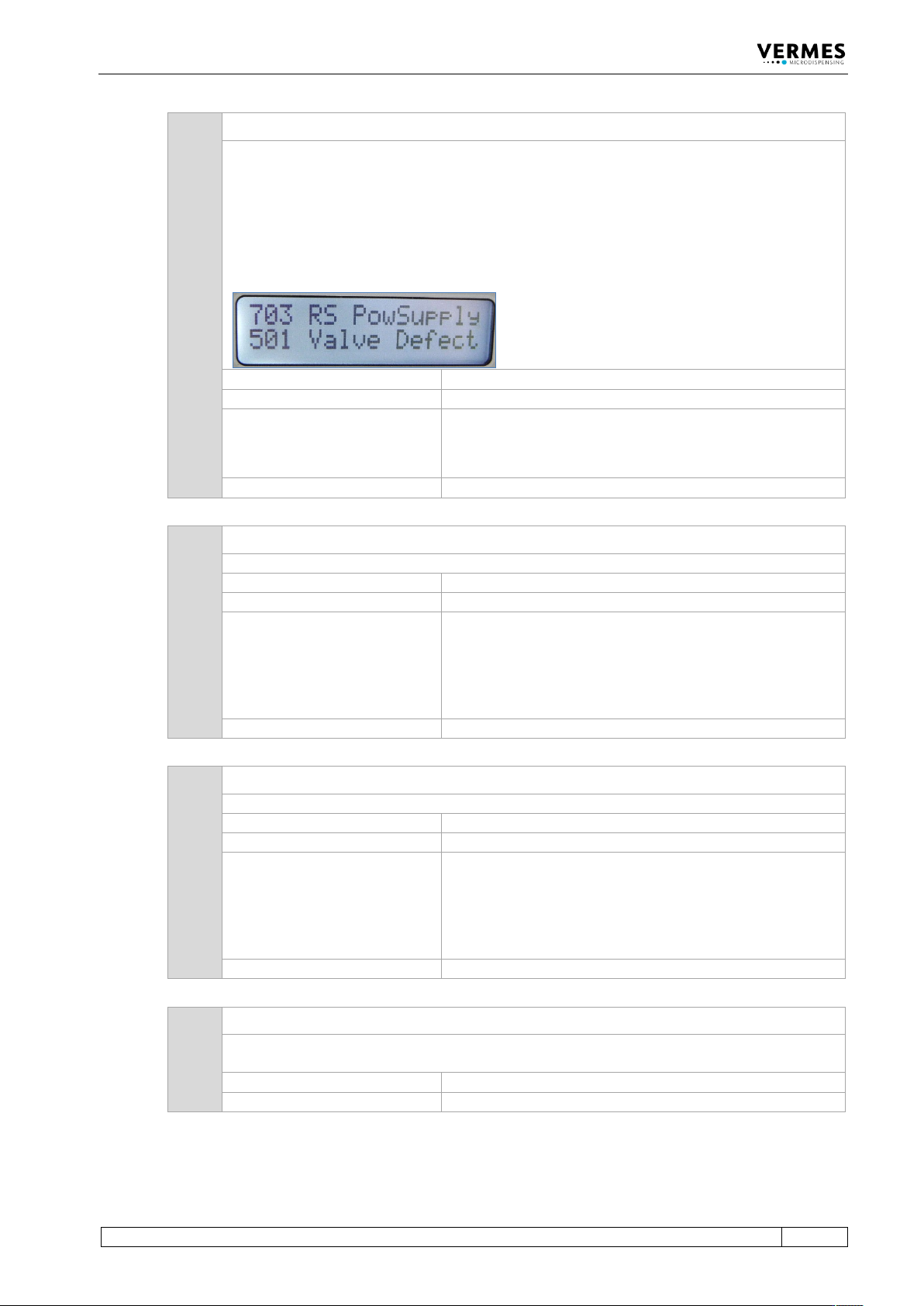
In certain circumstances, it can happen that in this phase an error “501 Valve Defect Error” is
detected. In this case, both errors are shown in the display of the MDC (see picture below).
Follow the instructions regarding error 501.
Error code display:
703 RS Power Supply pr. Enter
Error code status menu:
703 RS Power Supply
Error handling:
• Press [enter]-key to acknowledge error message.
• Lower the dispensing frequency, since your current
settings need too much power.
Valve:
Valve still open (start-up of the MDC)
810 810 communication error
There is an error with the internal communication.
Error code display:
810 communication error
Error code status menu:
810 communication error
Error handling:
• Press [enter] key to acknowledge the error message.
Heater and cooler status will be switched “OFF” in the
submenu “Heater/Cooler“.
• For further information, contact the Technical Support
(see Page 7).
Valve:
Valve is closed
820 820 incorrect heater data
The heater has incorrect data.
Error code display:
820 incorrect heater data
Error code status menu:
820 incorrect heater data
Error handling:
• Press [enter] key to acknowledge the error message.
Heater status will be switched “OFF” in the submenu
“Heater”.
• For further information, contact the Technical Support
(see Page 7).
Valve:
Valve is closed
830 830 wrong heater
The MDC cannot read the data from the heater correctly. Either the heater is defect or the
heater cable.
Error code display:
830 wrong heater
Error code status menu:
830 wrong heater
Error Messages
150
VTK-TR-BA-072e-1 - User Manual MDS 358X Series
Error handling:
• Press [enter] key to acknowledge the error message.
Heater status will be switched “OFF” in the submenu
“Heater”.
• Change the heater cable and try again.
• For further information, contact the Technical Support
(see Page 7).
Valve:
Valve is closed
840 840 heater unplugged
Is the heater not connected, although the heater is activated in the submenu “Heater”, the
error message “840 heater unplugged” appears. The display then switches between this
message and the message “Press enter”.
Error code display:
840 heater unplugged
Error code status menu:
840 heater unplugged
Error handling:
• Press [enter] key to acknowledge the error message.
Heater status will be switched “OFF” in the submenu
“Heater”.
• Connect the heater.
Valve:
Valve is closed
850 850 MDC not calibrated!
The error message “850 not calibrated! pr. Enter” appears, if the calibration values of the
heater are incorrect at the start-up of the MDC. The values will be overwritten with the factory
settings. There will be no entry in the error list.
Error code display:
850 MDC not calibrated!
Error code status menu:
No entry
Error handling:
• Press [enter] key to acknowledge the error message. If
no heater or cooling are needed, you can keep working
without calibration.
• For further information, contact the Technical Support
(see Page 7).
Valve:
Valve is closed
855 855 incorrect bus data
There is a problem with the internal communication. The transfer of data between MDC and
heater or cooling is interrupted.
Error code display:
855 incorrect bus data
Error code status menu:
855 incorrect bus data
Error handling:
• Press [enter] key to acknowledge the error message.
Heater status will be switched “OFF” in the submenu
“Heater“.
• For further information, contact the Technical Support
(see Page 7).
Valve:
Valve is closed
860 860 incorrect cooler data
There is an error with the internal communication. The communication between MDC and
cooling is interrupted.
Error code display:
860 incorrect cooler data
Error code status menu:
860 incorrect cooler data