Vermes MDS 358X user Manual.pdf - 第183页
Attachments 172 VTK - TR -BA- 072e - 1 - User Manua l MDS 358X S eries RS - 232C command s Functio n s 71 SCENARIO:READ:<scenario no.> Check th e parameters of select ed sc enario 72 SETUP:ASAVE:<setup no.>:&…

Attachments
VTK-TR-BA-072e-1 - User Manual MDS 358X Series
171
RS-232C commands Functions
38
SYSTEM:DOSOKDELAY:ON Activate the DOSOK-Delay
39
SYSTEM:SINGLEDOSOK:SETUP Set the Single-DOSOK signal to “Setup”
40
SYSTEM:SINGLEDOSOK:PULSE Set the Single-DOSOK signal to “Pulse”
41
SYSTEM:PASSWORD:<your password> Send the password for unlocking the keypad
42
SYSTEM:PASSWORD:OFF Deactivate the password for unlocking the keypad
43
SYSTEM:PASSWORD:ON Activate the password for unlocking the keypad
44
SYSTEM:PASSWORD:SET:<your password> Set the password for unlocking the keypad
45
SYSTEM:AUXILIARYMODE:OFF Deactivate the auxiliary mode
46
SYSTEM:AUXILIARYMODE:ON Activate the auxiliary mode
47
TRIGGER:ASET:? Check the pulse parameters in the RAM
48
TRIGGER:ASET:<RI>,<OT>,<FA>,<NL>,<NP>,<D
L>
Change the pulse parameters in the RAM
(MDC returns “OK”)
49
TRIGGER:ASET:<RI>,<OT>,<FA>,<NL>,<NP>,<D
L>,1
Change the pulse parameters in the EEPROM
(MDC returns “OK”)
50
STRIGGER:ASET:<RI>,<OT>,<FA>,<NL>,<NP>,<
DL>
Change the pulse parameters in the RAM
(MDC returns the saved parameters)
51
STRIGGER:ASET:<RI>,<OT>,<FA>,<NL>,<NP>,<
DL>,1
Change the pulse parameters in the EEPROM
(MDC returns the saved parameters)
52
VALVE:UP Open the valve
53
VALVE:DOWN Close the valve
54
VALVE:AOPEN Initiate a dispensing cycle with current parameters
(MDC returns “OK”)
55
VALVE:AOPEN:<RI>,<OT>,<FA>,<NL>,<NP>,<D
L>
Initiate a dispensing cycle with given parameters
(MDC returns “OK”)
56
VALVE:AOPENS<setup no.> Initiate a dispensing cycle with selected setup
( MDC returns “OK”)
57
SVALVE:AOPEN Initiate a dispensing cycle with current parameters
(MDC returns the saved parameters)
58
SVALVE:AOPEN:<RI>,<OT>,<FA>,<NL>,<NP>,<
DL>
Initiate a dispensing cycle with given parameters
(MDC returns the saved parameters)
59
SVALVE:AOPENS<setup no.> Initiate a dispensing cycle with selected setup
(MDC returns the saved parameters)
60
WRITE:LCD:<text> Write an ASCII text on the display
61
TAPPET:SET:<value> Set tappet maintenance counter
62
TAPPET:CLEAR Clear tappet maintenance counter
63
NOZZLE:SET:<value> Set nozzle maintenance counter
64
NOZZLE:CLEAR Clear nozzle maintenance counter
65
SCENARIO:STATUS Check the status of scenarios and PLCstops
66
SCENARIO:OFF Deactivate the use of scenarios
67
SCENARIO:ON Activate the use of scenarios
68
SCENARIO:PLCSTOP:1:OFF Deactivate the PLC-Stop
69
SCENARIO:PLCSTOP:1:ON Activate the PLC-Stop
70
SCENARIO:SAVE:<scenario no.>:<values> Save the parameters for selected scenario

Attachments
172
VTK-TR-BA-072e-1 - User Manual MDS 358X Series
RS-232C commands Functions
71
SCENARIO:READ:<scenario no.> Check the parameters of selected scenario
72
SETUP:ASAVE:<setup
no.>:<RI>,<OT>,<FA>,<NL>,<NP>,<DL>
Save parameters in a setup
73
SETUP:AREAD:<setup no.> Check the parameters of a setup
74
BAUDRATE:0/1/2/3/4 Change the baud rate
75
GETTD Check the current time
76
MDC:RESTART Restart the MDC
Attachments
VTK-TR-BA-072e-1 - User Manual MDS 358X Series
173
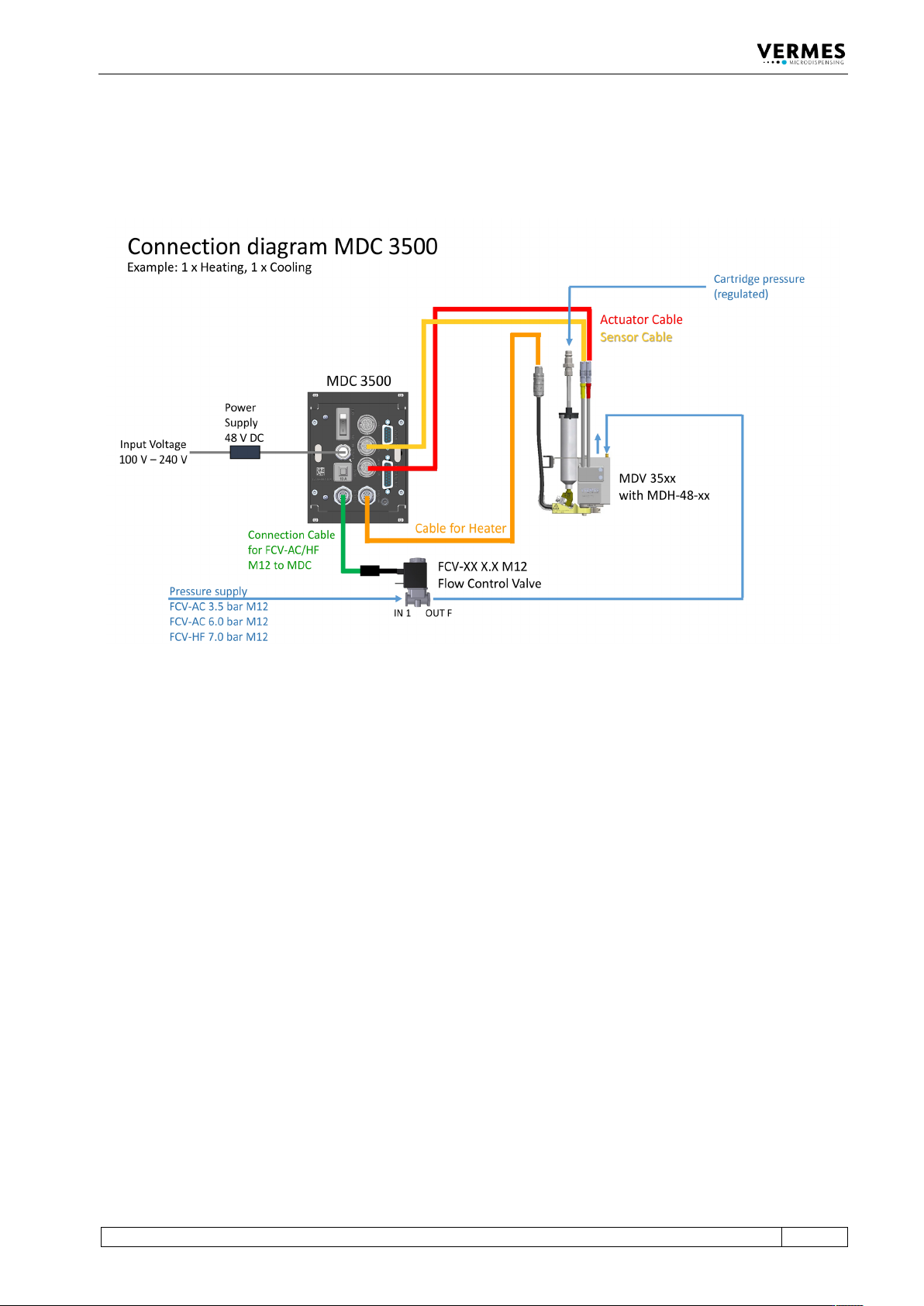
14.7 Connection Diagram MDS 3580
This diagram shows the connections of an MDS 3580.
Fig. 81: Connection Diagram MDS 3580