Vermes MDS 358X user Manual.pdf - 第155页
Error Me ssag es 144 VTK - TR -BA- 072e - 1 - User Manua l MDS 358X S eries 199 199 Valve Error General va lve data error (S ensor connection ). When t he checksu m of t he valve EEPRO M is compared to software data duri…
Error Messages
VTK-TR-BA-072e-1 - User Manual MDS 358X Series
143
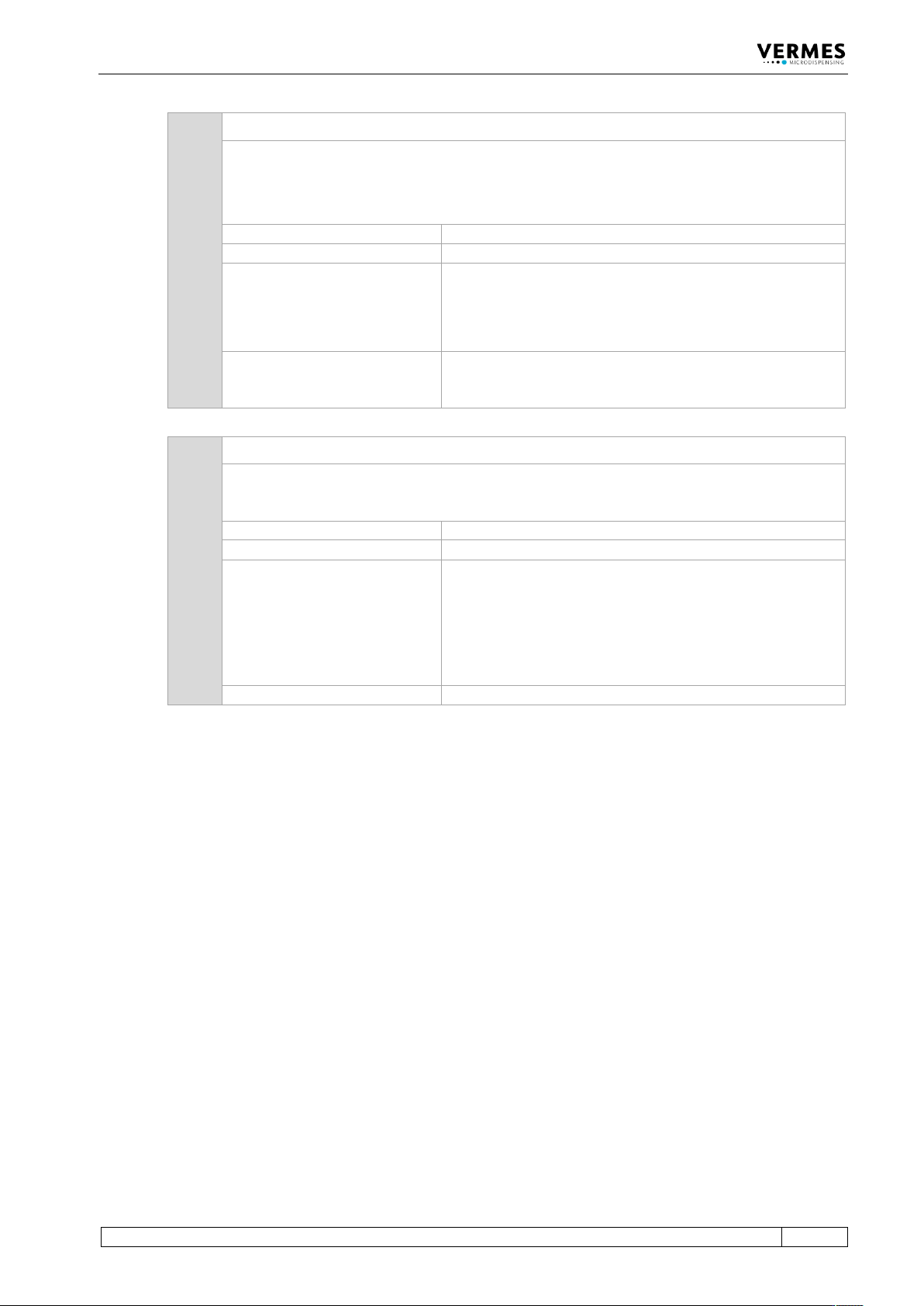
190 190 Incorrect Valve Data
This error message appears, if a checksum error occurs while writing the Cycle Counter.
Important Note!
The most common cause for this error is to unplug the valve before switching OFF the MDC or
before the MDC has completely shut down.
Error code display:
190 Incorrect Valve Data (Press Enter)
Error code status menu:
No entry
Error handling:
• Press [enter]-key to acknowledge error message.
• If error happens repeatedly, switch OFF control unit, and
inspect the connection. If necessary, exchange the cable
and/or valve.
Valve:
Valve remains unchanged. If the error message appears
during the start of the MDC, the valve is open; otherwise, it
is closed.
191 191 NozzleTappet Load Err.
During startup of the control unit, the system reads the counters (e.g. nozzle counter, tappet
counter). If a problem arises, this error message is displayed. Corresponding values may be
doubtful, until a new cycle is started.
Error code display:
191 NozzleTappet Load Err Enter.
Error code status menu:
No entry
Error handling:
• Press [enter]-key to acknowledge error message. The
MDC restarts.
• In case the error acknowledgement does not work, the
valve might be defect. If possible, test valve with
different MDC and MDC with different valve. If the valve
is defect, send it in for repair.
Valve:
Valve still open (start-up of the MDC)
Error Messages
144
VTK-TR-BA-072e-1 - User Manual MDS 358X Series
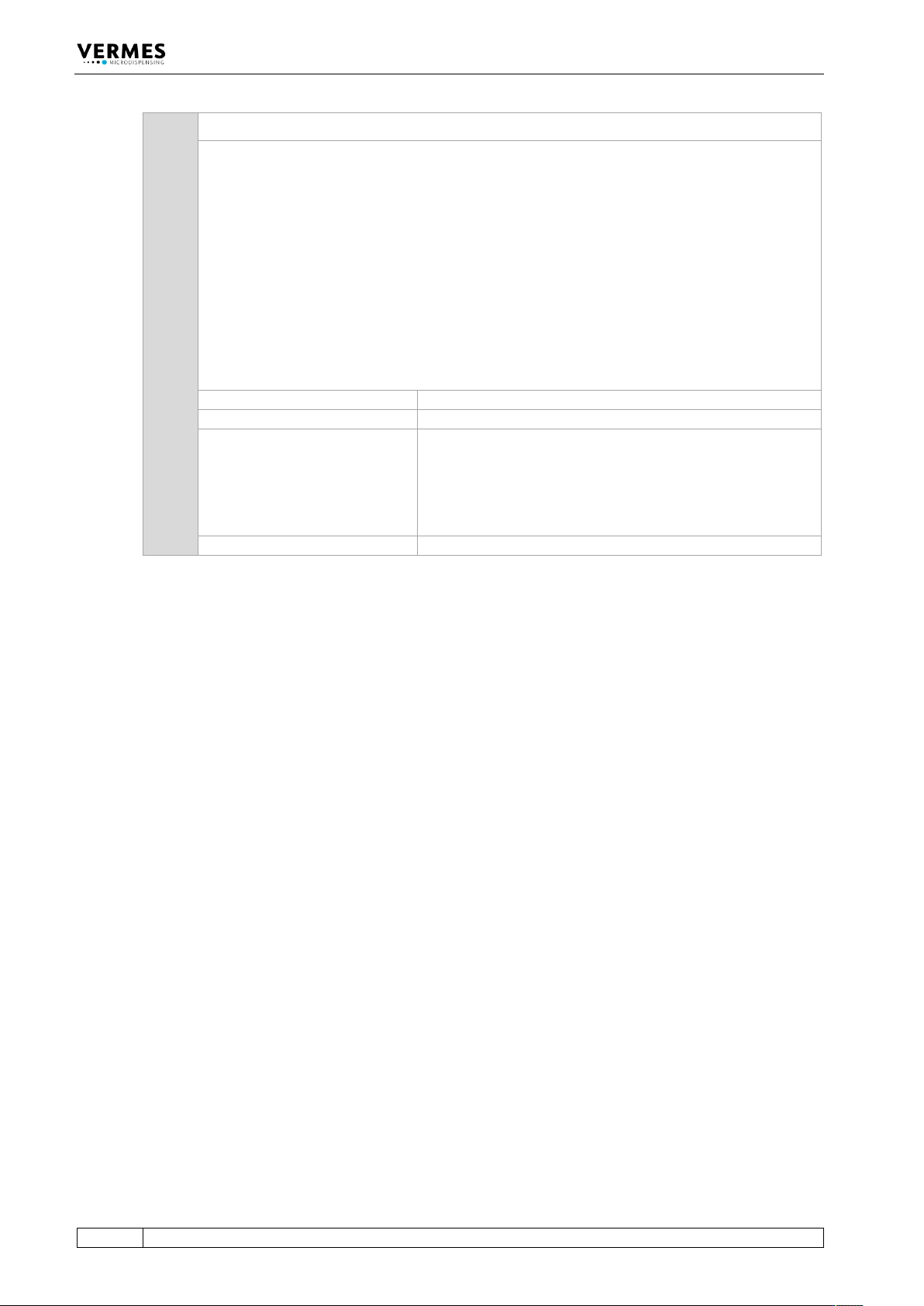
199 199 Valve Error
General valve data error (Sensor connection). When the checksum of the valve EEPROM is
compared to software data during startup, mismatch is notified by this message. This error
message appears with the start-up of the MDC.
At this point, you have the opportunity to switch to Auxiliary Mode.
Important Note!
This error message can also appear, when the MDC is connected to an MFC 3000 for cooling a
valve, and you switched ON the MDC too early.
When using an MFC for cooling, you always have to keep this order of steps:
1. Switch ON MFC
2. Switch ON the channel used for cooling at the MFC
3. Switch ON MDC
Error code display:
199 Valve Error Escape for Auxi.
Error code status menu:
199 Valve Error
Error handling:
• The sensor connection has not been plugged in
correctly. Switch OFF MDC and inspect the sensor cable
and its connection.
• Send valve to VERMES Microdispensing or to your
supplier
Valve:
Valve still open (start-up of the MDC)
Error Messages
VTK-TR-BA-072e-1 - User Manual MDS 358X Series
145
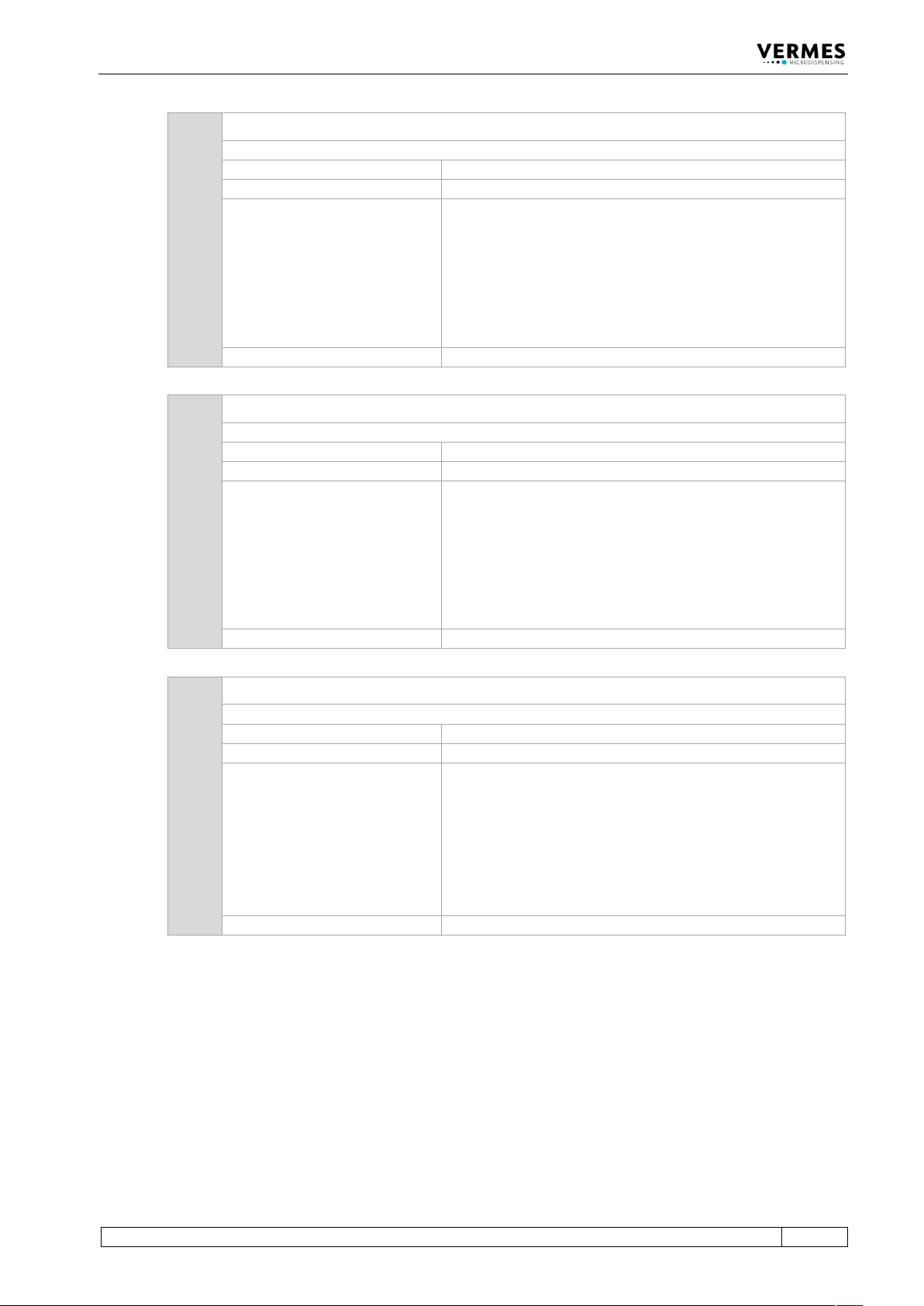
301 301 No Valve Present Error
The control unit does not recognize the valve during startup.
Error code display:
301 No Valve Present Error
Error code status menu:
301 No Valve Present Error
Error handling:
• The actuator connection has not been plugged in
correctly. Switch OFF MDC and inspect the actuator
cable and its connection. If the actuator cable is
damaged, it must be exchanged before restarting.
• Check MDC
• Send valve and/or MDC to VERMES Microdispensing or
to your supplier
Valve:
Valve still open (start-up of the MDC)
302 302 Actuator Connection Error
With system in operation, the connection between valve (actuator) and MDC is disrupted.
Error code display:
302 Actuator Connection Error
Error code status menu:
302 Actuator Connection Error
Error handling:
• The actuator connection has not been plugged in
correctly. Switch OFF MDC and inspect the actuator
cable and its connection. If the actuator cable is
damaged, it must be exchanged before restarting.
• Check MDC
• Send valve to VERMES Microdispensing or to your
supplier
Valve:
Valve is open
303 303 adjust error
This error can happen during operation. During the adjust a problem affects the calibration.
Error code display:
303 adjust error press enter
Error code status menu:
303 adjust error
Error handling:
• Switch OFF MDC, switch it back ON and try again.
• If possible, check MDC with a different valve, to see, if
the adjust works there
• If possible, check valve with a different MDC, to see, if
the adjust works there
• Send valve and/or MDC to VERMES Microdispensing or
to your supplier
Valve:
Valve is closed