Vermes MDS 358X user Manual.pdf - 第153页
Error Me ssag es 142 VTK - TR -BA- 072e - 1 - User Manua l MDS 358X S eries 11.2 Expla nat ions of Er ror M essag es 101 101 Incorr. Val ve This message som etimes appears dur ing startup of th e system. The cont rol uni…
Error Messages
VTK-TR-BA-072e-1 - User Manual MDS 358X Series
141
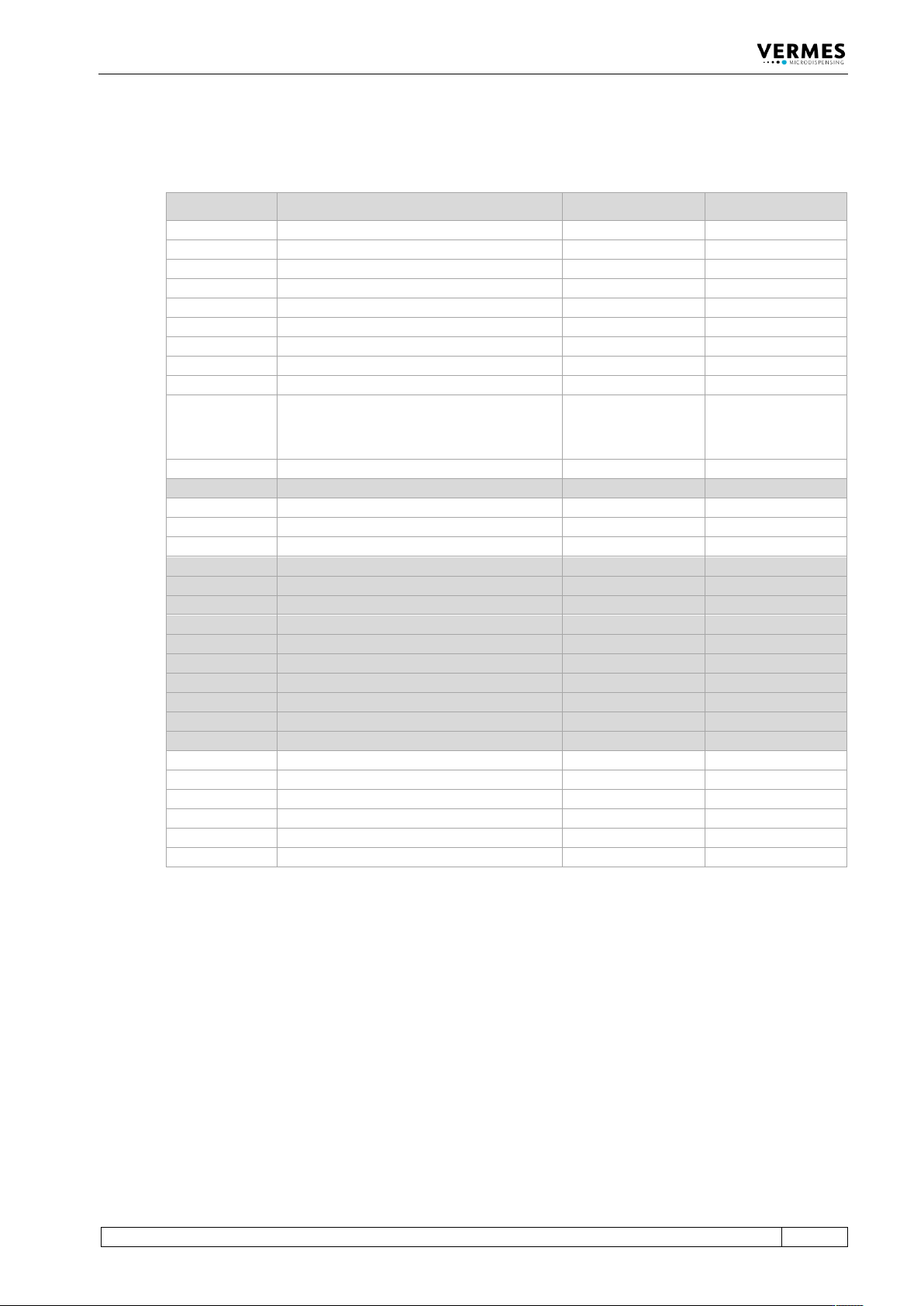
11.1 Table of Error Messages
The following table lists all error messages with their error code and when they might appear.
Error Code Error Message Related to When?
101
101 wrong valve
Valve
Start-up
102
102 wrong piezo type
Valve
Start-up
104
104 sensor communication error
Valve
Operation
190
190 incorrect valve data
Valve
Start-up, Operation
191
191 nozzle/tappet error > enter
Valve
Start-up
199
199 valve error escape for auxi.
Valve
Start-up
301
301 no valve present error
Valve
Start-up
302
302 actuator connection error
Valve
Operation
303
303 adjust error press enter
MDC
HW adjust
501 / -
501 valve defect error
or
maintenance needed
Valve
Start-up, Operation
502
502 MDV temp.high please wait
Valve
Start-up, Operation
601
601 USART buffer overflow
RS-232C
Operation
701
701 valve driver defect
MDC
Start-up, Operation
702
702 WD timeout press enter
MDC
Start-up, Operation
703
703 RS powsupply press enter
MDC
Start-up, Operation
810
810 communication error
MDC
Start-up, Operation
820
820 incorrect heater data
Heater
Start-up, Operation
830
830 wrong heater
Heater
Operation
840
840 heater unplugged
Heater
Operation
850
850 MDC not calibrated!
MDC
Start-up
855
855 incorrect bus data
MDC
Operation
860
860 incorrect cooler data
MDC
Operation
870
870 wrong cooler
Cooling
Start-up, Operation
875
875 cooler wrong PT100-signal
MDC
Start-up, Operation
880
880 cooler unplugged
Cooling
Operation
901
901 RAM-data error press enter
MDC Data
Start-up, Operation
902
902 EEPROM not formatted > enter
MDC Data
Start-up, Operation
903
903 EEPROM write error > enter
MDC Data
Operation
904
904 setup save error > enter
MDC Data
Operation
905
905 setup load error > enter
MDC Data
Operation
999
999 error in errorlist
MDC Data
Operation
Error Messages
142
VTK-TR-BA-072e-1 - User Manual MDS 358X Series
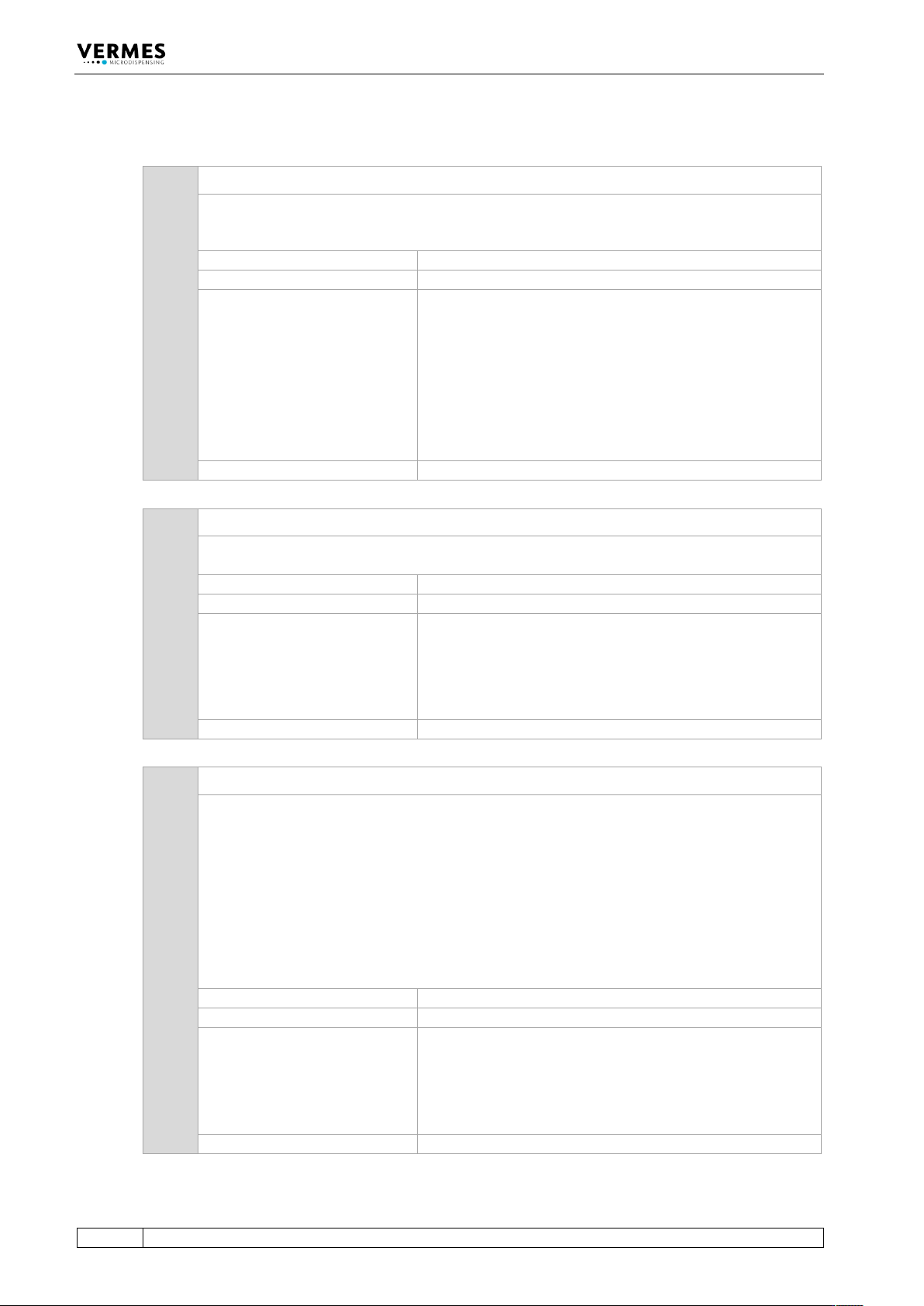
11.2 Explanations of Error Messages
101 101 Incorr. Valve
This message sometimes appears during startup of the system. The control unit checks the
data of valve and control unit. If the control unit does not recognize the valve resp. the
required valve type (e.g. finds a low viscosity valve), the error message is displayed.
Error code display:
101 Incorr. Valve
Error code status menu:
101 Incorr. Valve
Error handling:
• The sensor connection has not been plugged in
correctly. Switch OFF control unit, and inspect the
connection. If the cable is damaged, it must be
exchanged before restarting.
• Maybe an inadequate valve type has been installed.
• Check MDC (if possible, test system with another MDC
• Send MDC and/or valve to VERMES Microdispensing or
to your supplier
Valve:
Valve still open (start-up of the MDC)
102 102 Incorrect Piezo Type
The piezoelectric element does not match the current application (Valve Passport). This error
message appears with the start-up of the control unit.
Error code display:
102 Incorrect Piezo Type
Error code status menu:
102 Incorrect Piezo Type
Error handling:
• The sensor connection has not been plugged in
correctly. Switch OFF control unit, and inspect the
connection. If the cable is damaged, it must be
exchanged before restarting.
• Exchange valve
Valve:
Valve still open (start-up of the MDC)
104 104 Sensor Communication Error
This error message appears, when there is a problem with the sensor cable.
Important Note!
This error message can also appear, when the MDC is connected to an MFC 3000 for cooling a
valve, and you switched ON the MDC too early.
When using an MFC for cooling, you always have to keep this order of steps:
1. Switch ON MFC
2. Switch ON the channel used for cooling at the MFC
3. Switch ON MDC
Error code display:
104 Sensor Communication Error
Error code status menu:
104 Sensor Communication Error
Error handling:
• The sensor connection has not been plugged in
correctly. Switch OFF control unit, and inspect the
connection. If the cable is damaged, it must be
exchanged before restarting.
• Exchange valve
Valve:
Valve is closed
Error Messages
VTK-TR-BA-072e-1 - User Manual MDS 358X Series
143
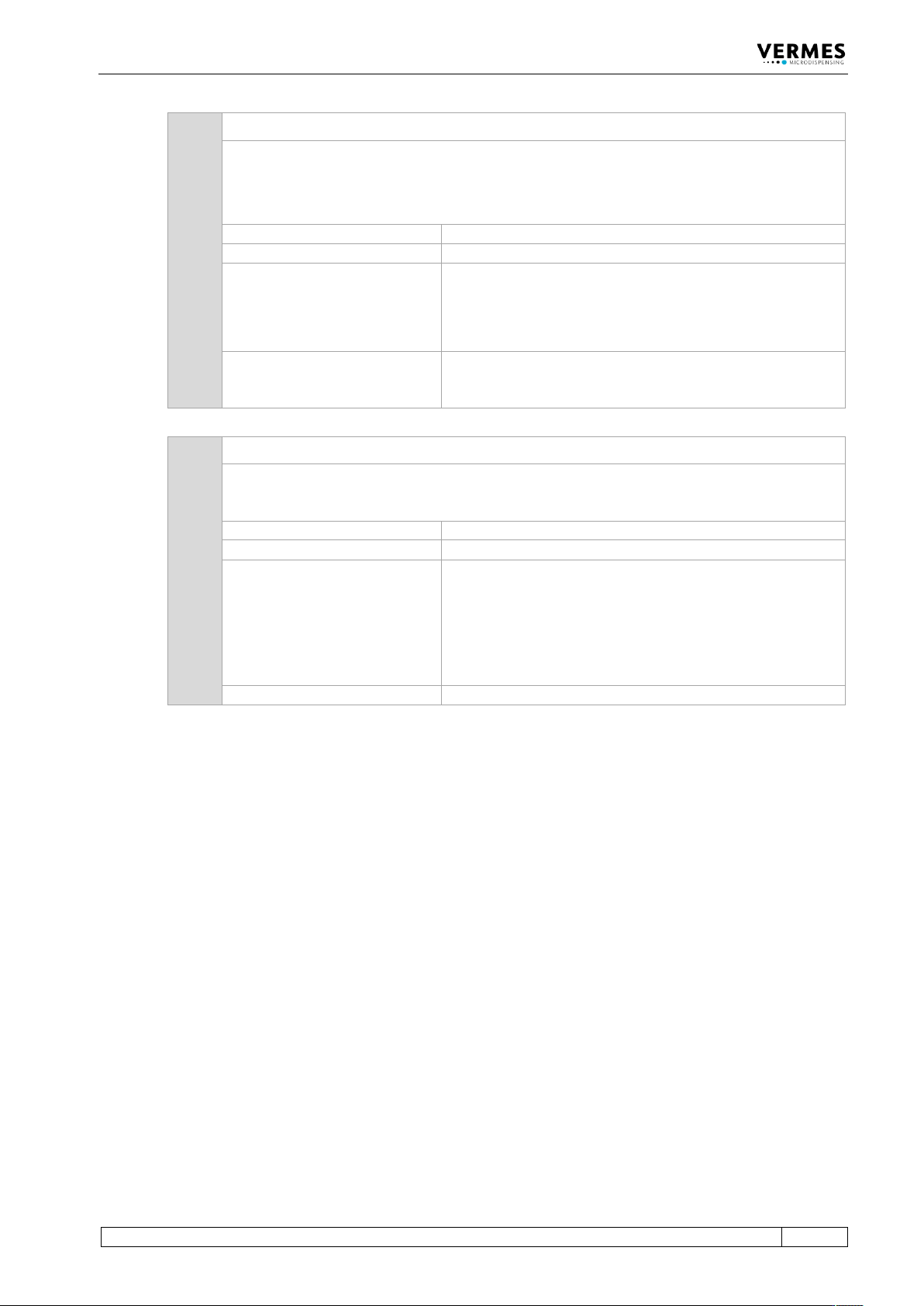
190 190 Incorrect Valve Data
This error message appears, if a checksum error occurs while writing the Cycle Counter.
Important Note!
The most common cause for this error is to unplug the valve before switching OFF the MDC or
before the MDC has completely shut down.
Error code display:
190 Incorrect Valve Data (Press Enter)
Error code status menu:
No entry
Error handling:
• Press [enter]-key to acknowledge error message.
• If error happens repeatedly, switch OFF control unit, and
inspect the connection. If necessary, exchange the cable
and/or valve.
Valve:
Valve remains unchanged. If the error message appears
during the start of the MDC, the valve is open; otherwise, it
is closed.
191 191 NozzleTappet Load Err.
During startup of the control unit, the system reads the counters (e.g. nozzle counter, tappet
counter). If a problem arises, this error message is displayed. Corresponding values may be
doubtful, until a new cycle is started.
Error code display:
191 NozzleTappet Load Err Enter.
Error code status menu:
No entry
Error handling:
• Press [enter]-key to acknowledge error message. The
MDC restarts.
• In case the error acknowledgement does not work, the
valve might be defect. If possible, test valve with
different MDC and MDC with different valve. If the valve
is defect, send it in for repair.
Valve:
Valve still open (start-up of the MDC)