2500_Users_Manual.pdf - 第114页
Task s and Ki ts ProM aster 25 00 User Manua l 3-39 To run a batch file in operator mode, enter: tl -b Batchfile_name where -b starts th e batch file m ode and batchfile_na me is any valid DO S file name. TaskLin k does …

Tasks and Kits
3-38 ProMaster 2500 User Manual
The requirements for user-created messages are described below:
• Message file must be an ASCII text file. Save the file as an
unformatted text file.
• Message file must be called
tl.msg
. TaskLink looks for a file with this
name. The maximum line length in this file is 66 characters.
• Each message number must begin with a tilde (~), followed by four
digits as in the following example: ~0023. The tilde and four-digit
number must be on a line by themselves. The message that will be
displayed includes all the text after the tilde and message number,
and before the next tilde in the file.
• Spacing and formatting is maintained (WYSIWYG) unless you use \b
(for bold). The \b does not appear on the screen and all characters
move to the left two spaces for every \b in the line.
Creating Task/Kit
Batch Files
You can create an ASCII batch file that allows you to run any combination
of Tasks and Kits in the order defined in the file. TaskLink reads the batch
file, searches the current Task Database file (last file used) for the Task/
Kit, and runs it using the normal screens.
Each line in the batch file (unformatted ASCII text file) is only required to
have the name of an existing Task or Kit. A sample file would look like
this:
First_task_name
Second_task_name
First_kit_name
If an optional Task Database file name is entered before the Task/Kit
name and is terminated by a double colon (
::
), TaskLink looks for the Task
in the specified Database file. The fourth line in the same sample file
below directs TaskLink to look in a Database file called
Not_current_file
to find a Kit called
Second_kit_name
.
First_task_name
Second_task_name
First_kit_name
Not_current_file::Second_kit_name
Note: Do not use two consecutive colons in Task or Kit names if you plan to use
those Tasks/Kits in batch files.
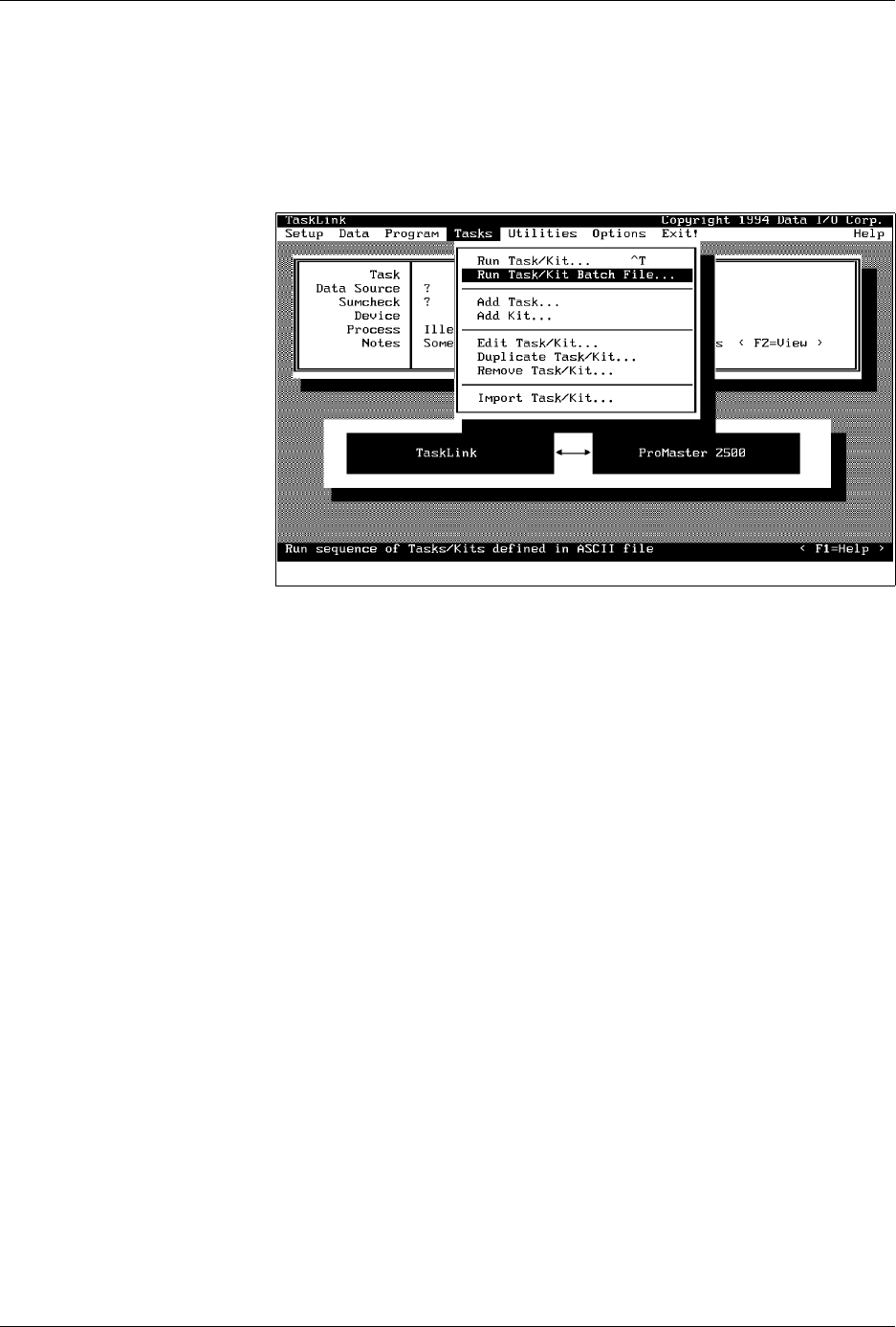
To run a batch file in administrator mode, select
Tasks
from the Main
menu. Choose a batch file from the list displayed, and press
↵
.
Tasks and Kits
ProMaster 2500 User Manual 3-39
To run a batch file in operator mode, enter:
tl -b
Batchfile_name
where
-b
starts the batch file mode and
batchfile_name
is any valid DOS
file name. TaskLink does not require any specific file extension for batch
files.
Figure 3-28
Selecting the Batch File Command

ProMaster 2500 User Manual 4-1
4
Operation
For System Operators and Administrators
Before you read this chapter, be familiar with the information in Chapter
1, especially the major components on the 2500. Chapter 1 has detailed
drawings of the beam, track sections, and labeler that identify parts that
will be referred to in this chapter. Chapter 1 also introduces TaskLink
concepts and describes how to move around between items on the screen.
This chapter describes actions an operator will perform during a typical
day operating the ProMaster 2500 system. Some of the topics covered in
this chapter include:
What Is a Task?........................................................................................4-2
Overview: Starting a New Task.............................................................4-2
Reconfiguring the System for a New Device.......................................4-7
Running a Task......................................................................................4-23
Aligning a Device to a PLCC Programming Module.......................4-27
Aligning a Device to a DIP/SOIC/32-pin PLCC
Programming Module ..........................................................................4-32
Introduction to Kits...............................................................................4-36
Adjusting Track Air...............................................................................4-40
WARNING:Handler components travel at high speeds and with
sufficient force to cause personal injury. The ProMaster
2500 has a safety interlock switch that prevents handler
components from moving while the hood is up.
Do not attempt to bypass this safety feature and operate
the handler with the hood raised.