2500_Users_Manual.pdf - 第91页
Task s and Ki ts 3-16 ProMa ster 25 00 U ser Ma nual There is one situation when the word width value would be chan ged. This occurs if you are trying to program 16-bit RAM data in to two 8-bit memory devices. Ass ume th…
Tasks and Kits
ProMaster 2500 User Manual 3-15
Selecting a
Translation Format
Selecting the translation format requires matching the data file format on
your PC disk with one of the more than 35 formats supported by the 2500.
Refer to the list of formats on the TaskLink screen by pressing
F2
from the
Translation Format
field on the
Edit Task
dialog box (see Figure 3-10).
Note: Consider high-speed download compatibility when you choose a format.
To identify an unknown format, refer to Appendix D for a description
and example of each data format supported by the 2500.
Other Memory
Parameters
From the Edit Task screen, select
<MORE>
and then
Memory
Parameters...
. TaskLink displays the
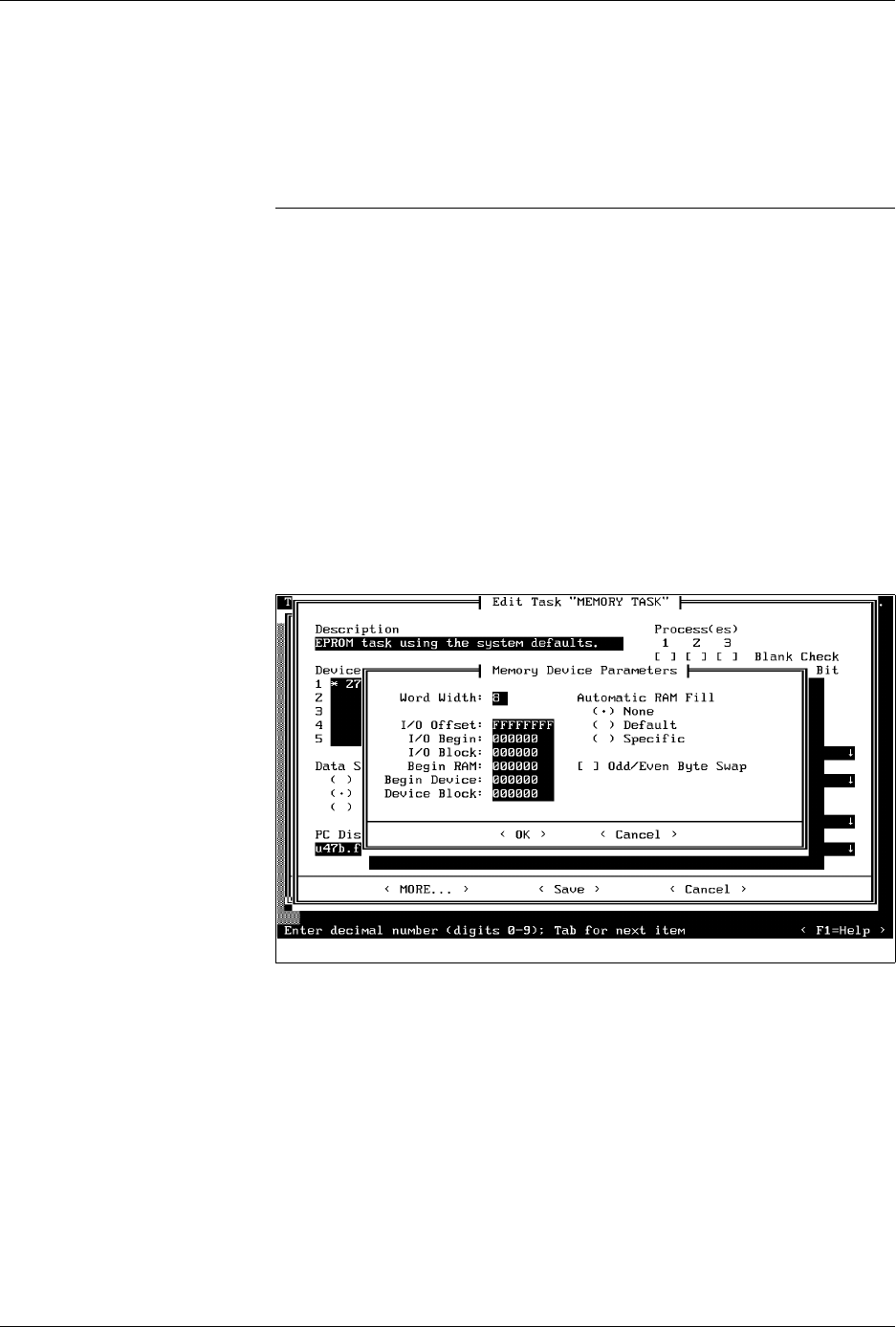
Memory Device Parameters
dialog
box with options described in the following sections.
TaskLink supports a variety of Data I/O programmers. Some of the
commands and options displayed on TaskLink’s menus (
Administrator
mode
only) are intended to be used with other products and are not used
in the operating environment of the 2500. Information on these
commands is available by pressing
F1
to invoke TaskLink’s online Help.
Only the commands used with the 2500 are described below.
Word Width
Word width is defined as the word size of the device being programmed.
In most cases this value defaults to the number of data bits at each
address in the device and therefore it is not changed.
Figure 3-11
Memory Parameters Dialog Box

Tasks and Kits
3-16 ProMaster 2500 User Manual
There is one situation when the word width value would be changed.
This occurs if you are trying to program 16-bit RAM data into two 8-bit
memory devices. Assume that the 2500 loads a file intended to program
16-bit data into two 8-bit devices. The low order bytes of each 16-bit word
are saved to all even address in RAM beginning with RAM address 0
(zero). The high order bytes for each word would be stored at RAM
address 1 and all odd address locations. If the default parameters are not
changed, the 2500 would program an 8-bit device (without any errors)
with both odd and even bytes. The device would not operate in a 16-bit
data circuit.
To program all low order bytes into one 8-bit device and all the high
order bytes into the second 8-bit device, the word width should be set as
if it were one “virtual” 16-bit device. The two 8-bit devices will operate in
their target circuit application “virtually” as if they were a single 16-bit
device.
To program a virtual 16-bit device using two 8-bit parts, perform the
following steps:
1. Create two Tasks, one for each 8-bit device that downloads the same
16-bit data file. In the first Task, Set Word Width = 16 (see Figure
3-11), and Set Begin RAM = 0 (default).
2. Create a second Task exactly the same as the first except: Set Begin
RAM = 1.
3. Load the first Task.
4. Program the number of devices required. The combination of these
two parameters instructs the 2500 to program the device from all
even RAM addresses, beginning with address 0. This creates the low
order device in the two-device set.
5. Load the second Task.
6. Program the number of devices equal to the number programmed by
the first Task. The 2500 programs the second device from all odd
RAM addresses, beginning with RAM address 1. This creates the
high order device in the two device set.
Setting I/O Offset
I/O Offset is a value that is subtracted from each file address during a
data file download from the PC to the 2500’s RAM. During a data file
upload from the 2500’s RAM to a PC file, the I/O Offset value is added to
the RAM address before it is transmitted.
The following example uses a file download, because it is the most
common application.
File Download:
File address number
– I/O offset number
----------------------------------
XXXX XXXX
+
Beginning RAM address number
-----------------------------------------------------
2500 RAM address =
YYYY YYYY

Tasks and Kits
ProMaster 2500 User Manual 3-17
The value of
YYYY YYYY
is the address where the byte of data is stored
in the 2500’s RAM.
Relative Addressing
Under most circumstances the I/O Offset is left at its default value of
FFFFFFFF
. By default, the 2500 assumes that the first byte of data it
receives should be located at RAM address 0 and all other data bytes
received will be located in RAM at addresses relative to the address of the
first byte. During a data file download from the PC to the 2500, the
default value instructs the 2500 to take the first data byte in the file
(regardless of the address that byte has in the file) and save it at the 2500’s
RAM address = 0. The address of the first byte becomes the I/O Offset
value and is subtracted from all subsequent data file addresses to arrive
at the ultimate 2500 RAM address for that file data byte.
The sample below shows how this
relative
addressing works in a typical
application.
File Download:
File address number 800
– I/O offset number -800
---------------------------------- -----
XXXX XXXX
000
+
Begin RAM number +000
--------------------------------- -----
2500 RAM address =
YYYY YYYY
000
Absolute Addressing
This parameter is usually changed from the default during a file
download from the PC to 2500’s RAM. Some file formats (primarily the
Intel formats) use absolute addresses. In this context we mean that the
address of each data byte in the file is the absolute address and the data
byte associated with that address should be saved at the same address in
the 2500’s RAM. If your file uses absolute addressing, then the I/O Offset
should be set to 0.
The following example shows how this
absolute
addressing works in a
typical application.
File Download:
File address number 800
– I/O offset number – 000
---------------------------------- -------
XXXX XXXX 800
+
Begin RAM number + 000
---------------------------------- -------
2500 RAM address =
YYYY YYYY
800
If you have a file with absolute addressing and the programmer is using
the default (relative addressing), the file will download and the devices
will program without any error messages. However, the devices will not
be programmed correctly, because the RAM was not loaded with data at
the intended locations.