2500_Users_Manual.pdf - 第17页
ProM aster 25 00 User Manua l xvii P reface The Preface includes details about con tacting Data I/O for technical assistance an d for repair an d warranty services. Th e Preface also explains the Bulletin Board Service, …
Safety Summary
xvi ProMaster 2500 User Manual
Symbol
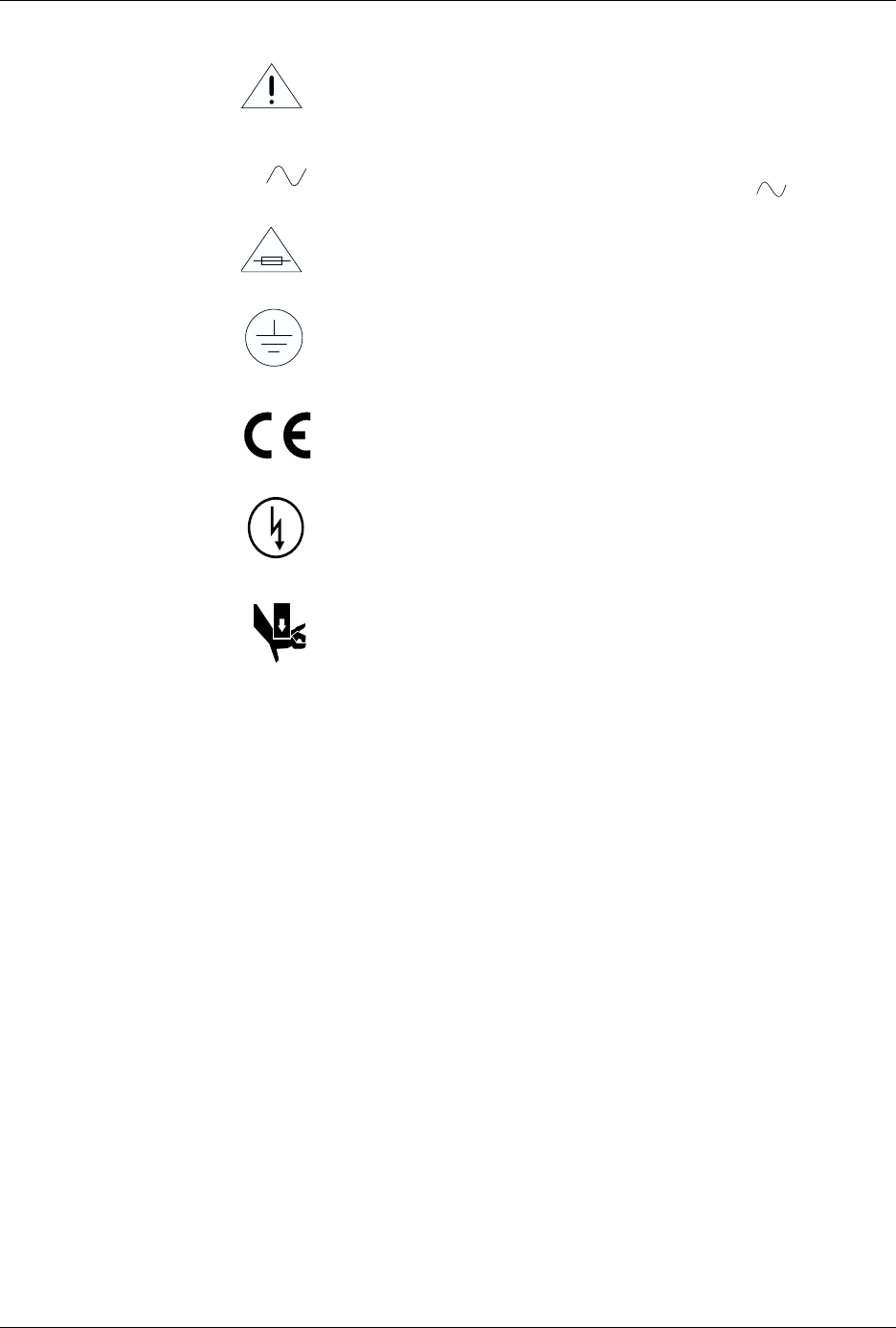
This symbol indicates that the user should consult the manual for
further detail.
This symbol stands for Volts ac, for example: 120 V = 120 Vac.
This symbol denotes a fuse rating for a user-replaceable fuse.
This symbol denotes earth ground. An antistatic wrist strap with
impedance of 1 M
Ω
(minimum) to 10 M
Ω
(maximum) can be
attached to terminals designated for that function and marked
with this symbol.
This symbol denotes compliance of the programmer with the
requirements called out by the EC (European Community) for this
equipment.
This symbol denotes dangerous, high voltage is present and
precautions should be taken to prevent injury from electrical
shock.
This symbol denotes that movement of system components can
cause physical injury from pinching or crushing.
V
ProMaster 2500 User Manual xvii
P
reface
The Preface includes details about contacting Data I/O for technical
assistance and for repair and warranty services. The Preface also explains
the Bulletin Board Service, typographic conventions and more.
Data I/O Customer Support
United States
Note: After April 27, 1997, use area code 425 instead of 206 when placing a call
to one of the phone or fax numbers listed in this Preface.
For technical assistance, repair, or warranty service, contact:
Data I/O Customer Resource Center
Telephone: 800-247-5700
(Press 2 on your touch-tone telephone to bypass the
recorded message and speak with the first available Support Engineer.)
Fax: 206-867-6972
For Keep Current subscription service or repair service contract, contact:
Data I/O Sales
Telephone: 800-332-8246
Canada
For technical assistance, contact:
Data I/O Customer Resource Center
Telephone: 800-247-5700
(Press 2 on your touch-tone telephone to bypass the
recorded message and speak with the first available Support Engineer.)
Fax: 206-869-2821
For repair or warranty service, contact:
Data I/O Canada
6725 Airport Road, Suite 102
Mississauga, Ontario, L4V 1V2
Telephone: 905-678-0761
Fax: 905-678-7306

Preface
xviii ProMaster 2500 User Manual
Japan
For technical assistance, repair, or warranty service, contact:
Data I/O Japan
Osaki CN Building 2F
5-10-10 Osaki
Shinagawa-Ku
Tokyo 141
Telephone: 3-3779-2152
Fax: 3-3779-2203
Germany
For technical assistance, repair, or warranty service, contact:
Data I/O GmbH
Lochhamer Schlag 5a
82166 Gräfelfing
Telephone: 089-858580
Fax: 089-8585810
Other European
Countries
For technical assistance, repair, or warranty service, contact your local
Data I/O representative.
Other Countries
Worldwide
For technical assistance, repair, or warranty service, contact the office
below and ask for the number of your local Data I/O representative.
Data I/O Intercontinental
10525 Willows Road NE
P.O. Box 97046
Redmond, WA USA 98073-9746
Telephone: 206-881-6444
Fax: 206-882-1043