2500_Users_Manual.pdf - 第270页
Repair and Repl acement Procedures 7-26 ProMa ster 25 00 U ser Ma nual 9. A pply a sma ll am ount of p urple Loc tite on the out er sur face of the new nut where it contacts the carriage during operation. 10. Twist th e …

Repair and Replacement Procedures
ProMaster 2500 User Manual 7-25
6. Use a 9/64-inch hex wrench to loosen the four hex screws holding the
front and rear carriage shafts to the left end plate.
Note: Have an assistant hold the lead screw and shafts during the next steps.
7. Loosen the two main plate corner screws and lift the main plate.
8. Use a hex wrench to remove the two screws holding the left end plate
to the main plate.
9. Lower the main plate and slide the end plate off the shafts and lead
screw.
10. Twist the lead screw until it pulls away from the beam traverse
motor. Walk the lead screw through the beam, then slide it away
from the 2500 through the left endplate.
Note: Make sure the anti-backlash nut remains intact when you remove the lead
screw.
11. Reinstall the lead screw and all of the removed components.
12. Lubricate the screw as described on page 5-63.
Replacing the Anti-
backlash Nut
If the anti-backlash nut is damaged, follow the steps below to replace it.
1. Remove the lead screw (as described in steps 1 through 10 on page
7-24) and carefully set it aside.
2. Use a 5/64-inch hex wrench to remove the two screws that hold the
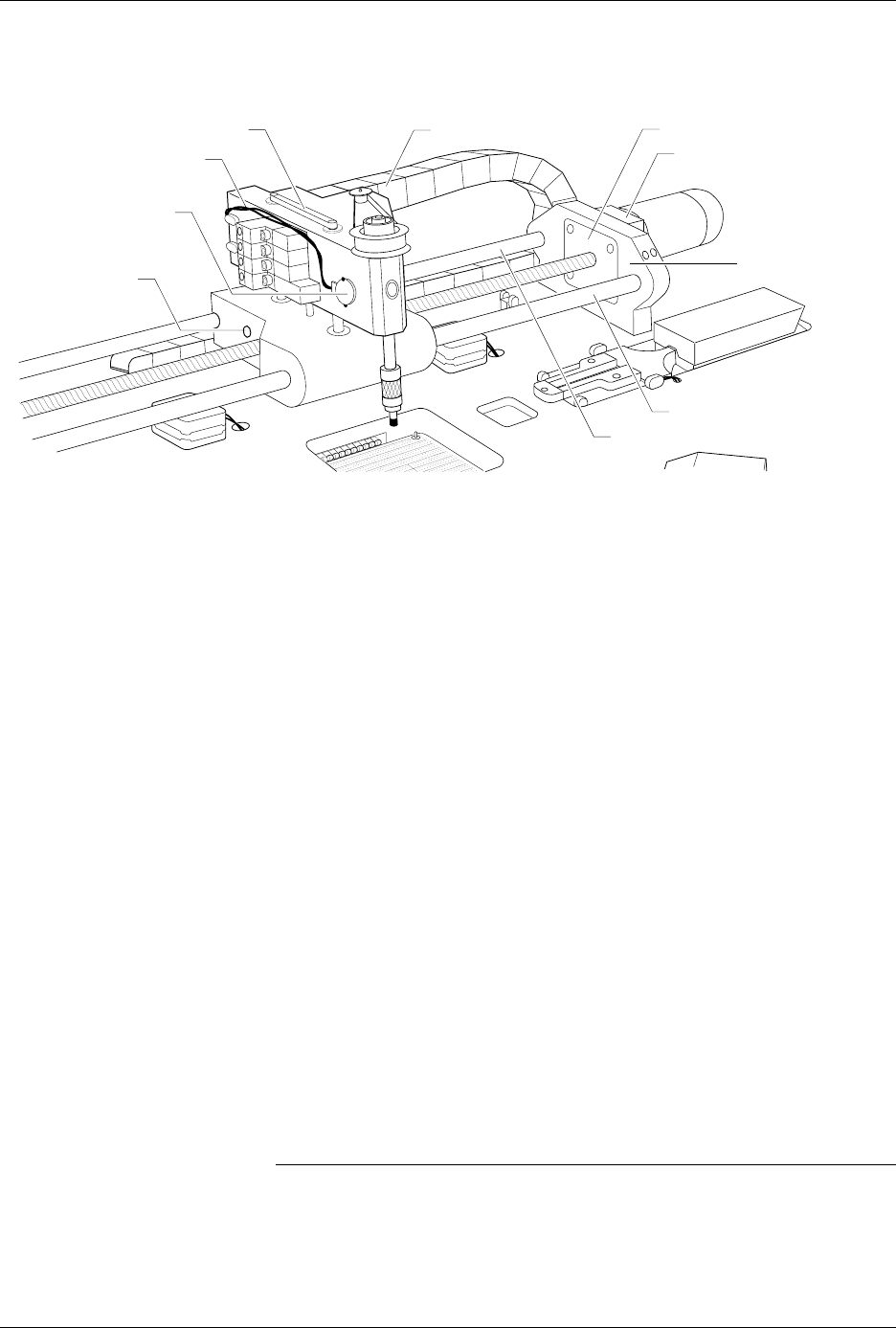
limit bar to the beam shafts (see Figure 7-17).
3. Pull the beam up and away from the beam shafts. Leave all of the
cables connected and carefully set the beam aside.
4. Use a 9/64-inch hex wrench to remove the four screws that hold the
front carriage shaft in place.
Note: There are two 9/64-inch hex screws at the front of the left end plate and
two 9/64-inch hex screws at the front of the right end plate.
5. Support the carriage while you slide the front carriage shaft through
the carriage. Set the front carriage shaft aside.
6. Use a 9/64-inch hex wrench to remove the four screws that hold the
rear carriage shaft in place (this is similar to step 4, above).
7. Support the carriage while you slide the rear carriage shaft through
the carriage. Set the rear carriage shaft aside.
8. From the left side of carriage, insert the anti-backlash nut removal
tool into the anti-backlash nut and twist it counterclockwise. As you
twist, the anti-backlash nut will protrude from the right side of the
carriage. Guide it out with your hand.
Note: You may need to use a wrench to break the anti-backlash nut free.

Repair and Replacement Procedures
7-26 ProMaster 2500 User Manual
9. Apply a small amount of purple Loctite on the outer surface of the
new nut where it contacts the carriage during operation.
10. Twist the new anti-backlash nut into place and carefully re-assemble
all of the disconnected components.
Replacing the Beam
Gasket
If there are air leaks in the beam, follow the steps below to replace the
beam air channel gasket.
1. Turn off the 2500, remove the power cord, and disconnect the air
supply.
2. Disconnect the vacuum sensor cable from the vacuum sensor switch.
3. Disconnect the four solenoid cables.
4. Use a 3/32-inch hex wrench to remove the solenoid cable connector.
5. Disconnect the beam head rotation motor cable.
6. Disconnect the three optic cables.
Note: Write down the cable positions before you cut the tie wraps that hold the
cables in place.
7. Use a 1/8-inch hex wrench to remove the two screws that hold the
cable harness to the right side of the beam.
8. Disconnect the gray air line and the black vacuum line from the two
quick connects, noting their location.
9. Use a 5/64-inch hex wrench to remove the two screws that hold the
limit bar to the beam shafts (see Figure 7-17).
Repair and Replacement Procedures
ProMaster 2500 User Manual 7-27
10. Use a 6/64-inch hex wrench to remove the two screws that hold the
air cylinder pin in place.
11. Hold the beam in place while you use a 3/32-inch hex wrench to
gently push the air cylinder pin through the beam.
12. Gently lift the beam up and away from the beam shafts.
13. Remove the two 1/16-inch set screws in the beam motor drive pulley.
14. Disconnect the beam motor cable.
15. Remove the single 3/32-inch hex mounting screw in the beam head
pulley.
16. Pull up the beam head pulley and remove the beam rotation belt.
17. Remove the motor drive pulley.
18. Use a 1/16-inch hex wrench to remove the four motor mounting
screws, then remove the beam head rotation motor.
19. Use a 3/32-inch hex wrench to remove the two air quick connects
(insert the hex wrench into the quick connect openings).
20. Use a 3/32-inch hex wrench to remove 20 screws in the baffle plate.
21. Use a 1/4-inch hex wrench to remove the three remaining pan head
screws in the baffle plate.
22. Peel off the old air channel gasket.
23. Place the new air channel gasket onto the baffle plate.
Note: Make sure the air channel gasket does not block any air and vacuum holes.
Figure 7-17
Beam Cable and Switch Locations
2287-1
VACUUM SENSOR CABLE
CABLE HARNESS GUIDE
BEAM TRAVERSE
MOUNTING BLOCK
RIGHT END PLATE
LIMIT BAR
BEARING COVER PLATE
REAR CARRIAGE SHAFT
FRONT COVER SHAFT
VACUUM SENSOR
SWITCH
AIR CYLINDER
PIN SCREW
(1 on each side)