2500_Users_Manual.pdf - 第248页
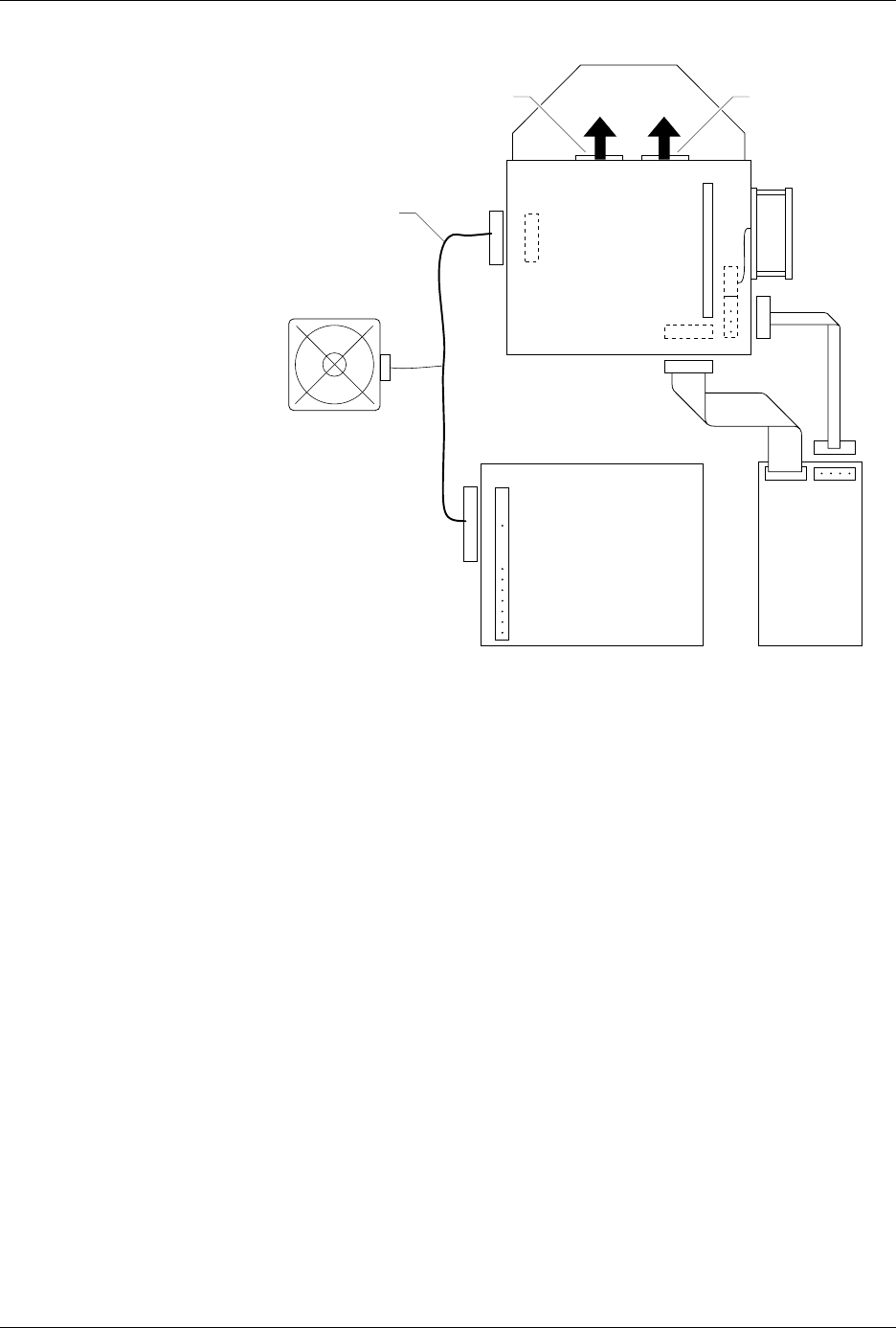
Repair and Repl acement Procedures 7-4 ProMa ster 25 00 U ser Ma nual 5. Disconnect the red and black power cable fro m the connector on the left side of the contro ller/wavefo rm board. (Figure 7-4 show s the location a…
Repair and Replacement Procedures
ProMaster 2500 User Manual 7-3
5. Insert the fuse holder into its slot with the arrow pointing in the same
direction as the arrows on the door and snap the door closed.
Programming Electronics Assembly Replacement
Removing the PE
Follow the steps below to remove the PE assembly from the 2500. The PE
assembly is mounted on the underside of the 2500’s main plate. You will
need to raise the main plate and use a 7/64-inch hex wrench to complete
the removal procedure.
WARNING:This procedure should be performed by a service
technician trained on electromechanical equipment. Do
not attempt this procedure unless you are qualified to do
so. Dangerous high voltages are generated under the main
plate that could cause a harmful electrical shock. Turn off
the 2500 before you begin this procedure.
To help eliminate damage from ESD, wear an antistatic
wrist strap that contains a 1M
Ω
(minimum) to 10M
Ω
(maximum) isolating resistor. The wrist strap should be
connected to the grounding plug.
1. Turn off the 2500 and remove the power cord.
2. Remove the programming module, if one is installed.
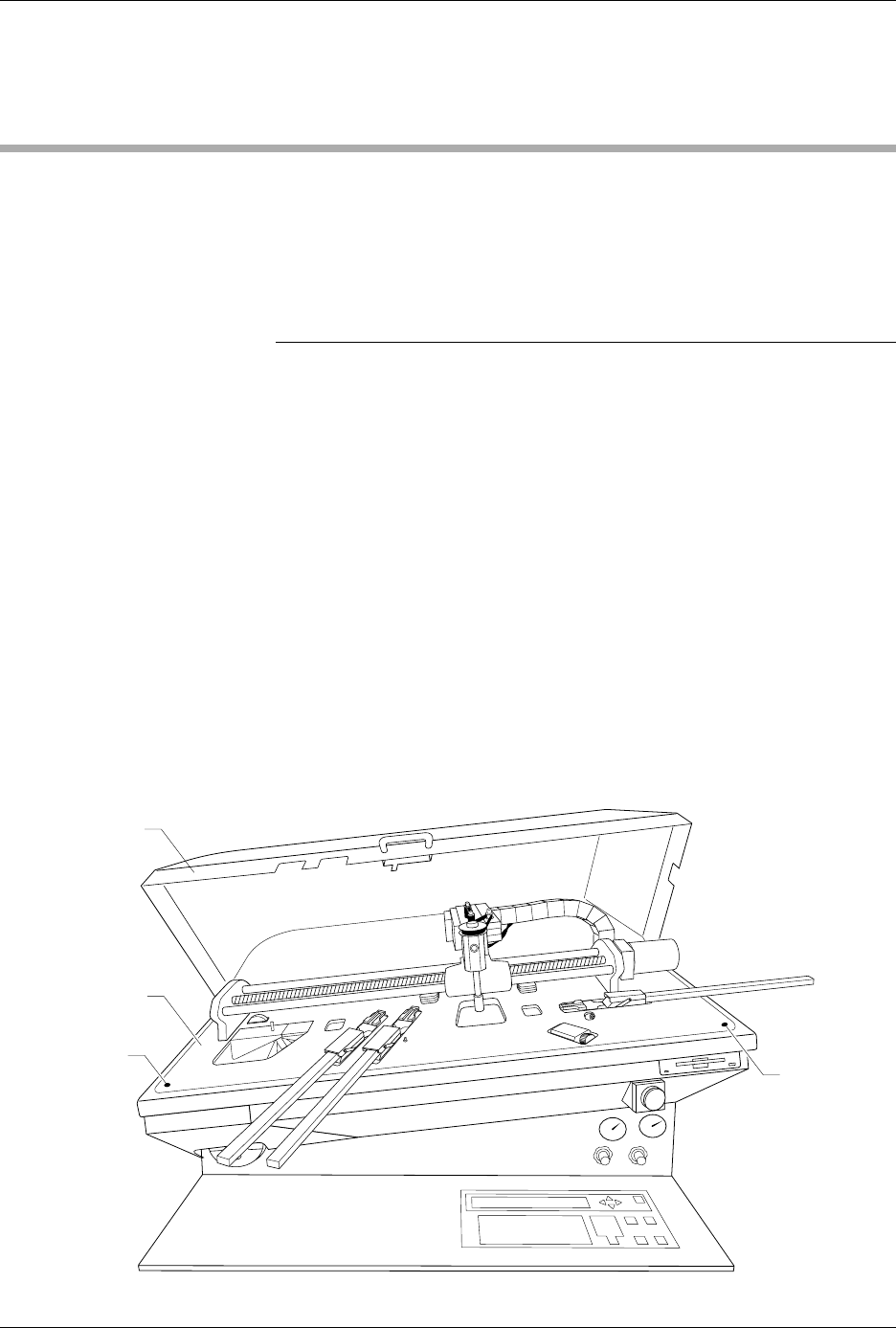
3. Unscrew the two captive hex screws located at the front corners of
the main plate (see Figure 7-3).
4. Lift the main plate until it stops in the fully upright position.
Figure 7-3
Location of the Main Plate Screws
2074-2
MAIN PLATE
MAIN PLATE
SCREW (1 of 2)
HOOD
MAIN PLATE
SCREW
(2 of 2)

Repair and Replacement Procedures
ProMaster 2500 User Manual 7-5
6. Locate the wide ribbon cable that connects the controller/waveform
board with the disk drive. (This is the wider of two ribbon cables
running between the controller/waveform board and the disk drive.)
Mark the polarity of this cable to the connector on the controller/
waveform board so you can reinstall it correctly later. Disconnect this
cable from the connector on the controller/waveform board.
7. Mark the polarity and location of the narrow ribbon cable connecting
the controller/waveform board with the disk drive. Disconnect this
cable from the connector on the controller/waveform board.
8. Locate and label the two RS-232C ribbon cables (terminal and remote
cables) on the controller/waveform board. These are indicated by
two black arrows in Figure 7-4. Mark their connector locations so you
will be able to reinstall them correctly. Disconnect these cables from
their connectors on the controller/waveform board.
9. From above the main plate, locate the six 7/64-inch hex screws that
hold the programming module clamp assembly to the main plate (see
Figure 7-5).
Remove two of the screws holding the back of the assembly and two
of the screws holding the front. Loosen the other two screws, but do
not remove them.
Figure 7-4
Polarity of the Cables on the
Programming Electronics
Assembly
2056-2
DISK
DRIVE
PROGRAMMING
ELECTRONICS
POWER SUPPLY
TO MAIN
CONTROLLER
BOARD
R
R
B
B
R
R
R
(BOTTOM)
(TOP)
B
B
B
BL
R
SYSTEM FAN
CONTROLLER/
WAVEFORM
BOARD
TERMINAL REMOTE
RED AND BLACK
POWER CABLE
TO TERMINAL PORT