2500_Users_Manual.pdf - 第221页
Preventi ve Mai nten ance ProM aster 25 00 User Manua l 5-67 Maintenance In tervals Interv al Component 2500 Oper ator 2500 Serv ice Every Day Prog rammin g module Track Beam chuck tips Optic holes Beam -to-p rogr ammi n…
Preventive Maintenance
5-66 ProMaster 2500 User Manual
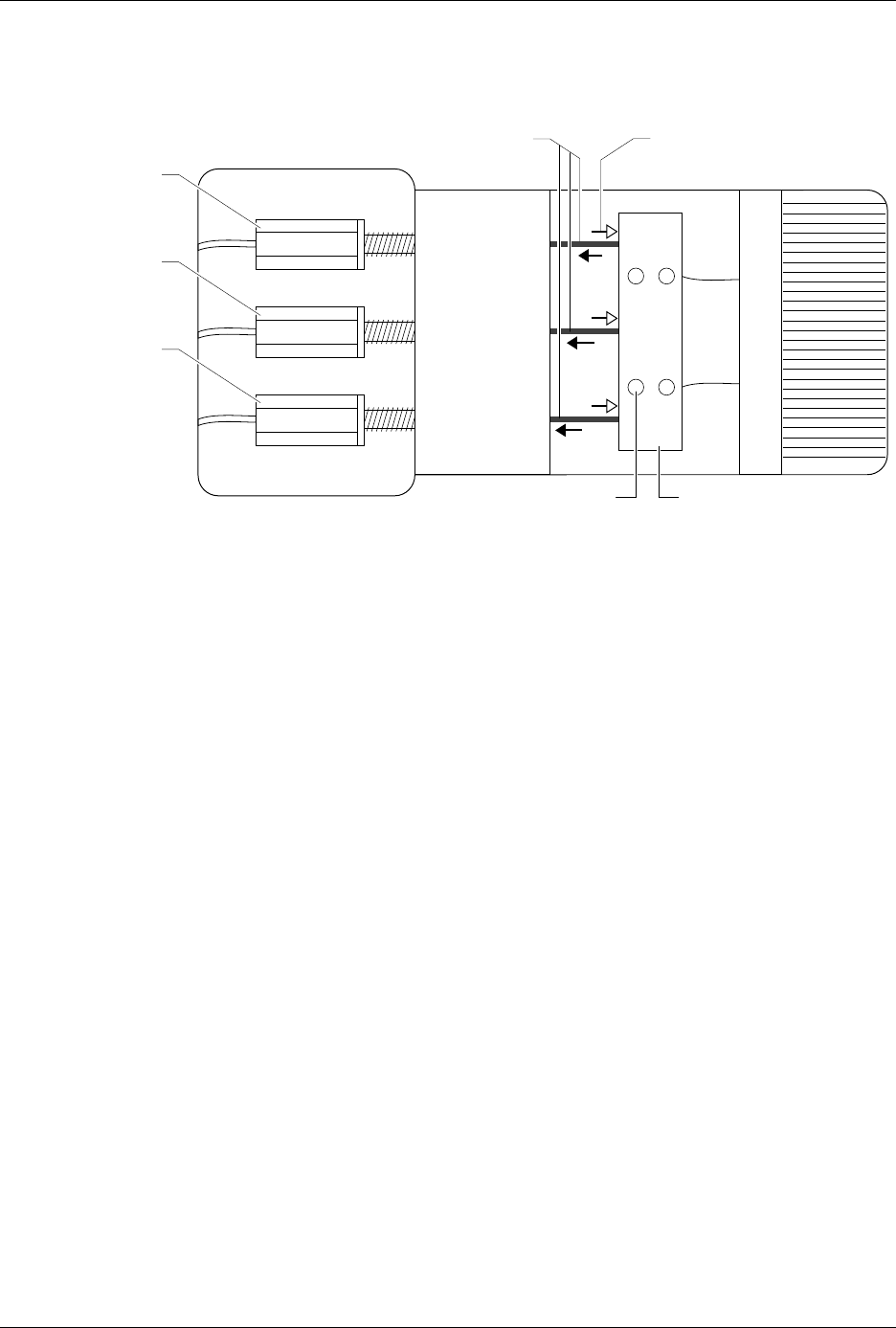
5. To perform a coarse track width adjustment, use a 3/32-inch hex
wrench to loosen the four set screws in the cable pinch block (see
Figure 5-29). Use calipers or a device to set a constant width for all
three track sections. Use a needle-nose pliers to pull one of the cables
away from the adjustment nuts to make the track wider, or push the
cable toward the adjustment nuts to make the track narrower.
6. Tighten the four set screws to lock the cable(s) in their new position.
Recheck the track width by opening the track to its widest setting
and then closing it down to the width used in step 5.
7. Apply a drop of silicone-based glue (such as RTV™) where the cable
enters the cable pinch block.
Figure 5-29
Adjusting the Track Width Cables
2285-1
PULLING THE CABLES
WILL WIDEN THE TRACK
PUSHING THESE CABLES
WILL NARROW THE TRACK
or
INPUT TRACK *
OUTPUT TRACK 1 *
(Right track)
OUTPUT TRACK 2 *
(Left track)
Turn clockwise to make
tracks wider
Turn counter-clockwise
to make tracks narrower
*
SET SCREW (1 of 4)
CABLE PINCH BLOCK

Preventive Maintenance
ProMaster 2500 User Manual 5-67
Maintenance Intervals
Interval Component 2500 Operator 2500 Service
Every Day
Programming module
Track
Beam chuck tips
Optic holes
Beam-to-programming module
alignment
Label path
Clean with air
Clean
Inspect/clean
Inspect/clean
Inspect
Clean
–
–
–
–
–
–
Every Week
Programming module contacts – Clean with DeoxIT
Every Month
(based on 40,000
devices/month)
Dust guards
Operator’s maintenance
(see page 5-55)
Keyboard and display
Beam chuck tips
Labeler ribbon
Label platen area
Programming module contacts
Label print quality
Label platen area
Thermal print head
Clean
–
–
Clean/replace
–
–
–
–
–
–
–
Verify process
Clean
–
Inspect/replace
Inspect/clean
Inspect/replace
Check
Inspect/clean
Clean
Every 6 Months
Beam lead screw
Beam vacuum generator filters
Beam limit bumper feet
DIP programming module contacts
Beam head shafts
–
–
–
–
–
Clean/lubricate
Clean/replace
Replace
Inspect/replace
Inspect/lubricate
Every 2 Years
Print head
Labeler ribbon clips
–
–
Replace
Replace

Preventive Maintenance
5-68 ProMaster 2500 User Manual