M20_Ope_E.pdf - 第240页
Chapter 5 Libraries 5-90 5-2 Feeder-related Libraries Feeder-related libraries link to the pickup data editor. Tray feeder Tape feeder Stick feeder Bulk feeder Packag ing li brary Tray library Pallet libr ary Pickup data…
Chapter 5 Libraries
5-89
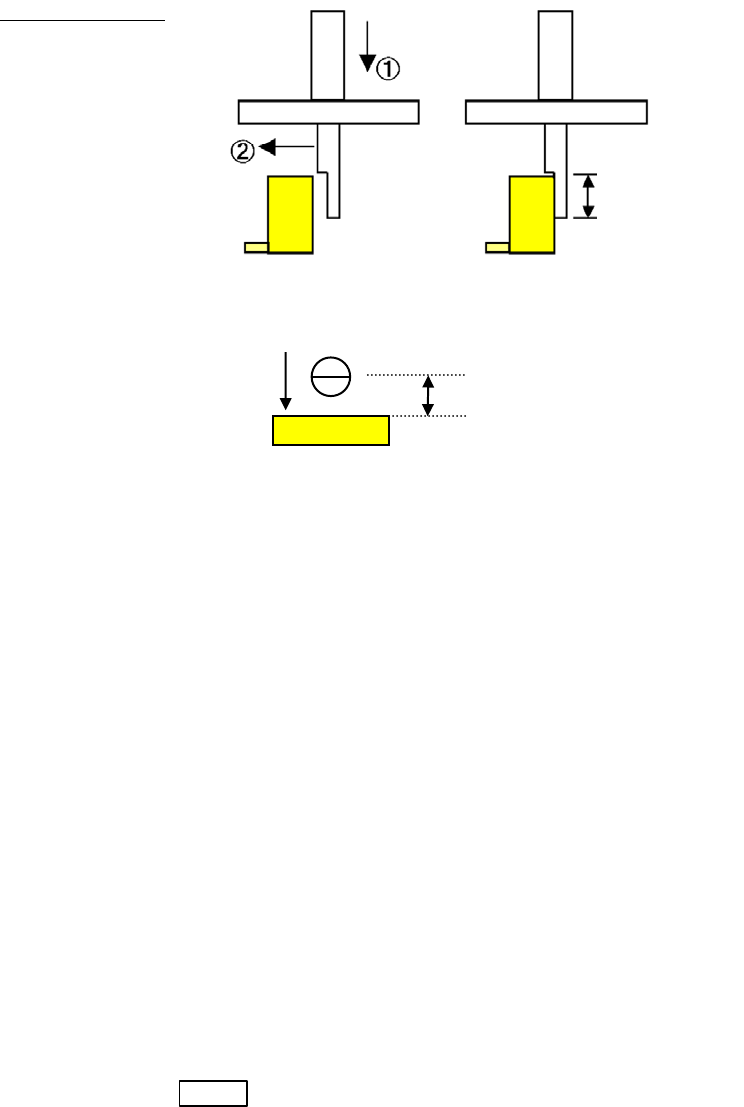
Side Pickup Offset: Specify the offset value for a side pickup nozzle to move after the head
has been lowered. When the head is to move in the negative direction
after it has been lowered, a negative (-) value shall be specified.
Example:
“Side Y” is specified in [Special Nozzle] (Side Pickup Nozzle, offset in
Y direction) and a negative value is entered in [Side Pickup Offset]
① The head moves down at the offset point in the Y direction from the
pickup point.
② The head moves in the negative Y direction.
Grip Length
(Side View)
(Top View)
Comp. Remain Check: This function checks if a component remains on the nozzle instead of
being placed on a board by vision process with the scan/beam camera
or by vacuum pressure.
Disabled
Vacuum pressure
Vision process
“Enable or Disable” is specified in Comp.Remain Check by Vission
Process or Comp.Remain Check by Vacuum Pressure in the User
Parameter>Functions(1).
ANC ID: Specify the ID number for an ANC hole for a specially designed
nozzle.
Remain Check Code: Specify the image code for comp. remain check.
Specifying the Pickup Angle for Directional Nozzles
To specify the pickup angle for the directional nozzle, enter the angle to [Package Angle] of the
tray library or the packaging library.
Note: In this case, create the component image data at the nozzle angle 0 degree (the angle the nozzle is
seated in ANC).
Timings When Automatic Nozzle ID Recognition is Performed
Automatic nozzle ID recognition is performed in the below three situations:
1. When you select Manual>Nozzle Info. and click <Scan Nozzles> button.
2. When you press START button. (only when the nozzle ID is not still acquired.)
3. When the job run is stopped (cycle stop) and re-started after the ANC channel is actuated
(open/close).
Grip Length
Side Pickup Offset
②
Side Pickup Nozzle
Chapter 5 Libraries
5-90
5-2 Feeder-related Libraries
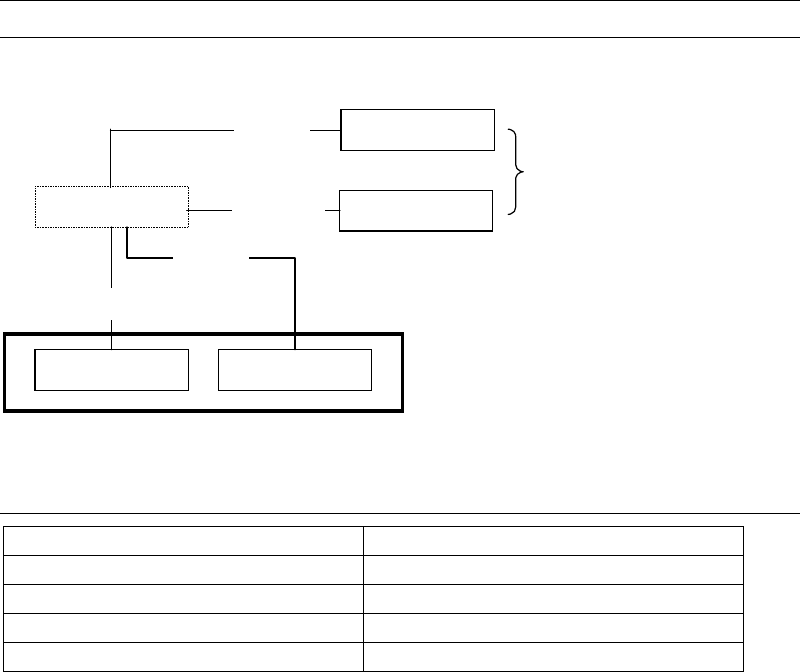
Feeder-related libraries link to the pickup data editor.
Tray feeder
Tape feeder
Stick feeder
Bulk feeder
Packaging library
Tray libraryPallet library
Pickup data editor
Tray
Pallet
Feeder library
Feeder
Packaging
5-2-1 Contents of Feeder-related Libraries
Contents
Pallet library (Pallet data) Link data and pickup order for tray feeders
Tray library (Tray data) Component layout on a tray and others
Packaging library (Package data) Component packaging information
Feeder library (Feeder Data) Feeder machine information
Chapter 5 Libraries
5-91
5-2-2 Pallet Library (Pallet Data)
Menu: Program>PalletData
Program>PickupData>Feeder/Pallet>PalletData
Maximum 500 records can be registered here.
Window:
File>Save: Saves the edited data.
Tool>Teach: Accesses the Teach dialog box.
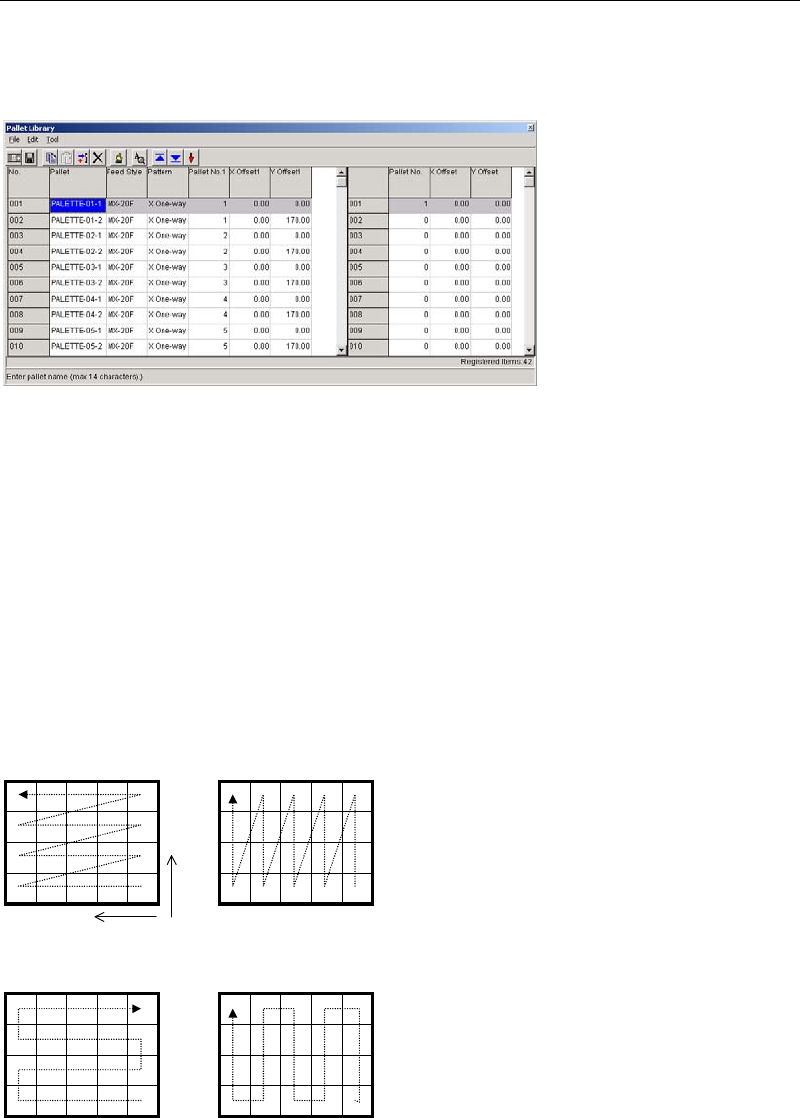
Pallet: Any pallet name is acceptable. This name represents a group of
linked pallets
1
. It serves to relate the pallet library and the pickup
data editor (program editor).
* Up to 14 characters can be entered.
Feed Style: Select from MX-RT1/MX-ST2/MX-20 / MXR(L)/MXR(R).
Pattern: Pickup pattern (see below).
Y Two-way X Two-way
Y One-way X One-way
Y
X
1
Pallet library data must be created even for a pallet with no link. In this case, use only the Pallet No.1, X Offset 1,
and Y Offset 1 fields.
A
link assignment for a pallet name is entered from
001 to 100 maximum in the right pane.
When clicking a pallet name in the left pane of
the window, the right pane changes accordingly.