M20_Ope_E.pdf - 第378页
Chapter 12 Management Data 12-2 12-1 Performance Record This section explains how to display and output performance records. Menu: Management > Performance Record ■ Per Job ● Accumulating performance records per job A…
Chapter 12 Management Data
12-1
Chapter 12
Management Data
Performance Record
Log
Operator Management
Plan
Operator Record
Chapter 12 Management Data
12-2
12-1 Performance Record
This section explains how to display and output performance records.
Menu: Management > Performance Record
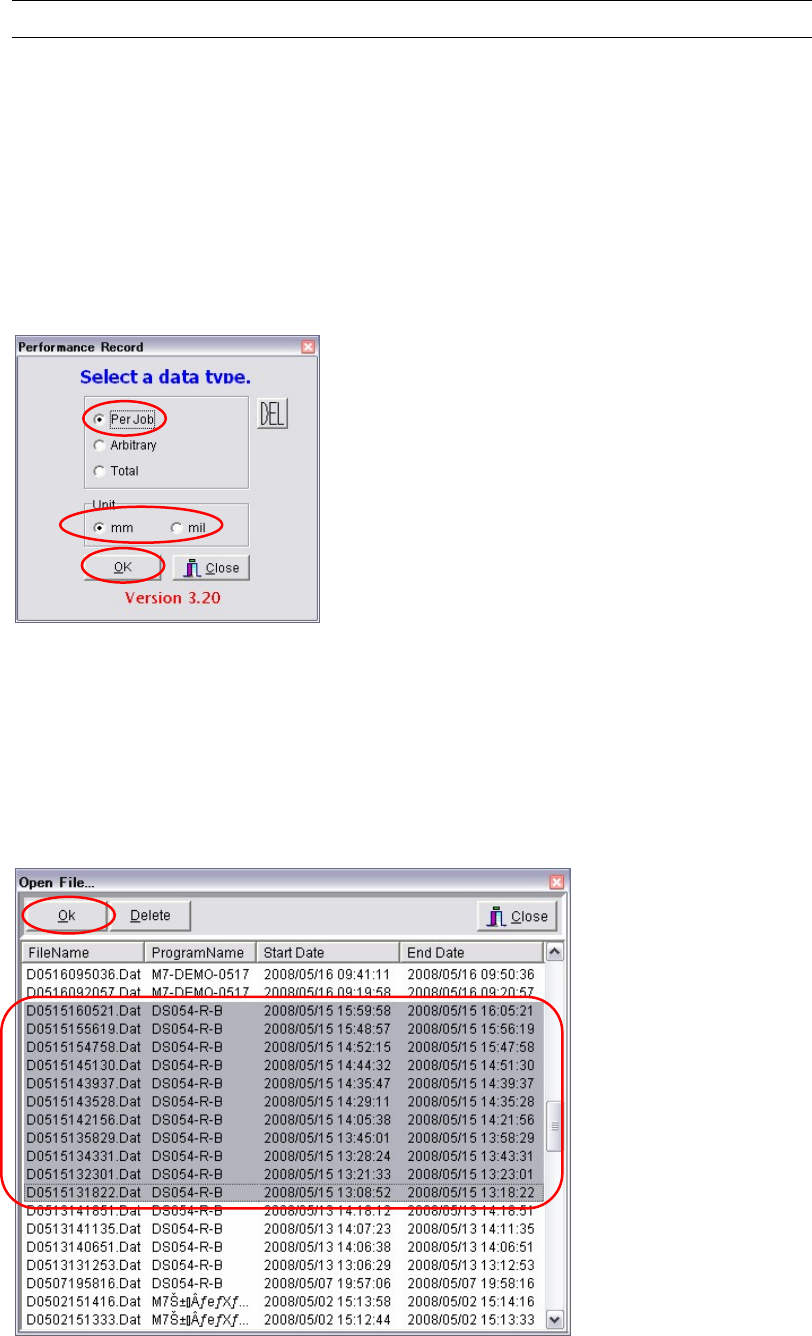
■Per Job
●Accumulating performance records per job
Action:
① Select Management > Performance Record.
② Select “Per Job”.
③ Select “mm” or “mil” for the unit.
④ Click <OK> button.
⑤ By referring to “Program Name”, “Start Date” and “End Date”, select the desired file.
Two or more files can be selected by clicking them while holding down the [Ctrl] key.
In addition, by clicking one file and then another while holding down the [Shift] key, all
the files between and including those two files can be selected collectively.
Note: To select two or more files, they must belong to the same production program. (It is not
possible to select files belonging to different production programs.)
⑥ Click <OK> button to display performance records. (If two or more files have been
selected, the sum of the performance records of those files will be displayed.)
⑦ If you want to output the records in text format, connect an USB memory to the USB port
of the machine and select File > Text Convert.
⑧ Select Removable Disk (G:) and click <OK> button.
⑨ A message “Convert to text data?” appears, so click <Yes>. The records will be output in
text format to the USB memory.

Chapter 12 Management Data
12-3
■Whole (Per Job)
* Items in this window vary according to machine models and types.
Run Time: Job End Time – Job Start Time (Total time in run mode)
Job Start Time
Job End Time
Actual Run Time: Rum time – Total Stop Time
Total Stop Time: Error Stop Time – Pause in Component Lack Time +
Pause Time + PCB Transfer Wait (for PCB arrival)
Error Stop Count
Pause in Component
Lack Count
Pause Count