M20_Ope_E.pdf - 第364页
Chapter 11 Parameter Setting 11-18 Note: When “Release error state automatically” check box is selected, a machine will not pause with an alarm, but proceed to step ② and ③ to continue the production. Note: If a PCB has …
Chapter 11 Parameter Setting
11-17
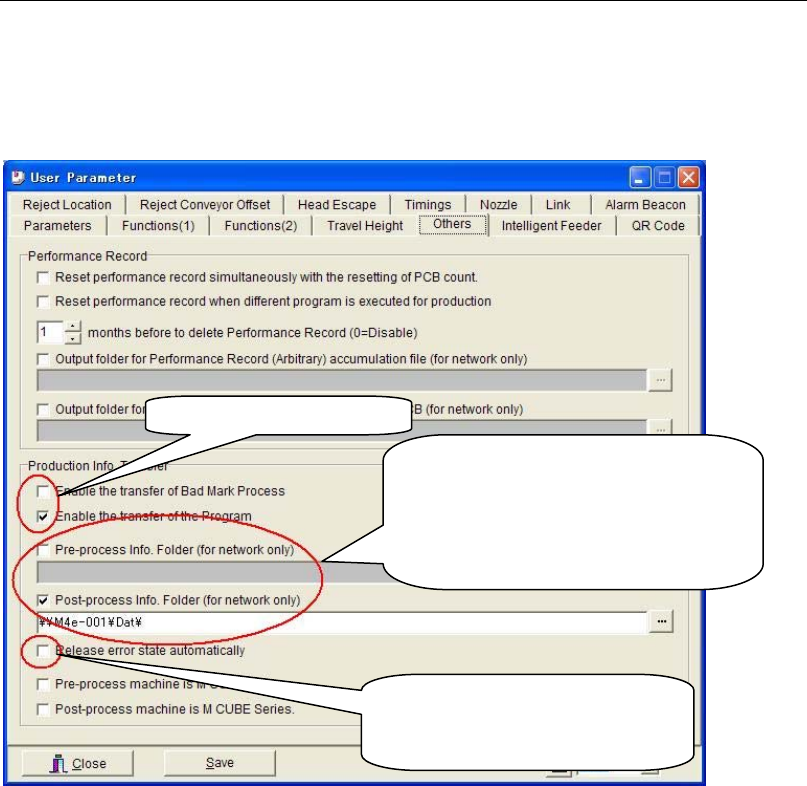
11-1-12-2 Production Info. Transfer (optional)
Menu: System>User Parameter>Others
When using the Production Info.Transfer function, the board transfer signals and the
connections for network (LAN) should be both established between the machines as a
precondition. Specify the path to the folder shared on a network for “Pre-process Info. Folder”
and “Post-process Info. Folder”.
Note: When the system cannot refer to the specified path because of an error in the designation of the
folder or a network failure, the files cannot be read. In such cases, the production information
will not be transferred correctly and the Production Info.Transfer error will occur.
If “Release error state automatically” check box is selected, the production information will be
discarded and the bad mark will be captured again to continue the production even if a
Production Info.Transfer error occurs.
●Transferred program name (Not used)
There are three kinds of program names transferred from the upstream machine to the
downstream machine.
① Program name recognized by PCB code
② Program name transferred from the upstream machine
③ Program name changed manually
●Check for matching of the transferred information
Compare the stored board number in the transferred information with the counted board
number by the downstream machine in order to check whether the transferred information
matches between the machines. If these numbers do not match, the Production Info.Transfer
error will occur and the following processing needs to be done.
① A machine pauses with an alarm.
② Adopt the stored board number in the transferred information to equalize the board
number at an error release. (equalize the counted board number with the stored board
number.)
③ For only a PCB which an error is detected on, the transferred information about bad mark
etc. will be discarded.
Comparison is made on a main clamp, neither the entrance nor the exit buffer.
Transferred information
Settings for a pre-process and a
post-process machine.
Select this box and specify the path to
the shared folder on a network when
information needs to be transferred.
Select this box when releasing an
error automatically and
continuing the production.

Chapter 11 Parameter Setting
11-18
Note: When “Release error state automatically” check box is selected, a machine will not pause with
an alarm, but proceed to step ② and ③ to continue the production.
Note: If a PCB has been replaced in the process of the production due to a conveyor transfer error, an
error may not be detected at checking for matching of the transferred information. There is
likelihood of producing defective boards with missing components.
Action:
① Set the parameters for the target machine(s).
To receive information from the pre-process machine, select the “Pre-process Info. Folder
(for network only)” check box.
To send information to the post-process machine, select the “Post-process Info. Folder (for
network only)” check box.
When not using this function, clear the check boxes.
② To specify the path to the target folders, click the search button(...) and select the target
folder (e.g. “¥¥Machine_name¥dat”)
Example: Connecting Three Machines and transferring the information through them
■ 1st machine: Select the “Post-process Info. Folder (for network only)” check box and specify
the path to the target folder.
■ 2nd machine: Select the “Pre-process Info. Folder (for network only)” and “Post-process Info.
Folder (for network only)” check boxes and specify the paths to the target folders.
■ 3rd machine: Select the “Pre-process Info. Folder (for network only)” check box and specify
the path to the target folder.
■ Connection between Machines
Action:
① Connecting Two Machines
To connect the machines, use the LAN cable (cross cable)
② Connecting Three Machines
To connect the machines, use the LAN cable (straight cables and HUB).
Ethernet 100BASE-T
HUB
No.1 No.2
No.3
Ethernet
No.1
No.2
Specify the same path.
Specify different path.
Specify the same path.
Chapter 11 Parameter Setting
11-19
■ Cautions and Limitations
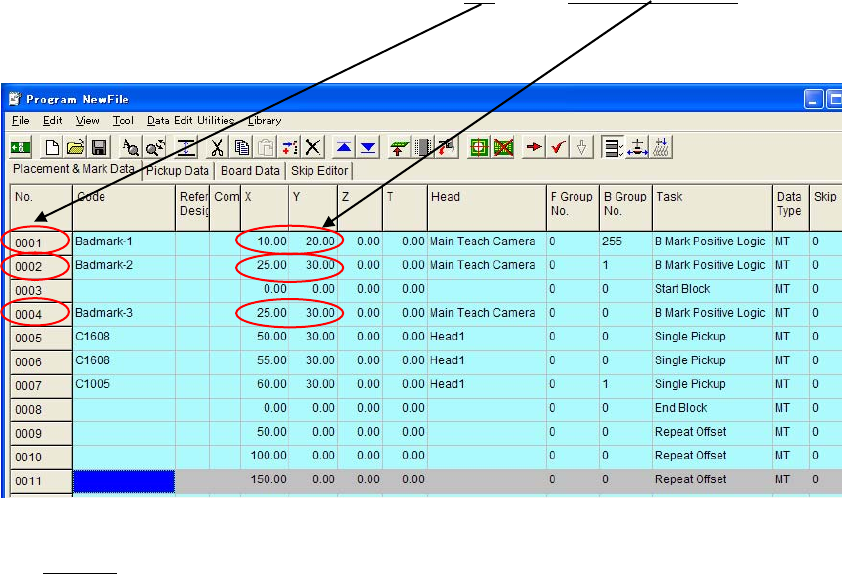
1. In the programs for each machine, the same step “No.
”s and “X and Y coordinates” value
must be used for bad mark steps.
Example:
2. Target machines must be next to each other.
Example
For a three-machine line, the information cannot be transferred from the 1st
machine to the 3rd machine. Make the setting to transfer the information in the
order of 1st -> 2nd -> 3rd machine..
3. In the following cases, an error may not be detected correctly. There is likelihood of
producing defective boards with missing components.
①When a PCB has been replaced in the process of the production due to a conveyor
transfer error or something.
②When picking up a PCB which has been carried out from the pre-process machine
manually, and putting another PCB into the current machine.
③When picking up a PCB which has been carried out from the current machine manually,
and putting another PCB into the post-process machine.
Note: When a PCB needs to be taken out from the machine during the production, cancel the
production firstly. And when putting the PCB back, put it back to the same machine. (Do not
put the PCB into a pre-process or a post-process machine.)
4. Machines with a buffer function such as a buffer conveyor must not be used between the
target machines .
5. When using the Production Info.Transfer function, the board transfer signals and the
connections for network (LAN) should be both established between the machines as a
precondition. Specify the path to the folder shared on a network for “Pre-process Info.
Folder” and “Post-process Info. Folder”.