M20_Ope_E.pdf - 第244页
Chapter 5 Libraries 5-94 Note: When using JEDEC pallets, the front/rear posi tioning block offset values are X=0/Y=170. To obtain accurate offset values, teaching must be perform ed. Link to the library can be made for t…
Chapter 5 Libraries
5-93
z MX-20/MX-ST2/MXR
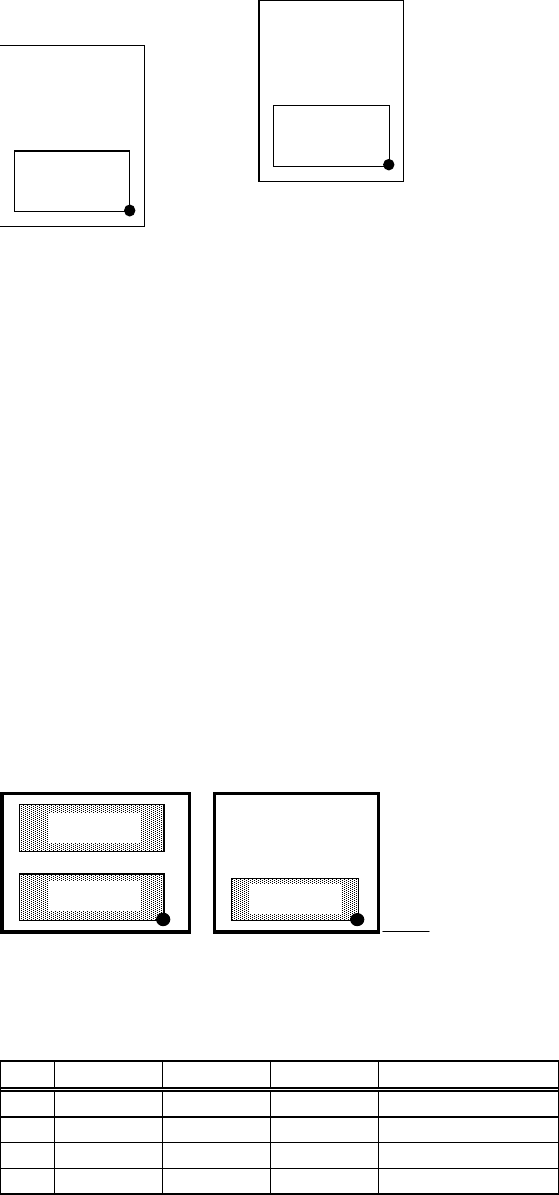
The reference coordinates on MX-20/MXR/MX-ST2 are pre-registered. Their X,Y coordinates
correspond to the front right corner of the tray when the tray is positioned against the pallet’s
positioning blocks. (in use of a JEDEC tray, the front positioning blocks) Their Z corresponds to
the pallet upper surface. To re-define the reference coordinates, follow the below steps:
Front sto
p
p
oint
Rear sto
p
p
oint
Action:
① Click Tool>Teach to open the Teach dialog box.
② In [Tray Teach] tab, set [Unit], [Shuttle Position], [Pallet No.] appropriately. Set [Mode] to
<Out>. Click <Move Pallet> button so the specified pallet moves out.
③ Teach the reference coordinates (XY) .
④ Click <User Origin> button.
⑤ Make sure [X][Y] fields display “0”.
⑥ Attach a nozzle to a head. Under [Axis], select “Z axis”. Teach the upper surface of the
pallet.
⑦ Click <User Origin> button.
⑧ Make sure [Z] field displays “0”.
Note: To define reference coordinates one by one for each pallet, access Manual>MX-20/MXR for
entering offset values to each reference point.
For any tray feeder, to use more than one tray on the same pallet, enter coordinate offsets of
each tray from the reference coordinates to [X Offset] and [Y Offset] fields of the pallet library.
Example: Create pallet library data for MX20 with which to link the pallet number 1, 4, and 5.
Pallet No. 4Pallet No. 1
Front stop point
Tray A
Tray B
Tray C
The setting for the pallet library (right half part) is shown below. Due to space limitation, each
setting field that is actually located side by side is vertically arranged.
Pallet No. X Offset
Y Offset
(Description)
#1 1 0 0 Tray A
#2 1 0 170 Tray B
#3 4 0 0 Tray C
#4 0 0 0 None
Chapter 5 Libraries
5-94
Note: When using JEDEC pallets, the front/rear positioning block offset values are X=0/Y=170. To
obtain accurate offset values, teaching must be performed.
Link to the library can be made for the same tray only.
Note: MX-ST2 and MX-20 share the same concept of reference point, except that they differ in their
structure. When using JEDEC pallets, the front/rear positioning block offset values are
X=0/Y=180. To obtain accurate offset values, teaching must be performed.
Note: MX-RT1 and MX-20 share the same concept of reference point, except that they differ in their
structure. When using JEDEC pallets, the front/rear tray offset value is approximately Y=140.
To obtain accurate offset value, teaching must be performed.
Chapter 5 Libraries
5-95
5-2-3 Tray Library (Tray Data)
Menu: Program>TrayData
Program>PickuData>Package/Tray>TrayData
Register tray data for use of the tray feeder. Before creating the tray library data, the pallet
library data must be created.
Window:
File>Save: Saves the edited data.
Tray: Tray name. Serves to relate the tray library and the pickup data
editor (program editor).
* Up to 500 records can be registered.
*
Up to 14 characters can be entered.
Pitch X: Component pitch in the X direction.
* Unit : 0.01mm
Pitch Y: Component pitch in the Y direction.
* Unit : 0.01mm
Count X: Number of component columns (X direction).
* The number can be entered up to 999.
Count Y: Number of component rows (Y direction).
* The number can be entered up to 999.
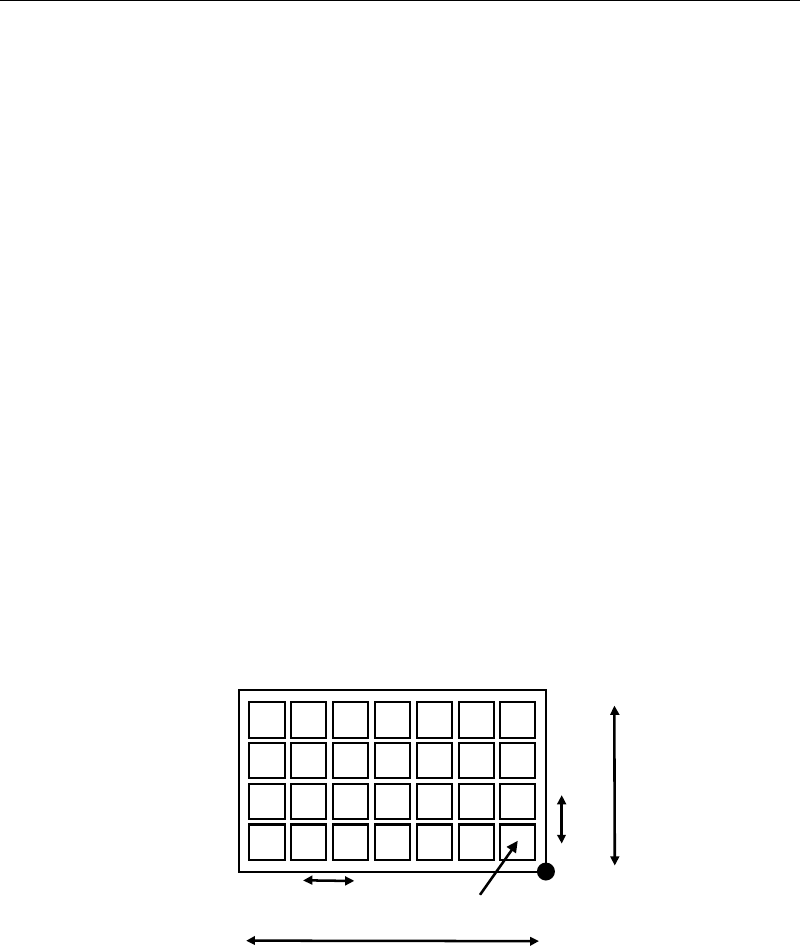
Original X: X coordinate of the original pickup point
* Unit : 0.01mm
Original Y: Y coordinate of the original pickup point
* Unit : 0.01mm
Count X
Pitch X
Pitch Y
Original X/Y
Count Y
Origin
Component Height: Height from the tray bottom to the component upper surface.
* Unit : 0.01mm