M20_Ope_E.pdf - 第354页
Chapter 11 Parameter Setting 11-8 11-1-7 Parameters Menu: System>UserParameter>Parameters Set the miscellaneous parameters. Use the default setting normally. Window: 1. Pass Score for Vision Process Result (XY) [ m…
Chapter 11 Parameter Setting
11-7
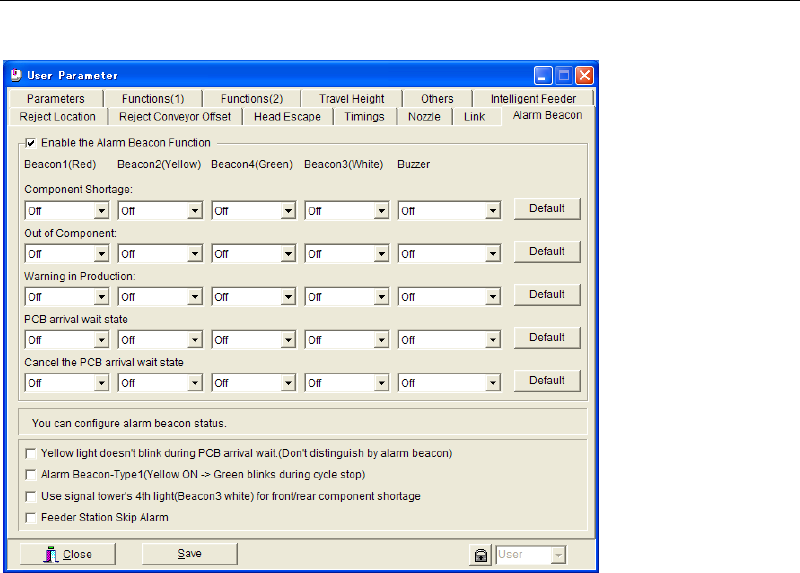
11-1-6 Alarm Beacon
Menu: System>UserParameter>AlarmBeacon
You can modify the alarm beacon status for notifying component shortage or exhaustion. The
saved setting is enabled only after you restart the system.
■ Yellow light doesn’t blink during PCB arrival wait (Don’t distinguish by alarm beacon)
■ Alarm Beacon-Type1 (Yellow ON -> Green blinks during cycle stop)
■ Use signal tower’s 4
th
light (Beacon3 white) for front/rear component shortage
■ Feeder Station Skip Alarm
Chapter 11 Parameter Setting
11-8
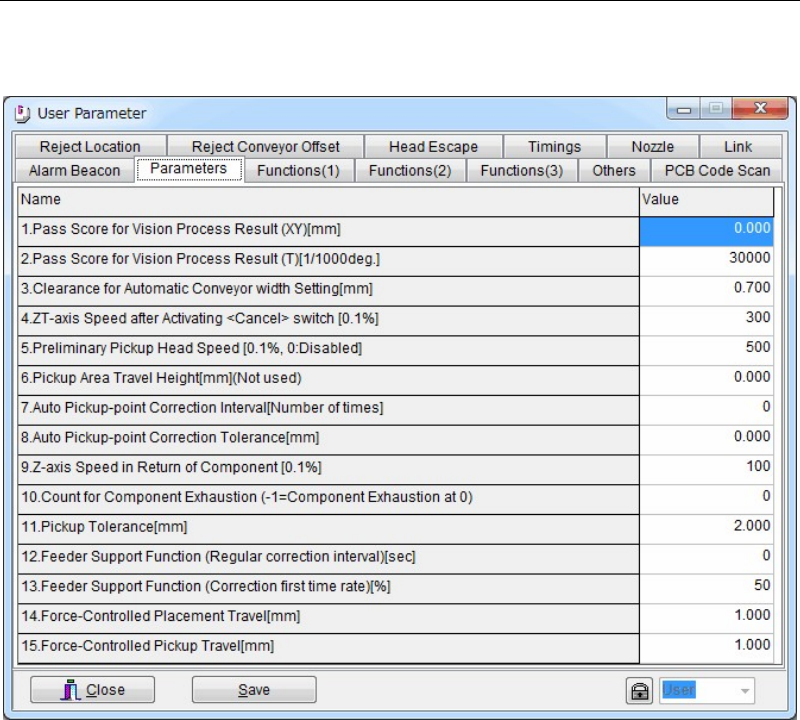
11-1-7 Parameters
Menu: System>UserParameter>Parameters
Set the miscellaneous parameters. Use the default setting normally.
Window:
1. Pass Score for Vision Process Result (XY) [mm]
2. Pass Score for Vision Process Result (T) [1/1000 deg.]
3. Clearance for Automatic Conveyor width Setting [mm]
Set the play between the conveyor rails and the PCB. This setting is automatically applied
to the automatic conveyor width setting. Normally, use the default setting.
4. ZT-axis Speed after Activating <Cancel> switch [0.1%]
5. Preliminary Head Speed [0.1%, 0: Disabled]
6. Pickup Area Travel Height [mm]
7. Automatic Pickup-point correction Interval [Number of Times]
This setting is used when [APC] setting in Pickup Data is enabled.
8. Automatic Pickup-point Correction Tolerance [mm]
This setting is used when [APC] setting in Pickup Data is enabled.
9. Z-axis Speed in Return of Component [0.1%]
10. Count for Component Exhaustion (-1=Component Exhaustion at 0)
11. Pickup Tolerance [mm]
12. Feeder Support Function (Regular correction interval) [sec]
13. Feeder Support Function (Correction first time rate) [%]
14. Force-Controlled Placement Travel [mm]
15. Force-Controlled Pickup Travel [mm]
Chapter 11 Parameter Setting
11-9
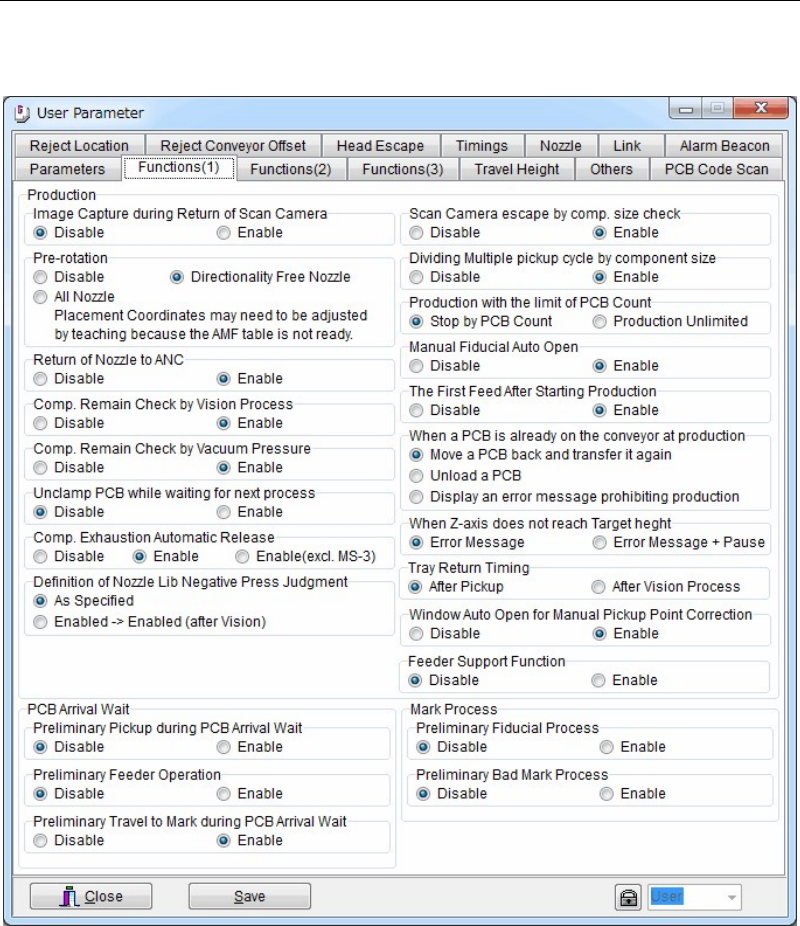
11-1-8 Functions
Menu: System>UserParameter>Functions(1)(2)(3)
Select Enable/Disable for each function. Use the default setting normally.
Window:
Production
1. Image Capture during Return of Scan Camera
2. Pre-rotation
3. Return of Nozzle to ANC
4. Comp. Remain Check by Vision Process
5. Comp. Remain Check by Vacuum Pressure
6. Unclamp PCB while waiting for next process
7. Comp. Exhaustion Automatic Release
8. Definition of Nozzle Lib Negative Press Judgment
9. Scan Camera escape by comp. size check
10. Dividing Multiple pickup cycle by component size
11. Production with the limit of PCB Count
12. Manual Fiducial Auto Open
13. The First Feed After Starting Production
14. When a PCB is already on the conveyor at production