M20_Ope_E.pdf - 第323页
Chapter 10 Replenishing Com ponents and Using Maintenance Menus 10-19 Timing tab Measures actuator on/off timing. Action: ① Click <Measure> button. The actuator on/o ff timing is measured and the results are disp…
Chapter 10 Replenishing Components and Using Maintenance Menus
10-18
Board Clamp Board stopper ON
Second stopper UP
Quick clamp UP
Push-up plate
Head Vacuum Breaker Head1 Vacuum Breaker
Head2 Vacuum Breaker
Head3 Vacuum Breaker
Head4 Vacuum Breaker
Head5 Vacuum Breaker
Head6 Vacuum Breaker
ANC ANC Open
Chapter 10 Replenishing Components and Using Maintenance Menus
10-19
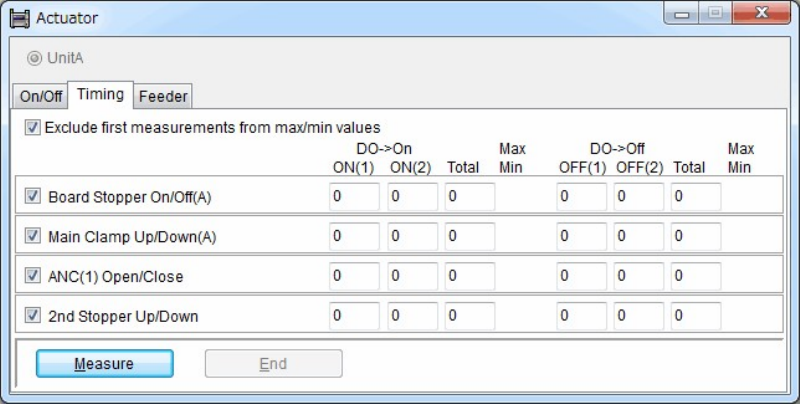
Timing tab
Measures actuator on/off timing.
Action:
① Click <Measure> button. The actuator on/off timing is measured and the results are
displayed one by one from the No.001 Board Stopper Up/Down.
② Click <End> button to end.
Window:
ON(1) Displays the time between when the ON command is issued until
the OFF sensor is turned OFF.
ON(2) Displays the time between when the OFF sensor is turned OFF until
the ON sensor is turned ON.
Total Displays the total time of ON(1) and ON(2).
OFF(1) Displays the time between when the OFF command is issued until
the ON sensor is turned OFF.
OFF(2) Displays the time between when the ON sensor is turned OFF until
the OFF sensor is turned ON.
Total Displays the total time of OFF(1) and OFF(2).
Max/Min Displays the maximum and minimum values among the values
obtained during the period between the start of measurement until
the end of measurement.
Note: Measurement is repeated unless <End> button is clicked.
Feeder tab
Performs feeder indexing for the specified feeder.
Action:
① Under [Location], select <ST-F> or <ST-R> button.
② Enter the feeder station number using the arrow keys.
③ Click <Execute> button. The specified feeder is activated and makes one feed.
Chapter 10 Replenishing Components and Using Maintenance Menus
10-20
10-4-6 Load Board
Menu: Manual>Load Board
Runs the conveyor to load or unload a board.
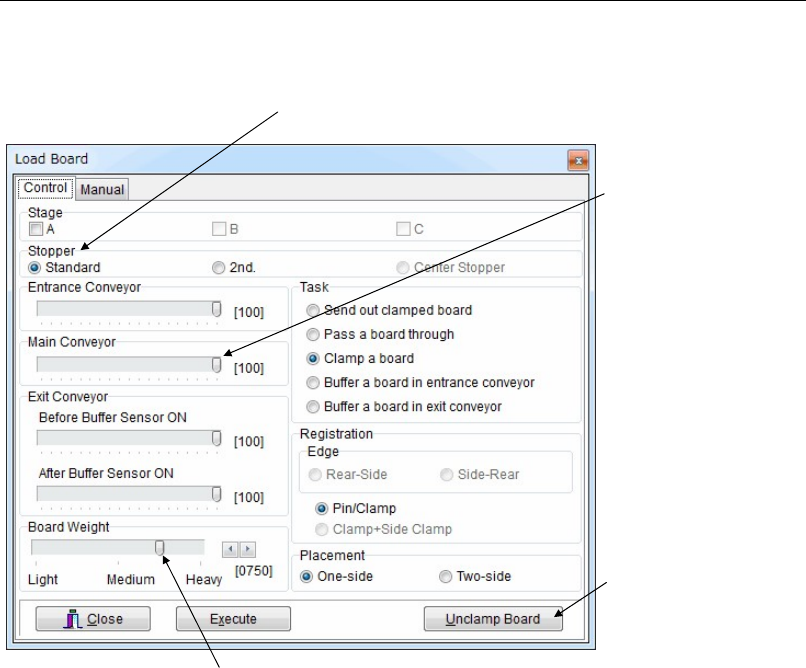
Control
Two-side Placement
When <One-side> is specified under [Placement], the loaded board starts to exit the mounter as
soon as the board is unclamped. When <Two-side> is specified, the loaded board starts to exit
the mounter after the board is unclamped and also the support pins (adjust plate) are
completely lowered.
Be sure to specify <Two-side> when the board has pre-processed components at its bottom.
This prevents interference between the components and the support pins.
Loading and Clamping a Board
Action:
① Place a board at the conveyor entrance where the beam of the entrance sensor is blocked.
② Select the stopper to use.
③ Under [Registration], select a registration method.
④ Select [Placement].
⑤ Click <Execute> button. The conveyor starts to run, and a board is loaded and clamped in
place.
Task Setting
Send out clamped board: Unloads a board set in the processing position.
Pass a board through: Passes a board through without clamping it in the processing
position.
Clamp a board: Loads and then clamps a board in the processing position.
Buffer a board in entrance...: Holds a board standby on the entrance conveyor.
Buffer a board in exit...: Holds a board standby on the exit conveyor.
Adjust the each conveyor
speed.
Select the sto
pp
er to use
Clicking this button unclamps
the board.
If the board is too heavy to reach the stopper, move this slider to the right.