M20_Ope_E.pdf - 第492页
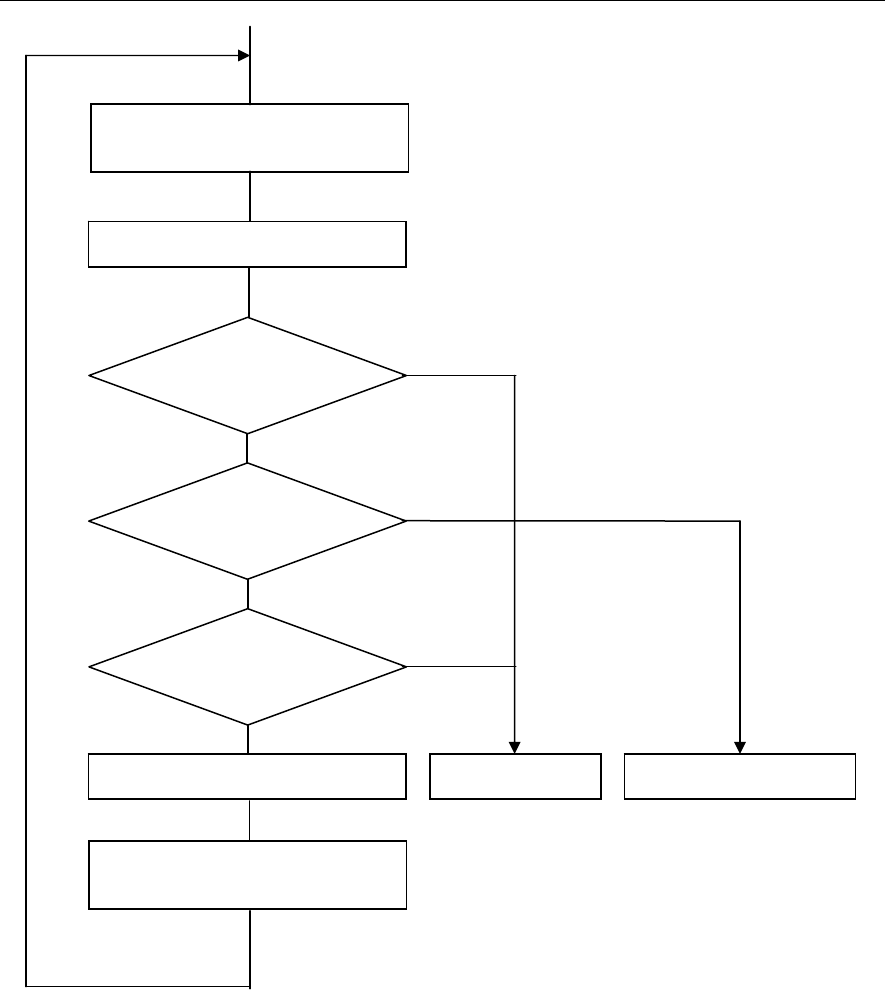
Chapter 16 Dispenser 16-22 16-3-1-6 Sequence of dispense correction No Yes Yes No Yes No Dispense check (Dot/line dispense) Dispense position change or dot station paper feed Is min. check count OK? Is image process OK? …
Chapter 16 Dispenser
16-21
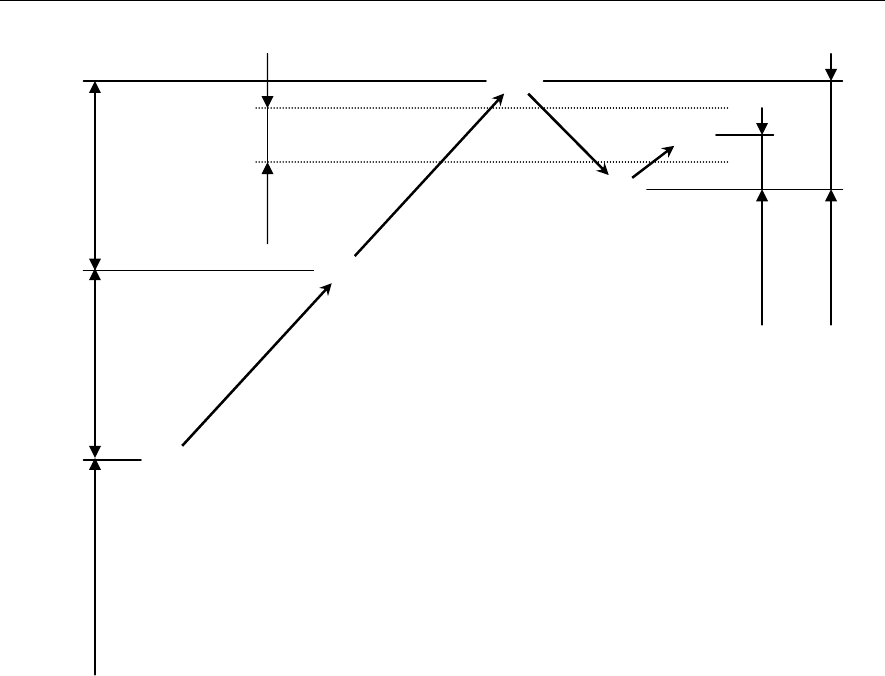
16-3-1-5 Dispense correction by means of 1/2 convergence method
The following describes the principle of the dispense correction.
Example:
① First, the dispense amount (hemisphere volume) set for the dot station is dispensed to perform the
dispense check. (① in the Fig. above)
② Since the dispense area is smaller than the range of the check tolerance value [±%], the set correction
amount is added to the dispense amount to retry the dispense check. (② in the Fig. above.)
③ Since the dispense area is still smaller than the range of the check tolerance value [±%], the set
correction amount is further added to the dispense amount to retry the dispense check. (③ in the Fig.
above)
④ Since the dispense area exceeds the range of the check tolerance value [±%], 1/2 of the previous
correction amount is subtracted from the dispense amount to retry the dispense check. (④ in the Fig.
above)
⑤ Since the dispense area becomes smaller than the range of the check tolerance value [±%], 1/2 of the
previous correction amount (1/4 of the original correction amount) is added to the dispense amount
to retry the dispense check.
The dispense area then enters the range of the check tolerance value [±%]. (⑤ in the Fig. above)
Note: Every time the dispense correction direction (positive/negative) is changed, the correction value is
reduced by half (1/2).
This correction method is called “1/2 convergence method”.
①
②
③
④
⑤
Check
tolerance
[±%]
Correction amount
Correction
amount /4
Set dispense amount
(Hemisphere volume)
Correction amount
Correction
amount /2
Chapter 16 Dispenser
16-22
16-3-1-6 Sequence of dispense correction
No
Yes
Yes
No
Yes
No
Dispense check
(Dot/line dispense)
Dispense position change or dot
station paper feed
Is min. check count OK?
Is image process OK?
Are dispense area and line
dispense width in average
allowable ran
g
e?
Is max. check count over?
PCB dispense start Alarm stop Dispense correction
Retr
y
Image process
Chapter 16 Dispenser
16-23
16-3-1-7 Dispense check operation
It is recommended to start the production after the dispense check has been performed on the dot station
and it has been confirmed that the dispense area is OK.
There are two kinds of methods: [Auto] or [Manual] available as described below.
Auto:
① Press the START
switch to run the program. When the dispense on the dot station starts, press the
STOP
switch.
② At this time, open the message display at the lower portion of the window and the overlay.
③ Repeat the dispense correction (retry). When the dispense check is determined as OK, press the
START
switch to restart the production. From the next production onward, it is not necessary to
stop the production for the dispense check.
Menu: Manual>Dispense
Manual:
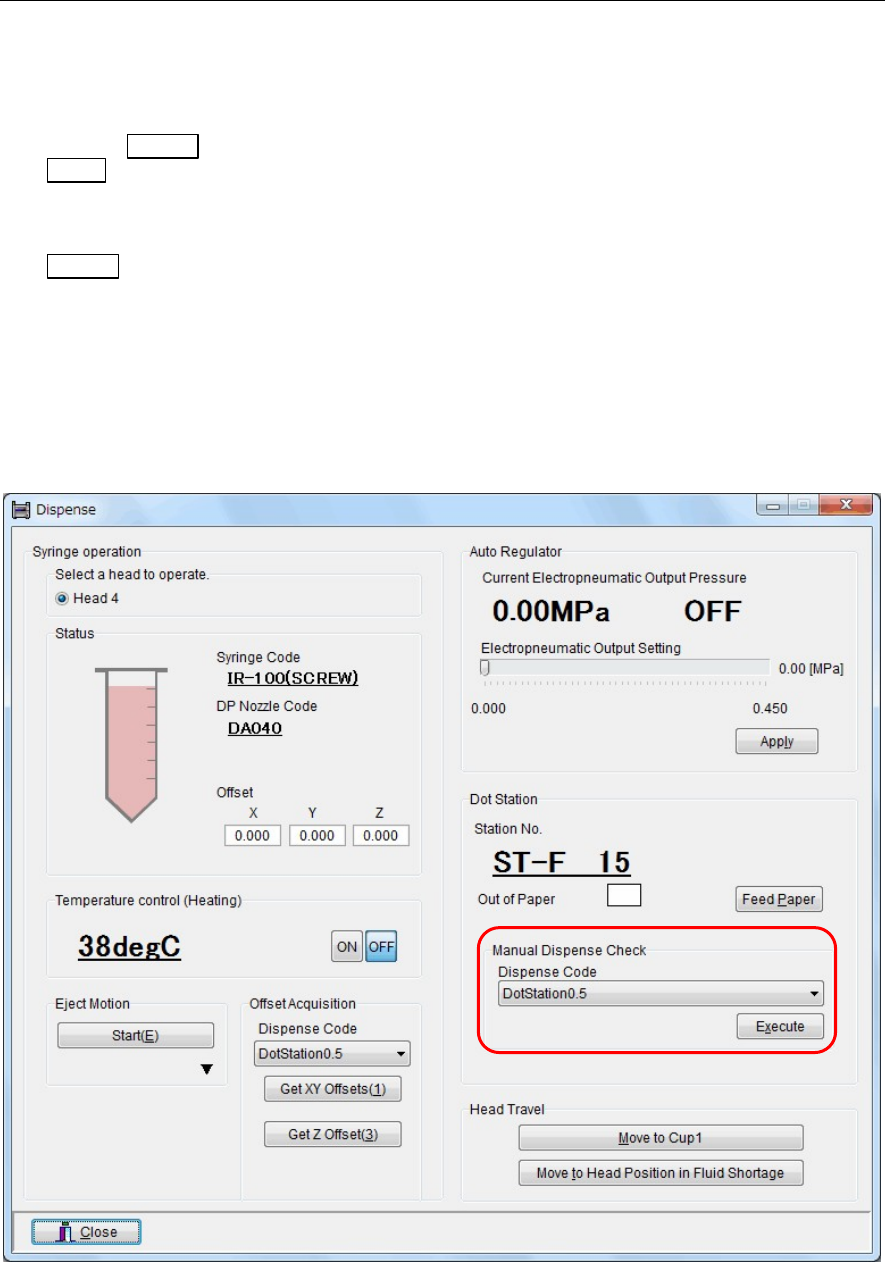
① Open the “Manual>Dispense” window.
② At this time, open the message display at the lower portion of the window and the overlay.
③ In this window, select a dispense code in the [Manual Dispense Check] area, and then click the
<Execute> button.
④ Perform the dispense check on the dot station.
⑤ Repeat the dispense correction (retry). When the dispense check is determined as OK, start the
production.