SME_Jig_User_Guide(Eng_Ver1).pdf - 第93页
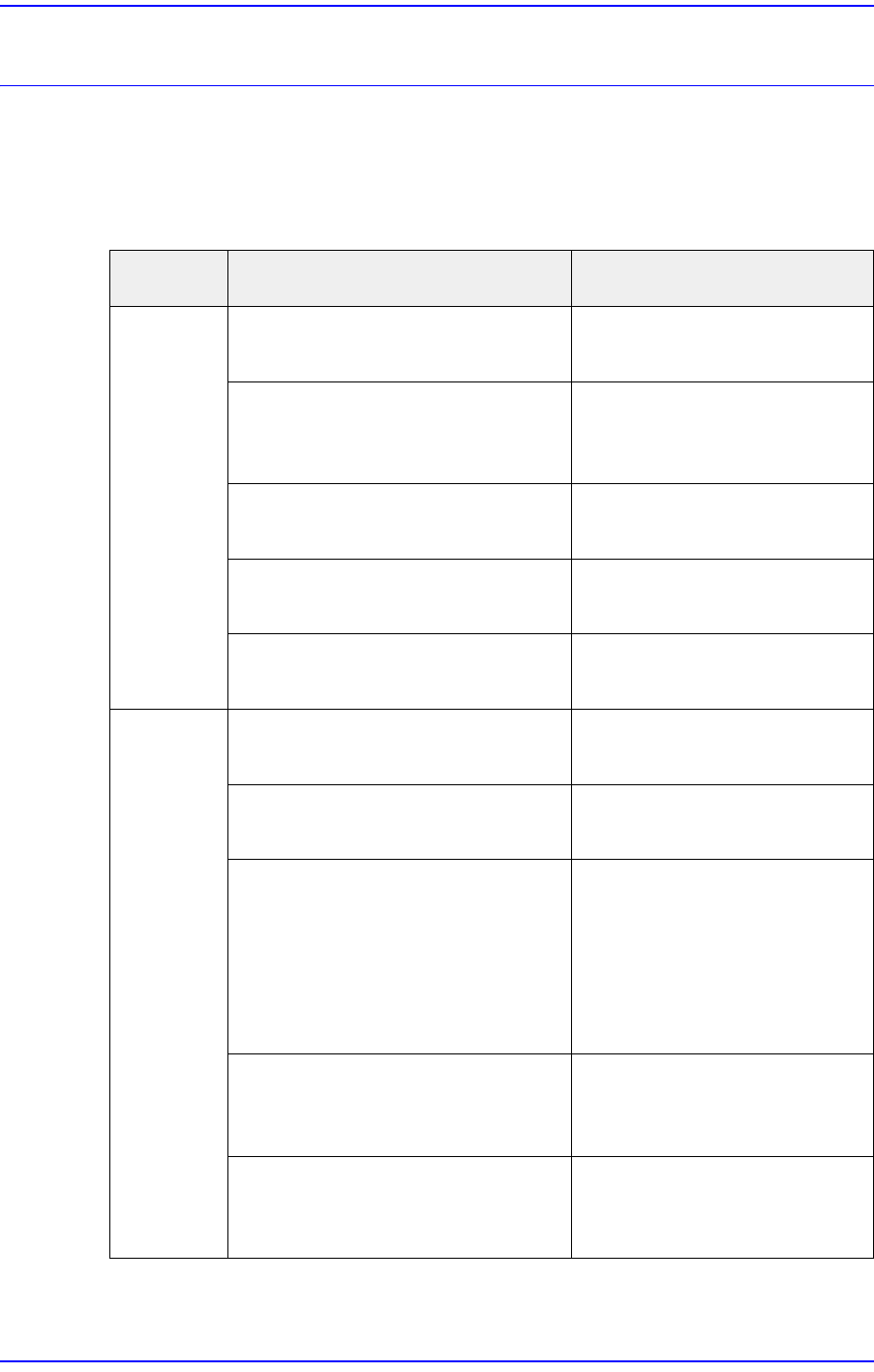
6-1 TroubleShooting Chapter6. TroubleShootin g 6.1. Problems and Measures Describes proble ms that may occur when using a calibra tion jig for an SME feeder and measures against them. Problem Possible Cause Measures Powe…
6-1
TroubleShooting
Chapter6. TroubleShooting
6.1. Problems and Measures
Describes problems that may occur when using a calibration jig for an SME feeder and
measures against them.
Problem Possible Cause Measures
Power is
not turned
on.
The power switch of the calibration
jig is turned off.
Turn on the power switch of
the calibration jig.
The switch of the multi-tab
supplying power to the calibration
jig is turned off.
Turn on the multi-tab switch.
The 220V power cable is defective. Replace the 220V power
cable.
The SMP is defective. Contact our C/S and replace
the SMP.
When the power supply fuse of the
calibration jig is cut off
Replace the power supply
fuse.
Communic
ation is not
available.
Communication is disconnected
due to a problem with the software.
Exit and restart the calibration
jig program.
Defective contact of the USB25PIN
cable.
Replace the USB25PIN cable.
While running the calibration jig
program in the PC, conflict of
programs occurred.
Exit and restart the calibration
jig program.
Reboot the PC.
If the problem is not solved,
reinstall the calibration jig
program.
A problem occurred to the wiring
from the CAN board to the
USB2USB holder.
Contact our designated C/S
(STS) or our overseas agent
and replace the wiring.
A problem occurred to the CAN
board.
Contact our designated C/S
(STS) or our overseas agent
and replace the CAN board.
6-2
User's Guide For Tape Feeder Calibration Jig
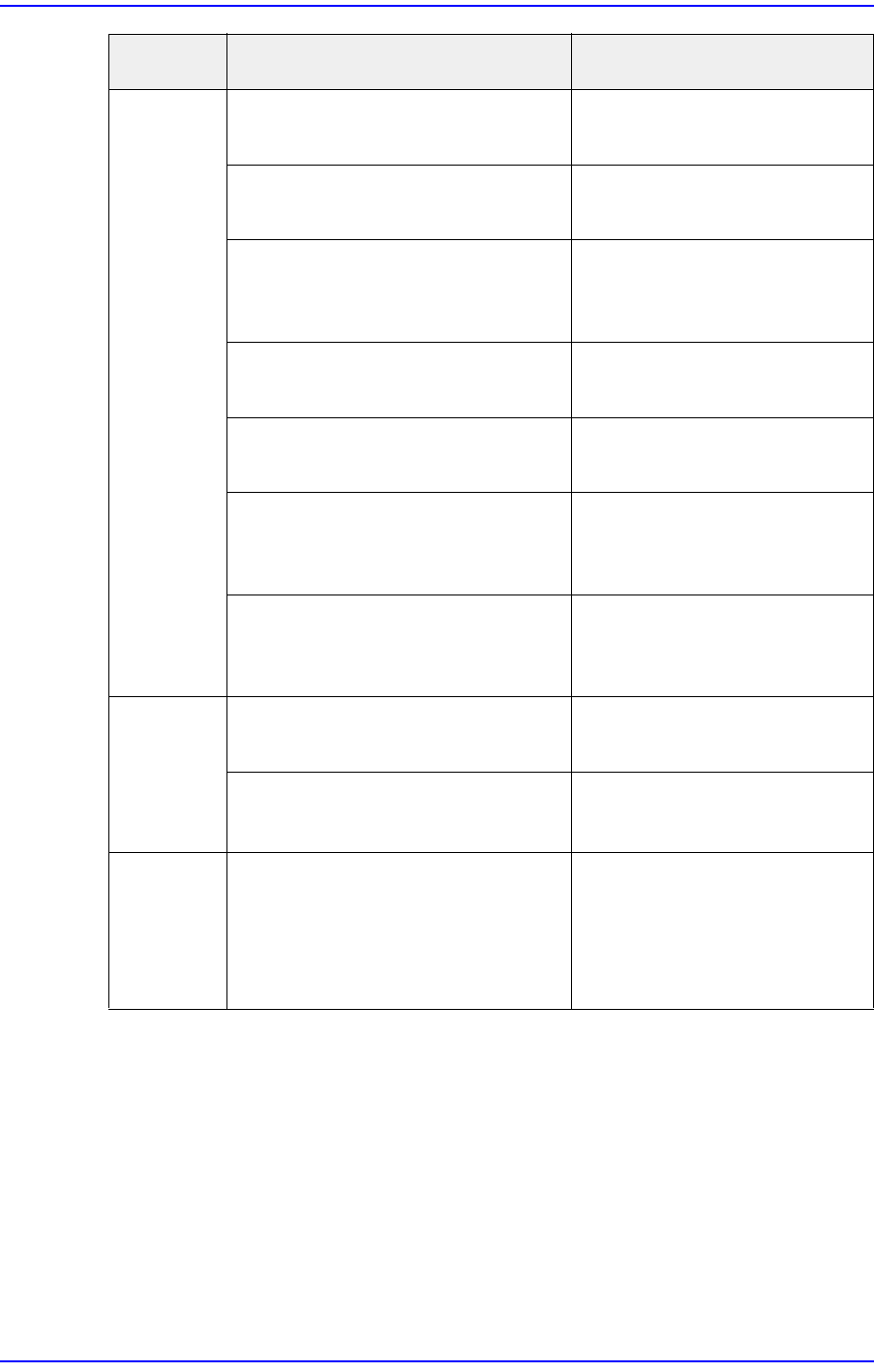
Camera
screen is
not shown.
Communication is disconnected
due to a problem with the software.
Exit and restart the calibration
jig program.
Defective contact of the USB25PIN
cable.
Replace the USB25PIN cable.
While running the calibration jig
program in the PC, conflict of
programs occurred.
Reboot the PC.
A problem occurred to the camera
driver installed in the PC.
Delete the camera driver in the
PC and reinstall the driver.
A USB hub is installed at the USB
2.0 port.
Install the USB hub at the USB
3.0 port.
Devices other than reader, CAN
communication cable and camera
are used at the USB hub.
Stop using an external device.
A problem occurred to the camera. Contact our designated C/S
(STS) or our overseas agent
and replace the camera.
The
calibration
jig program
is not
executed.
The PC OS is Windows 7 or below. Use a program above OS
Windows 7.
The PC OS is Windows 7 or above,
but it is 64 bit.
Use the program with
Windows 7 and 32 bit.
The
calibration
jig program
was shut
down.
Software bug occurred or USB
device conflict occurred.
Rerun the calibration jig
program.
Problem Possible Cause Measures