SME_Jig_User_Guide(Eng_Ver1).pdf - 第97页
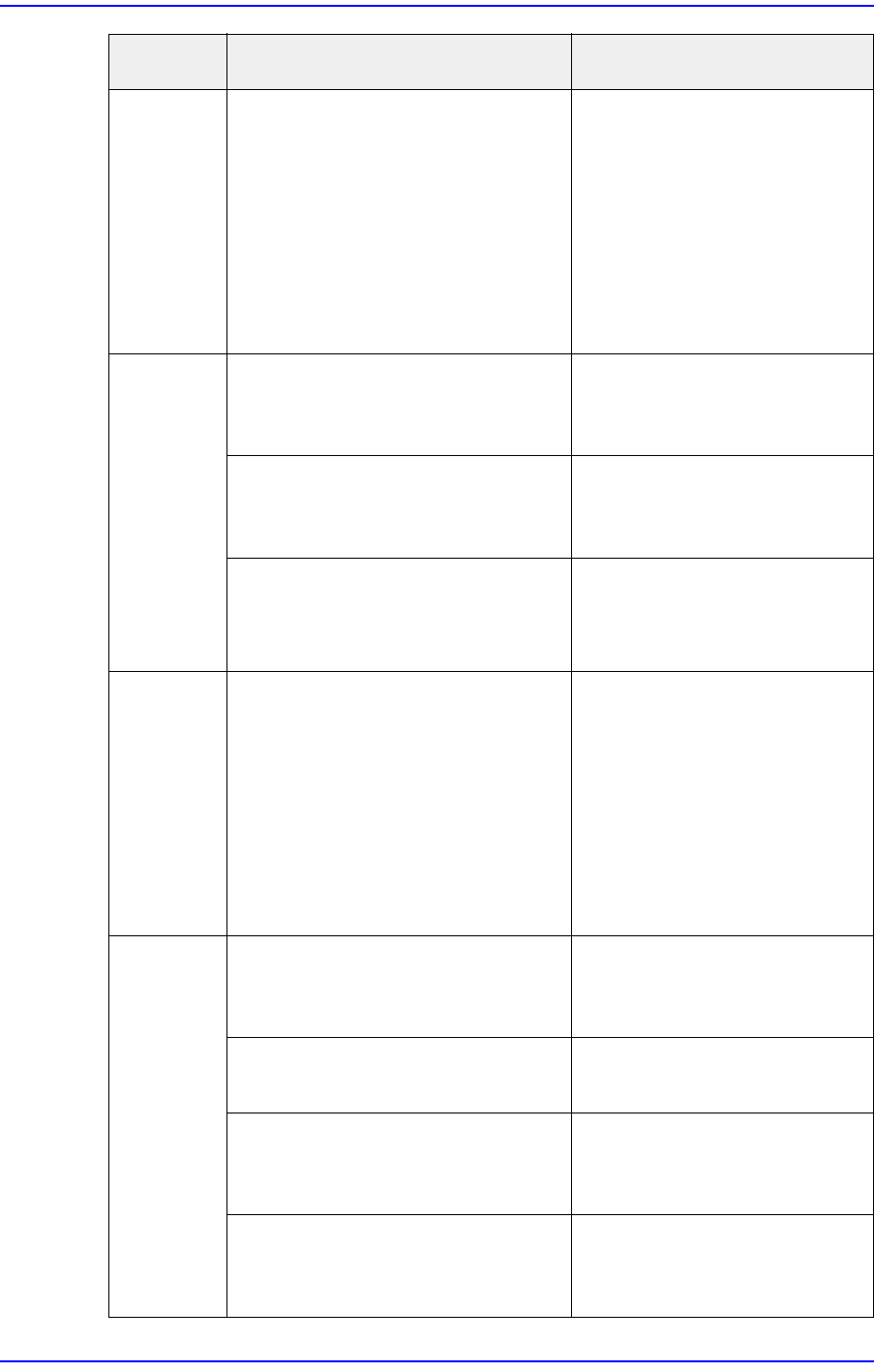
6-5 TroubleShooting When inspecting the part supply ac c ur ac y , a <Y NG> occurred. The threshold value is too small or too large. Set the master tape threshold. Lots of adhesive foreign materials exist on the ma…
6-4
User's Guide For Tape Feeder Calibration Jig
The size of
the master
tape origin
is different
from that of
the
recognition
line when
grabbing it.
The vision resolution value is not
appropriate.
Adjust the resolution value and
perform setup so that the origin
size will be the same as the
recognition line size.
When
inputting a
serial
number
through
barcode
scanning, it
is different
from the
saved
value.
When inputting a serial number, an
incorrect value was inputted
manually.
Have the barcode recognized
using the barcode scanner.
Failed to recognize the serial
number properly due to a
communication defect.
Refer to the problem,
[Communication not available].
After replacing the main board, the
serial number is not saved in the
main board.
Save the serial number in the
main board in the Repair
menu.
When
inspecting
the part
supply
accuracy,
back-
feeding is
not
performed.
The firmware version of the tape
feeder is 1.26 and below.
Update the firmware version of
the tape feeder to version 1.26
and above.
When
inspecting
the part
supply
accuracy,
the <X
NG>
occurred.
Foreign material is jammed in the
feeder base slot when setting the
origin of the master feeder.
After removing the foreign
material, set the origin again.
The master feeder is not clamped
when setting the origin.
Clamp the master feeder and
set the origin.
The tape feeder is bent. Adjust the X eccentric pin and
inspect the supply accuracy
again.
The X position was set incorrectly
while performing mapping.
Adjust the X eccentric pin and
inspect the supply accuracy
again.
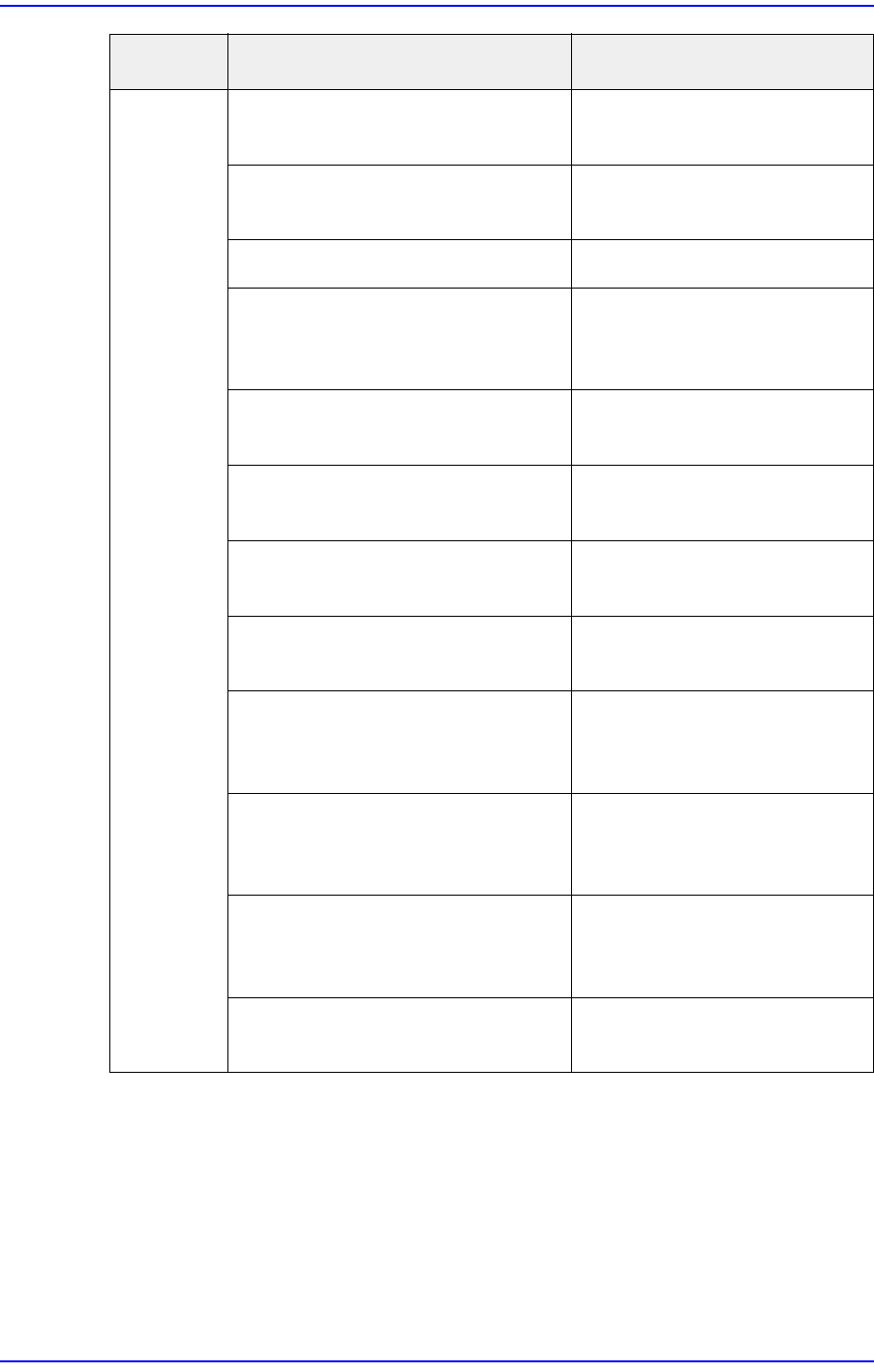
Problem Possible Cause Measures
6-5
TroubleShooting
When
inspecting
the part
supply
accuracy, a
<Y NG>
occurred.
The threshold value is too small or
too large.
Set the master tape threshold.
Lots of adhesive foreign materials
exist on the master tape.
Replace the master tape.
The master tape is damaged. Replace the master tape.
The start position of the master
tape inserted in the tape feeder is
incorrect.
Initialize the start position of
the master tape.
The intensity of the coaxial lighting
is insufficient.
Set the coaxial lighting for the
calibration jig.
The intensity of the fiducial lighting
is insufficient.
Set the fiducial lighting for the
calibration jig.
The sensor has not been initialized. Initialize the sensor and
perform mapping.
Mapping has not been finished. Initialize the sensor and
perform mapping.
The mapping data has been lost. Input the serial number and
initialize the sensor. Then
perform mapping.
Foreign material is jammed in the
feeder base slot when setting the
origin of the master feeder.
Remove any foreign materials
and set the origin.
The feeder is not clamped when
setting the origin of the master
feeder.
Clamp the master feeder and
set the origin.
The Y position was set incorrectly
while performing mapping.
Initialize the sensor and
perform mapping.
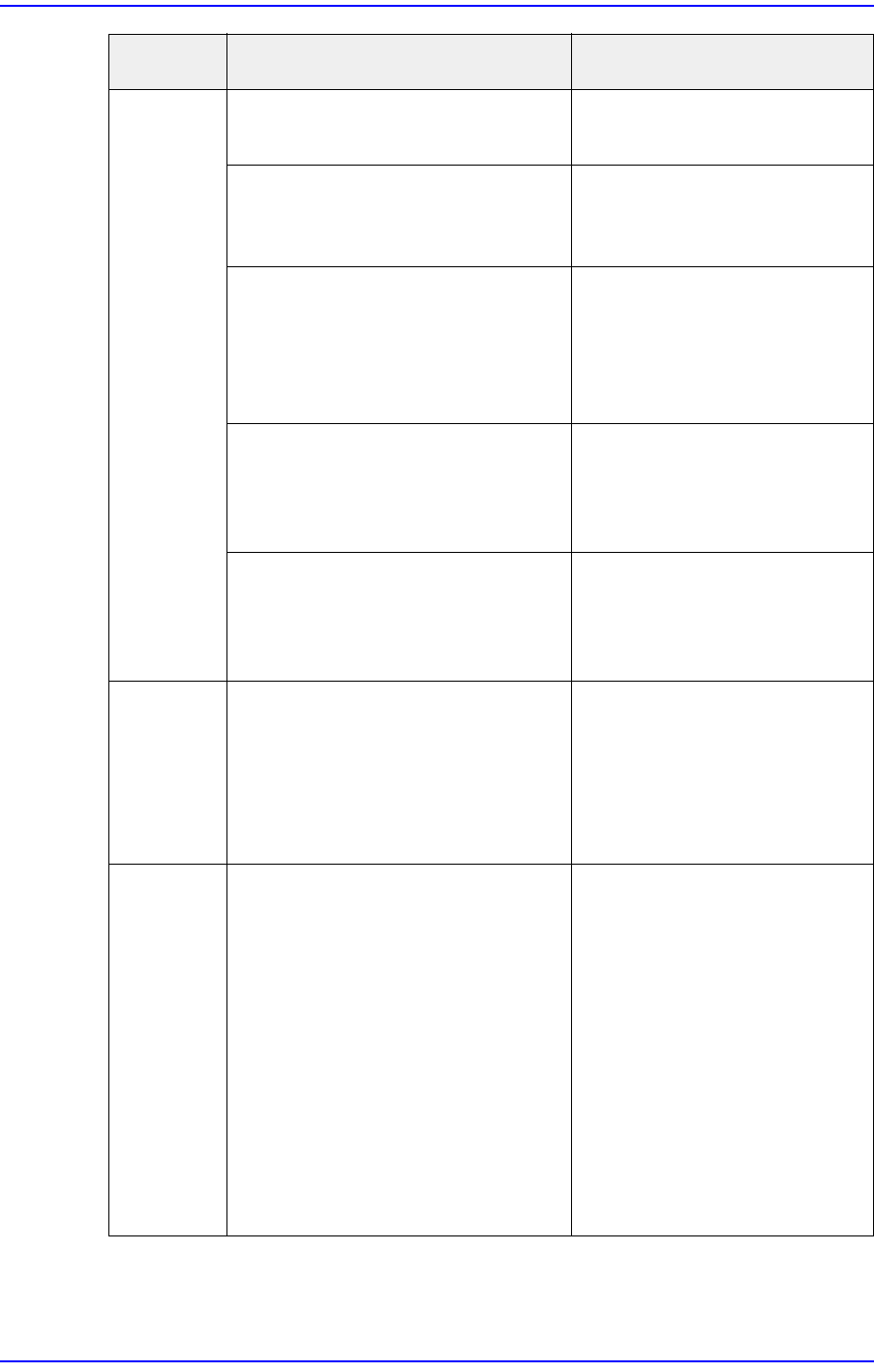
Problem Possible Cause Measures
6-6
User's Guide For Tape Feeder Calibration Jig
Failed to
initialize
the sensor
(the feeder
LED is
turned on
red).
Empty carrier tape is not inserted
into the tape feeder.
Insert the empty carrier tape
into the tape feeder.
The length of the empty carrier tape
inserted into the tape feeder is
short.
Insert the empty carrier tape
with a length longer than
100cm into the tape feeder.
The index sensor of the tape feeder
is defective.
Contact our C/S company
(STS) or local agent and
replace the feeder index
sensor. Then initialize the
sensor and perform mapping.
Lots of foreign materials exist on
the tape feeder sprocket.
Remove any foreign materials
that exist on the sprocket.
Then initialize the sensor and
perform mapping.
The main board of the tape feeder
is defective.
Contact our designated C/S
(STS) or our local agent and
replace the main board of the
tape feeder.
Back
feeding is
not
performed
during
mapping.
The firmware version of the tape
feeder is 1.26 and below.
Update the firmware version of
the tape feeder to version 1.26
and above.
The hole of
the master
tape to be
recognized
by the
vision
system
exceeds
the
recognition
range
during
mapping.
The home offset value is too small
or too large.
Set the home offset value
again.
Problem Possible Cause Measures