1OPERATION_.pdf - 第130页
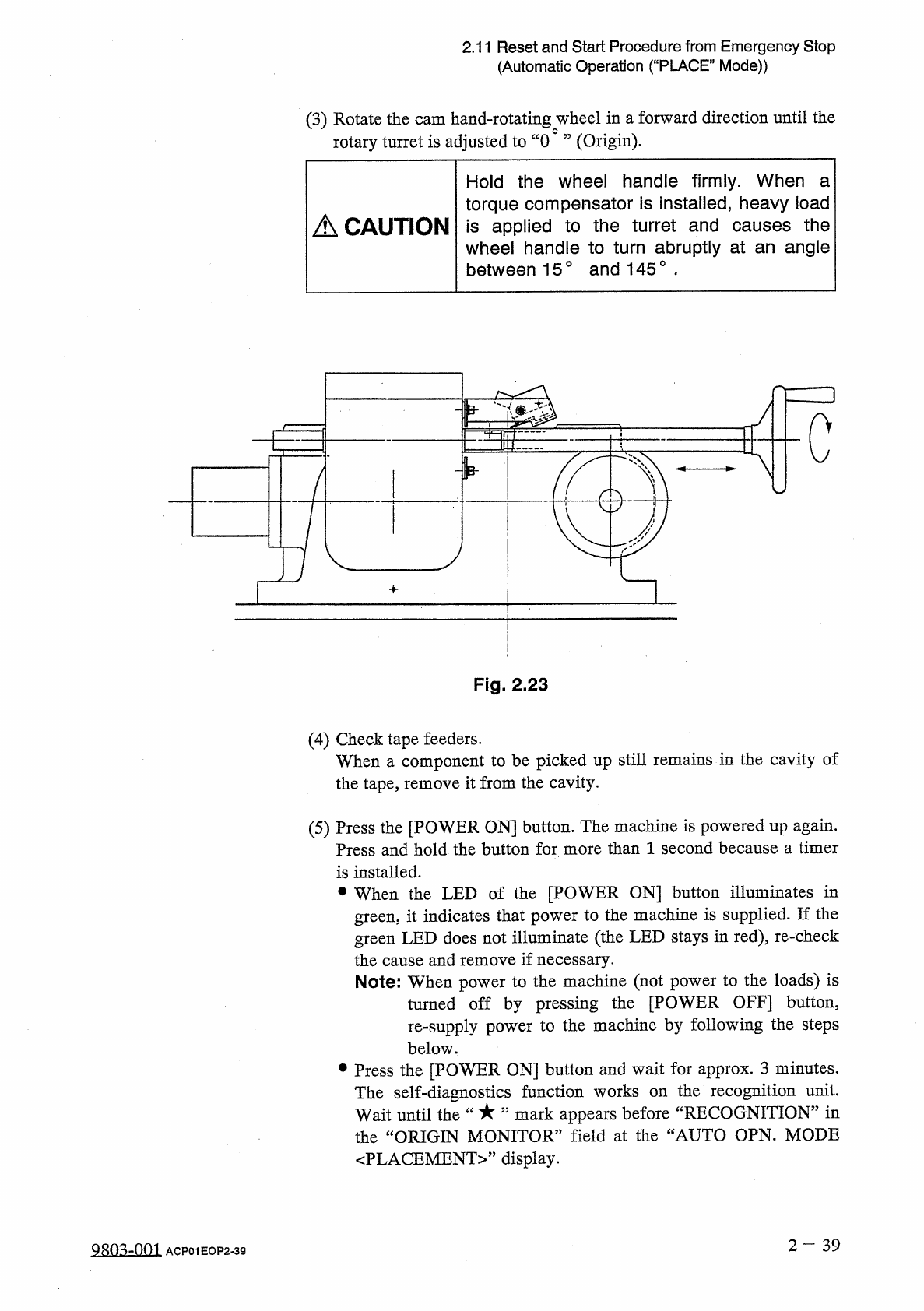
2.11 Reset and Start Procedure from Emergency Stop ( Automatic Operation ( “ PLACE ” Mode ) ) ( 6 ) After a “ mark has appeared before ^ RECOGNITION ” in the ORIGIN MONITOR ” field at the “ AUTO OPN . MODE 〈 PLACEMENT 〉 …
2.11
Reset
and
Start
Procedure
from
Emergency
Stop
(
Automatic
Operation
(
“
PLACE
”
Mode
)
)
(
3
)
Rotate
the
cam
hand
-
rotating
wheel
in
a
forward
direction
until
the
rotary
turret
is
adjusted
to
“
0
”
(
Origin
)
.
Hold
the
wheel
handle
firmly
.
When
a
torque
compensator
is
installed
,
heavy
load
is
applied
to
the
turret
and
causes
the
wheel
handle
to
turn
abruptly
at
an
angle
between
15
°
and
145
°
■
A
CAUTION
c
Fig
.
2.23
(
4
)
Check
tape
feeders
.
When
a
component
to
be
picked
up
still
remains
in
the
cavity
of
the
tape
,
remove
it
from
the
cavity
.
(
5
)
Press
the
[
POWER
ON
]
button
.
The
machine
is
powered
up
again
.
Press
and
hold
the
button
for
more
than
1
second
because
a
timer
is
installed
.
•
When
the
LED
of
the
[
POWER
ON
]
button
illuminates
in
green
,
it
indicates
that
power
to
the
machine
is
supplied
.
If
the
green
LED
does
not
illuminate
(
the
LED
stays
in
red
)
,
re
-
check
the
cause
and
remove
if
necessary
.
Note
:
When
power
to
the
machine
(
not
power
to
the
loads
)
is
turned
off
by
pressing
the
[
POWER
OFF
]
button
,
re
-
supply
power
to
the
machine
by
following
the
steps
below
.
參
Press
the
[
POWER
ON
]
button
and
wait
for
approx
.
3
minutes
.
the
recognition
unit
,
mark
appears
before
“
RECOGNITION
”
in
The
self
-
diagnostics
function
works
on
Wait
until
the
the
“
ORIGIN
MONITOR
”
field
at
the
“
AUTO
OPN
.
MODE
〈
PLACEMENT
〉
,
,
display
.
2
-
39
QRQ
^
-
001
ACP
01
EOP
2
-
39
2.11
Reset
and
Start
Procedure
from
Emergency
Stop
(
Automatic
Operation
(
“
PLACE
”
Mode
)
)
(
6
)
After
a
“
mark
has
appeared
before
^
RECOGNITION
”
in
the
ORIGIN
MONITOR
”
field
at
the
“
AUTO
OPN
.
MODE
〈
PLACEMENT
〉
”
display
,
perform
the
zeroing
operation
to
zero
each
individual
device
.
(
7
)
When
there
still
remains
an
unfinished
P
.
C
.
B
.
on
the
X
/
Y
table
,
determine
whether
or
not
the
P
.
C
.
B
.
should
be
completed
.
To
continue
the
placement
operation
,
open
the
“
AUTO
OPN
.
SUB
-
MENU
”
display
and
select
the
[
SEMI
-
AUTOMATIC
OPERATION
]
key
.
The
“
SEMI
-
AUTOMATIC
OPERATION
PLACEMENT
STEP
”
display
appears
on
the
screen
.
Press
the
[
FULL
AUTO
CONT
[
START
]
]
key
to
finish
the
P
.
C
.
B
.
completely
.
Refer
to
“
4.5
SEMI
-
AUTOMATIC
OPERATION
”
for
details
.
2
—
4 0
Q
80
^
-
nm
ACP
01
EOP
2
-
40
2.12
Stopping
Automatic
Operation
(
“
PLACE
”
Mode
)
2.12
Stopping
Automatic
Operation
(
“
PLACE
”
Mode
)
2.12
.
1
General
Stop
Procedure
•
Press
the
[
STOP
]
button
.
The
LED
of
the
[
START
]
button
extinguishes
.
After
placing
all
components
on
the
P
.
C
.
B
.
in
the
middle
of
production
process
,
each
individual
device
returns
to
its
stationary
position
and
the
machine
stops
running
.
•
The
green
tower
light
extinguishes
.
Note
:
The
P
.
C
.
B
.
is
not
discharged
from
the
X
/
Y
table
.
2.12
.
2
Automatic
Stop
Procedure
•
Stop
the
input
machine
.
It
is
assumed
that
“
ENABLE
”
is
set
in
the
text
box
of
the
label
“
AUTO
STOP
MODE
”
at
the
“
P
.
C
.
B
.
TRANSFER
MODE
SET
-
UP
”
display
.
The
machine
processes
all
P
.
C
.
B
/
s
on
the
system
line
,
discharges
them
,
and
stops
running
automatically
.
Note
:
When
a
machine
of
another
brand
is
connected
to
the
system
line
,
this
function
may
not
work
.
2.12
.
3
Emergency
Stop
Procedure
•
To
stop
the
machine
instantaneously
in
an
emergency
,
press
one
of
the
[
EMERGENCY
STOP
]
buttons
.
Power
to
the
loads
is
shut
off
and
the
machine
stops
ranning
instantaneously
.
2
一
41
QRO
^
-
nm
ACP
01
EOP
2
-
41