1OPERATION_.pdf - 第275页
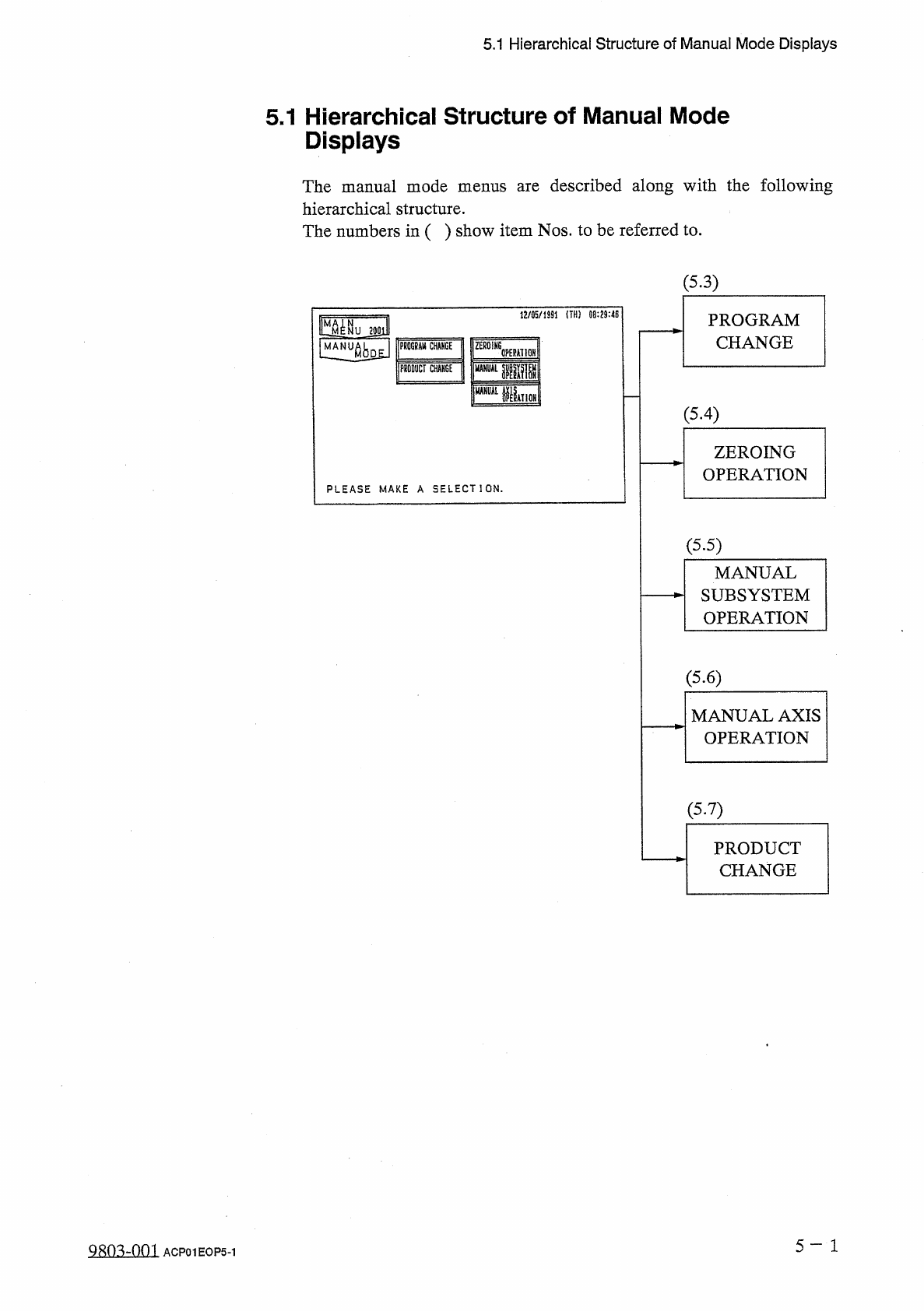
5.1 Hierarchical Structure of Manual Mode Displays 5.1 Hierarchical Structure of Manual Mode Displays The manual mode menus are described along with the following hierarchical structure . The numbers in ( ) show item Nos…
Page
5.1
Hierarchical
Structure
of
Manual
Mode
Displays
5.2
"
MANUAL
MODE
”
Display
5.3
Program
Change
5.4
Zeroing
Operation
5.5
Manual
Subsystem
Operation
5.6
Manual
Axis
Operation
5.7
Product
Change
5.7
.
1
Selection
of
Set
-
Up
Menus
and
Overall
Set
-
Up
Operation
5.7
.
2
Manual
Set
-
Up
Operation
of
L
/
R
Conveyor
and
X
/
Y
Table
Chute
Widths
5
-
n
fl
«
n
.
s
-
nm
ACP
01
EOPCC
5
5.1
Hierarchical
Structure
of
Manual
Mode
Displays
5.1
Hierarchical
Structure
of
Manual
Mode
Displays
The
manual
mode
menus
are
described
along
with
the
following
hierarchical
structure
.
The
numbers
in
(
)
show
item
Nos
.
to
be
referred
to
.
(
5.3
)
1
J
/
05
/
1
SS
1
!
TH
!
09
:
29
:
4
E
PROGRAM
CHANGE
|
MM
^
NU
2
J
0
lll
匕
limJ
lMIV
腦
j
rniiTcliicf
m
CT
CHM
6
E
'
psr
腿
HI
OH
I
pir
(
5.4
)
ZEROING
OPERATION
PLEASE
MAKE
A
SELECT
]
ON
.
(
5.5
)
MANUAL
SUBSYSTEM
OPERATION
(
5.6
)
MANUAL
AXIS
OPERATION
(
5.7
)
PRODUCT
CHANGE
5
-
1
Qsm
-
nm
ACP
01
EOP
5
-
1
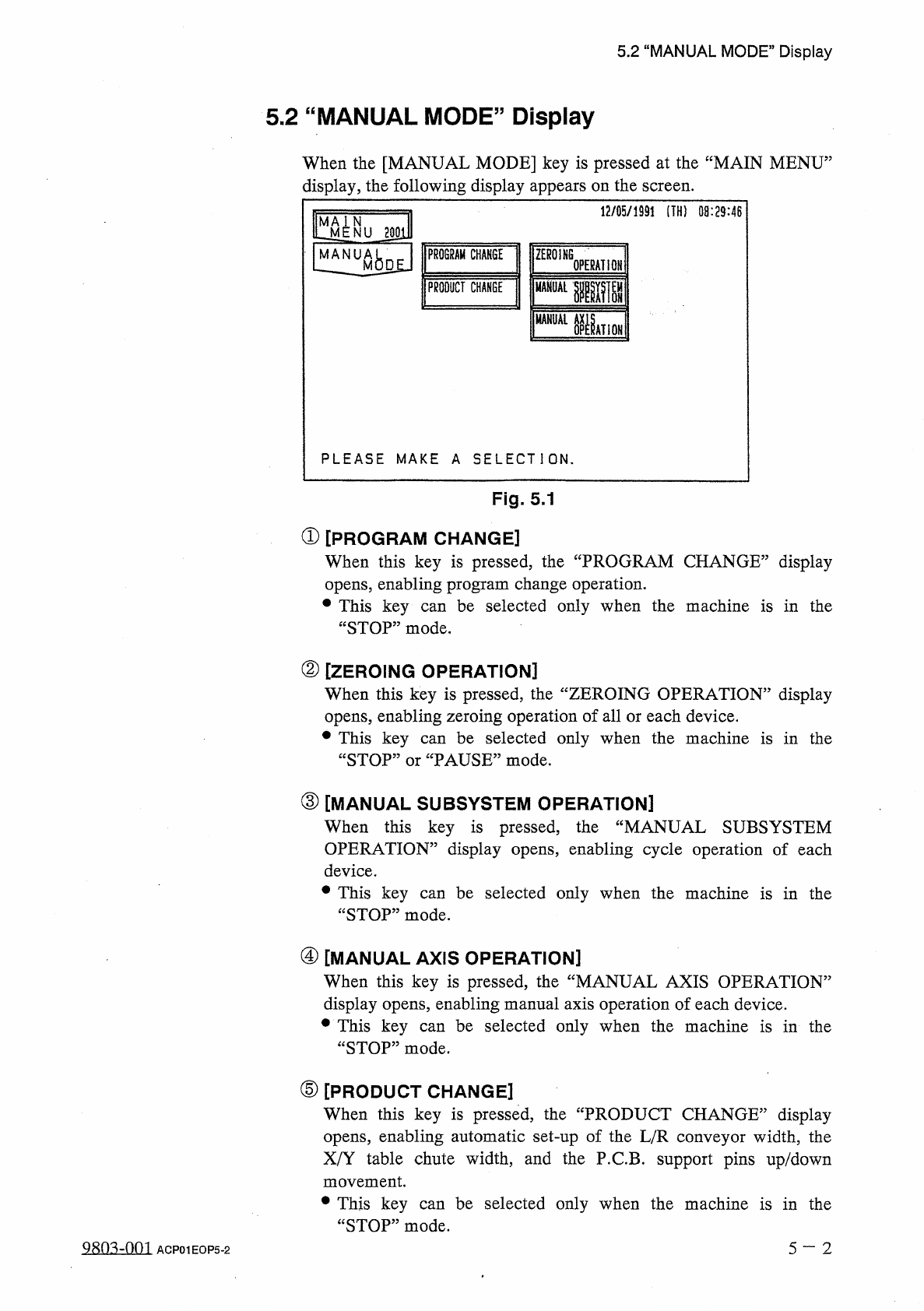
5.2
“
MANUAL
MODE
”
Display
5.2
“
MANUAL
MODE
”
Display
When
the
[
MANUAL
MODE
]
key
is
pressed
at
the
“
MAIN
MENU
:
display
,
the
following
display
appears
on
the
screen
.
12
/
05
/
1991
(
TH
)
08
:
29
:
46
M A I
LM
NUJgE
PROGRAM
CHANGE
ZEROING
OPERATION
Ml
MANUAL
PRODUCT
CHANGE
MANUAL
NATION
P L E A S E
M A K E
A
S E L E C T I O N
.
Fig
.
5.1
①
[
PROGRAM
CHANGE
]
When
this
key
is
pressed
,
the
“
PROGRAM
CHANGE
”
display
opens
,
enabling
program
change
operation
.
參
This
key
“
STOP
”
mode
.
be
selected
only
when
the
machine
is
in
the
can
②
[
ZEROING
OPERATION
]
When
this
key
is
pressed
,
the
“
ZEROING
OPERATION
”
display
opens
,
enabling
zeroing
operation
of
all
or
each
device
.
參
This
key
“
STOP
”
or
“
PAUSE
”
mode
.
be
selected
only
when
the
machine
is
in
the
can
③
[
MANUAL
SUBSYSTEM
OPERATION
]
When
this
key
is
pressed
,
the
“
MANUAL
SUBSYSTEM
OPERATION
”
display
opens
,
enabling
cycle
operation
of
each
device
.
•
This
key
“
STOP
”
mode
.
be
selected
only
when
the
machine
is
in
the
can
④
[
MANUAL
AXIS
OPERATION
]
When
this
key
is
pressed
,
the
“
MANUAL
AXIS
OPERATION
”
display
opens
,
enabling
manual
axis
operation
of
each
device
.
•
This
key
“
STOP
”
mode
.
be
selected
only
when
the
machine
is
in
the
can
⑤
[
PRODUCT
CHANGE
]
When
this
key
is
pressed
,
the
“
PRODUCT
CHANGE
”
display
opens
,
enabling
automatic
set
-
up
of
the
L
/
R
conveyor
width
,
the
X
/
Y
table
chute
width
,
and
the
P
.
C
.
B
.
support
pins
up
/
down
movement
.
•
This
key
“
STOP
”
mode
.
be
selected
only
when
the
machine
is
in
the
can
980
^
-
001
5
—
2
ACP
01
EOP
5
-
2