1OPERATION_.pdf - 第56页
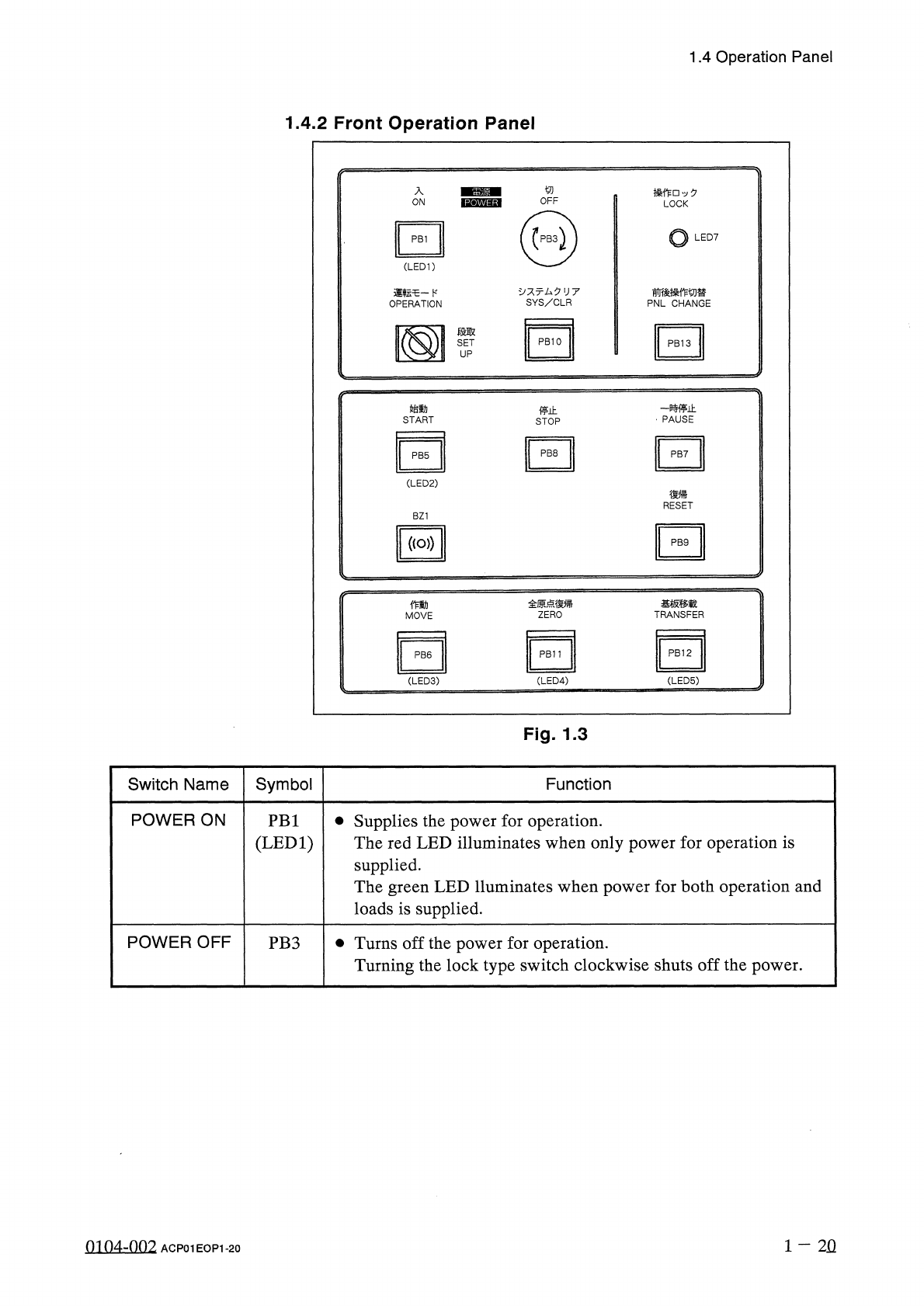
1.4 Operation Panel 1.4 . 2 Front Operation Panel 入 操 作 □ 夕 LOCK ON o LED 7 PB 1 ( LED 1 ) 、 : 亍厶夕 U 7 SYS / CLR 前後操作切替 PNL CHANGE 運転乇一卜 , OPERATION 段取 SET UP - 贿止 PAUSE 始動 停止 START STOP PB 8 PB 7 PB 5 ( LED 2 ) 復帰 RESET…
1.4
Operation
Panel
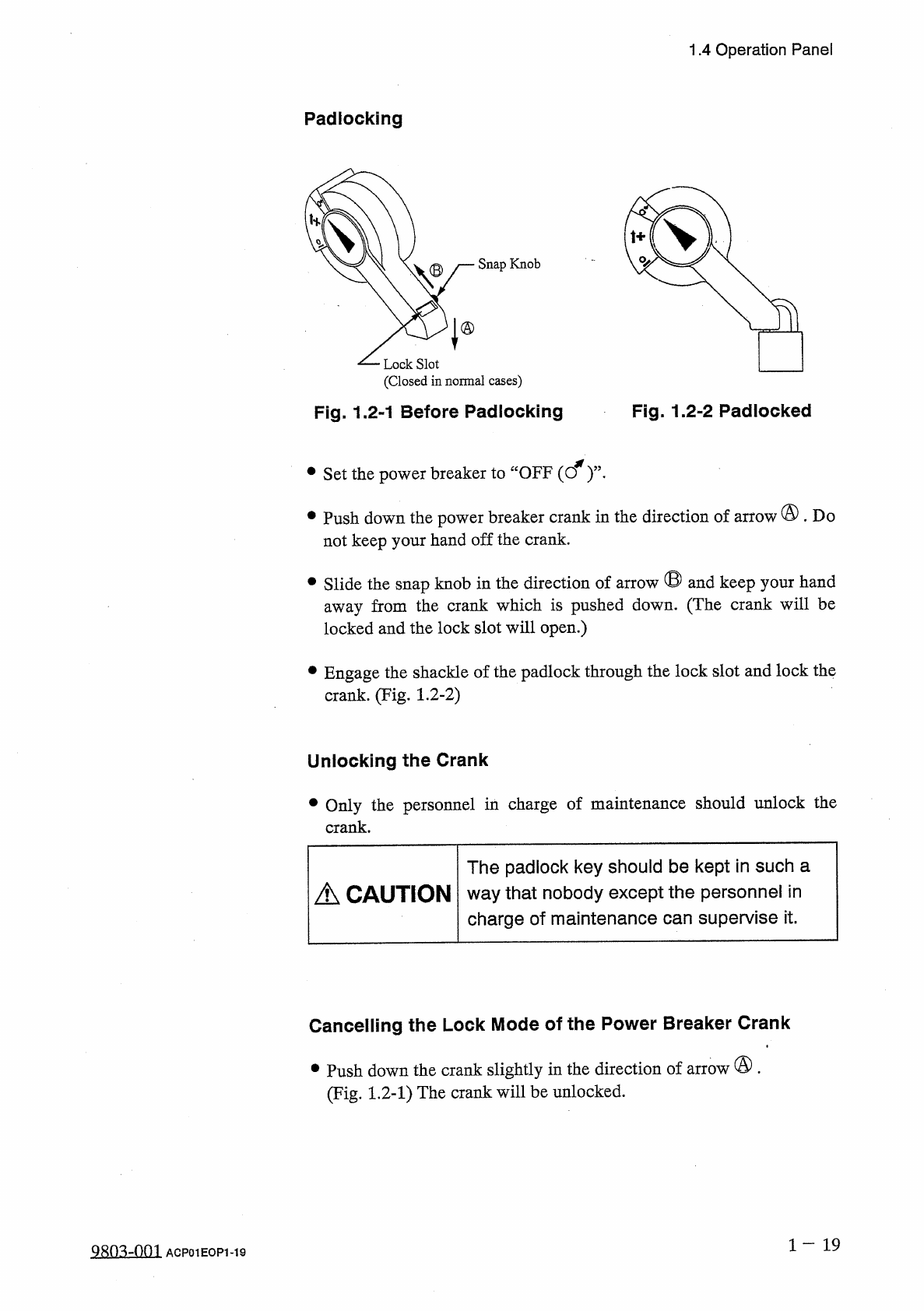
Padlocking
Snap
Knob
Lock
Slot
(
Closed
in
normal
cases
)
Fig
.
1.2
-
1
Before
Padlocking
Fig
.
1.2
-
2
Padlocked
•
Set
the
power
breaker
to
“
OFF
(
cf
)
’
’
•
•
Push
down
the
power
breaker
crank
in
the
direction
of
arrow
@
.
Do
not
keep
your
hand
off
the
crank
.
•
Slide
the
snap
knob
in
the
direction
of
arrow
®
and
keep
your
hand
away
from
the
crank
which
is
pushed
down
.
(
The
crank
will
be
locked
and
the
lock
slot
will
open
.
)
•
Engage
the
shackle
of
the
padlock
through
the
lock
slot
and
lock
the
crank
.
(
Fig
.
1.2
-
2
)
Unlocking
the
Crank
•
Only
the
personnel
in
charge
of
maintenance
should
unlock
the
crank
.
The
padlock
key
should
be
kept
in
such
a
way
that
nobody
except
the
personnel
in
charge
of
maintenance
can
supervise
it
.
A
CAUTION
Cancelling
the
Lock
Mode
of
the
Power
Breaker
Crank
•
Push
down
the
crank
slightly
in
the
direction
of
arrow
®
.
(
Fig
.
1.2
-
1
)
The
crank
will
be
unlocked
.
1
-
19
9
Sn
^
-
001
ACP
01
EOP
1
-
19
1.4
Operation
Panel
1.4
.
2
Front
Operation
Panel
入
操 作
□
夕
LOCK
ON
o
LED
7
PB
1
(
LED
1
)
、
:
亍厶夕
U
7
SYS
/
CLR
前後操作切替
PNL
CHANGE
運転乇一卜
,
OPERATION
段取
SET
UP
-
贿止
PAUSE
始動
停止
START
STOP
PB
8
PB
7
PB
5
(
LED
2
)
復帰
RESET
BZ
1
(
(
o
>
)
PB
9
全原点復帰
ZERO
基板移载
TRANSFER
働
MOVE
PB
12
PB
11
PB
6
(
LED
3
) (
LED
4
)
(
LED
5
)
Fig
.
1.3
Symbol
Switch
Name
Function
POWER
ON
•
Supplies
the
power
for
operation
.
The
red
LED
illuminates
when
only
power
for
operation
is
supplied
.
The
green
LED
lluminates
when
power
for
both
operation
and
loads
is
supplied
.
PB
1
(
LED
1
)
POWER
OFF
•
Turns
off
the
power
for
operation
.
Turning
the
lock
type
switch
clockwise
shuts
off
the
power
.
PB
3
1
-
2
Q
0104
-
002
ACP
01
EOP
1
-
20
1.4
Operation
Panel
Switch
Name
Symbol
Function
OPERATION
SW
3
The
selection
key
must
be
inserted
to
change
over
the
[
OPERATION
/
SET
UP
]
switch
to
the
“
OPERATION
”
or
the
“
SET
UP
”
side
.
SETUP
梅限汔与
xemfc
人纪
f
:
wc
:
ro
+
_
汔使无圭
r
FOR
AUTHORIZED
PERSONNEL
’
S
USE
ONLY
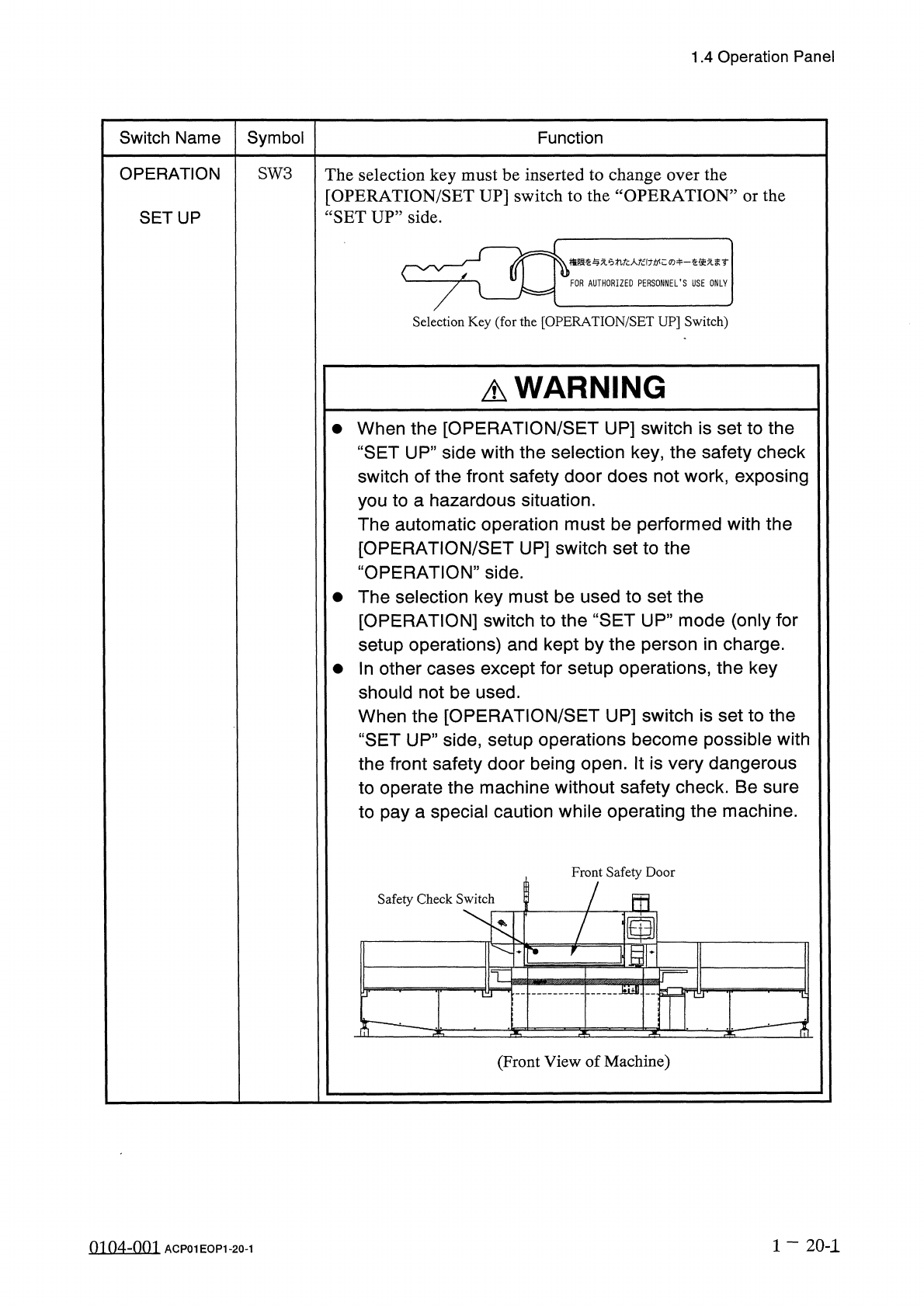
Selection
Key
(
for
the
[
OPERATION
/
SET
UP
]
Switch
)
A
WARNING
•
When
the
[
OPERATION
/
SET
UP
]
switch
is
set
to
the
“
SET
UP
”
side
with
the
selection
key
,
the
safety
check
switch
of
the
front
safety
door
does
not
work
,
exposing
you
to
a
hazardous
situation
.
The
automatic
operation
must
be
performed
with
the
[
OPERATION
/
SET
UP
]
switch
set
to
the
“
OPERATION
”
side
.
•
The
selection
key
must
be
used
to
set
the
[
OPERATION
]
switch
to
the
“
SET
UP
”
mode
(
only
for
setup
operations
)
and
kept
by
the
person
in
charge
.
•
In
other
cases
except
for
setup
operations
,
the
key
should
not
be
used
.
When
the
[
OPERATION
/
SET
UP
]
switch
is
set
to
the
“
SET
UP
”
side
,
setup
operations
become
possible
with
the
front
safety
door
being
open
.
It
is
very
dangerous
to
operate
the
machine
without
safety
check
.
Be
sure
to
pay
a
special
caution
while
operating
the
machine
.
Front
Safety
Door
Safety
Check
Switch
5
画
10
;
mr
7
T
—
^
-
(
Front
View
of
Machine
)
1
一
20
-
1
0104
-
001
ACP
01
EOP
1
-
20
-
1