1OPERATION_.pdf - 第288页
5.7 Product Change 5.7 Product Change 5.7 . 1 Selection of Set - Up Menus and Overall Set - Up Operation When the [ PRODUCT CHANGE ] key is pressed at the “ MANUAL MODE ” display , the following display appears on the sc…
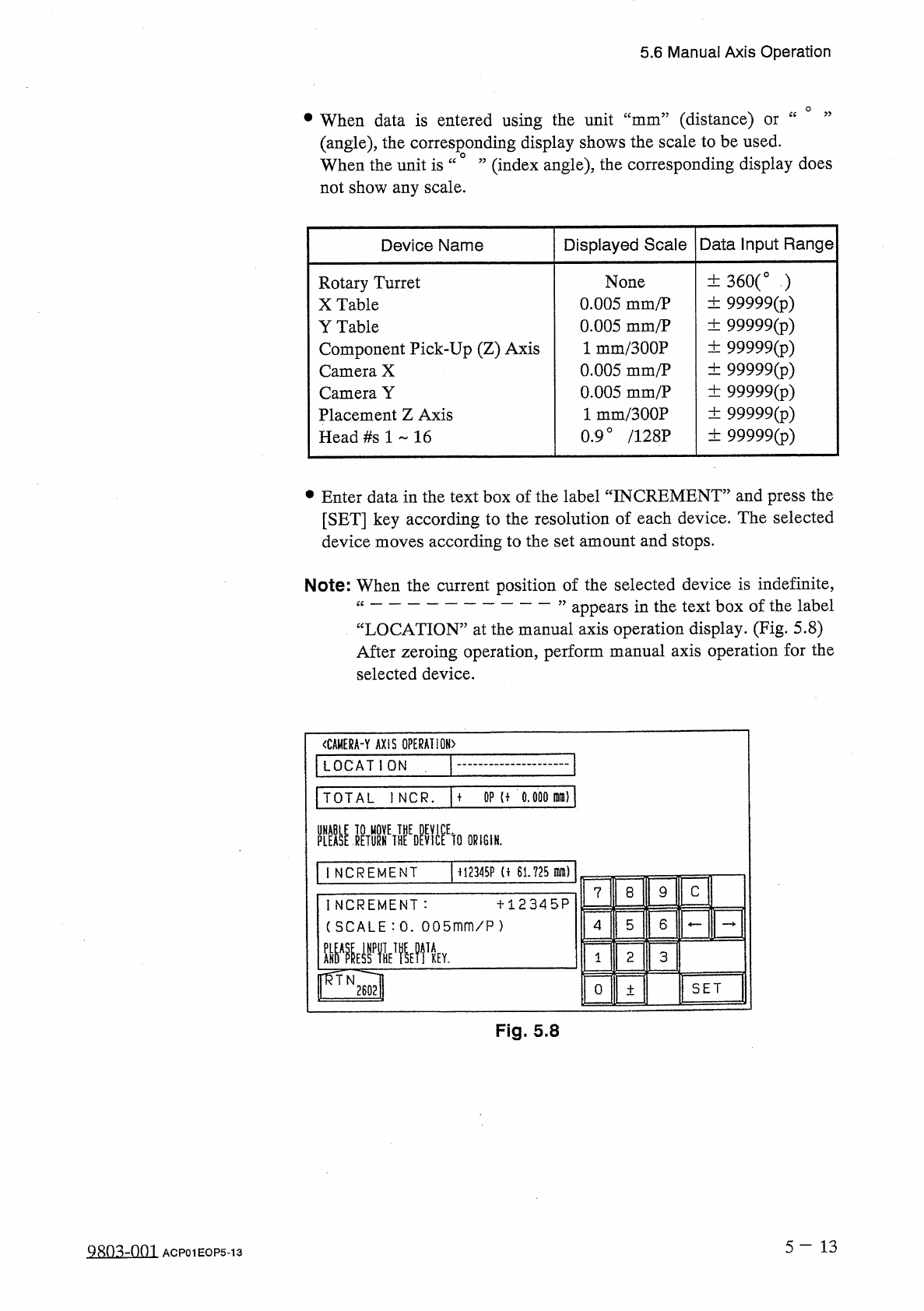
5.6
Manual
Axis
Operation
(
distance
)
(
angle
)
,
the
corresponding
display
shows
the
scale
to
be
used
.
(
index
angle
)
,
the
corresponding
display
does
•
When
data
is
entered
using
the
unit
ce
cc
mm
or
When
the
unit
is
“
not
show
any
scale
.
Displayed
Scale
Data
Input
Range
Device
Name
土
360
(
。
)
土
99999
(
p
)
土
99999
(
p
)
土
99999
(
p
)
土
99999
(
p
)
土
99999
(
p
)
土
99999
(
p
)
土
99999
(
^
)
None
0.005
mm
/
P
0.005
mm
/
P
1
mm
/
300
P
0.005
mm
/
P
0.005
mm
/
P
1
mm
/
300
P
0.9
°
/
128
P
Rotary
Turret
X
Table
Y
Table
Component
Pick
-
Up
(
Z
)
Axis
Camera
X
Camera
Y
Placement
Z
Axis
Head
#
s
1
16
•
Enter
data
in
the
text
box
of
the
label
“
INCREMENT
”
and
press
the
[
SET
]
key
according
to
the
resolution
of
each
device
.
The
selected
device
moves
according
to
the
set
amount
and
stops
.
Note
:
When
the
current
position
of
the
selected
device
is
indefinite
,
“
”
appears
in
the
text
box
of
the
label
“
LOCATION
”
at
the
manual
axis
operation
display
.
(
Fig
.
5.8
)
After
zeroing
operation
,
perform
manual
axis
operation
for
the
selected
device
.
<
CAMERA
-
Y
AXIS
OPERATION
)
LOCATION
TOTAL
1
NCR
.
M
OP
U
0.000
M
)
PLEASE
]
ETURHETHEEDEVlCEEtO
ORIGIN
.
M
2345
P
(
f
61.725
m
)
INCREMENT
C
9
8
7
INCREMENT
:
(
SCALE
:
0
.
005
mm
/
P
)
十
12345
P
6
5
4
mmvrn
TA
2
3
KEY
.
1
SET
0
土
Fig
.
5.8
5
-
1 3
QRo
^
-
om
ACP
01
EOP
5
-
13
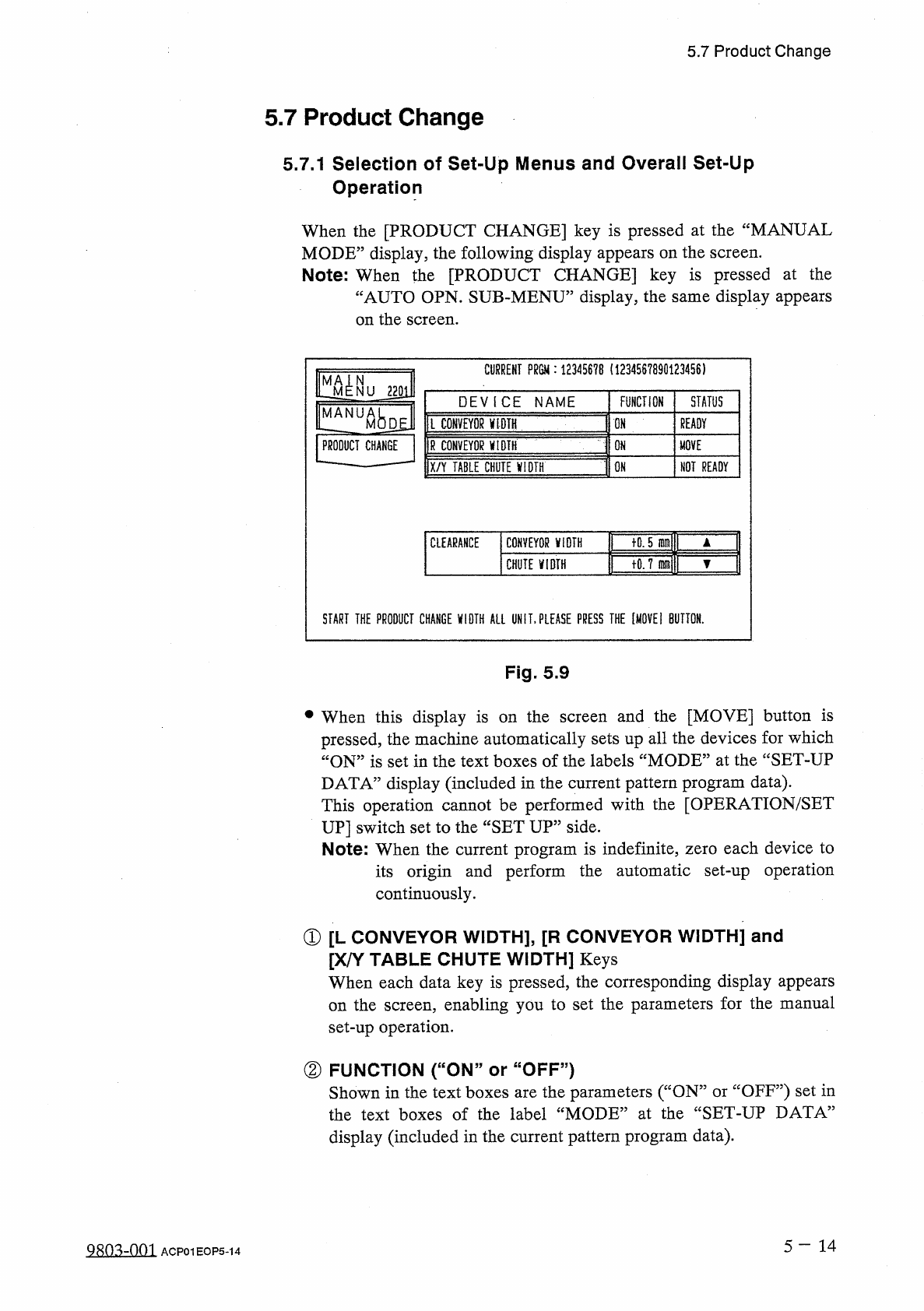
5.7
Product
Change
5.7
Product
Change
5.7
.
1
Selection
of
Set
-
Up
Menus
and
Overall
Set
-
Up
Operation
When
the
[
PRODUCT
CHANGE
]
key
is
pressed
at
the
“
MANUAL
MODE
”
display
,
the
following
display
appears
on
the
screen
.
Note
:
When
the
[
PRODUCT
CHANGE
]
key
is
pressed
at
the
“
AUTO
OPN
.
SUB
-
MENU
”
display
,
the
same
display
appears
on
the
screen
.
CURRENT
?
m
:
1234567
B
(
1234567890123456
)
m
N
NU
220
i
STATUS
DEVICE
NAME
FUNCTION
MANUA
Ml
l
CONVEYOR
V
1
DIH
ON
READY
M
|
R
CONVEYOR
yiDTH
PRODUCT
CHANGE
ON
MOVE
IX
/
Y
TABLE
CHilTElM
-
ON
NOT
READY
tQ
.
5
inmll
T
CLEARANCE
CONVEYOR
ViDTH
1
tO
.
7
mj
▼
CHUTE
VIDTH
START
THE
PRODUCT
CHANGE
VIDTH
ALL
UN
IT
,
PLEASE
PRESS
THE
[
MOVE
!
BUTTON
.
Fig
.
5.9
•
When
this
display
is
on
the
screen
and
the
[
MOVE
]
button
is
pressed
,
the
machine
automatically
sets
up
all
the
devices
for
which
“
ON
”
is
set
in
the
text
boxes
of
the
labels
“
MODE
”
at
the
“
SET
-
UP
DATA
”
display
(
included
in
the
current
pattern
program
data
)
.
This
operation
cannot
be
performed
with
the
[
OPERATION
/
SET
UP
]
switch
set
to
the
“
SET
UP
”
side
.
Note
:
When
the
current
program
is
indefinite
,
zero
each
device
to
its
origin
and
perform
the
automatic
set
-
up
operation
continuously
.
①
[
L
CONVEYOR
WIDTH
】
,
[
R
CONVEYOR
WIDTH
]
and
[
X
/
Y
TABLE
CHUTE
WIDTH
]
Keys
When
each
data
key
is
pressed
,
the
corresponding
display
appears
the
screen
,
enabling
you
to
set
the
parameters
for
the
manual
set
-
up
operation
.
on
②
FUNCTION
(
“
ON
”
or
“
OFF
”
)
Shown
in
the
text
boxes
are
the
parameters
(
“
ON
”
or
“
OFF
”
)
set
in
the
text
boxes
of
the
label
“
MODE
”
at
the
“
SET
-
UP
DATA
”
display
(
included
in
the
current
pattern
program
data
)
.
5
一
14
QRQ
^
-
nm
ACP
01
EOP
5
-
14
5.7
Product
Change
③
STATUS
“
MOVE
”
“
READY
,
:
The
machine
is
performing
the
set
-
up
operation
.
:
The
set
-
up
operation
is
completed
and
the
width
is
set
as
“
P
.
C
.
B
.
Width
+
Clearance
”
•
NOT
READY
”
:
The
width
is
set
as
“
P
.
C
.
B
.
Width
+
Clearance
”
but
the
current
position
is
not
located
(
managed
)
.
:
The
current
position
or
program
is
indefinite
.
(
Red
)
:
“
OFF
”
is
set
as
set
-
up
data
.
④
CLEARANCE
“
CLEARANCE
”
is
the
data
which
gives
some
leeway
to
the
actual
conveyor
and
chute
widths
,
adding
some
value
to
the
parameter
Y
set
as
P
.
C
.
B
.
size
in
the
current
pattern
program
data
.
(
No
parameter
can
be
set
for
each
individual
pattern
program
data
.
)
•
The
data
input
range
is
The
actual
conveyor
and
X
/
Y
table
chute
widths
must
be
“
P
.
C
.
B
.
Size
Y
十
Clearance
(
Recommended
Value
0.5
mm
)
”
.
—
5.0
+
5.0
mm
”
.
[
Input
Method
of
Clearance
Data
]
•
After
selecting
the
key
of
the
data
to
be
set
,
press
the
[
A
]
key
to
increase
the
value
or
[
▼
]
key
to
decrease
in
the
increments
decrements
of
0.1
mm
.
•
When
the
value
is
out
of
the
input
range
,
the
buzzer
in
the
touch
screen
sounds
but
no
change
is
made
in
the
parameter
.
or
Note
:
No
data
can
be
changed
while
one
of
the
devices
is
being
activated
.
5
—
1 5
9803
-
001
ACP
01
EOP
5
-
15