1OPERATION_.pdf - 第240页
MANUAL BYPASS IHYPASSFII ITL mss NOZZLE N A M E S H Q Z . N O . 1 H O Z . N O . 2 N O Z . N O . 3 K Q Z . H O . 4 N Q Z . m . 5 F A C T O R 01 / 02 〈 HEAD * NOZZLE BYPASS DATA 〉 HD . NO . 8 4.10 MANAGEMENT DATA 4.10 . 2 …
4.10
MANAGEMENT
DATA
(
4
)
How
to
Clear
Pattern
Program
Management
Data
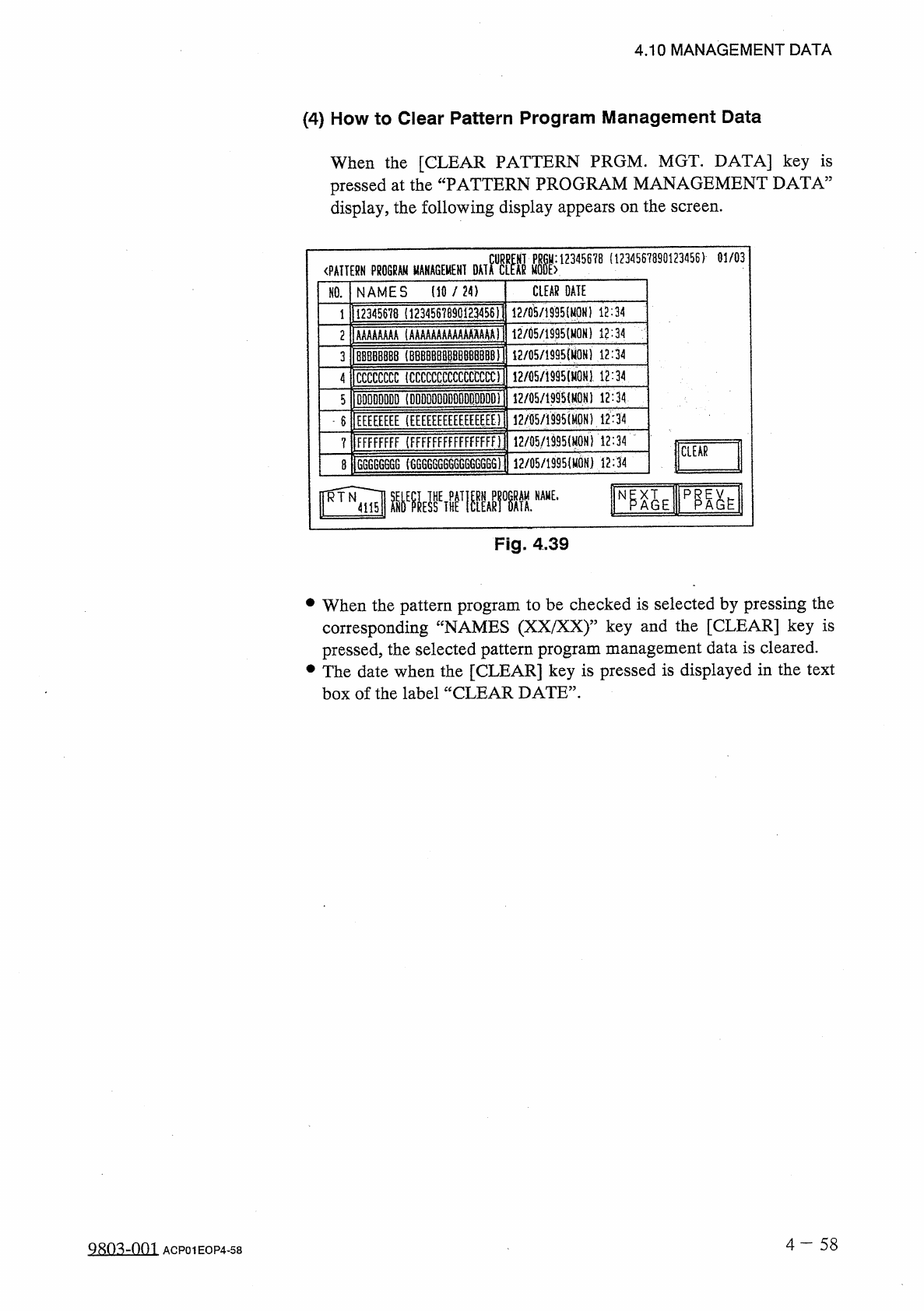
When
the
[
CLEAR
PATTERN
PRGM
.
MGT
.
DATA
]
key
is
pressed
at
the
“
PATTERN
PROGRAM
MANAGEMENT
DATA
”
display
,
the
following
display
appears
on
the
screen
.
(
1234567890123456
)
01
/
03
MTM
«
K
12345678
〈
PATTERN
PROGRAM
MANAGEMENT
NAMES
(
10
/
24
)
CLEAR
DATE
NO
.
1123
^
5678
(
1234567890
iE
3456
i
1
12
/
05
/
1995
l
12
:
34
12
/
05
/
1995
(
MON
)
12
:
34
2
1
AAAAAAAA
(
AAAAAAAAAAAAAAAA
)
12
/
05
/
1995
{
M
0
H
)
12
:
34
1
BBBBBBB
8
(
8
BBBBBB
卿
B
删
BBl
3
4
ICCCCCCCC
(
CCCCCCCCCCCCCCCC
)
!
2
/
05
/
i
995
(
H
0
N
}
12
:
34
12
/
05
/
1995
(
M
0
N
)
12
:
34
5
1
DDDDDDDD
(
DDDDDDDDDDDDDDDD
)
12
/
fl
5
/
iS
95
(
M
0
N
)
12
:
34
6
lEEEEEEEE
(
EEEEEEEEEEEEEEEE
)
FFFFFFFF
(
FFFFFFFFFFFFFFFfi
12
/
05
/
1
姚
(
MON
1
i
2
:
34
?
CLEAR
12
/
05
/
1995
(
MON
)
12
:
34
G
6
GGG
666
(
6
GG
6
GG
6666
GG
66
GG
)
8
Fig
.
4.39
•
When
the
pattern
program
to
be
checked
is
selected
by
pressing
the
corresponding
“
NAMES
(
XX
/
XX
)
”
key
and
the
[
CLEAR
]
key
is
pressed
,
the
selected
pattern
program
management
data
is
cleared
.
•
The
date
when
the
[
CLEAR
]
key
is
pressed
is
displayed
in
the
text
box
of
the
label
“
CLEAR
DATE
”
.
4
一
58
Q
8
m
-
001
ACP
01
EOP
4
-
58
MANUAL
BYPASS
IHYPASSFII
ITL
mss
NOZZLE
NAMES
HQZ
.
NO
.
1
HOZ
.
NO
.
2
NOZ
.
NO
.
3
KQZ
.
HO
.
4
NQZ
.
m
.
5
FACTOR
01
/
02
〈
HEAD
*
NOZZLE
BYPASS
DATA
〉
HD
.
NO
.
8
4.10
MANAGEMENT
DATA
4.10
.
2
HEAD
.
NOZZLE
BYPASS
DATA
Malfunctioning
nozzles
can
be
bypassed
.
The
bypassed
nozzles
bypassed
)
.
be
reset
to
the
original
condition
(
not
can
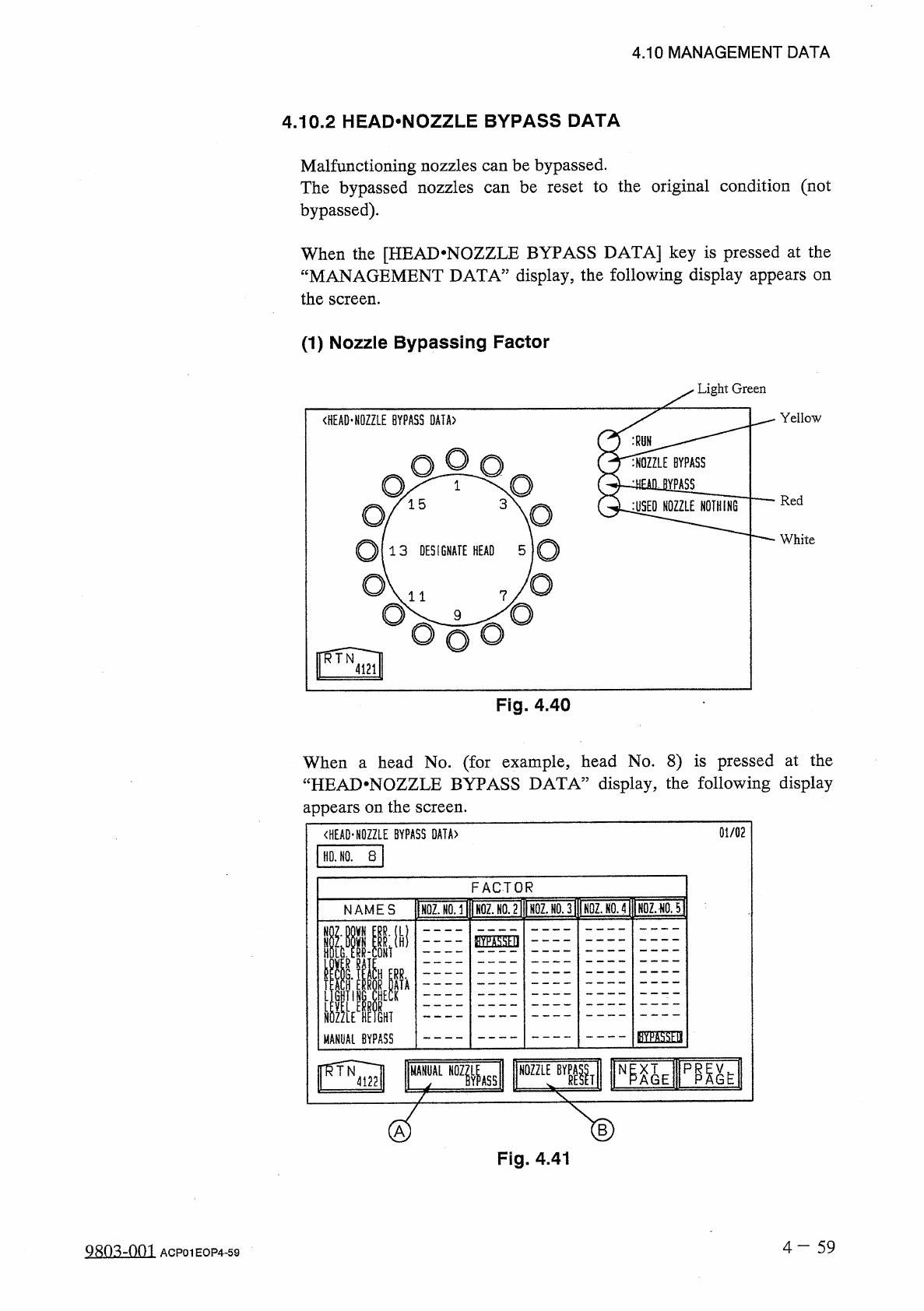
When
the
[
HEAD
*
NOZZLE
BYPASS
DATA
]
key
is
pressed
at
the
“
MANAGEMENT
DATA
”
display
,
the
following
display
appears
the
screen
.
on
(
1
)
Nozzle
Bypassing
Factor
Light
Green
Yellow
Red
White
Fig
.
4.40
When
a
head
No
.
(
for
example
,
head
No
.
8
)
is
pressed
at
the
“
HEAD
.
NOZZLE
BYPASS
DATA
”
display
,
the
following
display
appears
on
the
screen
.
B
Fig
.
4.41
4
-
59
QRO
^
-
nm
ACP
01
EOP
4
-
59
3
E
PA
WY
Df
RAK
rLnuc
T
CL
UM
HRHR
6
Ecoco
—
TIAnK
TKrru
NKnKAERAbRH
VWVDnR
-
—
rcNrt
oopk
—
rt
DD
.
RGH
_
t
h
.
dc
.
xuAiuH
-
r
7
^
J
-
ufAVAGVZ
4.10
MANAGEMENT
DATA
【
Labels
】
①
NOZ
.
DOWN
ERR
.
(
L
)
The
nozzle
which
was
specified
as
“
LOW
”
level
did
not
reach
the
low
level
.
②
NOZ
.
DOWN
ERR
.
(
H
)
The
nozzle
which
was
specified
as
“
HIGH
2
limit
and
stopped
.
③
HDLG
.
ERR
-
CONT
The
nozzle
reached
the
number
of
set
continuous
error
counts
.
④
LOWER
RATE
The
nozzle
reached
the
set
number
of
errors
before
it
reaches
the
specified
pick
-
up
rate
.
⑤
RECOG
.
TEACH
ERR
.
A
recognition
error
occurred
during
nozzle
position
teaching
.
⑥
TEACH
ERROR
DATA
A
value
exceeding
the
tolerance
position
teaching
.
(
Reserved
Data
)
⑦
LIGHTING
CHECK
A
recognition
check
)
and
lighting
teaching
.
⑧
LEVEL
ERROR
A
level
offset
value
exceeding
the
tolerance
was
calculated
during
nozzle
level
teaching
.
⑨
NOZZLE
HEIGHT
The
nozzle
height
exceeded
the
lower
limit
regardless
of
the
nozzle
level
designation
.
⑩
MANUAL
BYPASS
Bypass
mode
was
set
manually
.
level
reached
the
lower
calculated
during
nozzle
was
occurred
during
nozzle
position
(
lighting
error
[
How
to
set
bypass
mode
manually
]
•
Press
the
[
MANUAL
NOZZLE
BYPASS
]
key
@
.
The
“
MANUAL
NOZZLE
BYPASS
”
display
appears
on
the
screen
.
This
display
is
the
same
as
one
that
can
be
opened
at
the
“
SPECIAL
SEL
.
”
display
.
Refer
to
“
3.3
MANUAL
NOZZLE
BYPASS
”
in
the
instruction
manual
(
SECTION
DI
MAINTENANCE
MANUAL
)
for
details
.
[
How
to
cancel
bypass
mode
]
•
Press
the
[
NOZZLE
BYPASS
RESET
]
key
®
•
The
nozzle
bypass
mode
can
be
canceled
.
Bypass
mode
set
due
to
a
teaching
error
,
a
lighting
teaching
is
successful
,
bypass
mode
is
canceled
.
error
,
or
a
level
error
cannot
be
canceled
.
When
each
4
一
60
QR
03
-
nm
ACP
01
EOP
4
-
60