1OPERATION_.pdf - 第200页
4.6 Operation Mode Notes : ( a ) When “ DISABLE ” is set in the data box of the label “ DETECTION MODE ” , this function is not activated and does not detect any component shortage at every lane . Any component shortage …
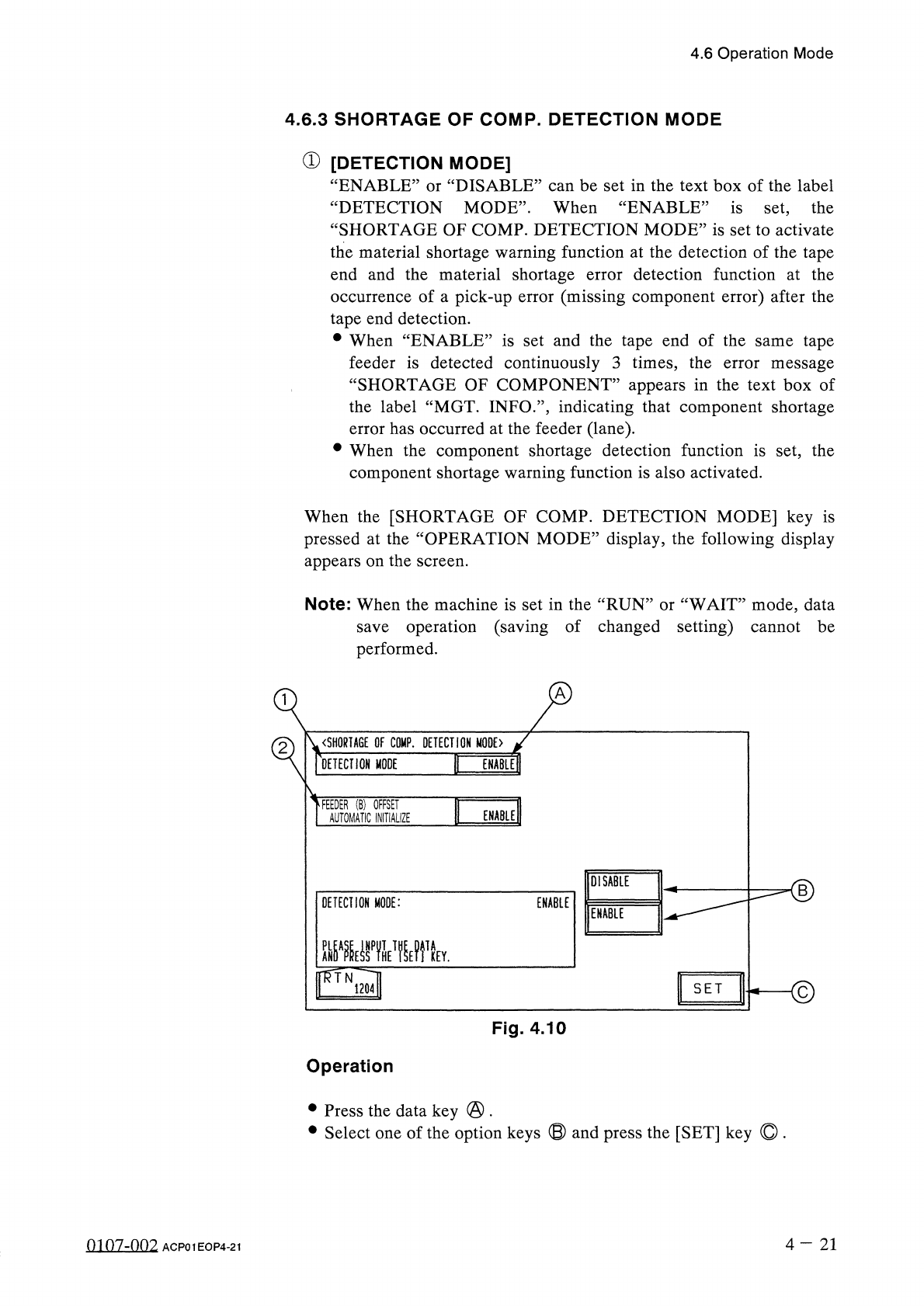
4.6
Operation
Mode
4.6
.
3
SHORTAGE
OF
COMP
.
DETECTION
MODE
①
[
DETECTION
MODE
]
“
ENABLE
DISABLE
”
can
be
set
in
the
text
box
of
the
label
“
DETECTION
MODE
”
.
When
“
ENABLE
”
is
set
,
the
“
SHORTAGE
OF
COMP
.
DETECTION
MODE
”
is
set
to
activate
the
material
shortage
warning
function
at
the
detection
of
the
tape
end
and
the
material
shortage
error
detection
function
at
the
occurrence
of
a
pick
-
up
error
(
missing
component
error
)
after
the
tape
end
detection
.
•
When
“
ENABLE
”
is
set
and
the
tape
end
of
the
same
tape
feeder
is
detected
continuously
3
times
,
the
error
message
“
SHORTAGE
OF
COMPONENT
”
appears
in
the
text
box
of
the
label
“
MGT
.
INFO
.
”
,
indicating
that
component
shortage
error
has
occurred
at
the
feeder
(
lane
)
.
•
When
the
component
shortage
detection
function
is
set
,
the
component
shortage
warning
function
is
also
activated
.
or
When
the
[
SHORTAGE
OF
COMP
.
DETECTION
MODE
]
key
is
pressed
at
the
“
OPERATION
MODE
”
display
,
the
following
display
appears
on
the
screen
.
Note
:
When
the
machine
is
set
in
the
“
RUN
”
or
“
WAIT
”
mode
,
data
save
operation
(
saving
of
changed
setting
)
cannot
be
performed
.
〈
SHORTAGE
OF
COMP
.
DETECTION
MODE
〉
DETECTION
MODE
FEEDER
(
B
)
OFFSET
AUTOMATIC
INITIALIZE
ENABLE
DISABLE
<
D
DETECTION
MODE
:
ENABLE
ENABLE
©
SET
Fig
.
4.10
Operation
•
Press
the
data
key
@
.
•
Select
one
of
the
option
keys
⑬
and
press
the
[
SET
]
key
©
.
4
-
21
0107
-
002
ACP
01
EOP
4
-
21
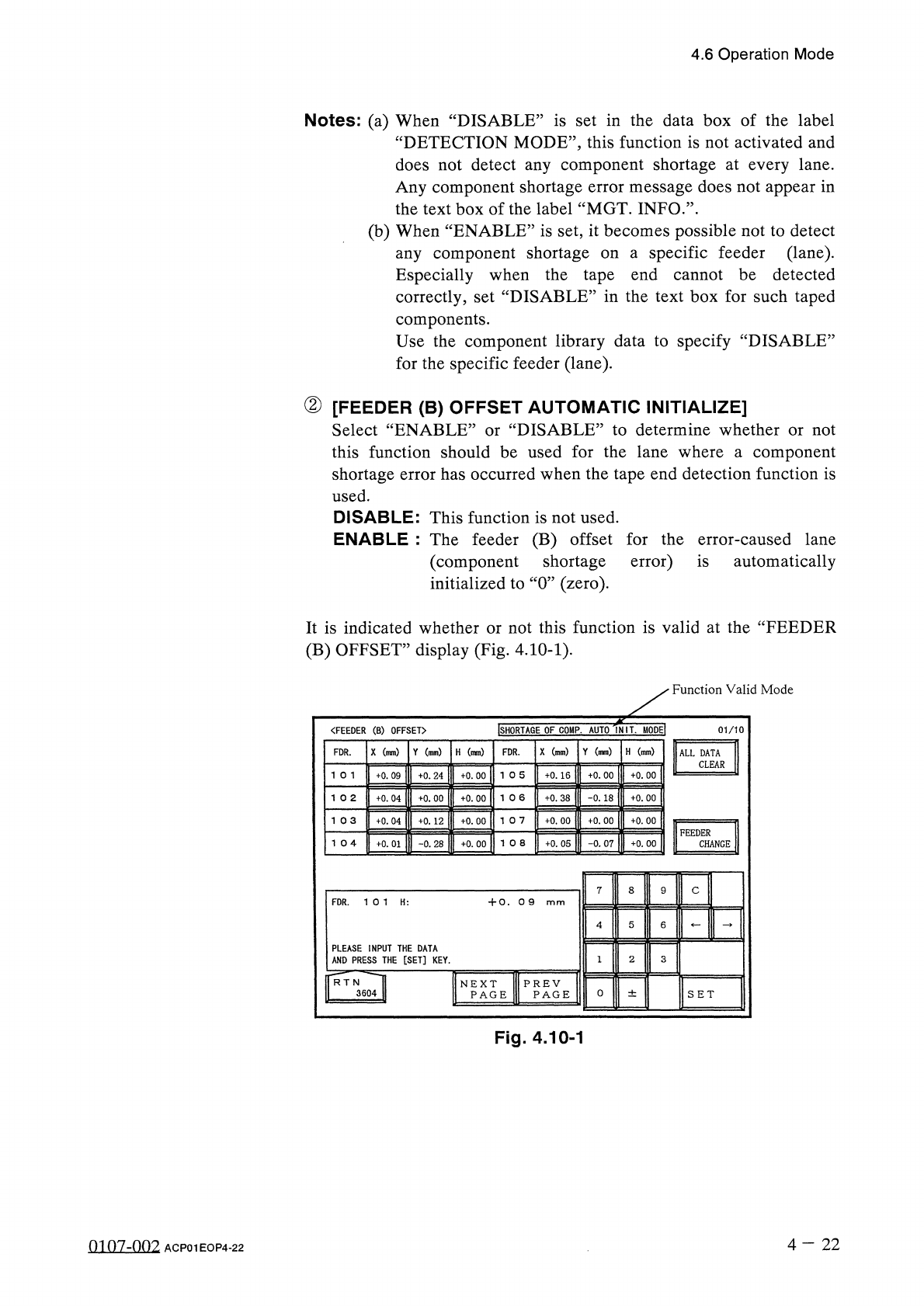
4.6
Operation
Mode
Notes
:
(
a
)
When
“
DISABLE
”
is
set
in
the
data
box
of
the
label
“
DETECTION
MODE
”
,
this
function
is
not
activated
and
does
not
detect
any
component
shortage
at
every
lane
.
Any
component
shortage
error
message
does
not
appear
in
the
text
box
of
the
label
“
MGT
.
INFO
.
’’
.
(
b
)
When
“
ENABLE
”
is
set
,
it
becomes
possible
not
to
detect
specific
feeder
(
lane
)
.
any
component
shortage
Especially
when
the
tape
end
cannot
be
detected
on
a
correctly
,
set
“
DISABLE
”
in
the
text
box
for
such
taped
components
.
Use
the
component
library
data
to
specify
“
DISABLE
”
for
the
specific
feeder
(
lane
)
.
②
[
FEEDER
(
B
)
OFFSET
AUTOMATIC
INITIALIZE
]
Select
“
ENABLE
”
or
“
DISABLE
”
to
determine
whether
or
not
this
function
should
be
used
for
the
lane
where
a
component
shortage
error
has
occurred
when
the
tape
end
detection
function
is
used
.
DISABLE
:
This
function
is
not
used
.
ENABLE
:
The
feeder
(
B
)
offset
for
the
error
-
caused
lane
(
component
shortage
error
)
is
automatically
initialized
to
“
0
”
(
zero
)
.
It
is
indicated
whether
or
not
this
function
is
valid
at
the
“
FEEDER
(
B
)
OFFSET
”
display
(
Fig
.
4.10
-
1
)
.
Function
Valid
Mode
INIL
MODEI
ISHORTAGE
OF
COMP
.
AUTO
"
〈
FEEDER
(
B
)
OFFSET
〉
01
/
10
X
(
mm
)
Y
(
mm
)
H
(
mm
)
X
(
mm
)
Y
(
mm
)
H
(
mm
)
FDR
.
FDR
.
ALL
DATA
CLEAR
+
0.09
+
0.16
+
0
.
00
+
0
.
00
+
0
.
24
+
0.00
1 0
6
+
0.38
-
0.18
+
0
.
00
+
0.04
+
0.00
+
0.00
10
7
1
03
+
0.04
+
0
.
12
+
0.00
+
0.00
+
0.00
+
0
.
00
FEEDER
+
0
.
05
-
0.07
+
0.00
CHANGE
+
0.01
-
0.28
+
0.00
7
8
C
FDR
.
10
1
H
:
+
0.0
9
PLEASE
INPUT
THE
DATA
AND
PRESS
THE
[
SET
]
KEY
.
3
f
*
RT
N
^
^
TI
3604
H
PREV
PAGE
NEXT
PAGE
0
±
SET
Fig
.
4.10
-
1
4
-
22
0107
-
002
ACP
01
EOP
4
-
22
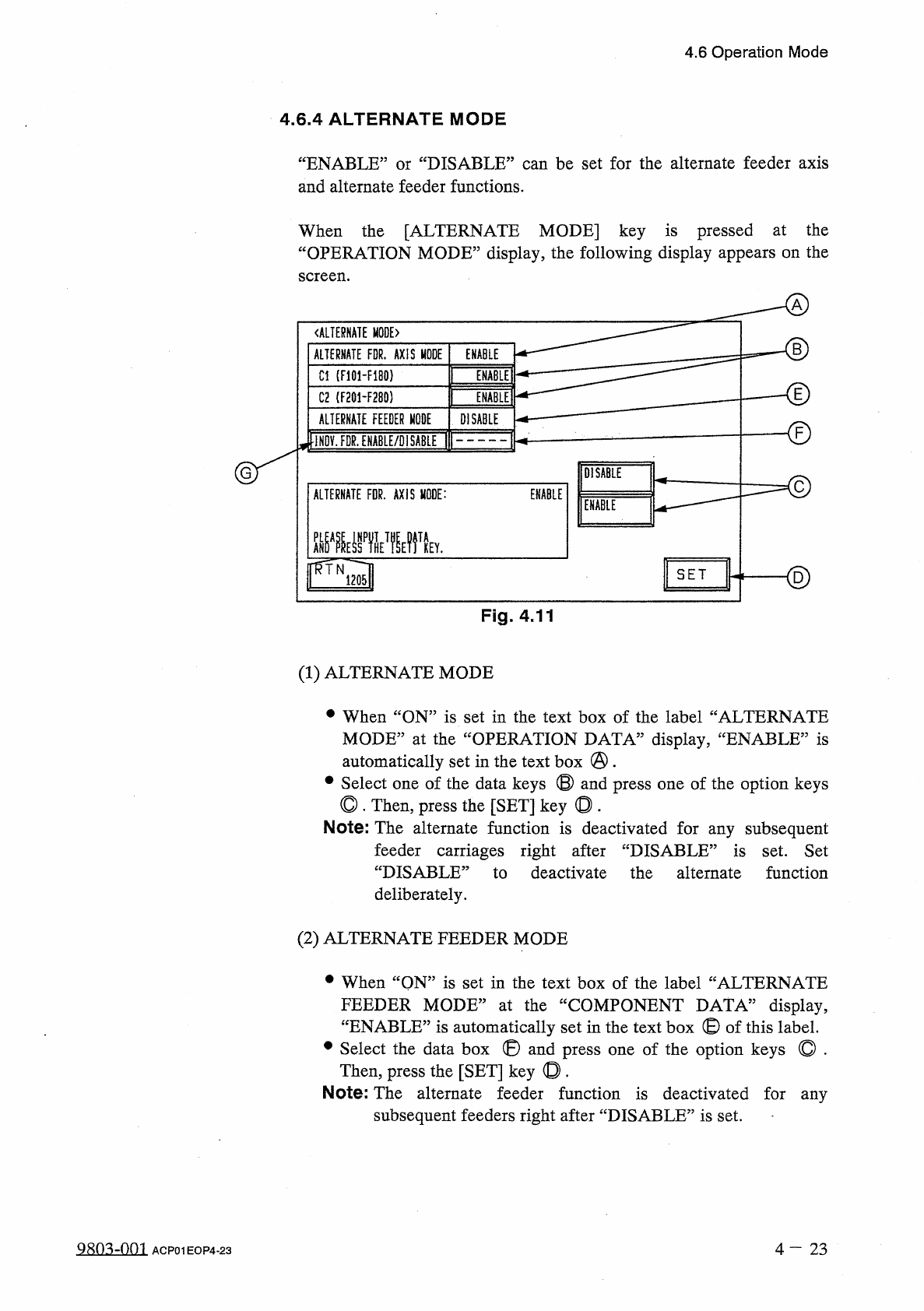
4.6
Operation
Mode
4.6
.
4
ALTERNATE
MODE
“
ENABLE
”
or
“
DISABLE
”
can
be
set
for
the
alternate
feeder
axis
and
alternate
feeder
functions
.
When
the
[
ALTERNATE
MODE
]
key
is
pressed
at
the
“
OPERATION
MODE
”
display
,
the
following
display
appears
on
the
screen
.
《
ALTERNATE
MODE
)
B
ALTERNATE
FDR
.
AXIS
MODE
ENABLE
ENABLE
]
Cl
(
F
101
-
F
180
)
E
INMEI
C
2
(
F
201
-
F
280
)
ALTERNATE
FEEDER
MODE
DISABLE
-
©
iNOV
.
FDR
.
ENABLE
/
DISABLE
DISABLE
ENABLE
ALTERNATE
FDR
.
AXIS
MODE
:
ENABLE
齜
WHE
?
fV
<
2
)
SET
Fig
.
4.11
(
1
)
ALTERNATE
MODE
•
When
“
ON
”
is
set
in
the
text
box
of
the
label
“
ALTERNATE
MODE
”
at
the
“
OPERATION
DATA
”
display
,
‘
automatically
set
in
the
text
box
@
.
#
Select
one
of
the
data
keys
©
and
press
one
of
the
option
keys
◎
.
Then
,
press
the
[
SET
]
key
◎
.
Note
:
The
alternate
function
is
deactivated
for
any
subsequent
‘
ENABLE
,,
is
feeder
carriages
right
after
“
DISABLE
”
is
set
.
Set
“
DISABLE
:
to
deactivate
the
alternate
function
deliberately
.
(
2
)
ALTERNATE
FEEDER
MODE
•
When
“
QN
”
is
set
in
the
text
box
of
the
label
“
ALTERNATE
FEEDER
MODE
”
at
the
“
COMPONENT
DATA
”
display
,
“
ENABLE
”
is
automatically
set
in
the
text
box
©
of
this
label
.
•
Select
the
data
box
®
and
press
one
of
the
option
keys
©
.
Then
,
press
the
[
SET
]
key
©
.
Note
:
The
alternate
feeder
function
is
deactivated
for
any
subsequent
feeders
right
after
“
DISABLE
”
is
set
.
980
^
-
001
4
-
2 3
ACP
01
EOP
4
-
23