1OPERATION_.pdf - 第214页
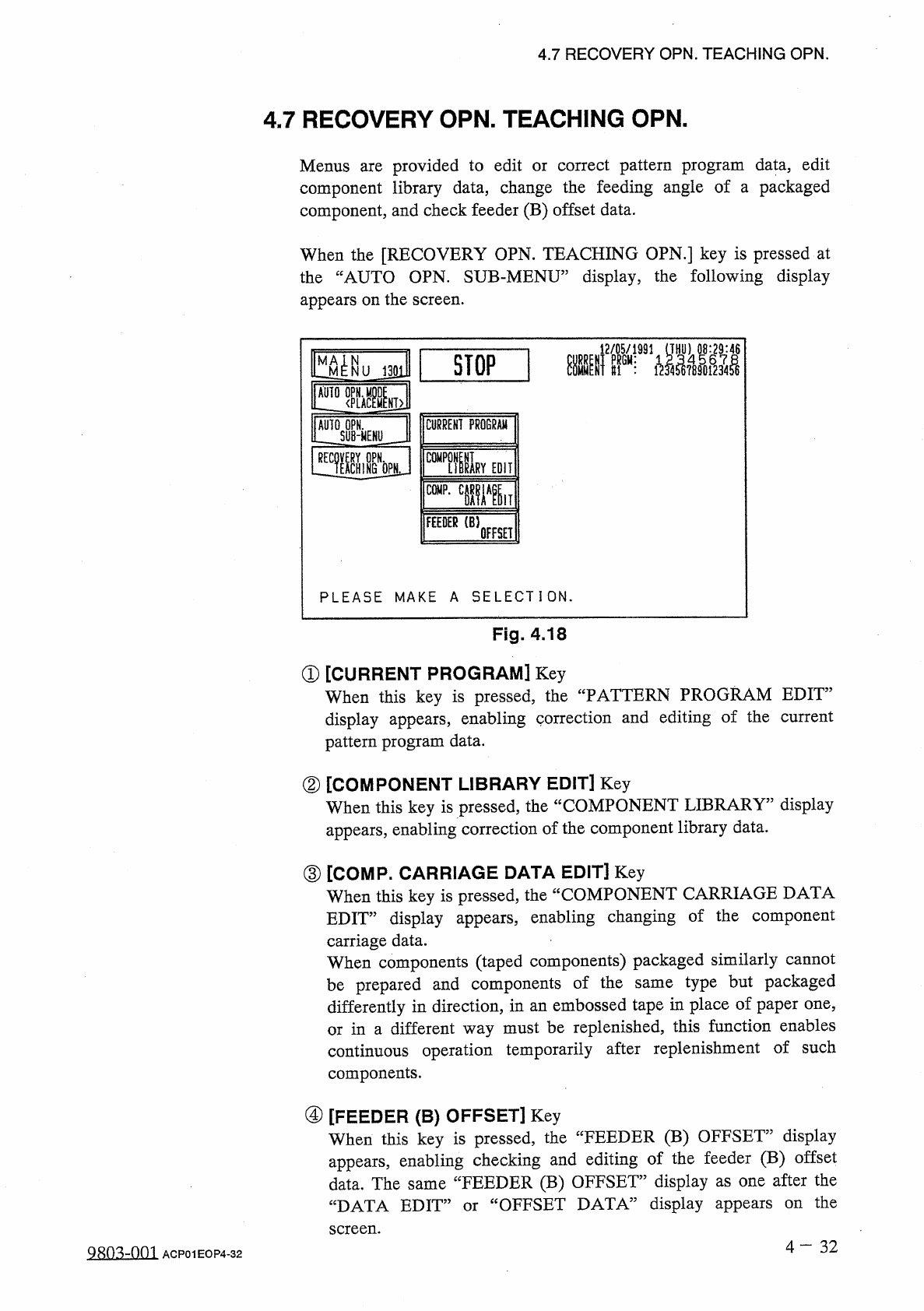
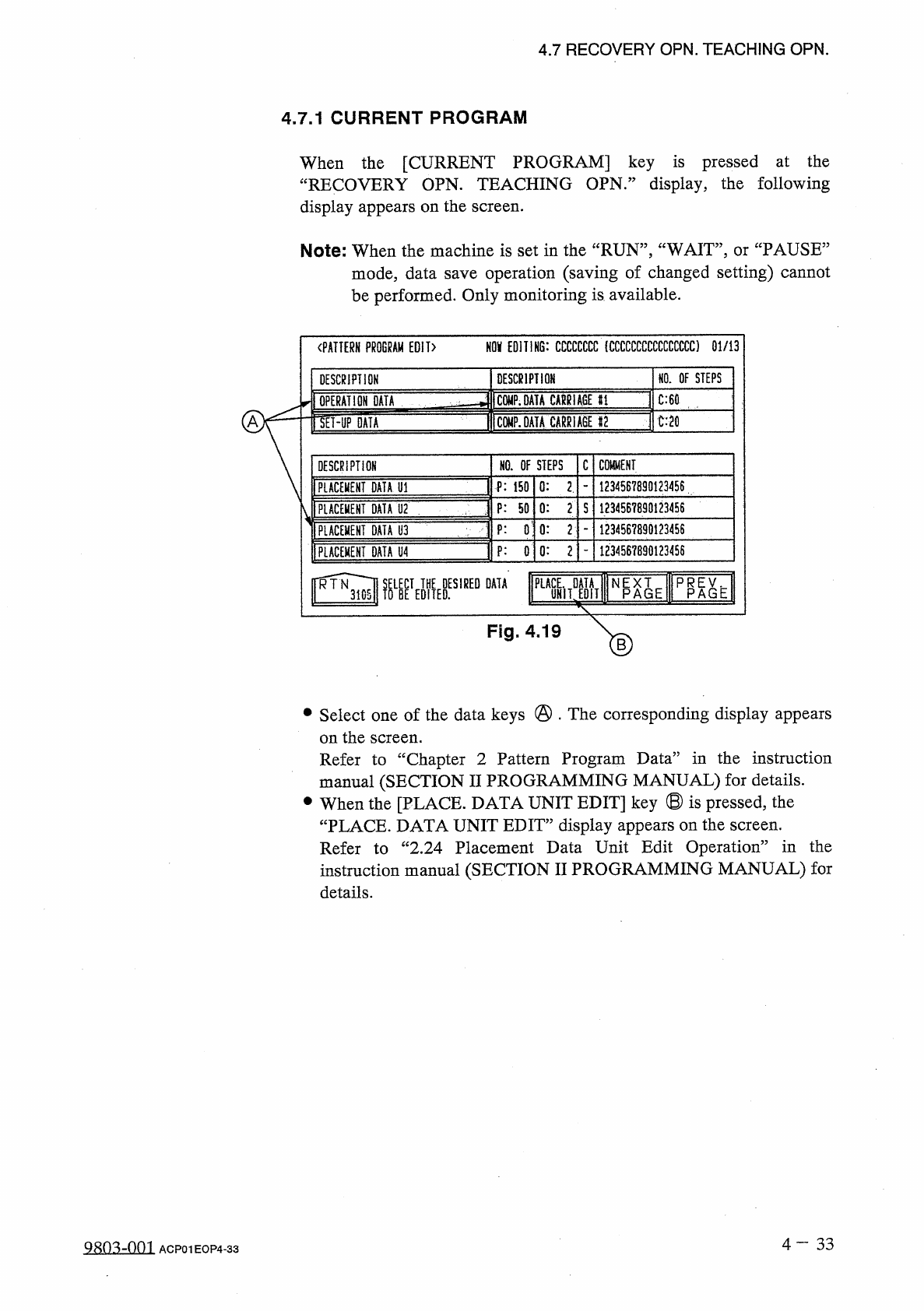
4.7 RECOVERY OPN . TEACHING OPN . 4.7 . 1 CURRENT PROGRAM When the [ CURRENT PROGRAM ] key is pressed at the “ RECOVERY OPN . TEACHING OPN . ” display , the following display appears on the screen . Note : When the machi…
4.7
RECOVERY
OPN
.
TEACHING
OPN
.
4.7
RECOVERY
OPN
.
TEACHING
OPN
.
Menus
are
provided
to
edit
component
library
data
,
change
the
feeding
angle
of
a
packaged
component
,
and
check
feeder
(
B
)
offset
data
.
correct
pattern
program
data
,
edit
or
When
the
[
RECOVERY
OPN
.
TEACHING
OPN
.
]
key
is
pressed
at
the
“
AUTO
OPN
.
SUB
-
MENU
”
display
,
the
following
display
appears
on
the
screen
.
趣
SI
1
STOP
1
MA
^
N
NUJ
301
M
麵
Mid
AUTO
OPN
.
SUB
-
MENU
RECOVERY
OPN
.
^
TEACHING
CURRENT
PROGRAM
睡
t
OPN
EDIT
Li
m
?
.
C
iWlT
FEEDER
(
B
)
OFFSET
PLEASE
MAKE
A
SELECT
I
ON
.
Fig
.
4.18
①
[
CURRENT
PROGRAM
]
Key
When
this
key
is
pressed
,
the
“
PATTERN
PROGRAM
EDIT
”
display
appears
,
enabling
correction
and
editing
of
the
current
pattern
program
data
.
②
[
COMPONENT
LIBRARY
EDIT
]
Key
When
this
key
is
pressed
,
the
“
COMPONENT
LIBRARY
”
display
appears
,
enabling
correction
of
the
component
library
data
.
③
[
COMP
.
CARRIAGE
DATA
EDIT
]
Key
When
this
key
is
pressed
,
the
“
COMPONENT
CARRIAGE
DATA
EDIT
”
display
appears
,
enabling
changing
of
the
component
carriage
data
.
When
components
(
taped
components
)
packaged
similarly
cannot
be
prepared
and
components
of
the
differently
in
direction
,
in
an
embossed
tape
in
place
of
paper
one
,
or
in
a
different
way
must
be
replenished
,
this
function
enables
continuous
operation
temporarily
after
replenishment
of
such
components
.
type
but
packaged
same
④
[
FEEDER
(
B
)
OFFSET
]
Key
When
this
key
is
pressed
,
the
“
FEEDER
(
B
)
OFFSET
”
display
appears
,
enabling
checking
and
editing
of
the
feeder
(
B
)
offset
data
.
The
same
“
FEEDER
(
B
)
OFFSET
”
display
as
one
after
the
“
DATA
EDIT
”
or
“
OFFSET
DATA
”
display
appears
screen
.
the
on
4
-
32
QRO
^
-
nm
ACP
01
EOP
4
-
32
4.7
RECOVERY
OPN
.
TEACHING
OPN
.
4.7
.
1
CURRENT
PROGRAM
When
the
[
CURRENT
PROGRAM
]
key
is
pressed
at
the
“
RECOVERY
OPN
.
TEACHING
OPN
.
”
display
,
the
following
display
appears
on
the
screen
.
Note
:
When
the
machine
is
set
in
the
“
RUN
”
,
“
WAIT
”
,
or
“
PAUSE
”
mode
,
data
save
operation
(
saving
of
changed
setting
)
cannot
be
performed
.
Only
monitoring
is
available
.
NOV
EDITING
:
CCCCCCCC
(
CCCCCCCCCCCCCCCC
)
01
/
13
〈
PATTERN
PROGRAM
EDIT
〉
NO
.
OF
STEPS
DESCRIPTION
DESCRIPTION
1
C
0
MP
.
DATA
MUGE
H
]
C
:
60
OPERATION
DATA
IW
.
DATA
CABRlAllF
C
:
20
A
lET
-
UP
DATA
C
COMMENT
NO
.
OF
STEPS
DESCRIPTION
1234567890123456
0
:
2
.
P
:
150
FLACEIOT
DATA
U
1
1
1234567890123456
PLACEMENT
DATA
U
2
P
:
50
0
:
2
S
3
P
:
0
:
0
:
2
1234567890123456
PLACEMENT
DATA
U
3
1234567890123456
0
:
2
P
:
0
PLACEKEHI
DATA
U
4
^
3
)
WETofyES
,
REDDATA
PLM
rMi
Fig
.
4.19
•
Select
one
of
the
data
keys
@
.
The
corresponding
display
appears
on
the
Refer
to
“
Chapter
2
Pattern
Program
Data
”
in
the
instruction
manual
(
SECTION
II
PROGRAMMING
MANUAL
)
for
details
.
•
When
the
[
PLACE
.
DATA
UNIT
EDIT
]
key
®
is
pressed
,
the
“
PLACE
.
DATA
UNIT
EDIT
”
display
appears
on
the
screen
.
Refer
to
“
2.24
Placement
Data
Unit
Edit
Operation
”
in
the
instruction
manual
(
SECTION
II
PROGRAMMING
MANUAL
)
for
details
.
screen
.
4
一
33
QRO
^
-
001
ACP
01
EOP
4
-
33
4.7
RECOVERY
OPN
.
TEACHING
OPN
.
4.7
.
2
COMPONENT
LIBRARY
EDIT
When
the
[
COMPONENT
LIBRARY
EDIT
]
key
is
pressed
at
the
“
RECOVERY
OPN
.
TEACHING
OPN
.
”
display
,
the
following
display
appears
on
the
screen
.
CURRENT
PRGM
:
12345678
(
1234567890123456
)
〈
COMPONENT
LIBRARY
)
COMPONENT
10
LIST
(
X X X
/
8 0 0
)
AAAAAAA
AAAAAAAA
I
IIIIII
1111
L
5555555555555555
DELE
了
33333
4
0
MF
0
NENT
5
FFFFFFF
FFFFFFFF
6686666666666666
llllil
niiiTriiirifiif
<
D
10
KKKKKUKKXKKKKKK
LLLLLLLLIULLLLL
NNNNN
^
fiNNNNNNNNN
0000000000000000
SEARCH
II
445555555555
|
|
66666666666666
1
COMPONENT
13
DATA
EDIT
55
14
15
66
WE
f
^
l
NPEAXGTE
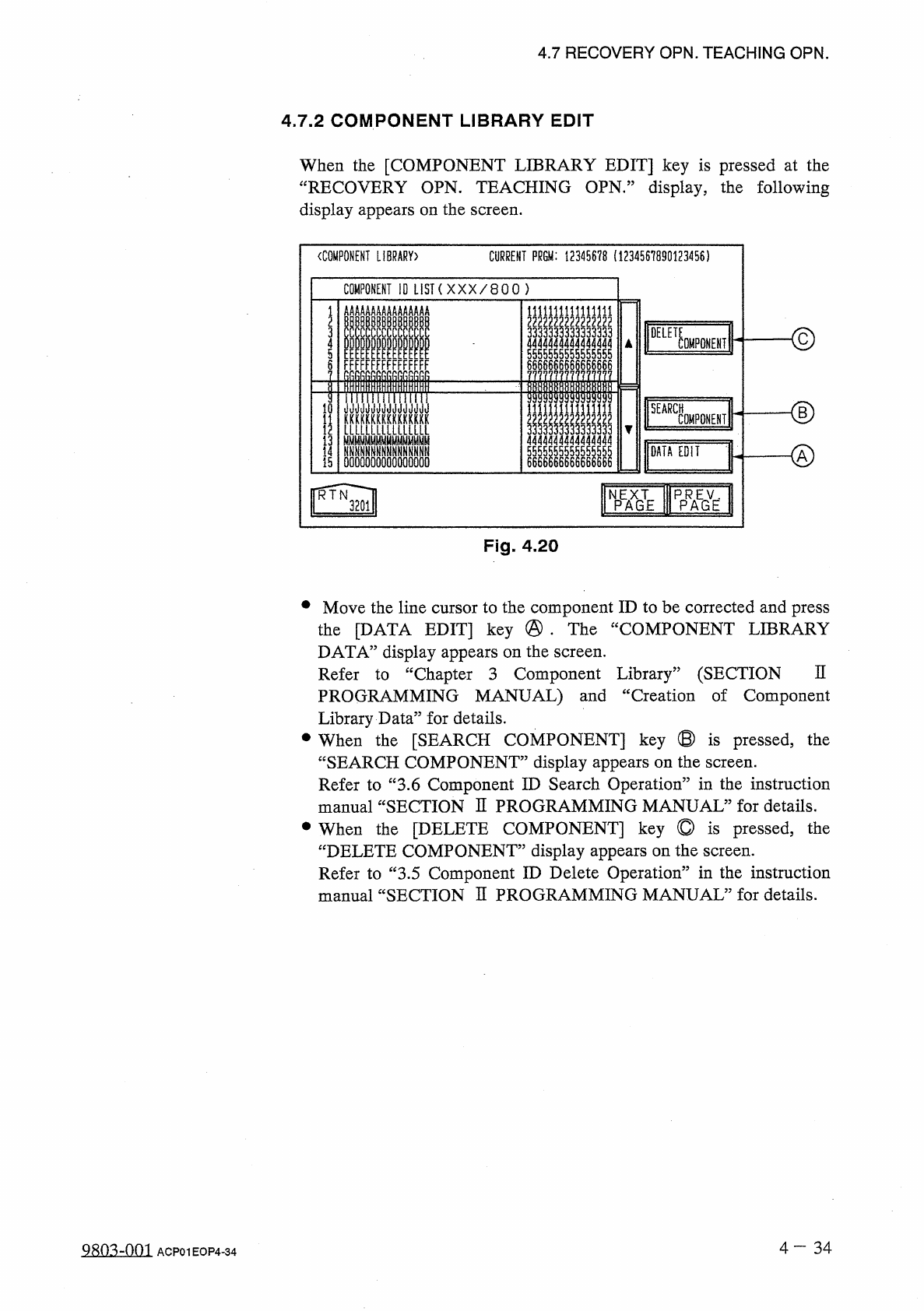
Fig
.
4.20
•
Move
the
line
cursor
to
the
component
ID
to
be
corrected
and
press
the
[
DATA
EDIT
]
key
@
•
The
“
COMPONENT
LIBRARY
DATA
”
display
appears
on
the
screen
.
Refer
to
“
Chapter
3
Component
Library
”
(
SECTION
PROGRAMMING
MANUAL
)
and
“
Creation
of
Component
Library
Data
”
for
details
.
•
When
the
[
SEARCH
COMPONENT
]
key
®
is
pressed
,
the
“
SEARCH
COMPONENT
”
display
appears
on
the
screen
.
Refer
to
“
3.6
Component
ID
Search
Operation
”
in
the
instruction
manual
“
SECTION
H
PROGRAMMING
MANUAL
”
for
details
.
•
When
the
[
DELETE
COMPONENT
]
key
©
is
pressed
,
the
“
DELETE
COMPONENT
”
display
appears
on
the
screen
.
Refer
to
“
3.5
Component
ID
Delete
Operation
”
in
the
instruction
manual
“
SECTION
H
PROGRAMMING
MANUAL
”
for
details
.
n
4
-
34
Q
^
o
^
-
nm
ACP
01
EOP
4
-
34