1OPERATION_.pdf - 第92页
2.1 Hierarchical Structure of Operation Displays ③ [ DATA EDIT ] key This option consists of labels for data editing ( pattern program data , component library data , device data , offset data , etc . ) . ④ [ SPECIAL SEL…
2.1
Hierarchical
Structure
of
Operation
Displays
2.1
Hierarchical
Structure
of
Operation
Displays
2.1
.
1
“
MAIN
MENU
”
Display
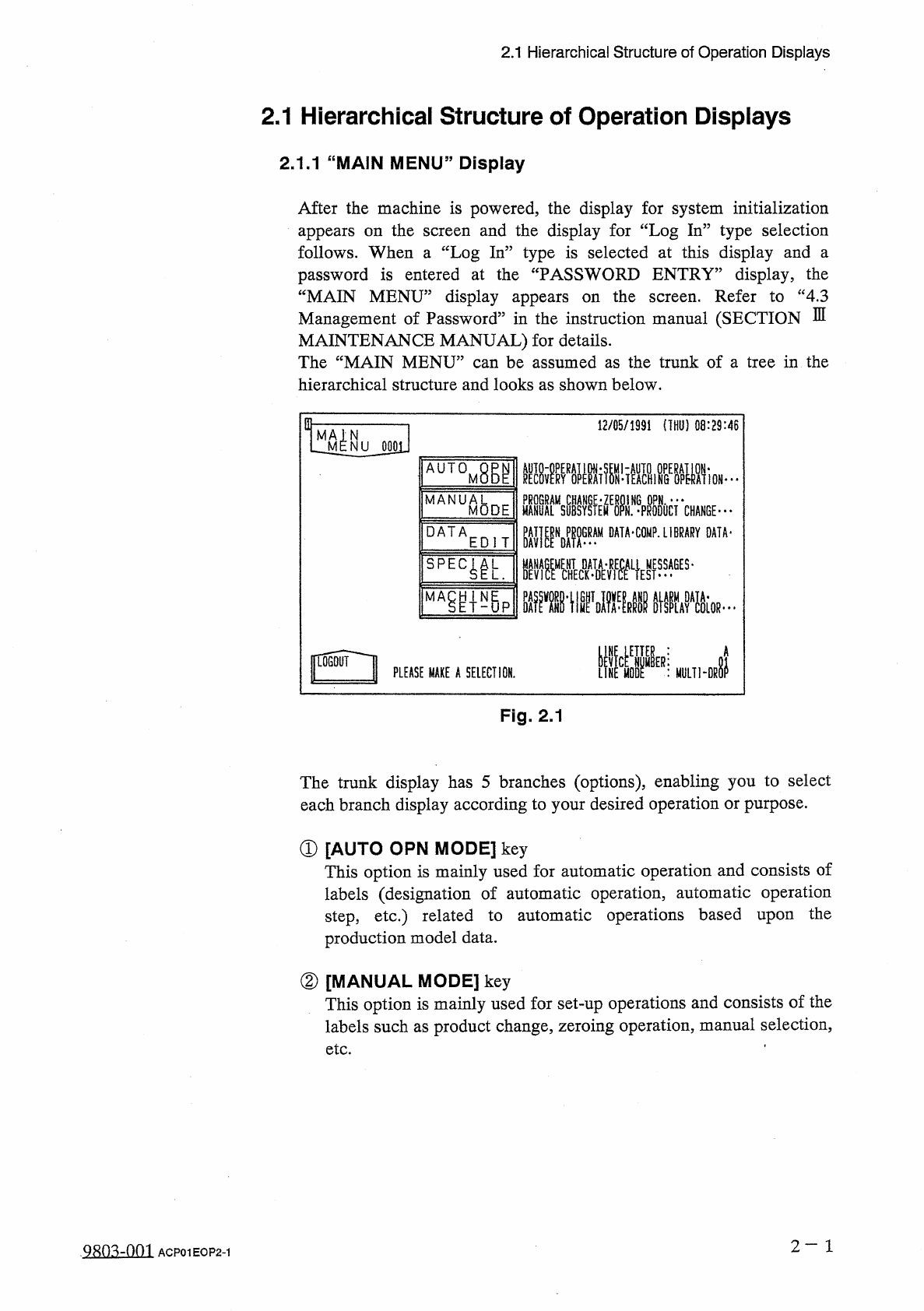
After
the
machine
is
powered
,
the
display
for
system
initialization
appears
on
the
follows
.
When
a
“
Log
In
”
type
is
selected
at
this
display
and
a
password
is
entered
at
the
“
PASSWORD
ENTRY
”
display
,
the
“
MAIN
MENU
”
display
appears
on
the
Management
of
Password
”
in
the
instruction
manual
(
SECTION
MAINTENANCE
MANUAL
)
for
details
.
The
“
MAIN
MENU
”
can
be
assumed
as
the
trunk
of
a
tree
in
the
hierarchical
structure
and
looks
as
shown
below
.
and
the
display
for
“
Log
In
”
type
selection
screen
Refer
to
“
4.3
screen
.
E
in
-
12
/
05
/
1991
(
THU
)
08
:
29
:
46
N
NU
0001
AUTOM
腳
HAIALMISYSIEM
^
N
.
^
PRODOCT
CHANGE
" "
"
PAT
|
|
NDP
^
GRAM
DATA
-
COMP
.
LIBRARY
DATA
-
■
疆擺
L
}
ES
,
ges
-
MANUA
8
DE
M
DATA
EDIT
瓶掛
.
iivKIF
%
um
-
Di
|
L
06
QUI
I
PLEASE
MAKE
A
SELECTION
.
Fig
.
2.1
The
trunk
display
has
5
branches
(
options
)
,
enabling
you
to
select
each
branch
display
according
to
your
desired
operation
or
purpose
.
①
[
AUTO
OPN
MODE
]
key
This
option
is
mainly
used
for
automatic
operation
and
consists
of
labels
(
designation
of
automatic
operation
,
automatic
operation
step
,
etc
.
)
related
to
automatic
operations
based
upon
production
model
data
.
the
②
[
MANUAL
MODE
]
key
This
option
is
mainly
used
for
set
-
up
operations
and
consists
of
the
labels
such
as
product
change
,
zeroing
operation
,
manual
selection
,
etc
.
2
一
1
ACP
01
EOP
2
-
1
2.1
Hierarchical
Structure
of
Operation
Displays
③
[
DATA
EDIT
]
key
This
option
consists
of
labels
for
data
editing
(
pattern
program
data
,
component
library
data
,
device
data
,
offset
data
,
etc
.
)
.
④
[
SPECIAL
SEL
.
]
key
This
option
consists
of
labels
(
management
data
,
recall
messages
,
device
check
(
input
check
)
,
teaching
operation
,
etc
”
)
related
to
machine
maintenance
and
inspection
.
⑤
[
MACHINE
SET
-
UP
]
key
This
option
consists
of
labels
related
to
machine
set
-
up
operations
which
enable
you
to
set
a
password
,
the
tower
lights
,
buzzer
,
calendar
,
error
indicating
colors
,
monitor
,
etc
.
2
一
2
Q
80
^
-
nm
ACP
01
EOP
2
-
2
2.1
Hierarchical
Structure
of
Operation
Displays
2.1
.
2
Hierarchical
Structure
of
Operation
Menus
12
/
05
/
1391
(
TNI
)
)
08
:
29
:
4
B
TMiSl
^
u
OGOLI
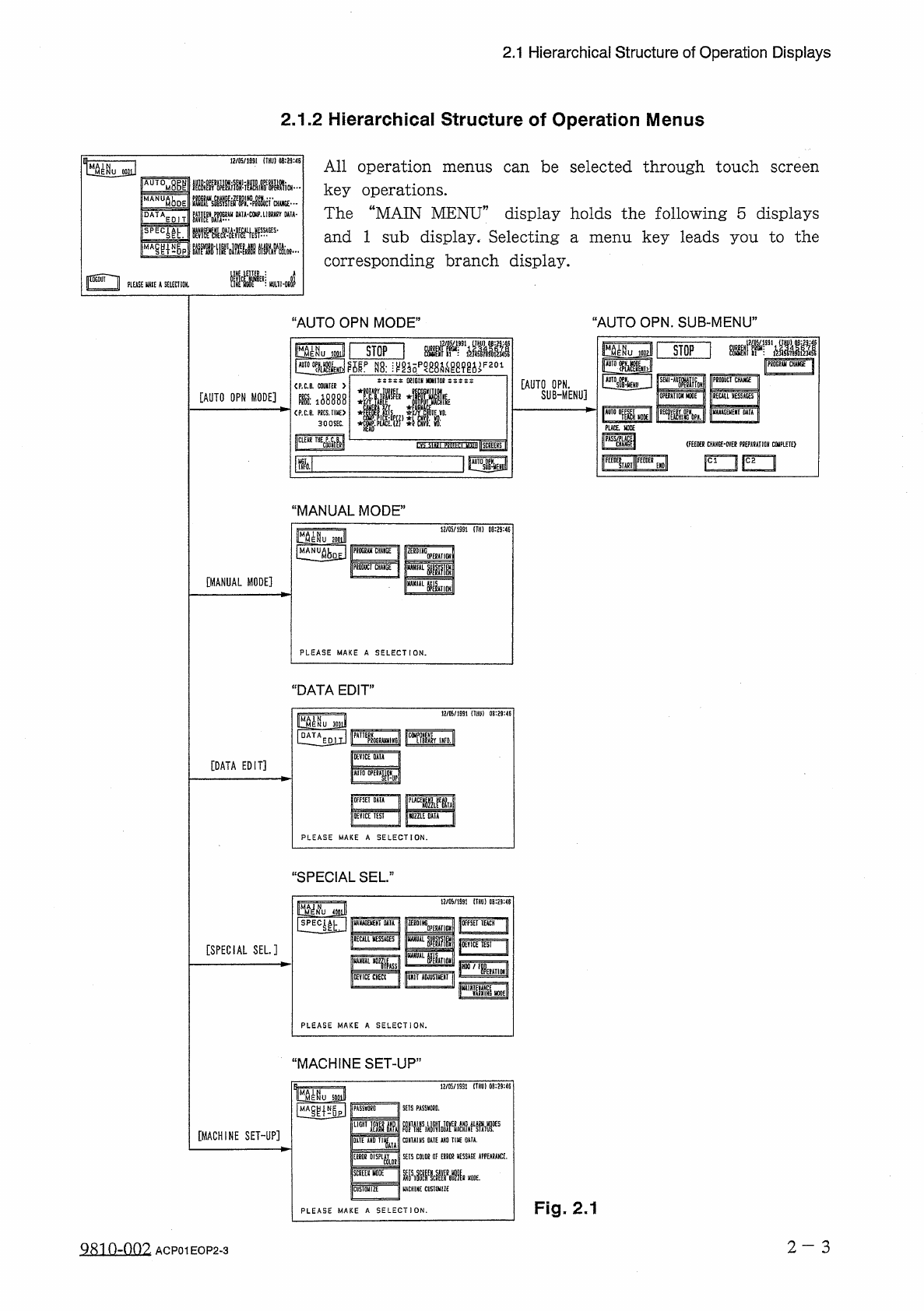
All
operation
menus
can
be
selected
through
touch
screen
key
operations
.
The
“
MAIN
MENU
”
display
holds
the
following
5
displays
and
1
sub
display
.
Selecting
corresponding
branch
display
.
iAUTQMBgl
售
f
.
麵
•
WT
1
rNuftboE
DATAEDIT
DA
1
A
-
COIP
.
UBJA
8
Y
MW
-
鼷
mwM
評
.
腦
__
M
…
FPE
4
lh
:
menu
key
leads
you
to
the
a
Mm
?
PLEASE
UAIE
k
SELECT
101
“
AUTO
OPN
.
SUB
-
MENU
”
‘
AUTO
OPN
MODE
”
fHtwaii
IMu
mill
I
STOP
I
rfPf
'
ffllll
as
:
^
g
^
pgB
8
a
^
89
g
^
F
201
STOP
1002
|
P
6
dGg
<
ji
CHAUGE
^
5
fy
'
•
nWoH
P
80
DUCI
CHAHGEl
REUIL
MESSAGES
1
J
WKAGEMEKI
DATAj
SiSCS
:
OSIGtN
M
0
NI
1
DI
!
[
AUTO
OPN
.
SUB
-
MENU
]
<
P
.
C
.
B
.
COUMFEK
>
IE
*
[
AUTO
OPN
MODE
]
OPUAIIDK
NODE
m
:
ii
8888
1
^
。。
—
雌
1
PLACE
.
HOPE
<
P
.
C
.
B
.
KCS
,
TI
«
E
>
300
SEC
.
儡
y
lilsCBEHS
I
(
FEEOER
CHAHGE
-
OVE
?
PDEPAUTION
COlPLErO
rvr
圆一
i
F
~
1
F
~
1
IM
MANUAL
MODE
"
£
1
«
/
05
/
1991
lim
08
:
29
:
«
zooJ
|
PR
CHMGE
IPRDDilCI
CliVliGE
"
rmm
[
MANUAL
MODE
]
卜
1
■
IJ
PLEASE
MAKE
A
SELECTION
.
DATA
EDIT
”
12
/
05
/
1991
(
TUI
)
)
08
:
29
:
46
KV
1
CE
DATA
[
DATA
EDIT
]
piuTT
1
l
-
IMU
OfFSEIDAIA
[
DEVICE
TEST
1
mill
DATA
I
PLEASE
MAKE
A
SELECTION
.
“
SPECIAL
SEL
.
”
12
/
05
/
1391
(
THU
)
0
B
:
29
:
<
5
Muml
lirE
4
iu
liUMGEVEKT
UIA
I
獅
1
“
1
[
OFFSET
T E A C H I
jOEYICE
1
ESI
II
KMU
KESSAGES
U
UM
眦顯腊
[
SPECIAL
SEL
.
]
iria
jiSMT
咖
/
lIM
I
0
IYICE
CHE
«
IjuXiT
AUJUSIMEUI
|
im
PLEASE
MAKE
A
SELECTION
.
“
MACHINE
SET
-
UP
,
12
/
05
/
1991
(
THU
)
0
B
:
29
:
46
5
^
}
SETS
PASSED
.
PASS
棚
D
LIGHT
mm
[
MACHINE
SET
-
UP
]
DATE
*
H
0
CONTAINS
0
ATE
AXO
TIIC
0
*
T
*
.
SETS
coiot
OF
am
Kmi
APPEARANCE
.
SKEIS
WDE
:
[
隱
HACHIHE
CIISTOUIZE
CU
5
T
0
liiZ
£
"
Fig
.
2.1
PLEASE
MAKE
A
SELECTION
.
2
-
3
Q
810
-
OQ
9
.
ACP
01
EOP
2
-
3