1OPERATION_.pdf - 第224页
4.9 RECALL MESSAGES 〈 RECALL OFFSET TEACH INFORMATION 〉 01 / XX 12 / 31 ( THU ) 12 : 50 GOOD lAiiiiitiaMaaw . wifiyiimi 01 / XX 〈 RECALL ( IMAGE ) RECOGNITION ERROR ) 34 12 / 31 ( THU ) 12 : 34 ffio . : 1234567 B 9012345…
4.9
RECALL
MESSAGES
4.9
RECALL
MESSAGES
provided
to
recall
device
errors
,
handling
errors
,
Menus
recognition
errors
,
machine
information
which
occurred
in
the
past
.
When
the
[
RECALL
MESSAGES
]
key
is
pressed
at
the
“
AUTO
OPN
.
SUB
-
MENU
”
display
,
the
following
display
appears
on
the
are
screen
.
This
display
can
be
opened
from
the
“
SPECIAL
SEL
.
display
.
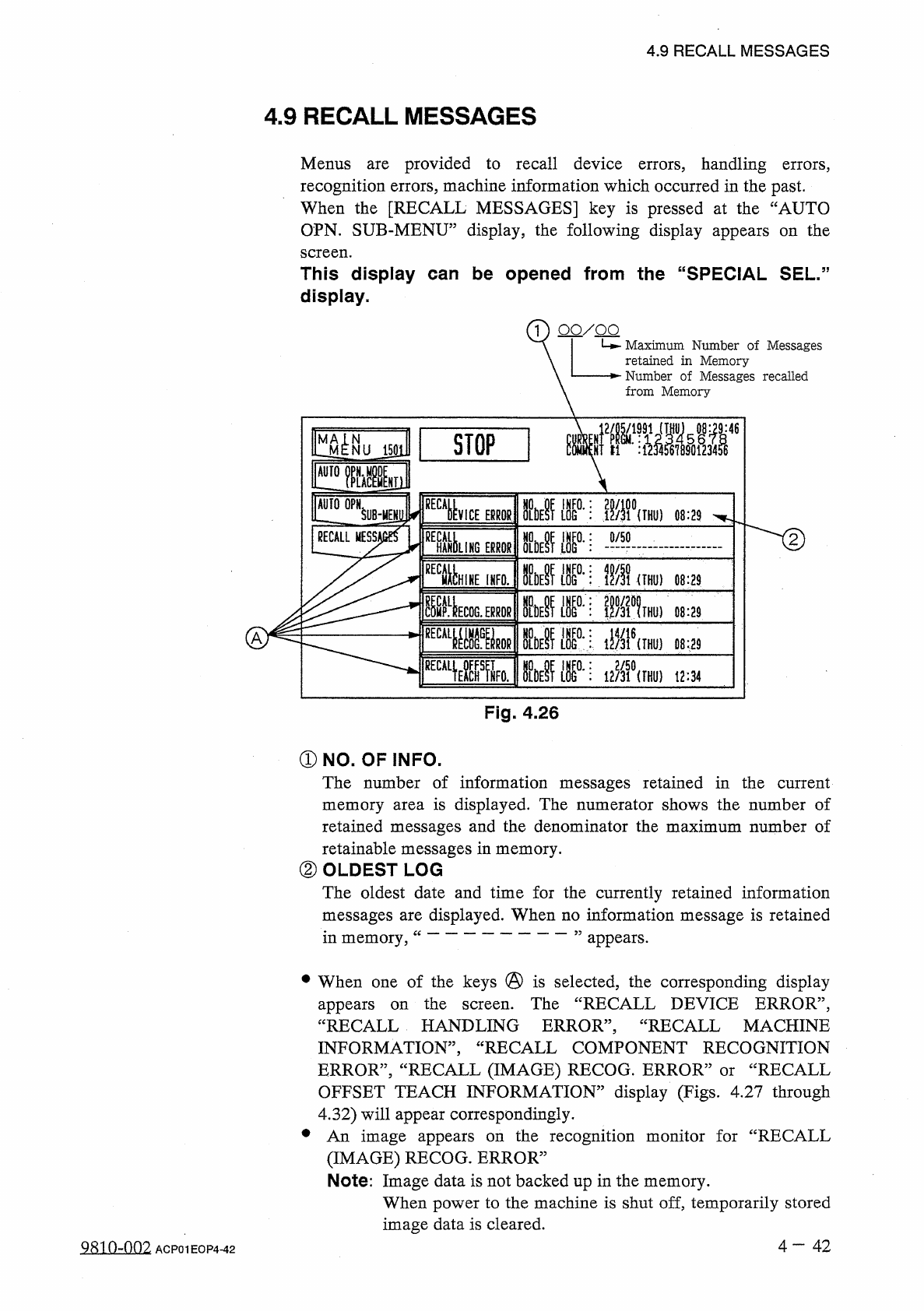
1
)
QO
/
QQ
Maximum
Number
of
Messages
retained
in
Memory
Number
of
Messages
recalled
from
Memory
:
46
M
4
^
NU
J
50
ll
l
STOP
~
~
l
[
I
FMSyl
AUTO
OPN
ll
°
'
:
.
翻
0
{
THU
}
SUHIENli
VICE
EPROR
08
:
29
RECALL
MESS
)
UNG
Mm
:
0
/
50
ERRORS
HHINE
IHFO
.
Mr
:
\
m
1
um
)
08
:
29
圓
0
.
霸
im
THU
)
08
:
29
ECOG
.
ERROR
M
m
Mm
mkirnrnm
A
08
:
29
眶
Wk
IhSi
:
i
•
游
G
)
t
2
:
34
Fig
.
4.26
①
NO
.
OF
INFO
.
The
number
of
information
messages
retained
in
the
current
memory
area
is
displayed
.
The
numerator
shows
the
number
of
retained
messages
and
the
denominator
the
maximum
number
of
retainable
messages
in
memory
.
②
OLDEST
LOG
The
oldest
date
and
time
for
the
currently
retained
information
messages
are
displayed
.
When
no
information
message
is
retained
in
memory
,
appears
.
•
When
one
of
the
keys
@
is
selected
,
the
corresponding
display
appears
“
RECALL
HANDLING
ERROR
,,
,
INFORMATION
,
,
,
ERROR
”
,
“
RECALL
(
IMAGE
)
RECOG
.
ERROR
:
OFFSET
TEACH
INFORMATION
”
display
(
Figs
,
4.27
through
4.32
)
will
appear
correspondingly
.
•
An
image
appears
(
IMAGE
)
RECOG
.
ERROR
”
Note
:
Image
data
is
not
backed
up
in
the
memory
.
When
power
to
the
machine
is
shut
of
£
?
temporarily
stored
image
data
is
cleared
.
the
The
“
RECALL
DEVICE
ERROR
,,
,
RECALL
MACHINE
on
screen
.
RECALL
COMPONENT
RECOGNITION
RECALL
or
the
recognition
monitor
for
“
RECALL
on
4
一
42
QRio
~
nn
2
ACP
01
EOP
4
-
42
4.9
RECALL
MESSAGES
〈
RECALL
OFFSET
TEACH
INFORMATION
〉
01
/
XX
12
/
31
(
THU
)
12
:
50
GOOD
lAiiiiitiaMaaw
.
wifiyiimi
01
/
XX
〈
RECALL
(
IMAGE
)
RECOGNITION
ERROR
)
34
12
/
31
(
THU
)
12
:
34
ffio
.
:
1234567
B
90123456
U
,
〈
RECALL
COMPONENT
RECOGNITION
ERROR
)
01
/
XX
4
12
/
31
(
THU
)
12
:
34
OI
^
OUI
1
I
!
l
234561890123456
1234517890123456
)
1
11
Oi
/
XX
〈
RECALL
MACHINE
INFORMATION
)
34
12
/
31
(
THU
)
12
:
34
〈
RECALL
HANDLING
ERROR
)
64
01
/
XX
riIHU
,
l
:
(
)
MP
MISSIS
SI
-
NSHj
|
M
Nn
i l F l
10
^
(
?
?
34
?
6
%
12
/
31
U
灘
DA
12
:
34
Latest
Data
Fig
.
4.32
34
3
E
01
/
XX
14
〈
RECALL
DEVICE
ERROR
)
Fig
.
4.31
12
/
31
(
THU
)
12
:
34
12
/
31
(
THU
)
12
:
34
12
/
31
(
THU
)
12
:
34
12
/
31
(
THU
)
12
:
34
12
/
31
(
THU
)
12
:
34
12
/
31
(
THU
)
12
:
34
12
/
31
(
THU
)
12
:
34
12
/
31
(
THU
)
12
:
34
12
/
31
(
THU
)
12
:
34
m
TFOB
xxxx
IMIllflM
wmmm
:
<
»
«
i
酬
DETECTED
.
34
XXX
!
4
M
DE
)
VAS
NOT
DETECTED
.
:
PHS
49
E
/
R
DEHAS
NOT
DETECTED
.
:
PHS
49
E
/
R
xxxx
DE
)
VAS
NOT
DETECTED
.
:
PHS
49
E
/
R
I
xxxx
DE
)
VAS
NOT
DETECTED
.
:
PHS
49
E
/
R
r
XXXX
DE
)
VAS
NOT
DETECTED
.
:
PHS
49
E
/
R
I
YYXX
DE
)
VAS
NOT
DETECTED
.
:
PHS
49
E
/
R
DEl
^
AS
NOT
DETECTED
.
;
PHS
49
E
/
R
NOT
DETECTED
.
:
PHS
49
E
/
R
謂
側
f
»
1
h
X
-
Fig
_
4.30
i
N
S
!
4
IMIlflil
1
:
4
!
1
謂
:
Ml
■
U
1
IMillflli
immui
iraiifiii
腳
:
ui
H
V
.
GE
25
Fig
.
4.29
ir
:
i
;
Old
Data
3
E
m
\
IM
Fig
.
4.28
i
m
TGIFS
]
5
L
P
^
E
OELETE
RECALL
MSG
.
Fig
.
4.27
•
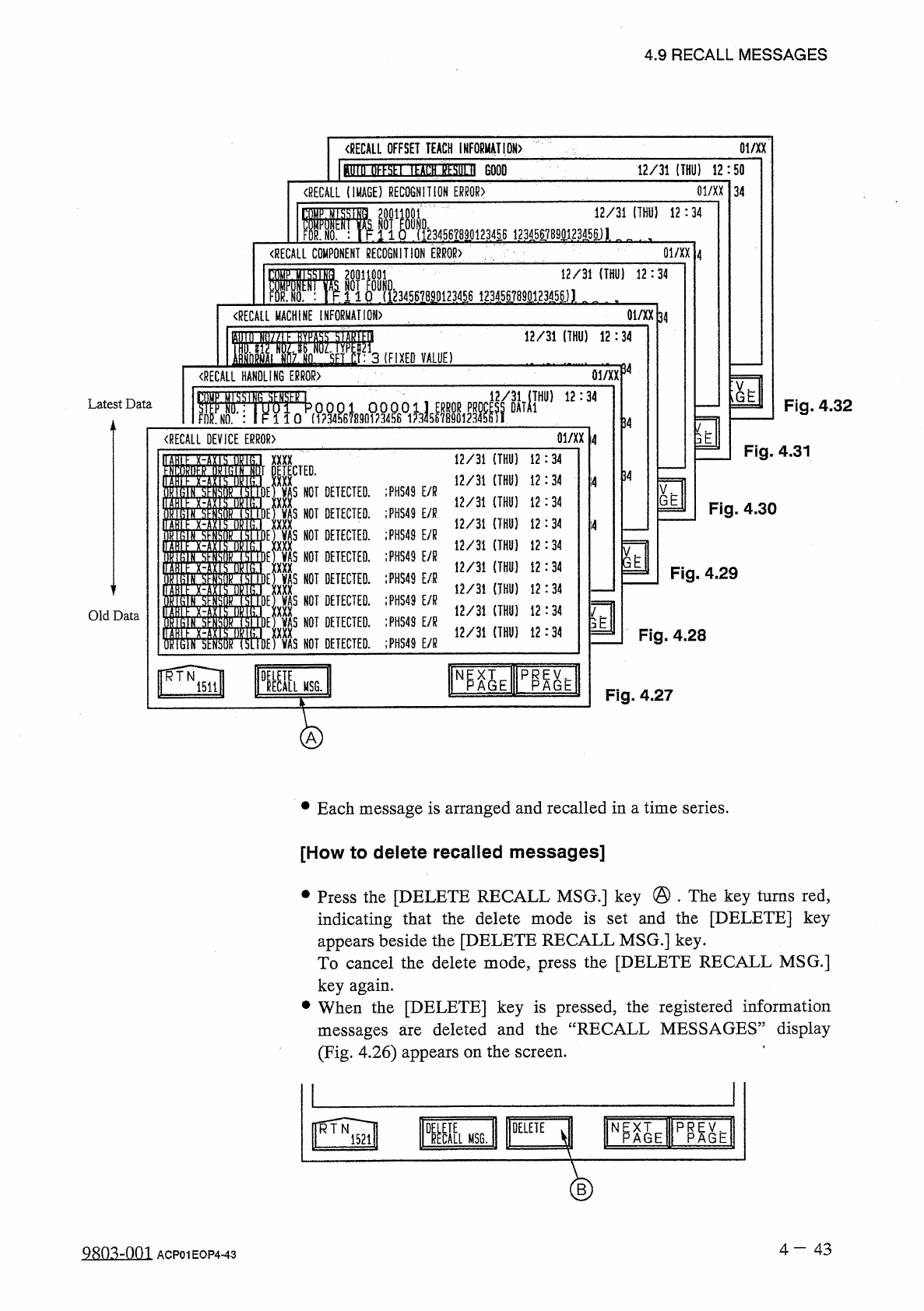
Each
message
is
arranged
and
recalled
in
a
time
series
.
[
How
to
delete
recalled
messages
]
•
Press
the
[
DELETE
RECALL
MSG
.
]
key
@
.
The
key
turns
red
,
indicating
that
the
delete
mode
is
set
and
the
[
DELETE
]
key
appears
beside
the
[
DELETE
RECALL
MSG
.
]
key
.
To
cancel
the
delete
mode
,
press
the
[
DELETE
RECALL
MSG
.
]
key
again
.
•
When
the
[
DELETE
]
key
is
pressed
,
the
registered
information
deleted
and
the
“
RECALL
MESSAGES
”
display
messages
are
(
Fig
.
4.26
)
appears
on
the
screen
.
H
^
AIE
TOE
DELETE
1
ECI
[
L
RTN
MSG
.
1521
B
4
-
43
9
EDMIQ
1
ACP
01
EOP
443
4.9
RECALL
MESSAGES
[
To
save
the
recalled
recognition
error
and
image
on
a
floppy
disk
]
This
function
is
used
to
save
the
image
which
caused
an
error
in
the
recognition
on
a
floppy
disk
for
image
analysis
performed
on
the
manufacturer
’
s
side
.
Note
:
This
function
is
used
by
our
service
personnel
.
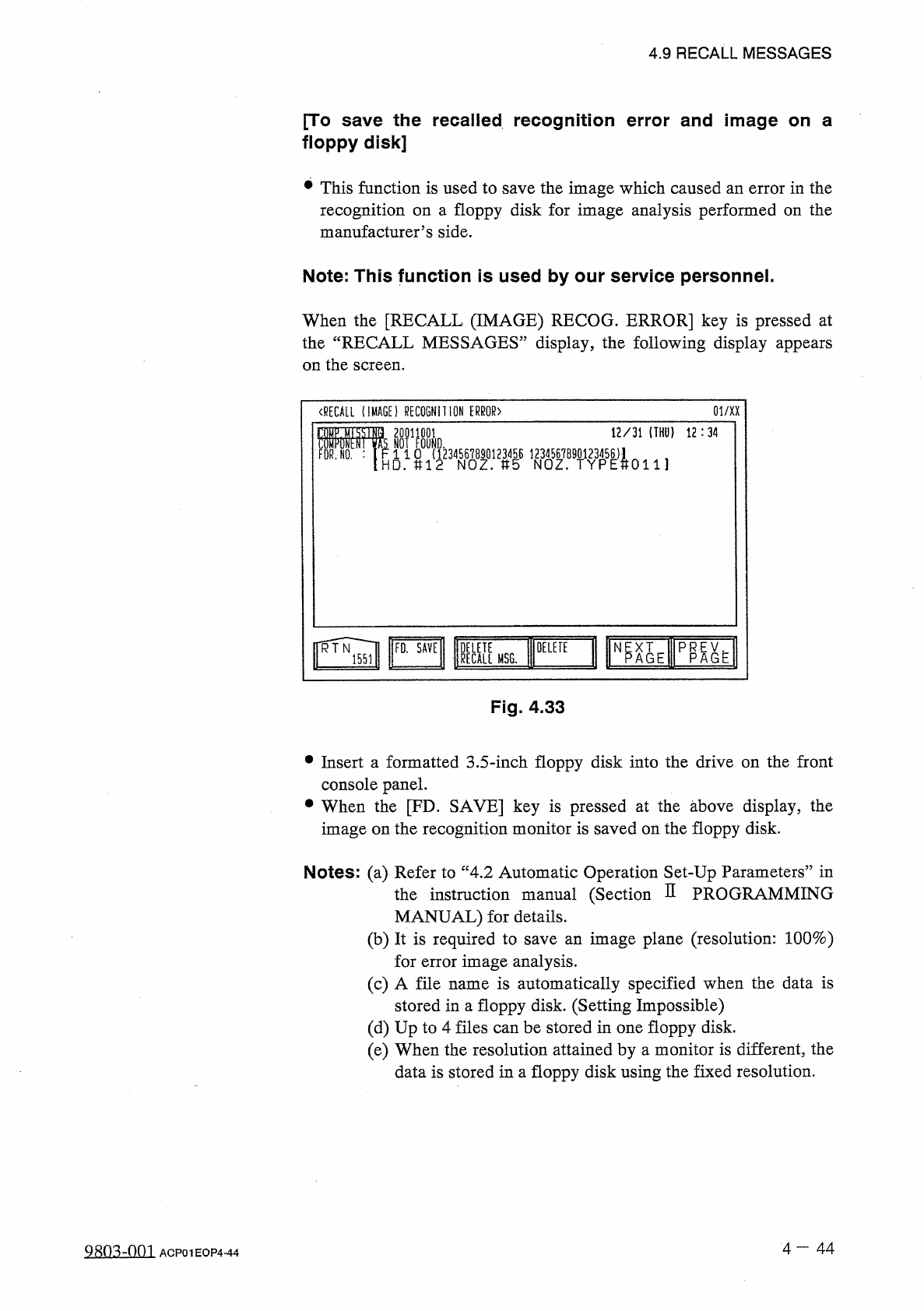
When
the
[
RECALL
(
IMAGE
)
RECOG
.
ERROR
]
key
is
pressed
at
the
“
RECALL
MESSAGES
”
display
,
the
following
display
appears
on
the
screen
.
(
RECALL
(
IMAGE
)
RECOGNITION
ERROR
〉
01
/
XX
12
/
31
(
THU
}
12
:
34
20011001
NOT
FOUND
.
r
.
1
1
0
(
1234567890123456
八
HD
.
U
12
NOZ
.
»
5
NOZ
.
微
?
8
娜
FDR
.
N O
.
:
0111
ff
^
Vl
Np XT
A G E
KMSG
.
DELETE
PR
AGE
P
Fig
.
4.33
•
Insert
a
formatted
3.5
-
inch
floppy
disk
into
the
drive
on
the
front
console
panel
.
•
When
the
[
FD
.
SAVE
]
key
is
pressed
at
the
above
display
,
the
image
on
the
recognition
monitor
is
saved
on
the
floppy
disk
.
Notes
:
(
a
)
Refer
to
“
4
,
2
Automatic
Operation
Set
-
Up
Parameters
”
in
instruction
manual
(
Section
D
PROGRAMMING
MANUAL
)
for
details
.
(
b
)
It
is
required
to
save
an
image
plane
(
resolution
:
100
%
)
for
error
image
analysis
.
(
c
)
A
file
name
is
automatically
specified
when
the
data
is
stored
in
a
floppy
disk
.
(
Setting
Impossible
)
(
d
)
Up
to
4
files
can
be
stored
in
one
floppy
disk
.
(
e
)
When
the
resolution
attained
by
a
monitor
is
different
,
the
data
is
stored
in
a
floppy
disk
using
the
fixed
resolution
.
the
4
-
44
9
R
0
^
00
^
ACP
01
EOP
4
-
44