1OPERATION_.pdf - 第150页
3.7 Alternate Mode ( Regulations of Feeder No . Setting ) ① The feeder No . where the alternate feeder function is set ( alternate source feeder No . ) should be the same as the component ID of the alternate destination …
3.7
Alternate
Mode
3.7
.
2
Alternate
Feeder
Function
When
a
feeder
becomes
short
of
components
,
this
function
selects
a
prepared
spare
feeder
.
After
all
components
are
picked
up
from
the
spare
feeder
,
another
spare
feeder
is
selected
as
if
a
baton
was
handed
over
to
the
next
runner
.
The
prepared
spare
feeders
must
contain
the
components
of
frequently
used
types
.
and
this
function
is
•
When
a
component
shortage
activated
,
the
interval
time
for
component
replenishment
can
be
prolonged
and
the
feeders
short
of
components
can
be
replenished
with
components
collectively
.
error
occurs
To
Implement
Alternate
Feeder
Function
(
1
)
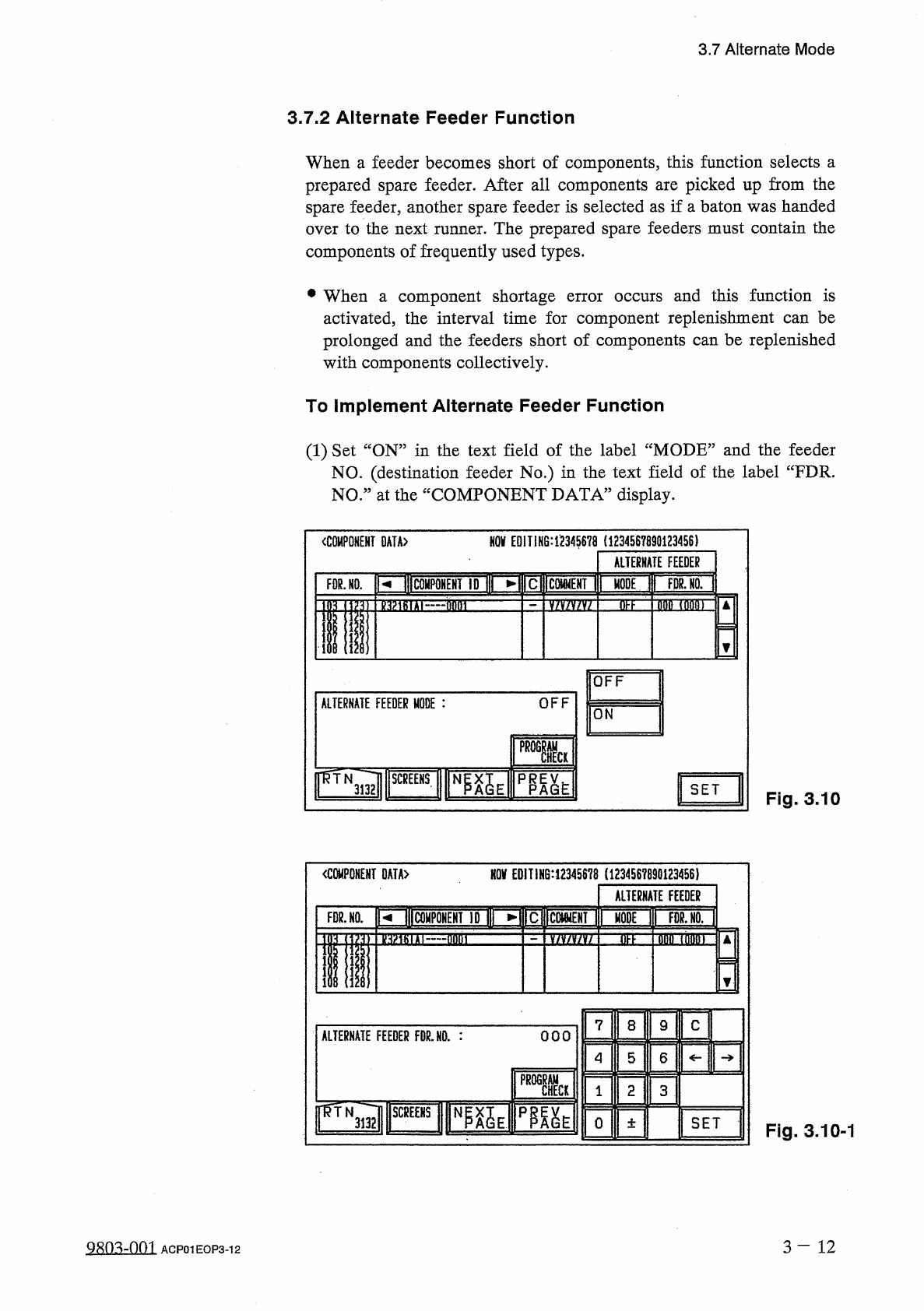
Set
“
ON
”
in
the
text
field
of
the
label
“
MODE
”
and
the
feeder
NO
.
(
destination
feeder
No
.
)
in
the
text
field
of
the
label
“
FDR
.
NO
.
”
at
the
“
COMPONENT
DATA
”
display
.
NOV
EDIT
1
H
6
:
1234
S
678
(
1234567890123456
)
COMPONENT
DATA
〉
ALTERNATE
FEEDER
RIBCOHPQHEHT
ID
I
MODE
T
|
TWoTl
FOR
.
NO
.
3
EE
fififl
TflMT
nmrrr
OFF
OFF
ALTERNATE
FEEDER
MODE
:
ON
SET
Fig
.
3.10
NOV
EDIT
!
N
6
:
12345678
(
123456789
Q
1234
S
6
)
mmm
OATA
>
ALTERNATE
FEEDER
prltolPONEHf
ID
I
►
FDR
.
NO
.
dtfn
加
tiT
M
flnni
v
/
v
/
v
/
v
/
DFF
7
C
8
9
ALTERNATE
FEEDER
FDR
.
NO
.
:
OOO
4
5
6
PROGRAM
CHECK
2
3
1
ir
^
TNTTi
mm
3132
0
SET
土
Fig
.
3.10
-
1
3
-
12
9
m
=
m
ACP
01
EOP
3
-
12
3.7
Alternate
Mode
(
Regulations
of
Feeder
No
.
Setting
)
①
The
feeder
No
.
where
the
alternate
feeder
function
is
set
(
alternate
source
feeder
No
.
)
should
be
the
same
as
the
component
ID
of
the
alternate
destination
feeder
No
.
②
The
alternate
destination
feeder
No
.
should
be
set
in
the
range
of
180
(
101
-
140
)
or
201
280
(
201
,
24
Q
)
”
.
including
the
cc
101
feeder
No
.
offset
.
③
The
alternate
destination
should
be
terminated
.
(
The
feeder
Nos
.
should
not
be
looped
.
)
④
Neither
the
control
command
“
S
:
alternate
destination
component
data
.
⑤
It
is
possible
to
designate
the
same
alternate
destination
feeder
from
different
feeder
Nos
.
®
The
number
of
alternate
feeder
links
is
not
limited
.
⑦
When
“
S
”
or
“
X
”
is
set
in
the
control
command
field
C
of
the
source
feeder
No
.
(
component
data
)
,
component
placement
for
this
feeder
No
.
is
bypassed
.
(
Components
are
not
placed
on
P
.
C
.
B
.
)
All
alternate
feeder
modes
designated
from
this
lane
become
invalid
.
⑧
The
feeder
Nos
.
(
lanes
)
where
the
feeder
temporary
origins
designated
are
not
changed
by
the
alternate
feeder
function
.
(
Fixed
at
the
designated
lanes
)
®
When
“
OFF
”
is
set
in
the
text
field
of
the
label
“
MODE
”
for
the
feeder
No
.
(
destination
feeder
No
.
)
,
the
alternate
feeder
function
stops
working
at
this
feeder
(
lane
)
.
;
X
”
should
be
set
in
the
nor
are
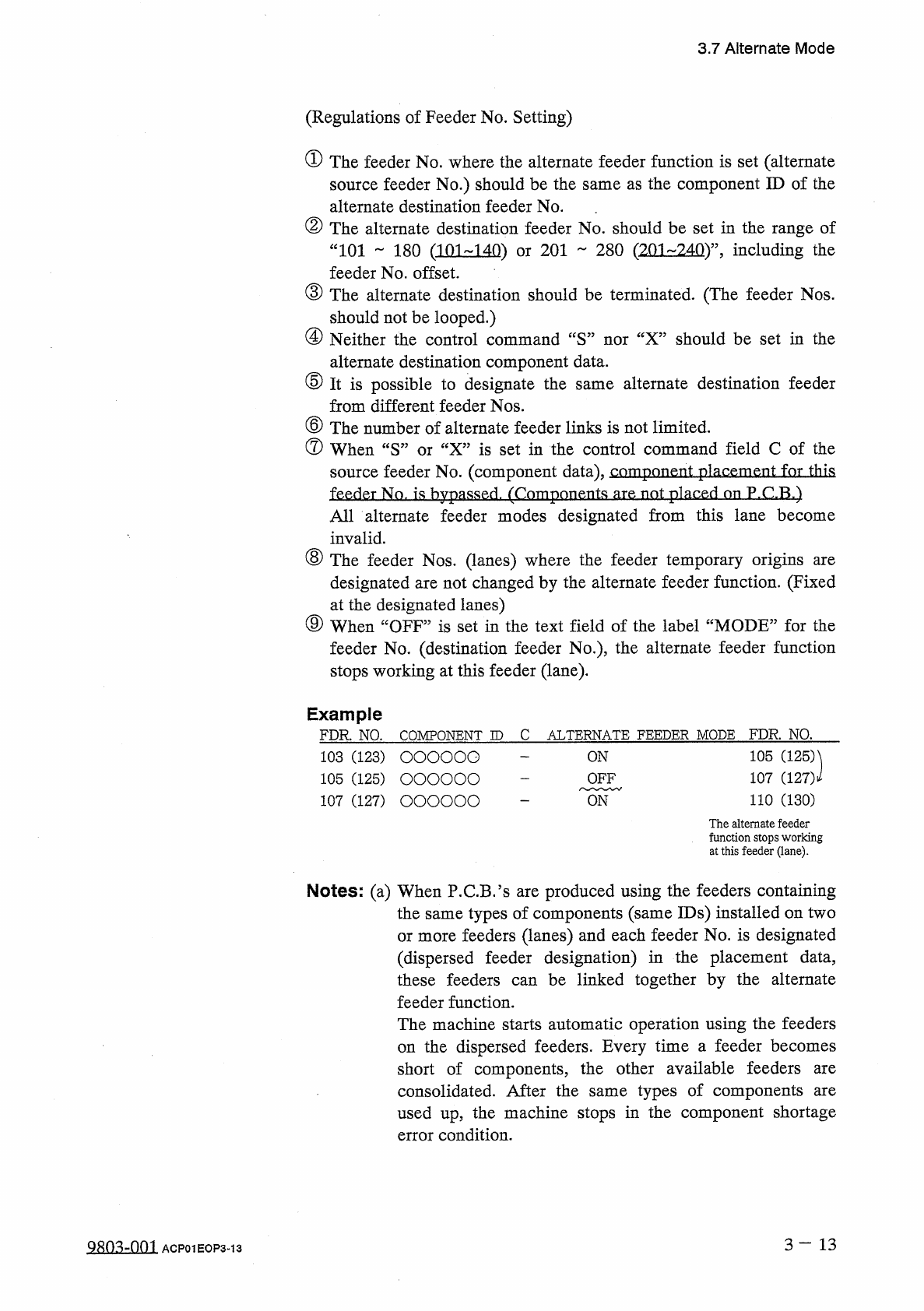
Example
FDR
.
NO
.
COMPONENT
ID
C
ALTERNATE
FEEDER
MODE
FDR
.
NO
.
105
(
125
)
107
(
127
)
i
110
(
130
)
103
(
123
)
OOOOOO
105
(
125
)
OOOOOO
107
(
127
)
OOOOOO
ON
OFF
ON
The
alternate
feeder
function
stops
working
at
this
feeder
(
lane
)
.
Notes
:
(
a
)
When
P
.
C
.
B
.
Js
are
produced
using
the
feeders
containing
the
same
types
of
components
(
same
IDs
)
installed
on
two
or
more
feeders
(
lanes
)
and
each
feeder
No
.
is
designated
(
dispersed
feeder
designation
)
in
the
placement
data
,
these
feeders
can
be
linked
together
by
the
alternate
feeder
function
.
The
machine
starts
automatic
operation
using
the
feeders
the
dispersed
feeders
.
Every
time
a
feeder
becomes
short
of
components
,
the
other
available
feeders
consolidated
.
After
the
same
types
of
components
used
up
,
the
machine
stops
in
the
component
shortage
error
condition
.
on
are
are
3
-
13
Q
80
^
-
nm
ACP
01
EOP
3
-
13
3.7
Alternate
Mode
(
b
)
When
the
destination
feeder
No
.
for
the
alternate
feeder
mode
is
set
for
the
carriage
which
is
not
designated
in
the
text
field
of
“
FDR
.
”
in
the
placement
data
(
P
-
NO
)
,
the
machine
runs
with
the
carriage
linked
.
(
c
)
The
underlined
feeder
Nos
.
in
(
)
apply
to
TCM
-
3100
J
.
(
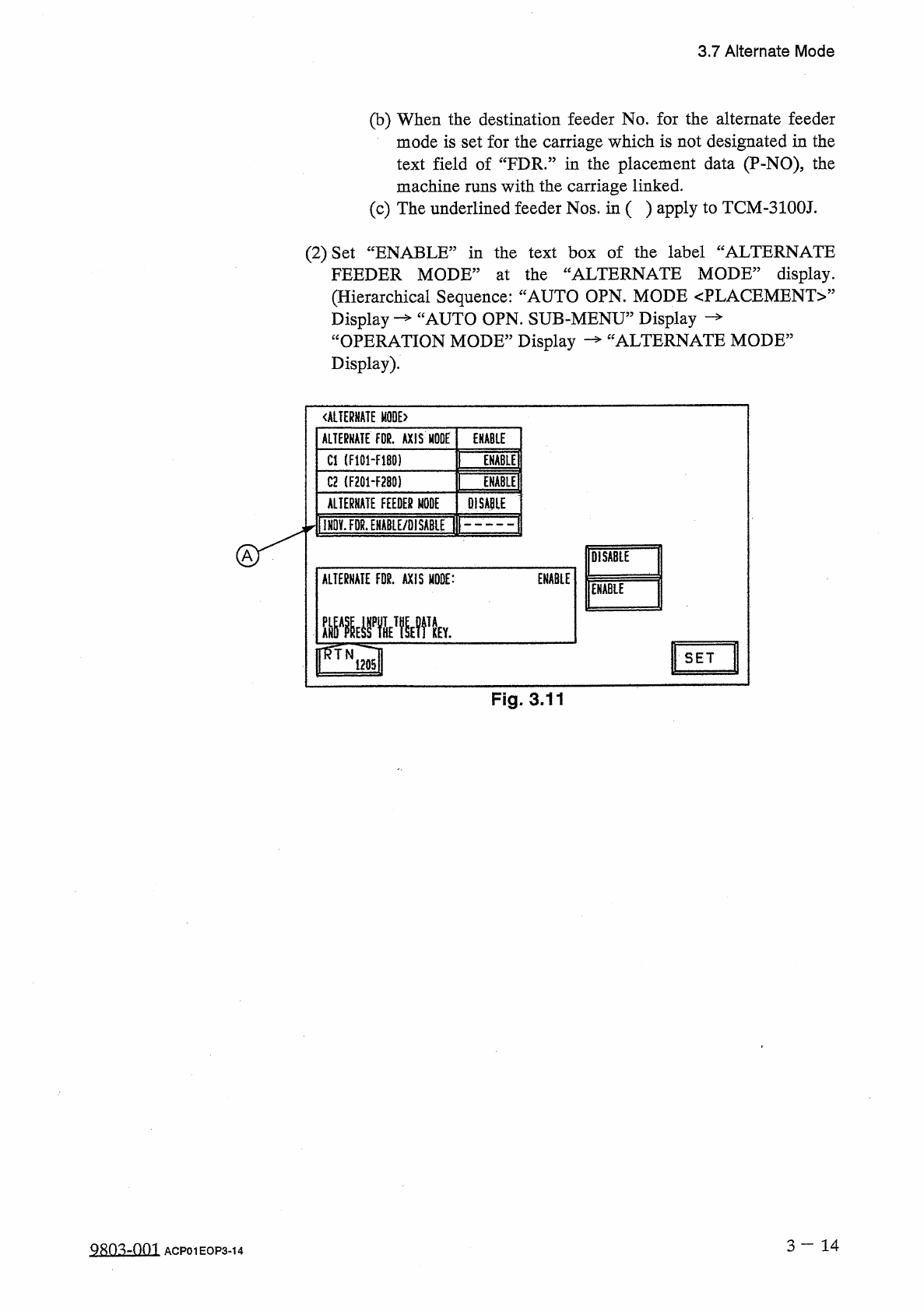
2
)
Set
“
ENABLE
”
in
the
text
box
of
the
label
“
ALTERNATE
FEEDER
MODE
”
at
the
“
ALTERNATE
MODE
”
display
.
(
Hierarchical
Sequence
:
“
AUTO
OPN
.
MODE
〈
PLACEMENT
〉
”
Display
“
OPERATION
MODE
”
Display
Display
)
.
cAUTO
OPN
.
SUB
-
MENU
”
Display
ALTERNATE
MODE
5
<
ALTERHATE
M
0
QE
>
ALTERNATE
FOR
.
AXIS
MODE
ENABLE
Cl
(
F
10
H
180
)
ENABLE
C
2
(
F
201
-
F
280
)
ENABLE
OISA
01
E
ALTERNATE
FEEDER
MODE
IKOVJOR
.
EHABLE
/
OISABIE
DISABLE
ALTERNATE
FDR
.
AXIS
MODE
:
ENABLE
ENABLE
SET
Fig
.
3.11
3
-
1 4
QRO
^
-
fini
ACP
01
EOP
3
-
14