1OPERATION_.pdf - 第262页
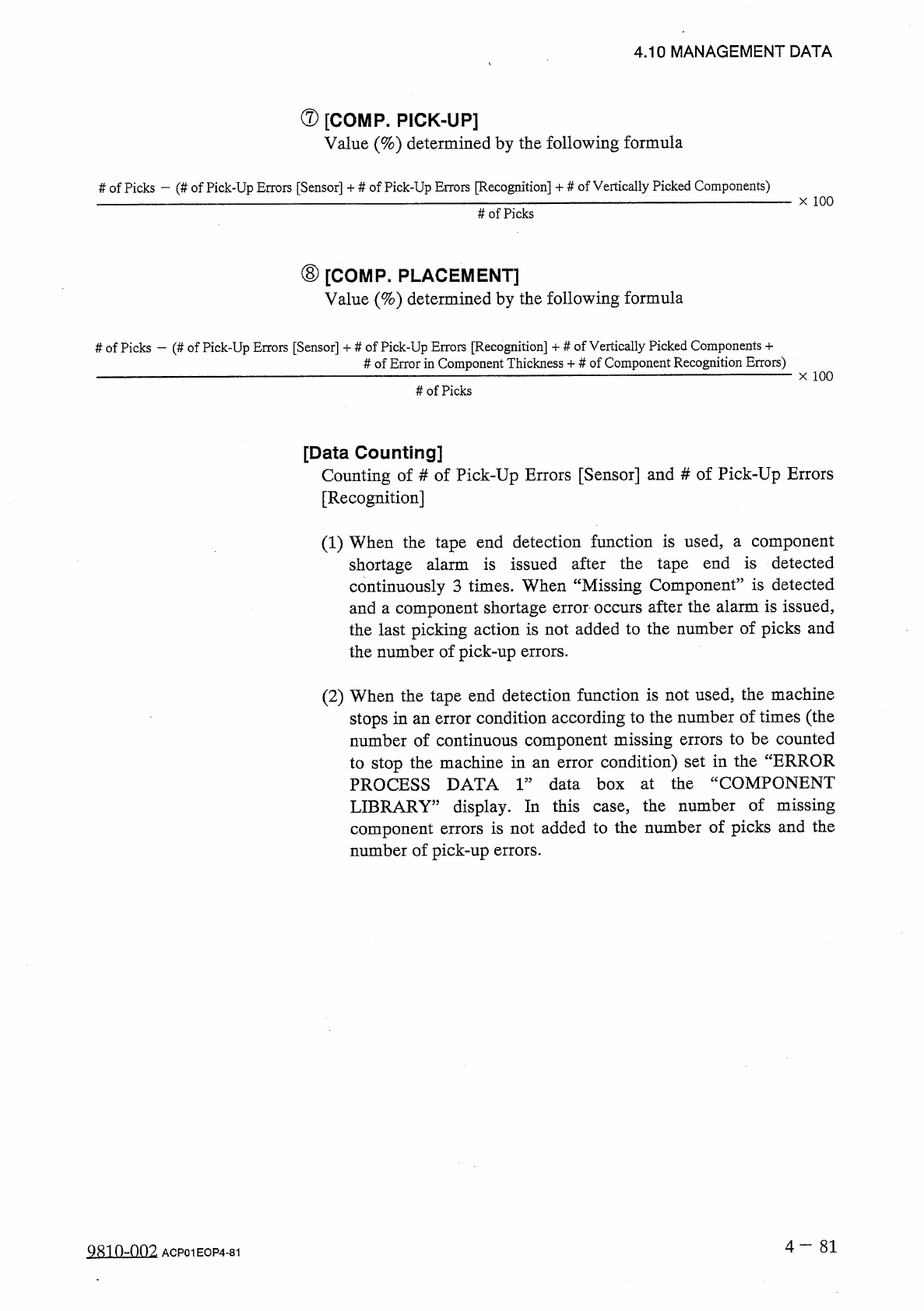
4.10 MANAGEMENT DATA ⑦ [ COMP _ PICK - UP ] Value ( % ) determined by the following formula # of Picks — ( # of Pick - Up Errors [ Sensor ] + # of Pick - Up Errors [ Recognition ] + # of Vertically Picked Components ) x …
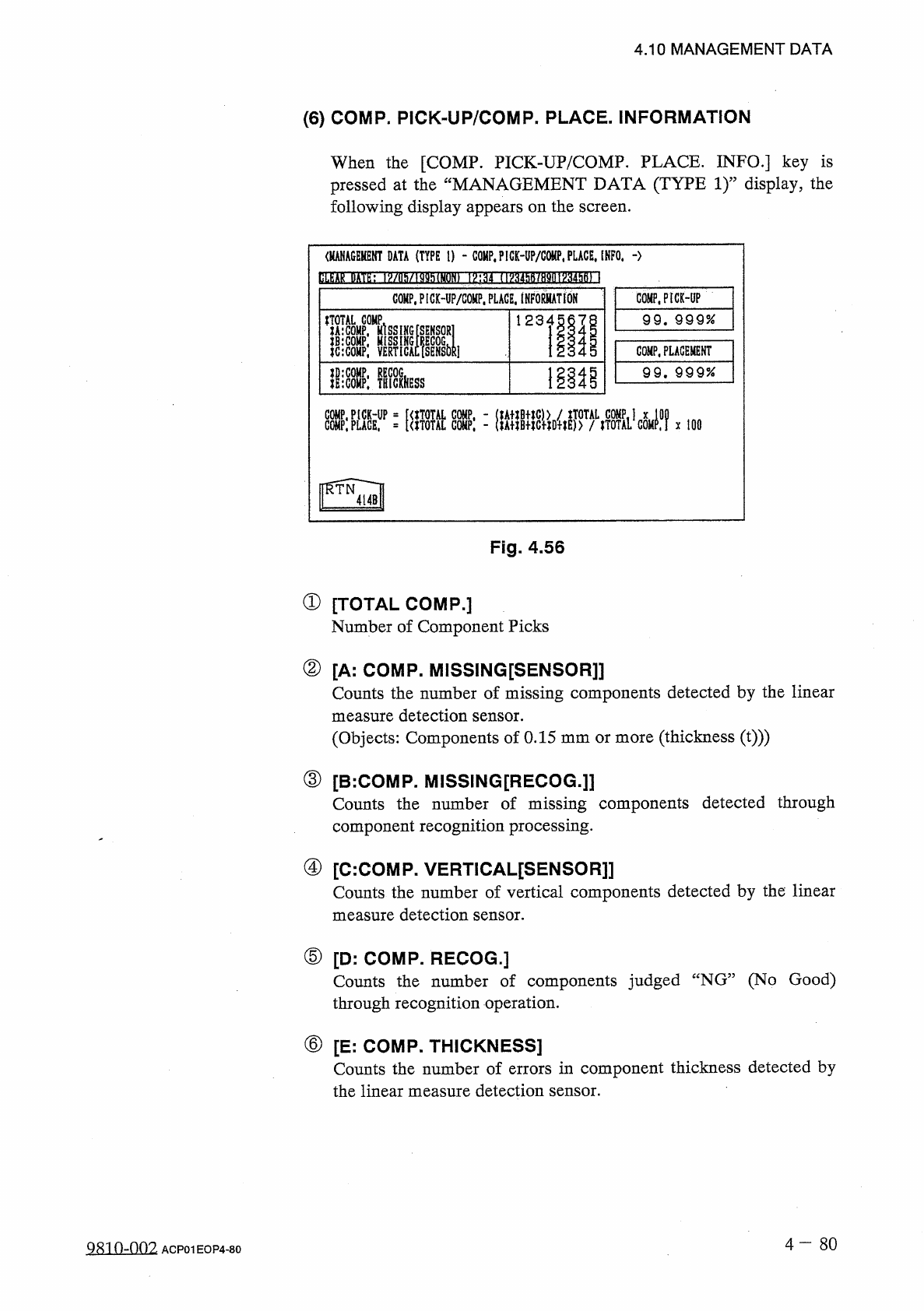
4.10
MANAGEMENT
DATA
⑹
COMP
.
PICK
-
UP
/
COMP
.
PLACE
.
INFORMATION
When
the
[
COMP
.
PICK
-
UP
/
COMP
.
PLACE
.
INFO
.
]
key
is
pressed
at
the
“
MANAGEMENT
DATA
(
TYPE
1
)
”
display
,
the
following
display
appears
on
the
screen
.
<
MANAGEKENT
DATA
(
TYPE
I
)
-
COMP
,
P
!
CK
-
UP
/
G
0
«
P
,
PLACE
.
INFO
.
-
>
bLfeAkHn
>
/
nMMh
(
MON
)
1
㈣
f
HV
34
hft
/
H
9
(
H
^
34
hB
)
\
COMP
.
PICMP
/
COHP
.
PLAGE
.
INFoSATtON
COMP
.
PICK
-
UP
99
.
999
%
liiCOHP
;
VERTlcAcfsENSblii
l llls
COMP
.
PLACEMENT
1
離
99
.
9 9 9
%
lIlcOMP
:
TRICIHESS
:
腦鼷
X
100
Fig
.
4.56
①
[
TOTAL
COMP
.
]
Number
of
Component
Picks
②
[
A
:
COMP
.
MISSING
[
SENSOR
]]
Counts
the
number
of
missing
components
detected
by
the
linear
measure
detection
sensor
.
(
Objects
:
Components
of
0.15
mm
or
more
(
thickness
(
t
)
))
③
[
B
:
COMP
.
MISSING
[
RECOG
.
]
]
Counts
the
number
of
missing
components
detected
through
component
recognition
processing
.
④
[
C
:
COMP
.
VERTICAL
[
SENSOR
]
]
Counts
the
number
of
vertical
components
detected
by
the
linear
measure
detection
sensor
.
⑤
[
D
:
COMP
.
RECOG
.
]
Counts
the
number
of
components
judged
“
NG
”
(
No
Good
)
through
recognition
operation
.
⑥
[
E
:
COMP
.
THICKNESS
]
Counts
the
number
of
errors
in
component
thickness
detected
by
the
linear
measure
detection
sensor
.
4
-
80
QR
10
-
002
ACP
01
EOP
4
-
80
4.10
MANAGEMENT
DATA
⑦
[
COMP
_
PICK
-
UP
]
Value
(
%
)
determined
by
the
following
formula
#
of
Picks
—
(
#
of
Pick
-
Up
Errors
[
Sensor
]
+
#
of
Pick
-
Up
Errors
[
Recognition
]
+
#
of
Vertically
Picked
Components
)
x
100
#
of
Picks
⑧
[
COMP
.
PLACEMENT
]
Value
(
%
)
determined
by
the
following
formula
#
of
Picks
—
(
#
of
Pick
-
Up
Errors
[
Sensor
]
+
#
of
Pick
-
Up
Errors
[
Recognition
]
-
f
#
of
Vertically
Picked
Components
+
#
of
Error
in
Component
Thickness
+
#
of
Component
Recognition
Errors
)
x
100
#
of
Picks
[
Data
Counting
]
Counting
of
#
of
Pick
-
Up
Errors
[
Sensor
]
and
#
of
Pick
-
Up
Errors
[
Recognition
]
(
1
)
When
the
tape
end
detection
function
is
used
,
a
component
shortage
alarm
is
issued
after
the
tape
end
is
detected
continuously
3
times
.
When
“
Missing
Component
”
is
detected
and
a
component
shortage
error
occurs
after
the
alarm
is
issued
,
the
last
picking
action
is
not
added
to
the
number
of
picks
and
the
number
of
pick
-
up
errors
.
(
2
)
When
the
tape
end
detection
function
is
not
used
,
the
machine
stops
in
an
error
condition
according
to
the
number
of
times
(
the
number
of
continuous
component
missing
errors
to
be
counted
to
stop
the
machine
in
an
error
condition
)
set
in
the
“
ERROR
PROCESS
DATA
1
”
data
box
at
the
“
COMPONENT
LIBRARY
”
display
.
In
this
case
,
the
number
of
missing
component
errors
is
not
added
to
the
number
of
picks
and
the
number
of
pick
-
up
errors
.
4
一
81
Q
^
10
-
n
02
ACP
01
EOP
4
-
81
4.10
MANAGEMENT
DATA
(
7
)
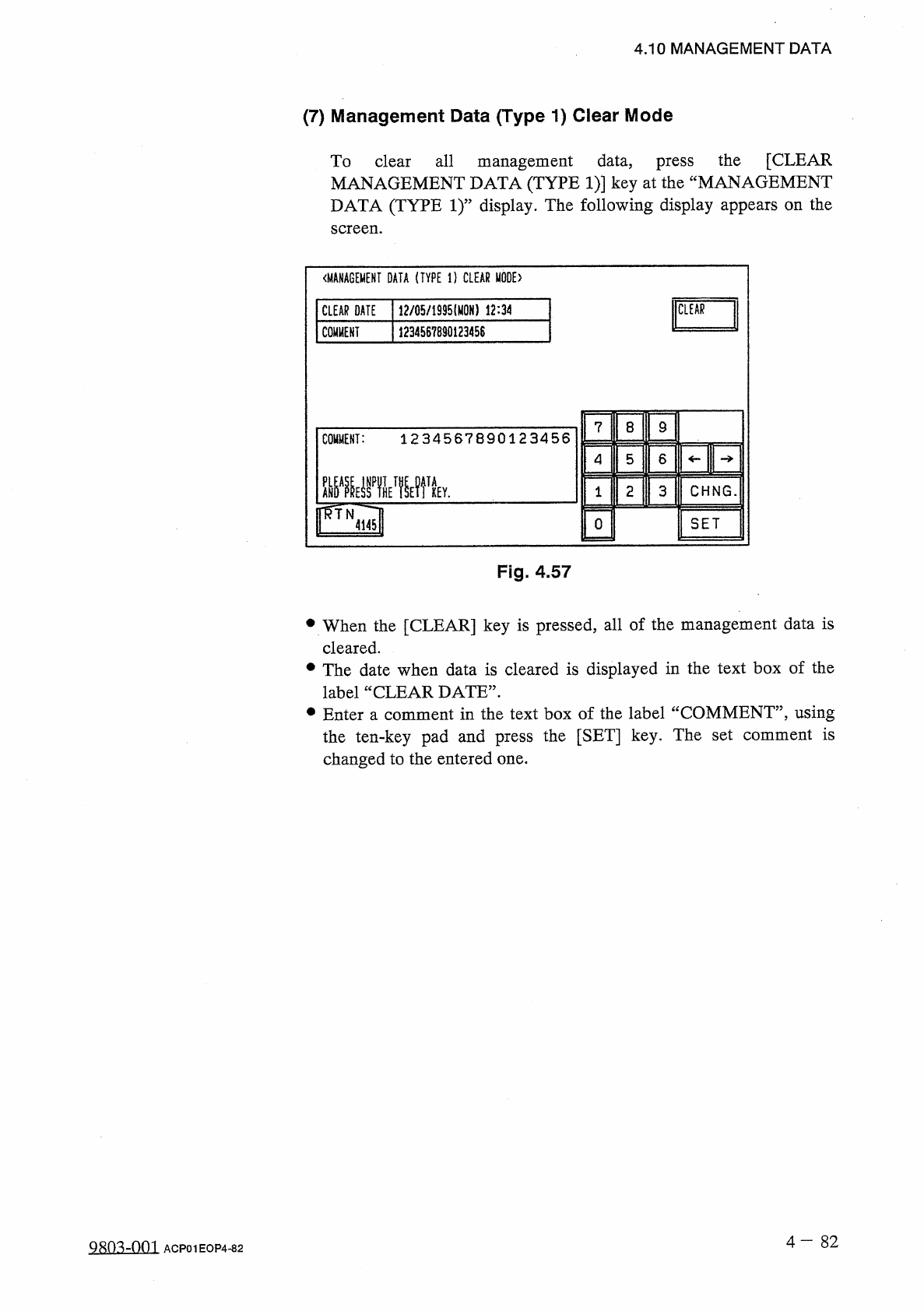
Management
Data
(
Type
1
)
Clear
Mode
To
clear
all
management
data
,
press
the
[
CLEAR
MANAGEMENT
DATA
(
TYPE
1
)
]
key
at
the
“
MANAGEMENT
DATA
(
TYPE
1
)
”
display
.
The
following
display
appears
on
the
screen
.
〈
MANAGEMENT
DATA
(
TYPE
1
)
CLEAR
MODE
)
CLEAR
DATE
12
/
05
/
1935
⑽
N
)
12
:
34
CLEAR
COMMENT
1234567890123458
7
8
9
COMMENT
:
1234567890123456
4
5
6
2
CHNG
.
3
1
SET
0
4145
Fig
.
4.57
•
When
the
[
CLEAR
]
key
is
pressed
,
all
of
the
management
data
is
cleared
.
•
The
date
when
data
is
cleared
is
displayed
in
the
text
box
of
the
label
“
CLEAR
DATE
”
.
•
Enter
a
comment
in
the
text
box
of
the
label
“
COMMENT
”
,
using
the
ten
-
key
pad
and
press
the
[
SET
]
key
.
The
set
comment
is
changed
to
the
entered
one
.
4
-
8 2
9803
-
001
ACP
01
EOP
4
-
82