1OPERATION_.pdf - 第82页
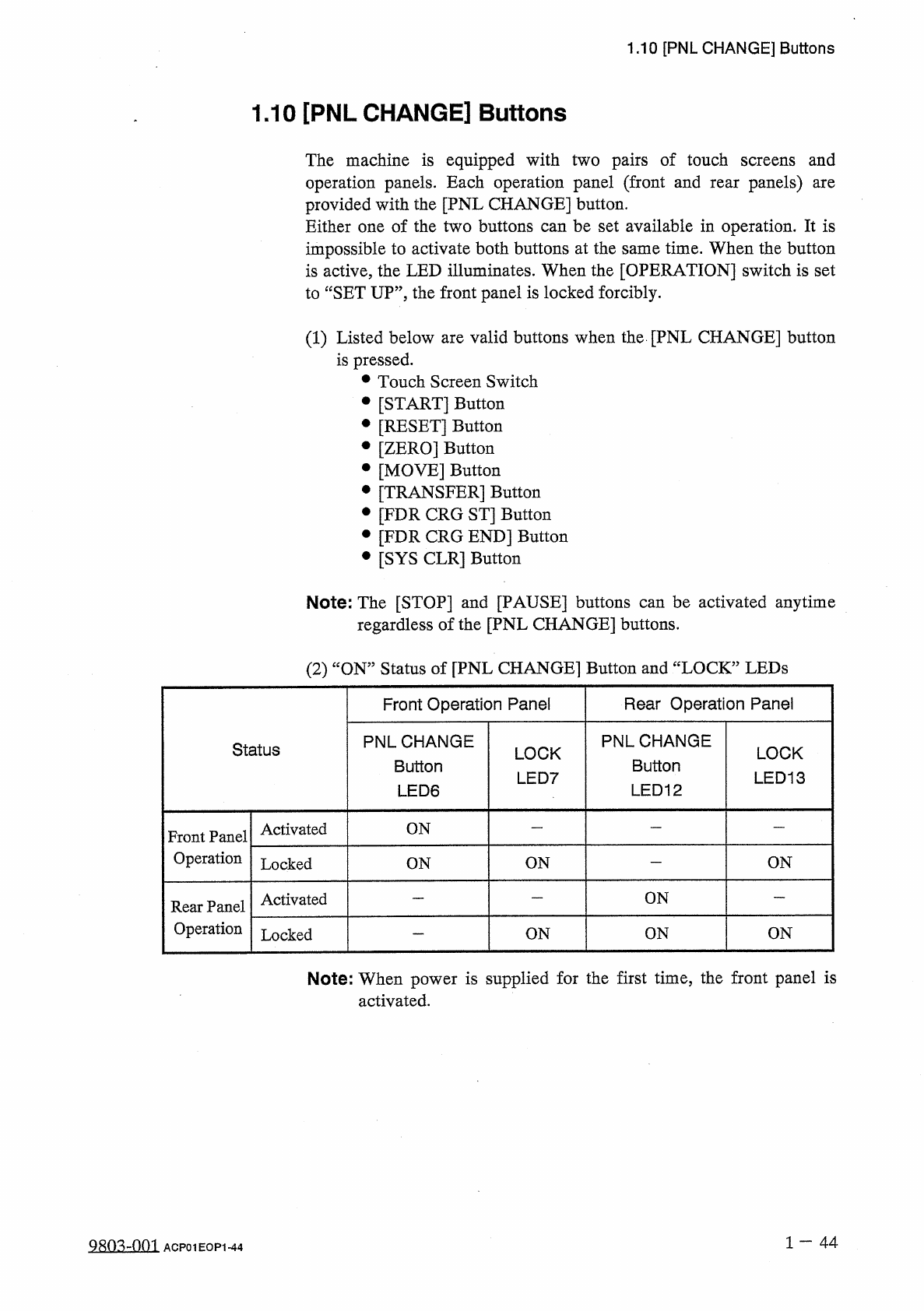
1.10 [ PNL CHANGE ] Buttons 1.10 [ PNL CHANGE ] Buttons The machine is equipped with operation panels . Each operation panel ( front and provided with the [ PNL CHANGE ] button . Either one of the two buttons can be set …
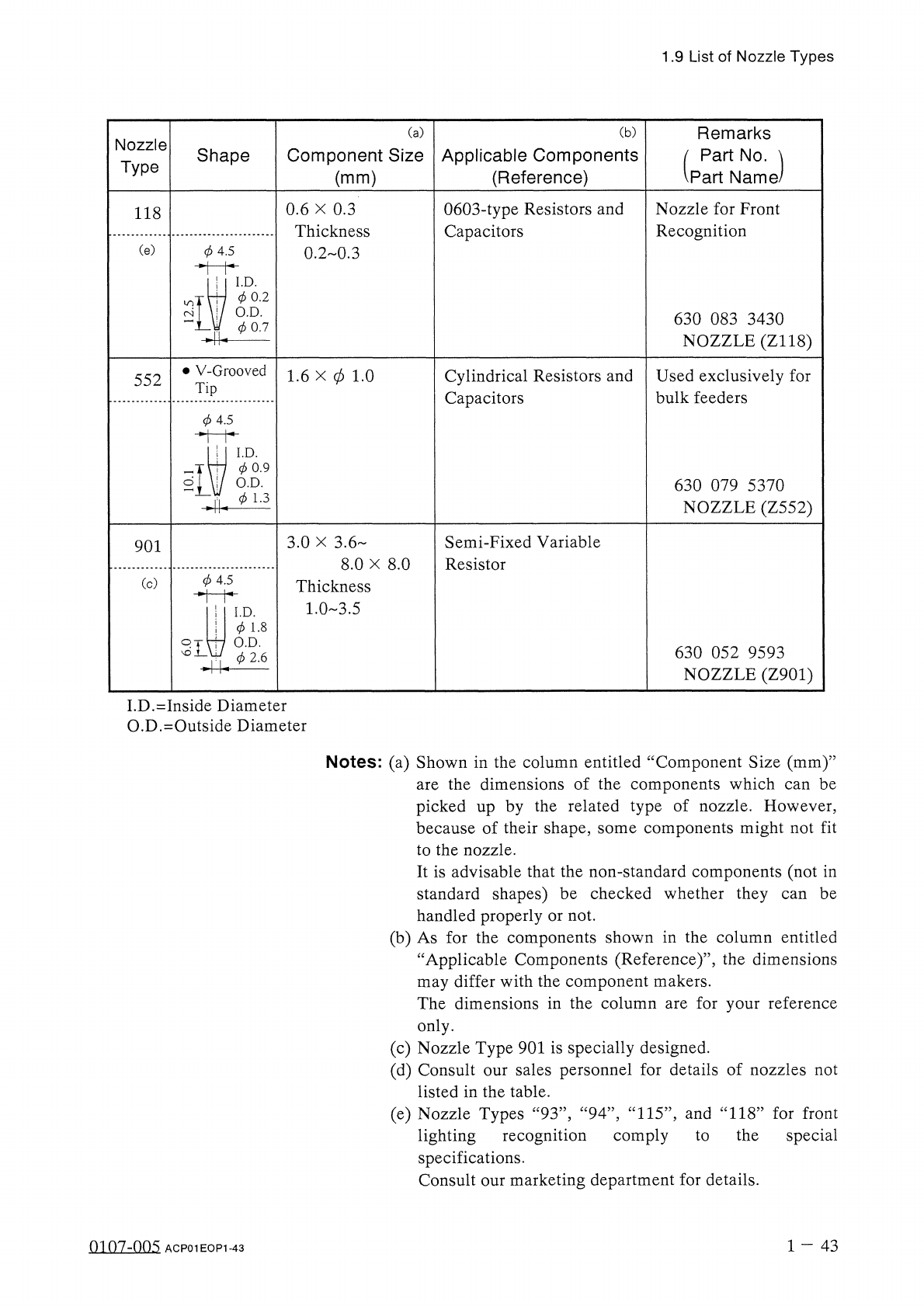
1.9
List
of
Nozzle
Types
(
b
)
Remarks
Part
No
.
、
Part
Name
(
a
)
Nozzle
Type
Component
Size
(
mm
)
Applicable
Components
(
Reference
)
Shape
0603
-
type
Resistors
and
Capacitors
Nozzle
for
Front
Recognition
0.6
X
0.3
Thickness
0.2
0.3
118
(
e
)
0
4.5
I
.
D
.
0
0.2
O
.
D
.
630
083
3430
NOZZLE
(
Z
118
)
0
0.7
•
V
-
Grooved
1.6
X
0
1.0
Cylindrical
Resistors
and
Capacitors
Used
exclusively
for
bulk
feeders
552
Tip
(
j
)
4.5
I
.
D
.
(
j
)
0.9
O
.
D
.
630
079
5370
NOZZLE
(
Z
552
)
0
1.3
4
Semi
-
Fixed
Variable
Resistor
3.0
X
3.6
901
8.0
X
8.0
0
4.5
(
c
)
Thickness
1.0
3.5
!
I
.
D
.
!
0
1
-
8
2
L
\
J
7
O
.
D
.
630
052
9593
NOZZLE
(
Z
901
)
(
j
)
2.6
I
.
D
.
=
Inside
Diameter
O
.
D
.
=
Outside
Diameter
Notes
:
(
a
)
Shown
in
the
column
entitled
aComponent
Size
(
mm
)
’’
the
dimensions
of
the
components
which
can
be
picked
up
by
the
related
type
of
nozzle
.
However
,
because
of
their
shape
,
some
components
might
not
fit
to
the
nozzle
.
It
is
advisable
that
the
non
-
standard
components
(
not
in
standard
shapes
)
be
checked
whether
they
can
be
handled
properly
or
not
.
(
b
)
As
for
the
components
shown
in
the
column
entitled
“
Applicable
Components
(
Reference
)
’’
,
the
dimensions
may
differ
with
the
component
makers
.
The
dimensions
in
the
column
are
for
your
reference
only
.
(
c
)
Nozzle
Type
901
is
specially
designed
.
(
d
)
Consult
our
sales
personnel
for
details
of
nozzles
not
listed
in
the
table
.
(
e
)
Nozzle
Types
“
93
”
,
“
94
”
,
“
115
”
,
and
“
118
”
for
front
lighting
recognition
comply
to
the
special
specifications
.
Consult
our
marketing
department
for
details
.
are
1
-
43
0107
-
005
ACP
01
EOP
1
-
43
1.10
[
PNL
CHANGE
]
Buttons
1.10
[
PNL
CHANGE
]
Buttons
The
machine
is
equipped
with
operation
panels
.
Each
operation
panel
(
front
and
provided
with
the
[
PNL
CHANGE
]
button
.
Either
one
of
the
two
buttons
can
be
set
available
in
operation
.
It
is
impossible
to
activate
both
buttons
at
the
same
time
.
When
the
button
is
active
,
the
LED
illuminates
.
When
the
[
OPERATION
]
switch
is
set
to
“
SET
UP
’
’
,
the
front
panel
is
locked
forcibly
.
pairs
of
touch
screens
and
panels
)
two
rear
are
(
1
)
Listed
below
are
valid
buttons
when
the
[
PNL
CHANGE
]
button
is
pressed
.
•
Touch
Screen
Switch
•
[
START
]
Button
•
[
RESET
]
Button
•
[
ZERO
]
Button
•
[
MOVE
]
Button
•
[
TRANSFER
]
Button
•
[
FDR
CRG
ST
]
Button
•
[
FDR
CRG
END
]
Button
•
[
SYS
CLR
]
Button
Note
:
The
[
STOP
]
and
[
PAUSE
]
buttons
can
be
activated
anytime
regardless
of
the
[
PNL
CHANGE
]
buttons
.
(
2
)
“
ON
”
Status
of
[
PNL
CHANGE
]
Button
and
“
LOCK
”
LEDs
Rear
Operation
Panel
Front
Operation
Panel
PNLCHANGE
Button
LED
12
PNLCHANGE
Button
LED
6
Status
LOCK
LED
13
LOCK
LED
7
Activated
ON
Front
Panel
Operation
ON
ON
Locked
ON
ON
Activated
Rear
Panel
Operation
ON
ON
ON
Locked
Note
:
When
power
is
supplied
for
the
first
time
,
the
front
panel
is
activated
.
1
一
44
ACP
01
EOP
1
-
44
1.10
[
PNL
CHANGE
]
Buttons
•
When
one
of
the
[
PNL
CHANGE
]
buttons
is
pressed
,
the
LED
illuminates
,
indicating
that
the
button
is
selected
.
At
the
same
time
,
both
green
LED
7
and
LED
13
(
LEDs
of
“
LOCK
”
)
also
illuminate
because
they
CHANGE
]
button
and
the
“
LOCK
”
LED
on
the
panel
are
ON
,
the
operation
panel
becomes
activated
.
In
this
case
,
when
the
[
PNL
CHANGE
]
button
on
the
unselected
operation
panel
is
pressed
,
the
operation
panels
cannot
be
changed
from
one
to
the
other
as
long
as
the
“
LOCK
”
LED
is
ON
.
interconnected
.
When
the
LED
of
the
[
PNL
operation
are
same
•
To
cancel
“
LOCK
”
mode
on
the
selected
operation
panel
,
press
the
[
PNL
CHANGE
]
button
located
on
the
panel
again
.
The
“
LOCK
”
mode
is
canceled
and
both
green
LED
7
and
LED
13
extinguish
.
•
The
operation
panels
can
be
changed
from
one
to
the
other
by
the
desired
panel
only
pressing
the
[
PNL
CHANGE
]
button
when
both
are
not
in
“
LOCK
”
mode
.
Either
one
of
the
operation
panels
on
be
selected
regardless
of
the
operation
mode
(
Ex
.
:
RUN
”
or
“
PAUSE
”
mode
)
of
the
machine
.
can
When
the
console
panel
is
not
locked
and
the
[
STOP
]
or
[
PAUSE
]
button
on
the
unselected
console
panel
is
pressed
,
the
console
panel
on
the
pressed
button
side
becomes
activated
automatically
and
the
LED
of
the
[
CONSOLE
CHANGE
]
button
also
illuminates
automatically
.
•
When
the
[
SYS
CLR
]
button
on
the
operation
panel
in
“
LOCK
’
mode
is
pressed
,
the
“
LOCK
”
mode
is
canceled
.
A
WARNING
•
Before
the
machine
is
powered
and
some
operations
are
performed
at
the
front
or
the
rear
side
of
the
machine
,
confirm
that
the
LED
of
the
[
PNL
CHANGE
]
button
or
the
“
LOCK
”
lamp
(
green
)
on
the
required
side
is
ON
.
If
the
“
LOCK
”
lamp
is
not
ON
,
the
machine
can
be
operated
from
the
other
side
,
exposing
the
operators
to
a
hazardous
situation
.
•
In
principle
,
the
machine
must
be
operated
by
only
one
person
.
If
there
are
more
than
one
,
ensure
good
communication
by
giving
loud
verbal
instructions
.
1
-
45
m
07
-
nn
^
ACP
01
EOP
1
-
45