1OPERATION_.pdf - 第137页
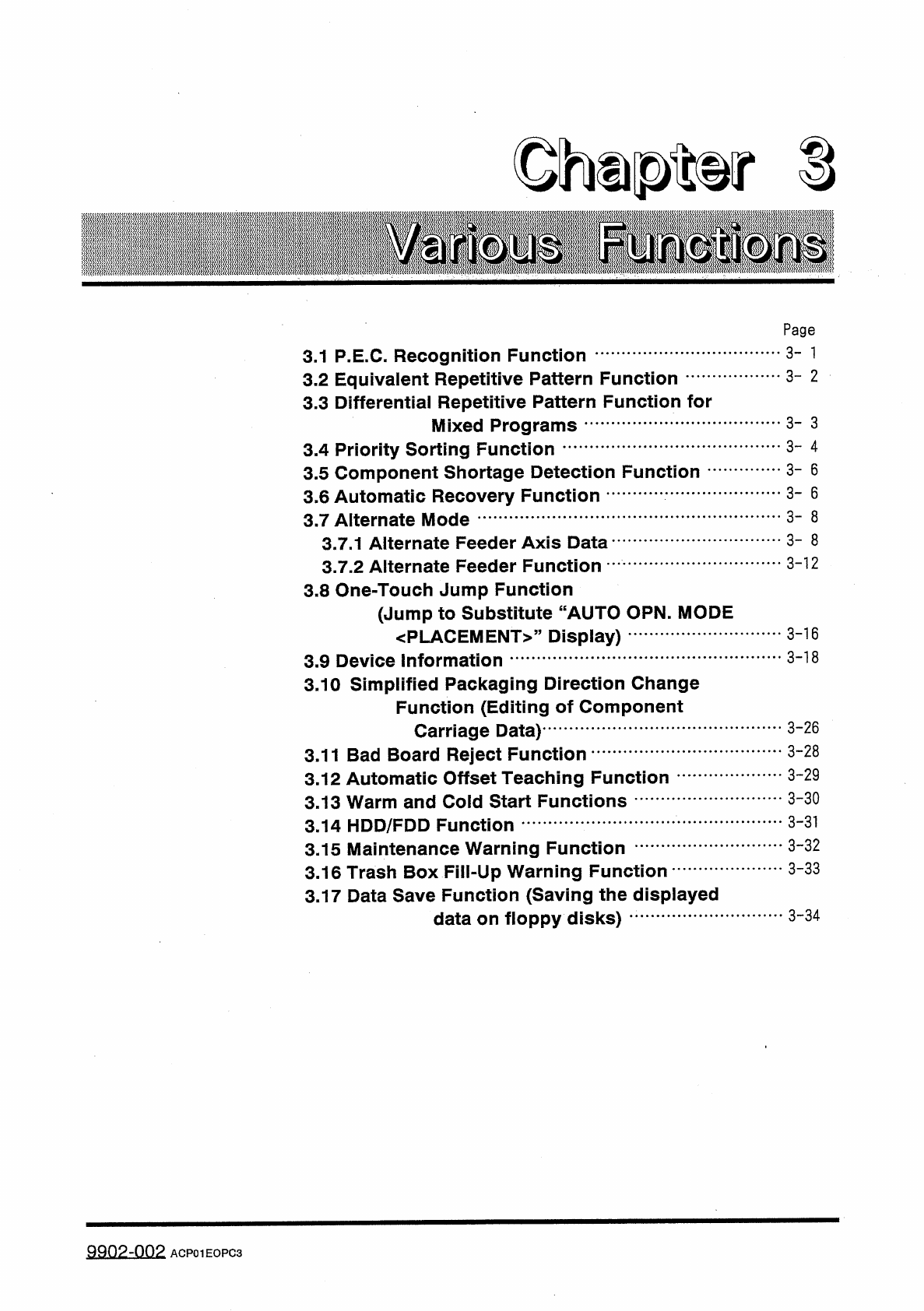
Page 3 - 1 3.1 P . E . C . Recognition Function 3.2 Equivalent Repetitive Pattern Function 3.3 Differential Repetitive Pattern Function for Mixed Programs 3.4 Priority Sorting Function 3.5 Component Shortage Detection Fu…
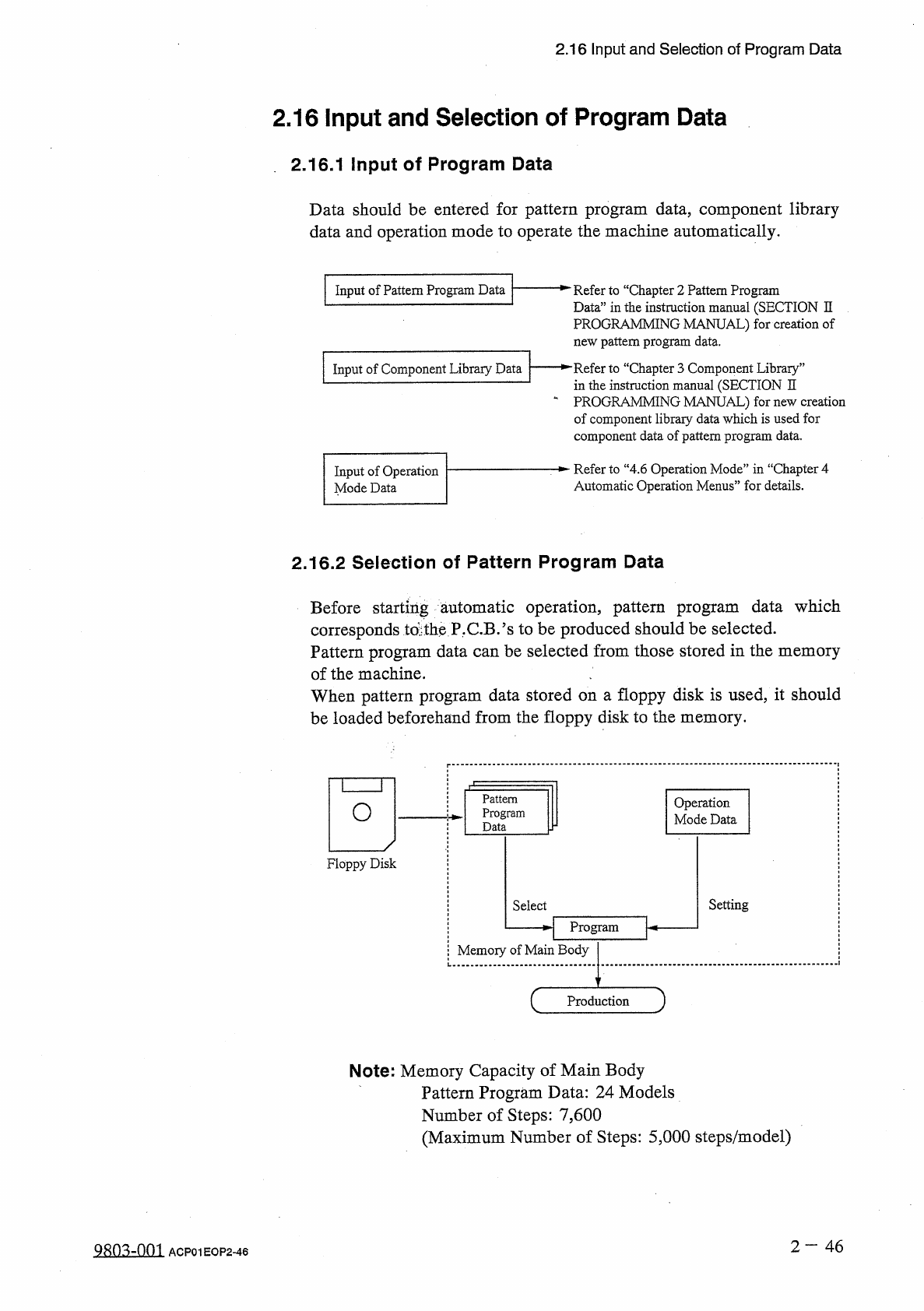
2.16
Input
and
Selection
of
Program
Data
2.16
Input
and
Selection
of
Program
Data
2
,
16.1
Input
of
Program
Data
Data
should
be
entered
for
pattern
program
data
,
component
library
data
and
operation
mode
to
operate
the
machine
automatically
.
Input
of
Pattern
Program
Data
一
^
Refer
to
“
Chapter
2
Pattern
Program
Data
”
in
the
instruction
manual
(
SECTION
II
PROGRAMMING
MANUAL
)
for
creation
of
new
pattern
program
data
.
一
►
"
Refer
to
“
Chapter
3
Component
Library
”
in
the
instruction
manual
(
SECTION
II
一
PROGRAMMING
MANUAL
)
for
new
creation
of
component
libraiy
data
which
is
used
for
component
data
of
pattern
program
data
.
Input
of
Component
Library
Data
Refer
to
“
4.6
Operation
Mode
”
in
“
Chapter
4
Automatic
Operation
Menus
”
for
details
.
Input
of
Operation
Mode
Data
2.16
.
2
Selection
of
Pattern
Program
Data
Before
starting
automatic
operation
,
pattern
program
corresponds
td
tbe
P
.
C
.
B
/
s
to
be
produced
should
be
selected
.
Pattern
program
data
can
be
selected
from
those
stored
in
the
memory
of
the
machine
.
When
pattern
program
data
stored
on
a
floppy
disk
is
used
,
it
should
be
loaded
beforehand
from
the
floppy
disk
to
the
memory
.
data
which
Pattern
Program
Data
Operation
Mode
Data
O
Floppy
Disk
Setting
Select
H
Program
卜
Memory
of
Main
Body
Production
Note
:
Memory
Capacity
of
Main
Body
Pattern
Program
Data
:
24
Models
Number
of
Steps
:
7
,
600
(
Maximum
Number
of
Steps
:
5
,
000
steps
/
model
)
2
-
46
QRO
^
-
nm
ACP
01
EOP
2
-
46
Page
3
-
1
3.1
P
.
E
.
C
.
Recognition
Function
3.2
Equivalent
Repetitive
Pattern
Function
3.3
Differential
Repetitive
Pattern
Function
for
Mixed
Programs
3.4
Priority
Sorting
Function
3.5
Component
Shortage
Detection
Function
3.6
Automatic
Recovery
Function
3.7
Alternate
Mode
3.7
.
1
Alternate
Feeder
Axis
Data
3.7
.
2
Alternate
Feeder
Function
3.8
One
-
Touch
Jump
Function
(
Jump
to
Substitute
“
AUTO
OPN
.
MODE
<
PLACEMENT
>
>
,
Display
)
3.9
Device
Information
3.10
Simplified
Packaging
Direction
Change
Function
(
Editing
of
Component
Carriage
Data
)
3.11
Bad
Board
Reject
Function
3.12
Automatic
Offset
Teaching
Function
3.13
Warm
and
Cold
Start
Functions
3.14
HDD
/
FDD
Function
3.15
Maintenance
Warning
Function
3.16
Trash
Box
Fill
-
Up
Warning
Function
3.17
Data
Save
Function
(
Saving
the
displayed
data
on
floppy
disks
)
3
-
2
3
-
3
3
-
4
3
-
6
3
-
6
3
-
8
3
-
8
3
-
12
3
-
16
3
-
18
3
-
26
3
-
28
3
-
29
3
-
30
3
-
31
3
-
32
3
-
33
3
-
34
9902
-
002
ACP
01
EOPC
3
3.1
P
.
E
.
C
.
Recognition
Function
3.1
P
.
E
.
C
.
Recognition
Function
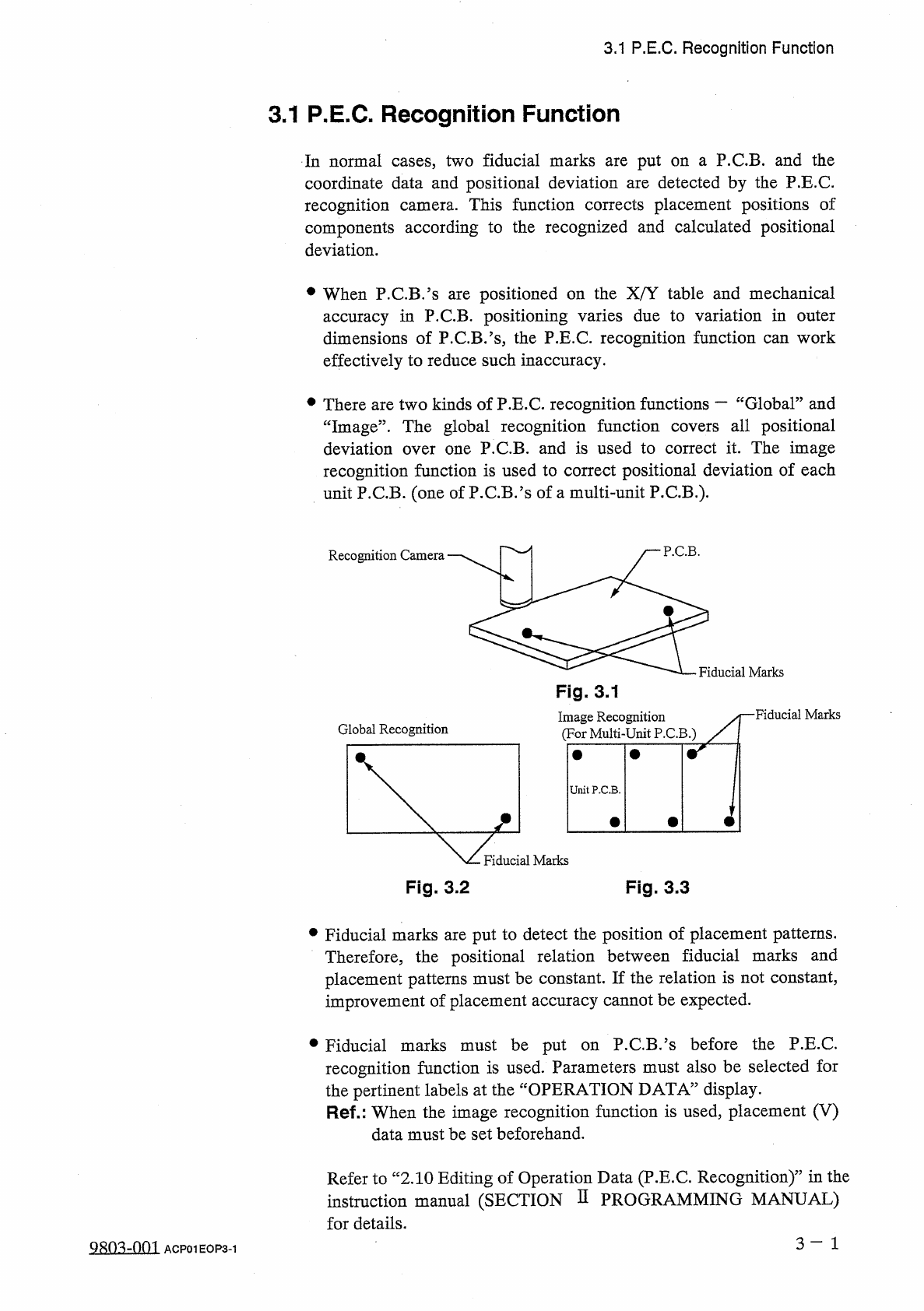
In
normal
cases
,
two
fiducial
marks
are
put
on
a
P
.
C
.
B
.
and
the
coordinate
data
and
positional
deviation
are
detected
by
the
P
.
E
.
C
.
recognition
camera
.
This
function
corrects
placement
positions
of
components
according
to
the
recognized
and
calculated
positional
deviation
.
•
When
P
.
C
.
B
.
’
s
are
positioned
on
the
X
/
Y
table
and
mechanical
accuracy
in
P
.
C
.
B
.
positioning
varies
due
to
variation
in
outer
dimensions
of
P
.
C
.
B
.
’
s
,
the
P
.
E
.
C
.
recognition
function
can
work
effectively
to
reduce
such
inaccuracy
.
•
There
are
two
kinds
of
P
.
E
.
C
.
recognition
functions
—
“
Global
”
and
all
positional
“
Image
”
.
The
global
recognition
function
deviation
over
one
P
.
C
.
B
.
and
is
used
to
correct
it
.
The
image
recognition
function
is
used
to
correct
positional
deviation
of
each
unit
P
.
C
.
B
.
(
one
of
P
.
C
.
B
.
’
s
of
a
multi
-
unit
P
.
C
.
B
.
)
.
covers
P
.
C
.
B
.
Recognition
Camera
Fiducial
Marks
Fig
.
3.1
■
Fiducial
Marks
Image
Recognition
(
For
Multi
-
Unit
P
.
C
.
B
.
)
Global
Recognition
UnitP
.
C
.
B
.
Fiducial
Marks
Fig
.
3.2
Fig
.
3.3
•
Fiducial
marks
are
put
to
detect
the
position
of
placement
patterns
.
Therefore
,
the
positional
relation
between
fiducial
marks
and
placement
patterns
must
be
constant
.
If
the
relation
is
not
constant
,
improvement
of
placement
accuracy
cannot
be
expected
.
P
.
C
.
B
,
’
s
before
the
P
.
E
.
C
.
•
Fiducial
marks
must
be
put
recognition
function
is
used
.
Parameters
must
also
be
selected
for
the
pertinent
labels
at
the
Ref
.
:
When
the
image
recognition
function
is
used
,
placement
(
V
)
on
display
.
OPERATION
DATA
”
data
must
be
set
beforehand
.
Refer
to
“
2.10
Editing
of
Operation
Data
(
P
.
E
.
C
.
Recognition
)
'
5
in
the
instruction
manual
(
SECTION
D
PROGRAMMING
MANUAL
)
for
details
.
3
-
1
QRO
^
-
001
ACP
01
EOP
3
-
1