1OPERATION_.pdf - 第169页
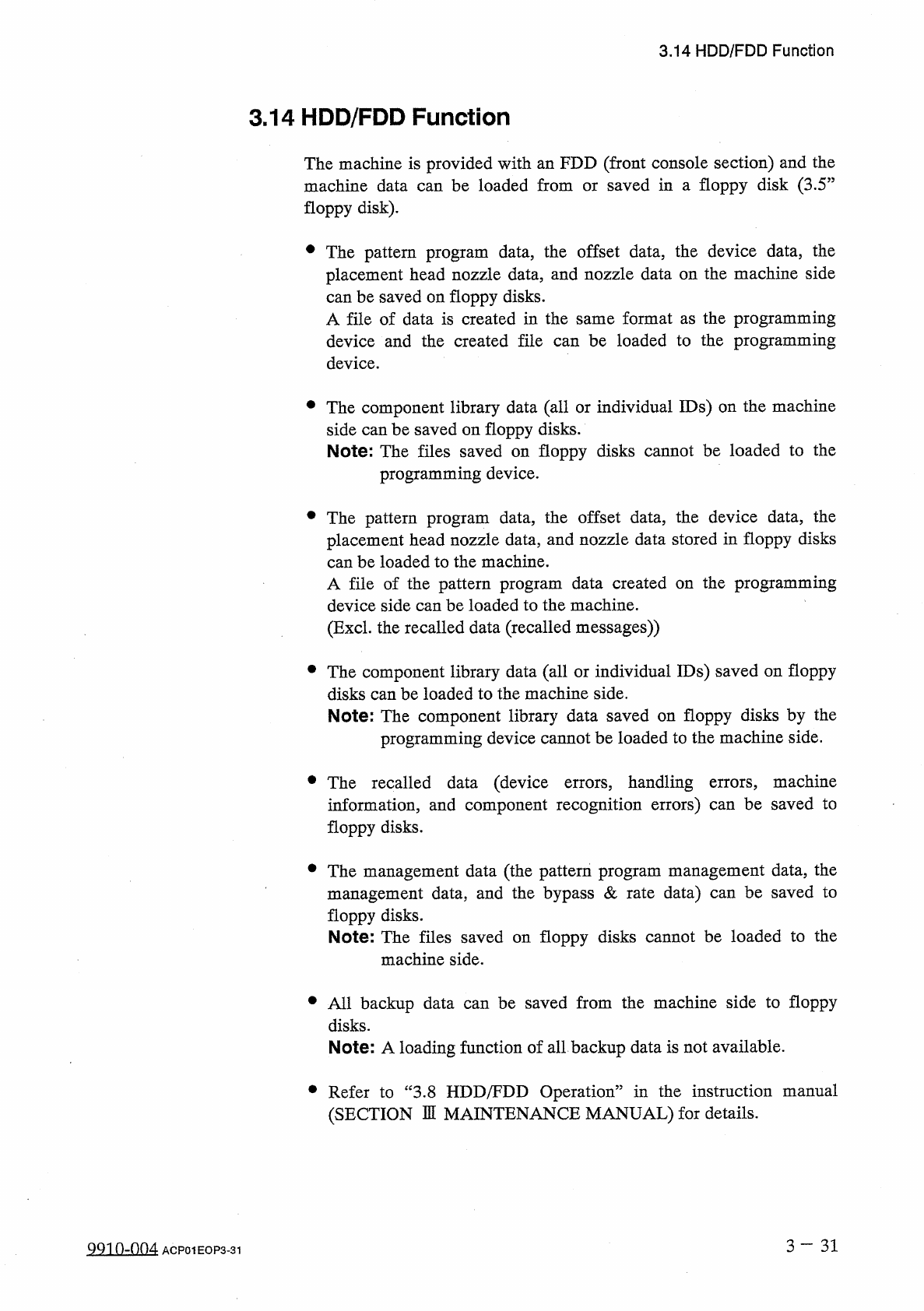
3.14 HDD / FDD Function 3.14 HDD / FDD Function The machine is provided with an FDD ( front console section ) and the machine data can be loaded from floppy disk ) . saved in a floppy disk ( 3.5 J or # The pattern progra…
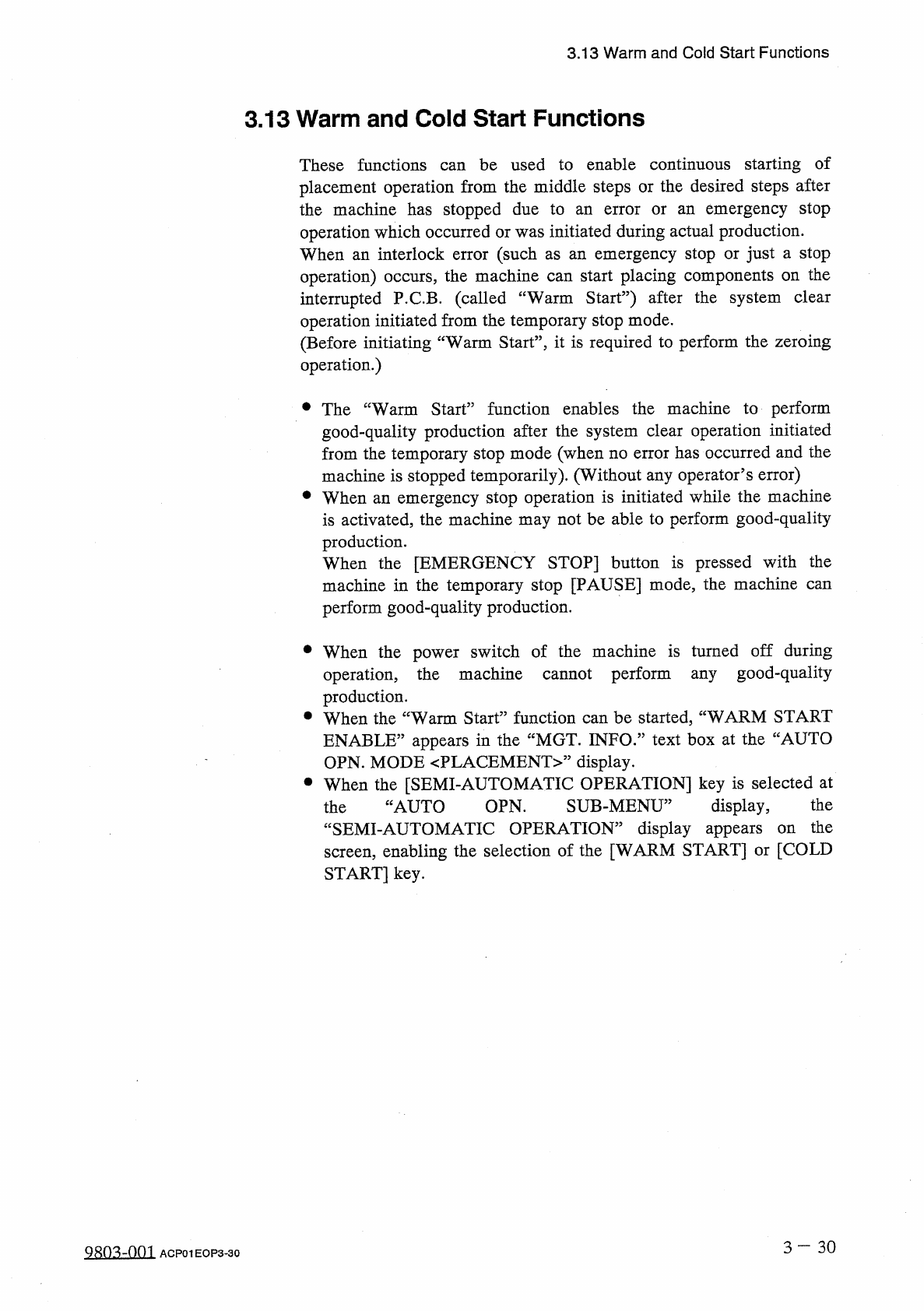
3.13
Warm
and
Cold
Start
Functions
3.13
Warm
and
Cold
Start
Functions
These
functions
can
be
used
to
enable
continuous
starting
of
placement
operation
from
the
middle
steps
or
the
desired
steps
after
the
machine
has
stopped
due
to
operation
which
occurred
or
was
initiated
during
actual
production
.
When
an
interlock
error
(
such
as
operation
)
occurs
,
the
machine
can
start
placing
components
on
the
interrupted
P
.
C
.
B
.
(
called
“
Warm
Start
”
)
after
the
system
clear
operation
initiated
from
the
temporary
stop
mode
.
(
Before
initiating
“
Warm
Start
’
’
,
it
is
required
to
perform
the
zeroing
operation
.
)
emergency
stop
an
error
or
an
emergency
stop
or
just
a
stop
an
•
The
“
Warm
Start
”
function
enables
the
machine
to
perform
good
-
quality
production
after
the
system
clear
operation
initiated
from
the
temporary
stop
mode
(
when
no
error
has
occurred
and
the
machine
is
stopped
temporarily
)
.
(
Without
any
operator
’
s
error
)
•
When
an
emergency
stop
operation
is
initiated
while
the
machine
is
activated
,
the
machine
may
not
be
able
to
perform
good
-
quality
production
.
When
the
[
EMERGENCY
STOP
]
button
is
pressed
with
the
machine
in
the
temporary
stop
[
PAUSE
]
mode
,
the
machine
can
perform
good
-
quality
production
.
•
When
the
power
switch
of
the
machine
is
turned
off
during
operation
,
the
machine
cannot
perform
any
good
-
quality
production
.
•
When
the
“
Warm
Start
”
function
can
be
started
,
“
WARM
START
ENABLE
”
appears
in
the
“
MGT
.
INFO
.
”
text
box
at
the
“
AUTO
OPN
.
MODE
〈
PLACEMENT
〉
”
display
.
•
When
the
[
SEMI
-
AUTOMATIC
OPERATION
]
key
is
selected
at
SUB
-
MENU
”
the
display
,
“
SEMI
-
AUTOMATIC
OPERATION
”
display
appears
screen
,
enabling
the
selection
of
the
[
WARM
START
]
or
[
COLD
START
]
key
.
JAUTO
OPN
.
the
the
on
3
-
3 0
QR
0
^
~
001
ACP
01
EOP
3
-
30
3.14
HDD
/
FDD
Function
3.14
HDD
/
FDD
Function
The
machine
is
provided
with
an
FDD
(
front
console
section
)
and
the
machine
data
can
be
loaded
from
floppy
disk
)
.
saved
in
a
floppy
disk
(
3.5
J
or
#
The
pattern
program
data
,
the
offset
data
,
the
device
data
,
the
placement
head
nozzle
data
,
and
nozzle
data
on
the
machine
side
can
be
saved
on
floppy
disks
.
A
file
of
data
is
created
in
the
same
format
as
the
programming
device
and
the
created
file
can
be
loaded
to
the
programming
device
.
•
The
component
library
data
(
all
or
individual
IDs
)
on
the
machine
side
can
be
saved
on
floppy
disks
.
Note
:
The
files
saved
on
floppy
disks
cannot
be
loaded
to
the
programming
device
.
•
The
pattern
program
data
,
the
offset
data
,
the
device
data
,
the
placement
head
nozzle
data
,
and
nozzle
data
stored
in
floppy
disks
can
be
loaded
to
the
machine
.
A
file
of
the
pattern
program
data
created
device
side
can
be
loaded
to
the
machine
.
(
Excl
.
the
recalled
data
(
recalled
messages
)
)
the
programming
on
•
The
component
library
data
(
all
or
individual
IDs
)
saved
on
floppy
disks
can
be
loaded
to
the
machine
side
.
Note
:
The
component
library
data
saved
on
floppy
disks
by
the
programming
device
cannot
be
loaded
to
the
machine
side
.
•
The
recalled
data
(
device
errors
,
handling
errors
,
machine
information
,
and
component
recognition
errors
)
can
be
saved
to
floppy
disks
.
•
The
management
data
(
the
pattern
program
management
data
,
the
management
data
,
and
the
bypass
&
rate
data
)
can
be
saved
to
floppy
disks
.
Note
:
The
files
saved
on
floppy
disks
cannot
be
loaded
to
the
machine
side
.
•
All
backup
data
can
be
saved
from
the
machine
side
to
floppy
disks
.
Note
:
A
loading
function
of
all
backup
data
is
not
available
.
•
Refer
to
“
3.8
HDD
/
FDD
Operation
”
in
the
instruction
manual
(
SECTION
DI
MAINTENANCE
MANUAL
)
for
details
.
3
-
31
Q
91
0
-
004
ACP
01
EOP
3
-
31
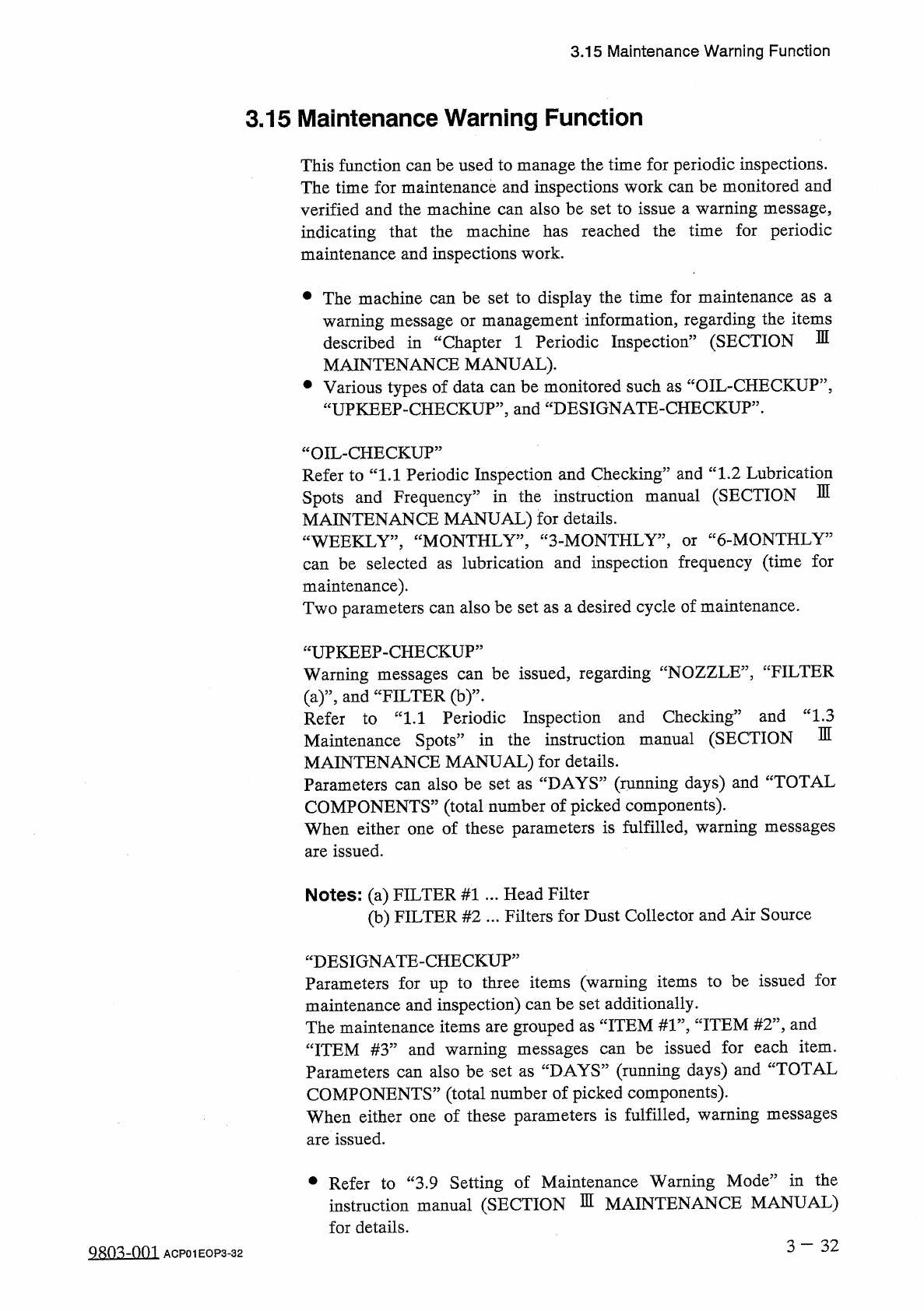
3.15
Maintenance
Warning
Function
3.15
Maintenance
Warning
Function
This
function
can
be
used
to
manage
the
time
for
periodic
inspections
.
The
time
for
maintenance
and
inspections
work
can
be
monitored
and
verified
and
the
machine
can
also
be
set
to
issue
a
warning
message
,
indicating
that
the
machine
has
reached
the
time
for
periodic
maintenance
and
inspections
work
.
•
The
machine
can
be
set
to
display
the
time
for
maintenance
as
a
warning
message
or
management
information
,
regarding
the
items
described
in
“
Chapter
1
Periodic
Inspection
”
(
SECTION
MAINTENANCE
MANUAL
)
.
•
Various
types
of
data
can
be
monitored
such
as
“
OIL
-
CHECKUP
”
,
“
UPKEEP
-
CHECKUP
”
,
and
“
DESIGNATE
-
CHECKUP
”
.
m
“
OIL
-
CHECKUP
”
Refer
to
“
1.1
Periodic
Inspection
and
Checking
”
and
“
1.2
Lubrication
Spots
and
Frequency
”
in
the
instruction
manual
(
SECTION
MAINTENANCE
MANUAL
)
for
details
.
“
WEEKLY
,
,
,
“
MONTHLY
,
,
,
“
3
-
MONTHLY
”
,
can
be
selected
as
lubrication
and
inspection
frequency
(
time
for
maintenance
)
.
Two
parameters
can
also
be
set
as
a
desired
cycle
of
maintenance
.
6
-
MONTHLY
3
or
“
UPKEEP
-
CHECKUP
”
Warning
messages
can
be
issued
,
regarding
“
NOZZLE
”
,
'
'
FILTER
(
a
)
”
,
and
“
FILTER
(
b
)
”
-
。
Refer
to
“
1.1
Periodic
Inspection
and
Checking
3
Maintenance
Spots
”
in
the
instruction
manual
(
SECTION
MAINTENANCE
MANUAL
)
for
details
.
Parameters
can
also
be
set
as
“
DAYS
”
(
running
days
)
and
“
TOTAL
COMPONENTS
”
(
total
number
of
picked
components
)
.
When
either
one
of
these
parameters
is
fulfilled
,
warning
messages
are
issued
.
and
“
1.3
m
Notes
:
(
a
)
FILTER
#
1
.
.
.
Head
Filter
(
b
)
FILTER
#
2
.
.
.
Filters
for
Dust
Collector
and
Air
Source
“
DESIGNATE
-
CHECKUP
”
Parameters
for
up
to
three
items
(
warning
items
to
be
issued
for
maintenance
and
inspection
)
can
be
set
additionally
.
The
maintenance
items
are
grouped
as
“
ITEM
#
1
”
,
“
ITEM
#
2
”
,
and
be
issued
for
each
item
.
:
DAYS
”
(
running
days
)
and
“
TOTAL
COMPONENTS
”
(
total
number
of
picked
components
)
.
When
either
one
of
these
parameters
is
fulfilled
,
warning
messages
are
issued
.
“
ITEM
#
3
”
and
warning
messages
Parameters
can
also
be
set
as
can
•
Refer
to
“
3.9
Setting
of
Maintenance
Warning
Mode
”
in
the
instruction
manual
(
SECTION
瓜
MAINTENANCE
MANUAL
)
for
details
.
3
-
32
28
Q
3
dQQl
ACP
01
EOP
3
-
32