1OPERATION_.pdf - 第188页
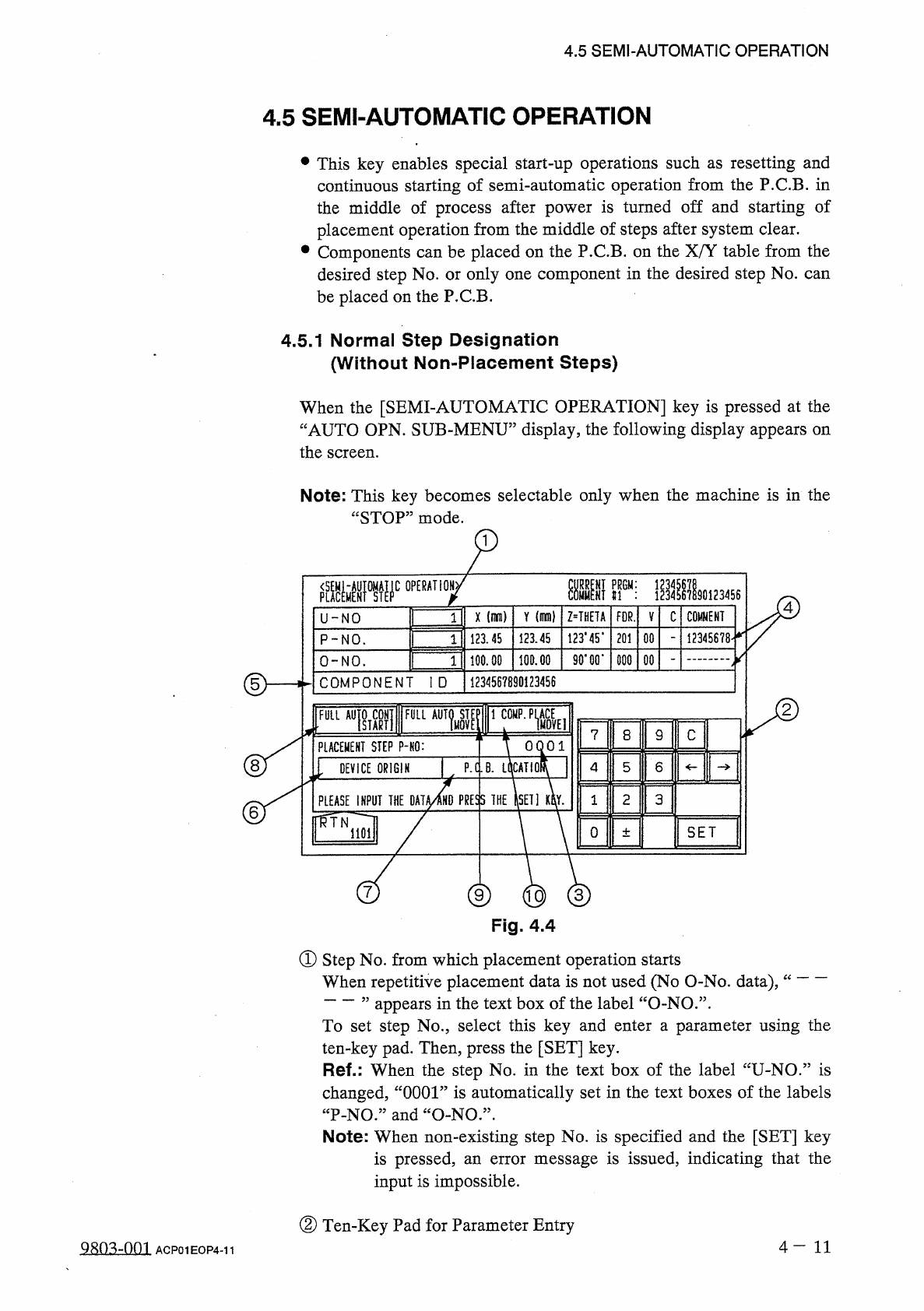
4.5 SEMI - AUTOMATIC OPERATION 4.5 SEMI - AUTOMATIC OPERATION • This key enables special start - up operations such as resetting and continuous starting of semi - automatic operation from the P . C . B . in the middle of…
4.4
Program
Change
(
3
)
When
the
program
change
is
completed
,
the
selected
pattern
program
name
turns
green
,
indicating
that
it
is
newly
selected
as
current
pattern
program
data
.
The
current
pattern
program
name
indicated
by
@
also
changes
to
the
newly
selected
one
.
Notes
:
(
a
)
When
the
data
is
checked
NG
(
No
Good
)
,
the
data
check
display
appears
,
showing
detailed
information
of
the
error
.
Refer
to
the
information
and
correct
or
edit
the
error
item
of
the
pattern
program
data
.
At
this
time
,
(
indefinite
name
)
appears
in
the
text
field
@
of
the
label
“
CURRENT
PRGM
”
.
(
b
)
When
the
[
CURRENT
PROGRAM
]
key
⑬
is
pressed
,
the
“
AUTO
OPN
.
MODE
<
PLACEMENT
>
”
display
opens
directly
.
u
?
?
??
?
?
?
?
,
,
4
一
10
-
1
9902
-
001
ACP
01
EOP
4
-
10
-
1
4.5
SEMI
-
AUTOMATIC
OPERATION
4.5
SEMI
-
AUTOMATIC
OPERATION
•
This
key
enables
special
start
-
up
operations
such
as
resetting
and
continuous
starting
of
semi
-
automatic
operation
from
the
P
.
C
.
B
.
in
the
middle
of
process
after
power
is
turned
off
and
starting
of
placement
operation
from
the
middle
of
steps
after
system
clear
.
•
Components
can
be
placed
on
the
P
.
C
.
B
.
on
the
X
/
Y
table
from
the
desired
step
No
.
or
only
one
component
in
the
desired
step
No
.
can
be
placed
on
the
P
.
C
.
B
.
4.5
.
1
Normal
Step
Designation
(
Without
Non
-
Placement
Steps
)
When
the
[
SEMI
-
AUTOMATIC
OPERATION
]
key
is
pressed
at
the
“
AUTO
OPN
.
SUB
-
MENU
”
display
,
the
following
display
appears
on
the
screen
.
Note
:
This
key
becomes
selectable
only
when
the
machine
is
in
the
“
STOP
”
mode
.
our
:
90123456
4
Y
(
mm
)
COMMENT
X
(
mm
)
Z
=
THETA
FDR
.
C
V
U
-
N O
1
123
*
45
*
123.45
12345678
-
12145
201
00
P
-
NO
.
1
90
.
GO
.
100.00
100.00
000
00
0
-
NO
.
1
d
>
1234567890123456
C O M P O N E N T
I D
FTML
[
FULL
AUTO
ST
FULL
M O V
7
8
9
C
OQOl
PLACEMENT
STEP
P
-
KO
:
8
P
.
C
.
B
.
LCICATlOf
4
5
6
DEVICE
ORIGIN
PRESS
THE
ISEII
m
.
2
3
PLEASE
INPUT
THE
OAT
1
6
ffiTN
0
SET
1101
±
nd
)
C
3
Fig
.
4.4
①
Step
No
.
from
which
placement
operation
starts
When
repetitive
placement
data
is
not
used
(
No
O
-
No
.
data
)
,
”
appears
in
the
text
box
of
the
label
“
O
-
NO
.
”
.
To
set
step
No
.
,
select
this
key
and
enter
a
parameter
using
the
ten
-
key
pad
.
Then
,
press
the
[
SET
]
key
.
Ref
.
:
When
the
step
No
.
in
the
text
box
of
the
label
“
U
-
NO
.
”
is
changed
,
“
0001
”
is
automatically
set
in
the
text
boxes
of
the
labels
“
P
-
NO
.
”
and
“
O
-
N O
•
Note
:
When
non
-
existing
step
No
.
is
specified
and
the
[
SET
]
key
is
pressed
,
an
error
message
is
issued
,
indicating
that
the
input
is
impossible
.
“
②
Ten
-
Key
Pad
for
Parameter
Entry
4
-
1 1
QRQ
^
-
001
ACP
01
EOP
4
-
11
4.5
SEMI
-
AUTOMATIC
OPERATION
③
Entered
Parameter
Display
Section
When
the
[
SET
]
key
is
pressed
,
the
displayed
parameter
is
specified
as
operation
start
step
.
④
Comment
of
the
step
No
.
specified
as
operation
start
step
is
displayed
.
⑤
Component
ID
used
in
the
specified
step
Component
ID
used
in
the
step
specified
as
operation
start
one
is
displayed
.
⑥
DEVICE
ORIGIN
(
Origin
Monitor
Section
)
When
the
device
is
located
at
its
origin
,
this
label
turns
green
.
When
it
is
not
at
its
origin
,
it
turns
light
red
.
Semi
-
automatic
operation
cannot
be
performed
when
the
device
is
not
at
.
its
origin
.
⑦
P
.
C
.
B
.
LOCATION
(
P
.
C
.
B
.
Location
Monitor
Section
)
When
a
P
.
C
.
B
.
is
correctly
positioned
,
this
label
turns
green
.
When
there
is
no
P
.
C
.
B
.
or
a
P
.
C
.
B
.
is
not
positioned
correctly
,
it
turns
light
red
.
Semi
-
automatic
operation
cannot
be
performed
when
a
P
.
C
.
B
.
is
not
positioned
correctly
on
the
X
/
Y
table
.
Semi
-
automatic
operation
is
set
ready
when
®
and
⑦
are
green
.
⑧
[
FULL
AUTO
CONT
[
START
]
]
key
This
key
is
used
to
specify
the
continuous
operation
from
the
operation
start
step
No
.
When
the
[
START
]
button
is
pressed
after
this
key
is
selected
,
the
“
AUTO
OPN
.
MODE
〈
PLACEMENT
〉
”
display
appears
on
the
screen
and
automatic
operation
starts
.
Note
:
FULL
AUTO
CONT
:
Normal
automatic
operation
is
performed
continuously
from
the
steps
specified
in
the
text
boxes
of
the
labels
“
U
-
NO
.
”
,
“
P
-
NO
.
”
and
wO
-
NO
.
,
,
.
⑨
[
FULL
AUTO
STEP
[
MOVE
]
]
key
This
key
is
used
to
specify
step
operation
from
the
operation
start
step
No
.
When
the
[
MOVE
]
button
is
pressed
,
the
“
AUTO
OPN
.
MODE
<
PLACEMENT
>
”
display
appears
on
the
screen
and
automatic
operation
starts
.
When
the
machine
is
set
in
the
“
PAUSE
”
mode
,
the
automatic
operation
stops
once
because
this
is
a
step
operation
.
Note
:
FULL
AUTO
STEP
:
Every
time
the
[
MOVE
]
button
is
pressed
,
step
operation
is
performed
from
the
steps
specified
in
the
text
boxes
of
the
labels
“
U
-
NO
.
”
,
“
P
-
NO
.
”
,
and
“
O
-
NO
.
”
.
4
一
12
QRO
^
-
nm
ACP
01
EOP
4
-
12