1OPERATION_.pdf - 第190页
4.5 SEMI - AUTOMATIC OPERATION ⑩ [ 1 COMP . PLACE [ MOVE ] ] key This key is used to specify placement of one component in the operation start step No . When the [ MOVE ] button is pressed after this key is selected , no…
4.5
SEMI
-
AUTOMATIC
OPERATION
③
Entered
Parameter
Display
Section
When
the
[
SET
]
key
is
pressed
,
the
displayed
parameter
is
specified
as
operation
start
step
.
④
Comment
of
the
step
No
.
specified
as
operation
start
step
is
displayed
.
⑤
Component
ID
used
in
the
specified
step
Component
ID
used
in
the
step
specified
as
operation
start
one
is
displayed
.
⑥
DEVICE
ORIGIN
(
Origin
Monitor
Section
)
When
the
device
is
located
at
its
origin
,
this
label
turns
green
.
When
it
is
not
at
its
origin
,
it
turns
light
red
.
Semi
-
automatic
operation
cannot
be
performed
when
the
device
is
not
at
.
its
origin
.
⑦
P
.
C
.
B
.
LOCATION
(
P
.
C
.
B
.
Location
Monitor
Section
)
When
a
P
.
C
.
B
.
is
correctly
positioned
,
this
label
turns
green
.
When
there
is
no
P
.
C
.
B
.
or
a
P
.
C
.
B
.
is
not
positioned
correctly
,
it
turns
light
red
.
Semi
-
automatic
operation
cannot
be
performed
when
a
P
.
C
.
B
.
is
not
positioned
correctly
on
the
X
/
Y
table
.
Semi
-
automatic
operation
is
set
ready
when
®
and
⑦
are
green
.
⑧
[
FULL
AUTO
CONT
[
START
]
]
key
This
key
is
used
to
specify
the
continuous
operation
from
the
operation
start
step
No
.
When
the
[
START
]
button
is
pressed
after
this
key
is
selected
,
the
“
AUTO
OPN
.
MODE
〈
PLACEMENT
〉
”
display
appears
on
the
screen
and
automatic
operation
starts
.
Note
:
FULL
AUTO
CONT
:
Normal
automatic
operation
is
performed
continuously
from
the
steps
specified
in
the
text
boxes
of
the
labels
“
U
-
NO
.
”
,
“
P
-
NO
.
”
and
wO
-
NO
.
,
,
.
⑨
[
FULL
AUTO
STEP
[
MOVE
]
]
key
This
key
is
used
to
specify
step
operation
from
the
operation
start
step
No
.
When
the
[
MOVE
]
button
is
pressed
,
the
“
AUTO
OPN
.
MODE
<
PLACEMENT
>
”
display
appears
on
the
screen
and
automatic
operation
starts
.
When
the
machine
is
set
in
the
“
PAUSE
”
mode
,
the
automatic
operation
stops
once
because
this
is
a
step
operation
.
Note
:
FULL
AUTO
STEP
:
Every
time
the
[
MOVE
]
button
is
pressed
,
step
operation
is
performed
from
the
steps
specified
in
the
text
boxes
of
the
labels
“
U
-
NO
.
”
,
“
P
-
NO
.
”
,
and
“
O
-
NO
.
”
.
4
一
12
QRO
^
-
nm
ACP
01
EOP
4
-
12
4.5
SEMI
-
AUTOMATIC
OPERATION
⑩
[
1
COMP
.
PLACE
[
MOVE
]
]
key
This
key
is
used
to
specify
placement
of
one
component
in
the
operation
start
step
No
.
When
the
[
MOVE
]
button
is
pressed
after
this
key
is
selected
,
nozzle
places
only
one
component
in
the
operation
start
step
No
.
After
that
,
the
device
is
zeroed
and
stops
at
its
origin
.
Note
:
1
COMP
.
PLACE
:
The
nozzle
places
only
one
component
in
the
steps
specified
in
the
text
boxes
of
the
labels
“
U
-
NO
.
”
,
“
P
-
NO
.
”
,
and
“
O
-
NO
.
”
.
Notes
:
(
a
)
When
the
operation
is
started
with
the
machine
in
the
“
STOP
”
mode
,
the
rotary
turret
may
automatically
be
zeroed
.
(
b
)
Steps
can
be
verified
at
an
X
/
Y
table
test
and
entered
.
4
-
1 3
QSQ
3
ZQQJ
ACP
01
EOP
4
-
13
4.5
SEMI
-
AUTOMATIC
OPERATION
4.5
.
2
Setting
of
Warm
and
Cold
Start
Functions
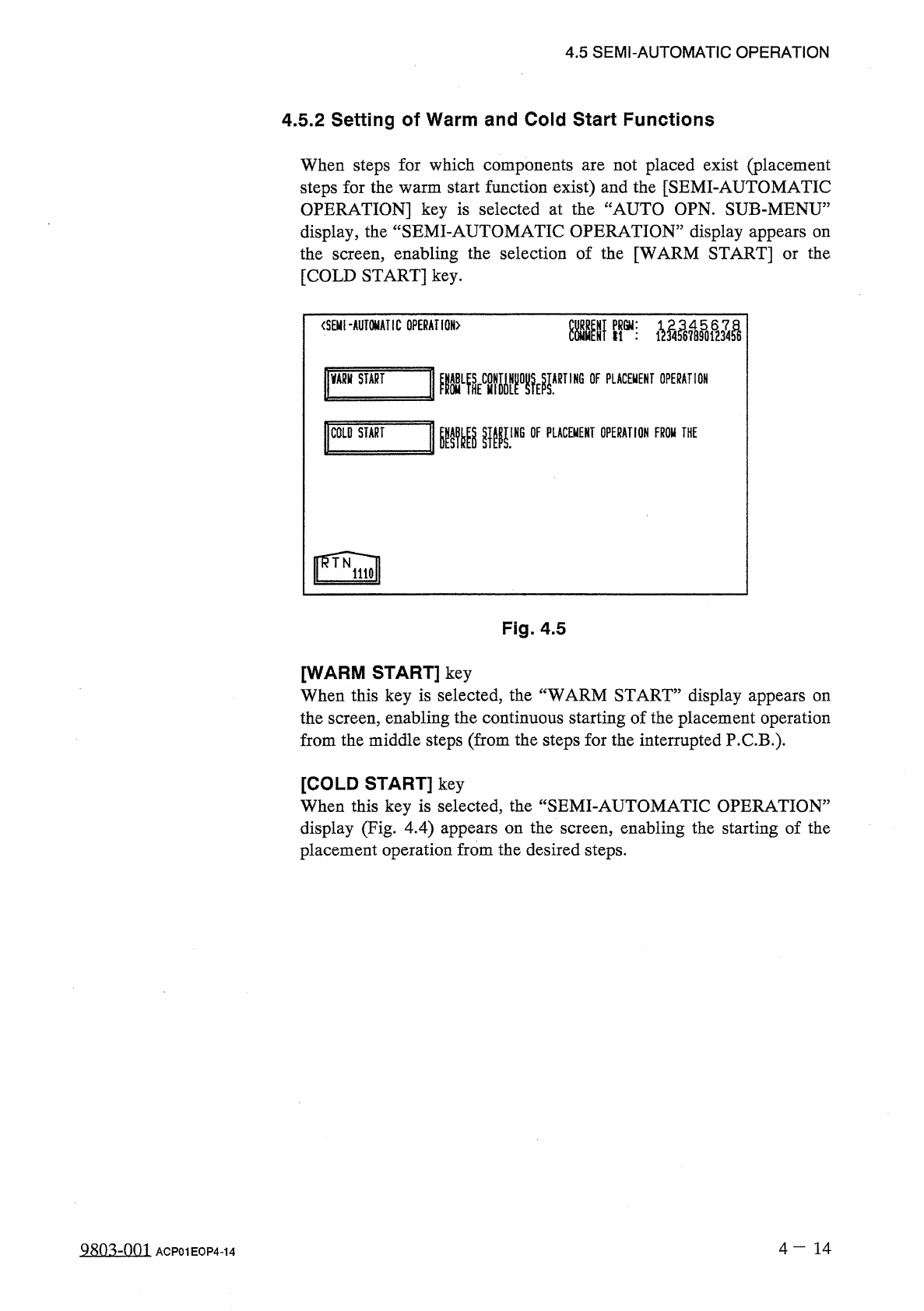
When
steps
for
which
components
steps
for
the
warm
start
function
exist
)
and
the
[
SEMI
-
AUTOMATIC
OPERATION
]
key
is
selected
at
the
“
AUTO
OPN
.
SUB
-
MENU
”
display
,
the
“
SEMI
-
AUTOMATIC
OPERATION
”
display
appears
on
the
screen
,
enabling
the
selection
of
the
[
WARM
START
]
or
the
[
COLD
START
]
key
.
not
placed
exist
(
placement
are
<
SEMI
-
AUTOMATIC
GPERAHGN
〉
Kir
;
VARH
START
ARTING
OF
PLACEMENT
OPERATION
mmw
1
COLO
START
IHG
OF
PLACEMENT
OPERATION
FROW
THE
Fig
.
4.5
[
WARM
START
]
key
When
this
key
is
selected
,
the
“
WARM
START
”
display
appears
on
the
screen
,
enabling
the
continuous
starting
of
the
placement
operation
from
the
middle
steps
(
from
the
steps
for
the
interrupted
P
.
C
.
B
.
)
.
[
COLD
START
]
key
When
this
key
is
selected
,
the
“
SEMI
-
AUTOMATIC
OPERATION
”
display
(
Fig
.
4.4
)
appears
on
the
screen
,
enabling
the
starting
of
the
placement
operation
from
the
desired
steps
.
4
一
14
a
8
Q
3
zQQl
ACP
01
EOP
4
-
14