1OPERATION_.pdf - 第207页
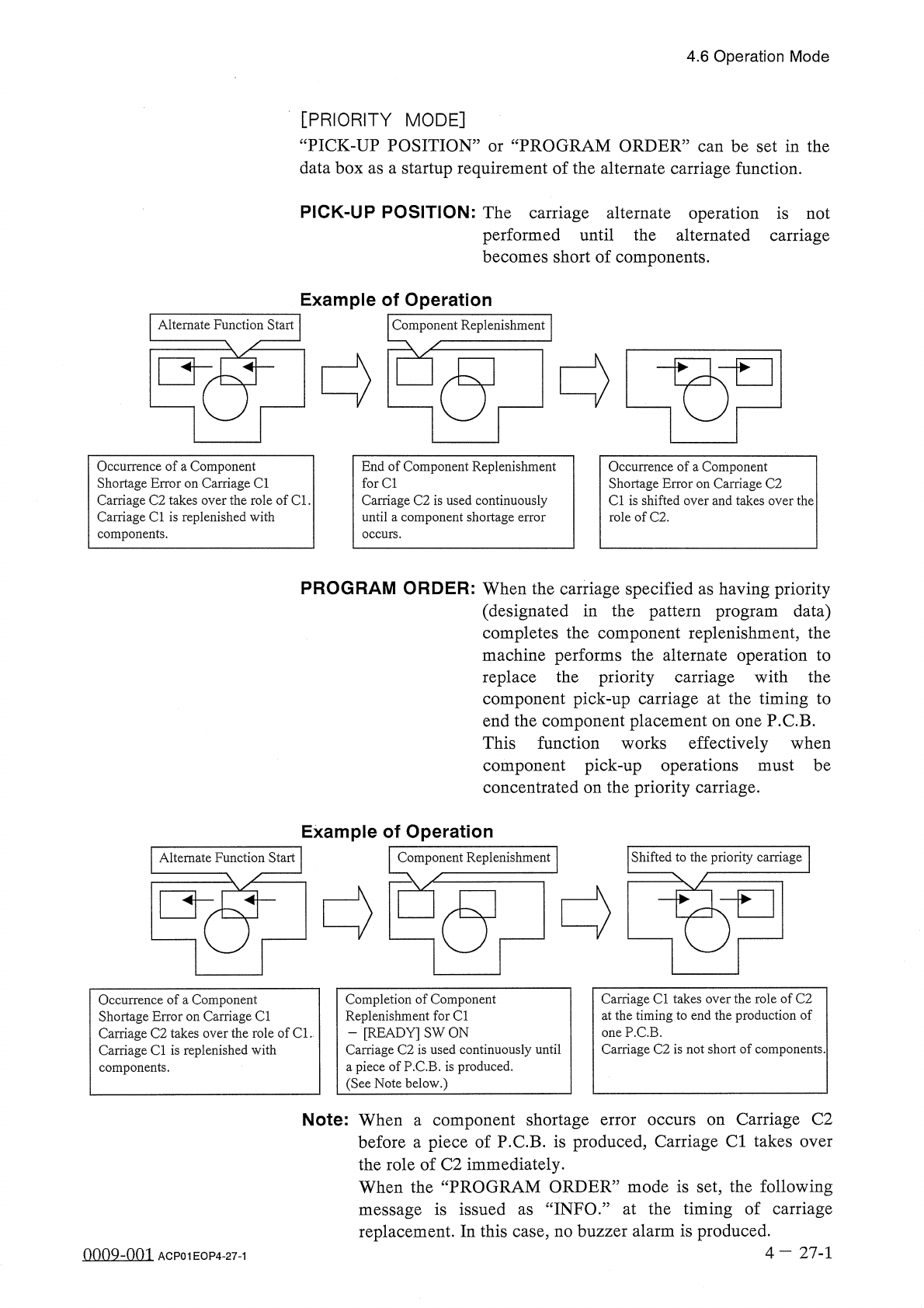
4.6 Operation Mode [ PRIORITY MODE ] “ PICK - UP POSITION ” or “ PROGRAM ORDER ” can be set in the data box as a startup requirement of the alternate carriage function . PICK - UP POSITION : The carriage alternate operat…
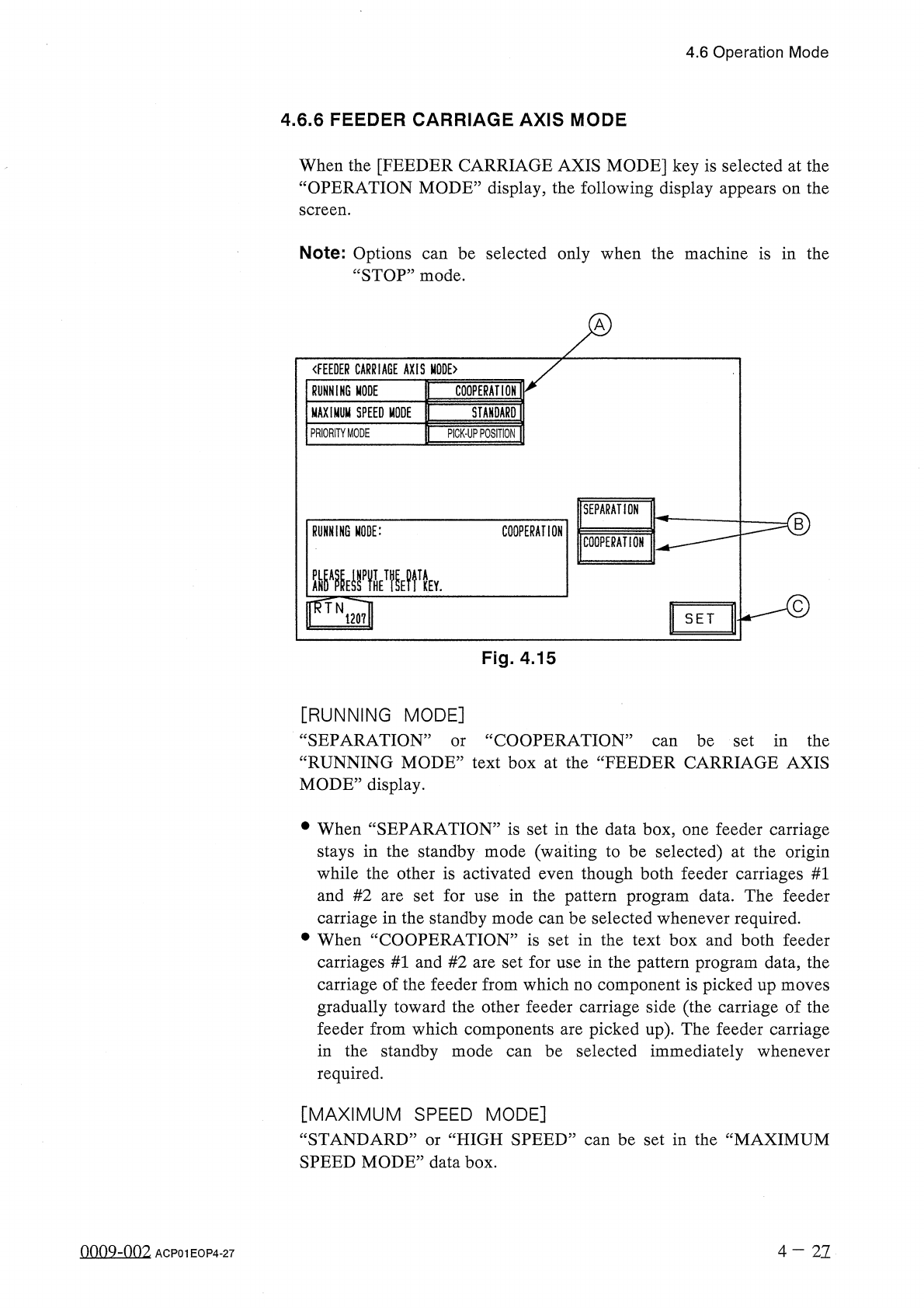
4.6
Operation
Mode
4.6
.
6
FEEDER
CARRIAGE
AXIS
MODE
When
the
[
FEEDER
CARRIAGE
AXIS
MODE
]
key
is
selected
at
the
“
OPERATION
MODE
”
display
,
the
following
display
appears
on
the
screen
.
Note
:
Options
“
STOP
”
mode
.
be
selected
only
when
the
machine
is
in
the
can
〈
FEEDER
CARRIAGE
AXIS
MODE
〉
RUNNING
MODE
COOPERATION
MAXIMUM
SPEED
MODE
STANDARD
PRIORITY
MODE
PICK
-
UP
POSITION
SEPARATION
RUNNING
MODE
:
COOPERATION
COOPERATION
齜
i
邊
wytv
mN
120
?
!
SET
Fig
.
4.15
[
RUNNING
MODE
]
“
SEPARATION
”
“
RUNNING
MODE
”
text
box
at
the
“
FEEDER
CARRIAGE
AXIS
MODE
”
display
.
cc
COOPERATION
”
can
be
set
in
the
or
•
When
“
SEPARATION
”
is
set
in
the
data
box
,
one
feeder
carriage
stays
in
the
standby
mode
(
waiting
to
be
selected
)
at
the
origin
while
the
other
is
activated
even
though
both
feeder
carriages
#
1
and
#
2
are
set
for
use
in
the
pattern
program
data
.
The
feeder
carriage
in
the
standby
mode
can
be
selected
whenever
required
.
•
When
“
COOPERATION
”
is
set
in
the
text
box
and
both
feeder
carriages
#
1
and
#
2
are
set
for
use
in
the
pattern
program
data
,
the
carriage
of
the
feeder
from
which
no
component
is
picked
up
moves
gradually
toward
the
other
feeder
carriage
side
(
the
carriage
of
the
feeder
from
which
components
are
picked
up
)
.
The
feeder
carriage
in
the
standby
mode
required
.
be
selected
immediately
whenever
can
[
MAXIMUM
SPEED
MODE
]
“
STANDARD
”
or
“
HIGH
SPEED
”
can
be
set
in
the
“
MAXIMUM
SPEED
MODE
”
data
box
.
nno
9
-
nn
2
4
-
21
ACP
01
EOP
4
-
27
4.6
Operation
Mode
[
PRIORITY
MODE
]
“
PICK
-
UP
POSITION
”
or
“
PROGRAM
ORDER
”
can
be
set
in
the
data
box
as
a
startup
requirement
of
the
alternate
carriage
function
.
PICK
-
UP
POSITION
:
The
carriage
alternate
operation
is
not
performed
until
the
alternated
carriage
becomes
short
of
components
.
Example
of
Operation
Alternate
Function
Start
Component
Replenishment
Occurrence
of
a
Component
Shortage
Error
on
Carriage
Cl
Carriage
C
2
takes
over
the
role
of
Cl
.
Carriage
Cl
is
replenished
with
components
.
End
of
Component
Replenishment
for
Cl
Carriage
C
2
is
used
continuously
until
a
component
shortage
error
occurs
.
Occurrence
of
a
Component
Shortage
Error
on
Carriage
C
2
Cl
is
shifted
over
and
takes
over
the
role
of
C
2
.
PROGRAM
ORDER
:
When
the
carriage
specified
as
having
priority
(
designated
in
the
pattern
program
data
)
completes
the
component
replenishment
,
the
machine
performs
the
alternate
operation
to
replace
the
priority
carriage
with
the
component
pick
-
up
carriage
at
the
timing
to
end
the
component
placement
on
one
P
.
C
.
B
.
This
function
works
effectively
when
component
pick
-
up
operations
must
be
concentrated
on
the
priority
carriage
.
Example
of
Operation
Shifted
to
the
priority
carriage
Alternate
Function
Start
Component
Replenishment
Carriage
Cl
takes
over
the
role
of
C
2
at
the
timing
to
end
the
production
of
one
P
.
C
.
B
.
Carriage
C
2
is
not
short
of
components
.
Completion
of
Component
Replenishment
for
Cl
-
[
READY
]
SW
ON
Carriage
C
2
is
used
continuously
until
a
piece
of
P
.
C
.
B
.
is
produced
.
(
See
Note
below
.
)
Occurrence
of
a
Component
Shortage
Error
on
Carriage
Cl
Carriage
C
2
takes
over
the
role
of
Cl
.
Carriage
Cl
is
replenished
with
components
.
Carriage
C
2
over
Note
:
When
component
shortage
before
a
piece
of
P
.
C
.
B
.
is
produced
,
Carriage
Cl
takes
the
role
of
C
2
immediately
.
When
the
“
PROGRAM
ORDER
”
mode
is
set
,
the
following
message
is
issued
as
“
INFO
.
”
at
the
timing
of
carriage
replacement
.
In
this
case
,
no
buzzer
alarm
is
produced
.
error
occurs
on
a
4
-
27
-
1
0009
-
001
ACP
01
EOP
4
-
27
-
1
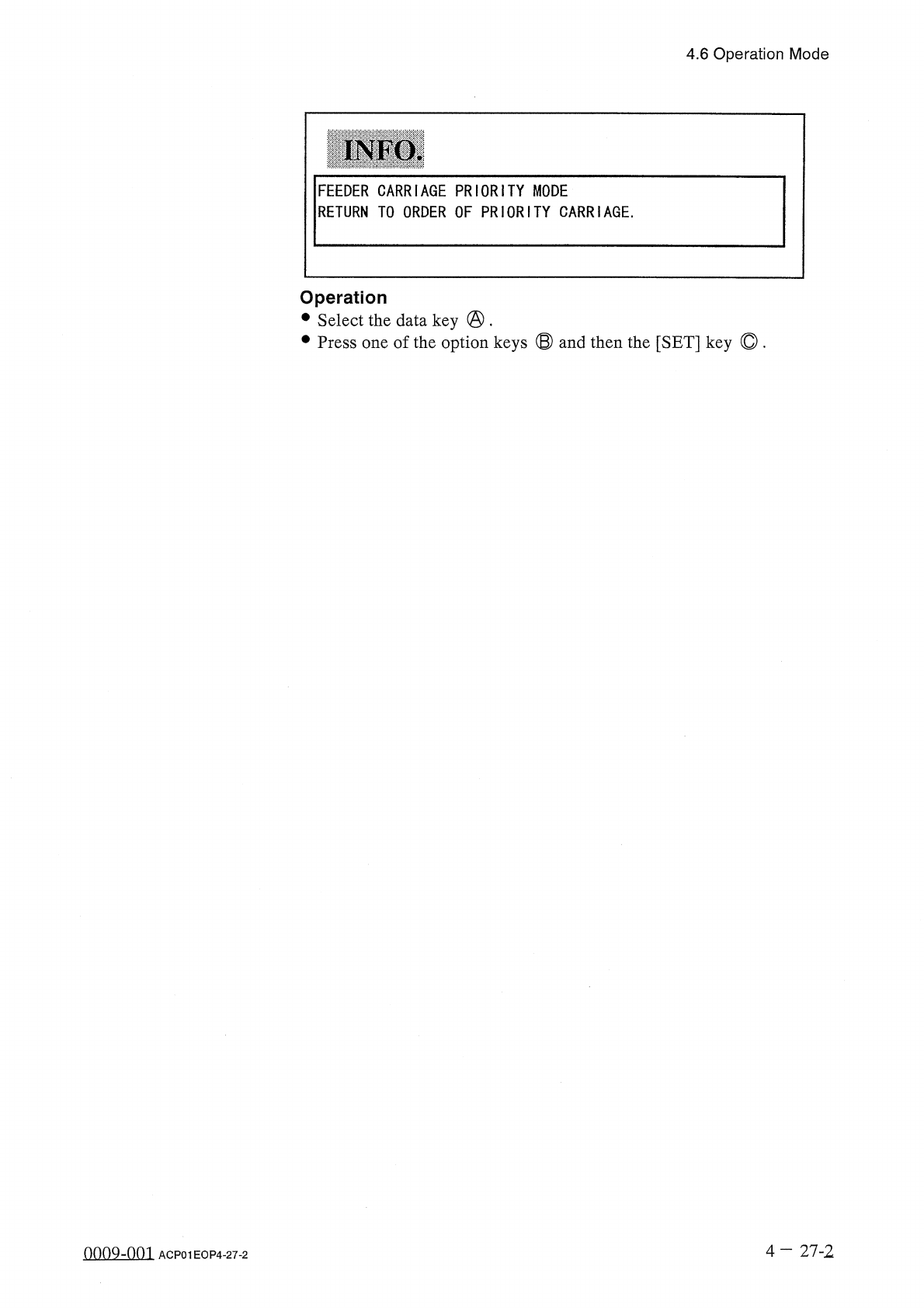
4.6
Operation
Mode
INFO
.
FEEDER
CARRIAGE
PRIORITY
MODE
RETURN
TO
ORDER
OF
PRIORITY
CARRIAGE
.
Operation
•
Select
the
data
key
@
.
•
Press
one
of
the
option
keys
®
and
then
the
[
SET
]
key
©
.
4
—
27
-
2
oooQ
-
nni
ACP
01
EOP
4
-
27
-
2