1OPERATION_.pdf - 第181页
PROGRAM CHANGE M A I N n LMENU _ IOO ; 1 I AUTO OPN . MODE r < PLACEMENI > 1 I \ INDIVIDUAL FDR . , ENABLE / DISABLE PLACE . MODE WARM - UP RUNNING MODE SET PA 5 S / P ^ ( FEEMCHANGE - OVER PREPARATION COMPLETE ) C…
4.2
“
AUTO
OPN
.
MODE
〈
PLACEMENT
〉
,,
Display
PRODUCT
PCB
The
following
is
displayed
when
a
repetitive
program
is
used
.
•
PRODUCT
PCB
(
O
-
NO
.
Number
of
Specified
Multi
-
Unit
P
.
C
.
B
/
s
)
•
PLACEMENT
DATA
SORT
/
NORMAL
/
REVERSE
•
B
.
B
.
R
.
When
the
bad
board
reject
function
is
used
,
this
appears
.
COMP
.
TYPES
The
number
of
different
component
IDs
specified
in
the
component
data
is
displayed
.
When
component
types
are
set
on
two
or
more
lanes
using
the
same
component
ID
names
,
the
number
of
the
component
types
is
regarded
as
one
type
.
COMPONENTS
The
number
of
components
to
be
placed
actually
is
displayed
.
When
“
S
”
(
Skip
)
or
“
C
”
(
Cancel
)
is
set
as
a
control
command
,
the
component
of
the
step
is
not
included
in
“
COMPONENTS
”
.
SEL
.
CRG
.
The
box
indicating
the
selected
carriage
illuminates
green
.
P
.
E
.
C
.
This
is
displayed
when
the
P
.
E
.
C
.
recognition
function
is
used
.
TEMP
.
ORIG
.
This
is
displayed
when
the
feeder
axis
temporary
origin
function
(
specified
in
the
operation
data
)
is
used
.
ALTERNATE
FEEDER
This
is
displayed
when
the
alternate
feeder
function
is
set
in
the
component
data
.
Note
:
When
the
machine
is
in
the
automatic
operation
mode
and
the
[
START
]
button
is
pressed
,
this
display
appears
automatically
.
•
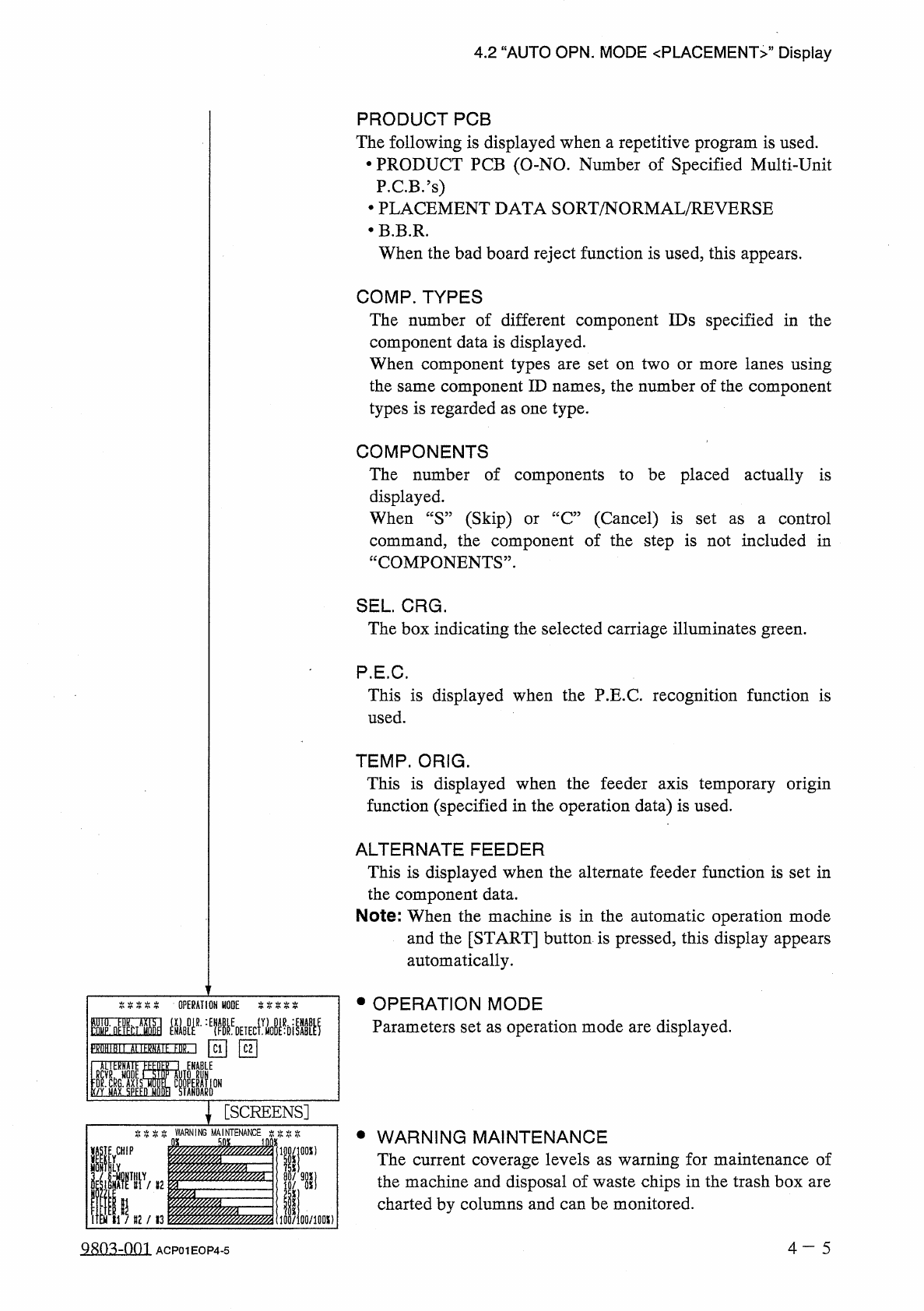
OPERATION
MODE
Parameters
set
as
operation
mode
are
displayed
.
IHM
■
孤墨麵
\
[
SCREENS
]
WARNING
•
WARNING
MAINTENANCE
The
current
coverage
levels
as
warning
for
maintenance
of
the
machine
and
disposal
of
waste
chips
in
the
trash
box
are
charted
by
columns
and
can
be
monitored
.
[
WHIP
iOO
/
lflOX
)
4
—
5
9803
-
001
ACP
01
EOP
4
-
5
PROGRAM
CHANGE
M A I N
n
LMENU
_
IOO
;
1
I
AUTO
OPN
.
MODE
r
<
PLACEMENI
>
1
I
\
INDIVIDUAL
FDR
.
,
ENABLE
/
DISABLE
PLACE
.
MODE
WARM
-
UP
RUNNING
MODE
SET
PA
5
S
/
P
^
(
FEEMCHANGE
-
OVER
PREPARATION
COMPLETE
)
CH
INI
,
min
Hgi
)
l
.
\
FEEDER
FEEDER
C
2
START
IND
A
CANNO
;
t
MfcNU
PRODUCT
CHANGE
OPERATION
MODE
RECALL
MESSAGES
臟
MANAGEMENT
DATA
5
11
9
10
)
(
4
Fig
.
4.2
3
2
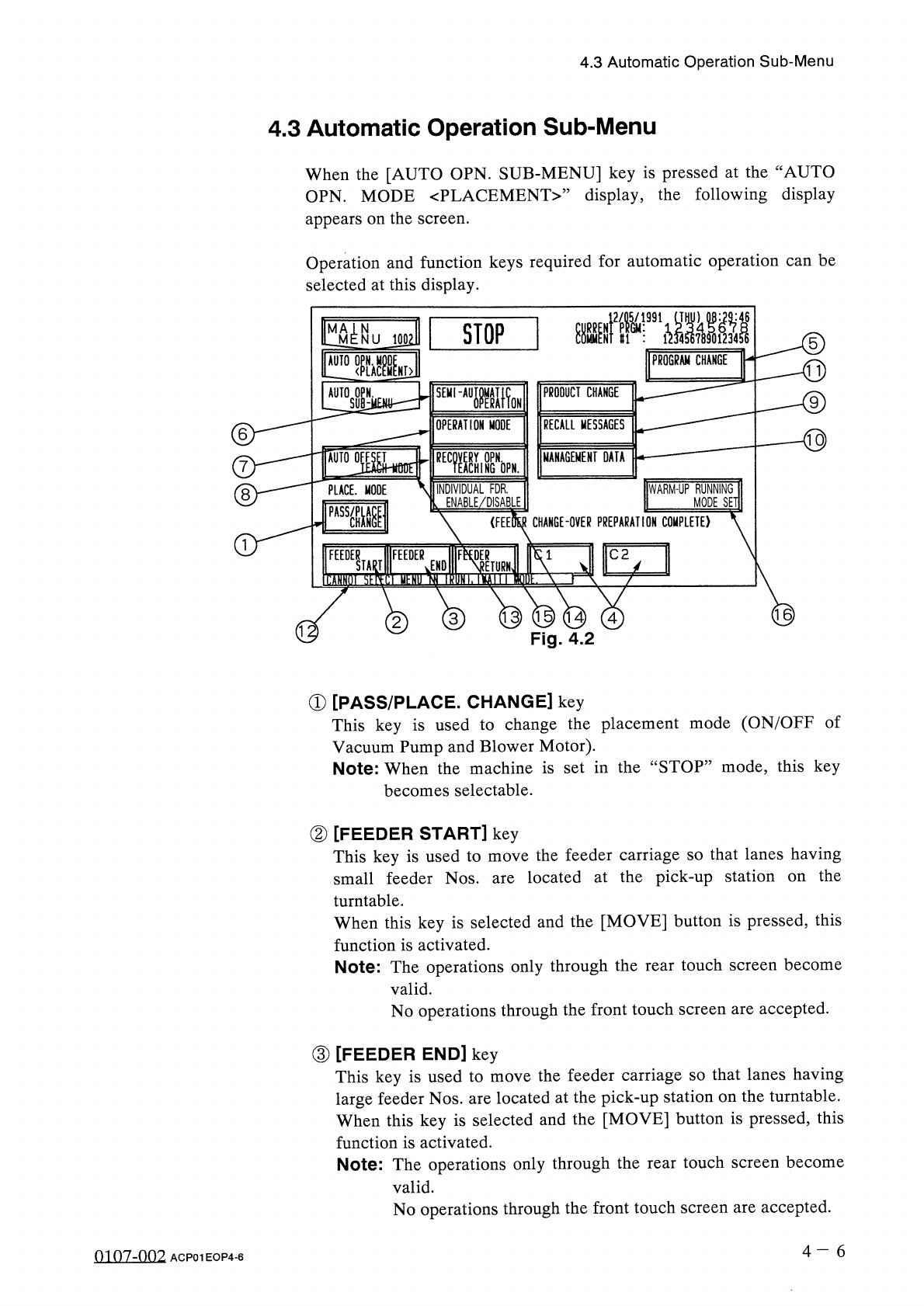
①
[
PASS
/
PLACE
.
CHANGE
]
key
This
key
is
used
to
change
the
placement
mode
(
ON
/
OFF
of
Vacuum
Pump
and
Blower
Motor
)
.
Note
:
When
the
machine
is
set
in
the
“
STOP
”
mode
,
this
key
becomes
selectable
.
②
[
FEEDER
START
]
key
This
key
is
used
to
move
the
feeder
carriage
so
that
lanes
having
small
feeder
Nos
.
are
located
at
the
pick
-
up
station
turntable
.
When
this
key
is
selected
and
the
[
MOVE
]
button
is
pressed
,
this
function
is
activated
.
Note
:
The
operations
only
through
the
rear
touch
screen
become
valid
.
No
operations
through
the
front
touch
screen
are
accepted
.
the
on
③
[
FEEDER
END
]
key
This
key
is
used
to
move
the
feeder
carriage
so
that
lanes
having
large
feeder
Nos
.
are
located
at
the
pick
-
up
station
on
the
turntable
.
When
this
key
is
selected
and
the
[
MOVE
]
button
is
pressed
,
this
function
is
activated
.
Note
:
The
operations
only
through
the
rear
touch
screen
become
valid
.
No
operations
through
the
front
touch
screen
are
accepted
.
4
一
6
4.3
Automatic
Operation
Sub
-
Menu
4.3
Automatic
Operation
Sub
-
Menu
When
the
[
AUTO
OPN
.
SUB
-
MENU
]
key
is
pressed
at
the
“
AUTO
OPN
.
MODE
〈
PLACEMENT
〉
”
display
,
the
following
display
appears
on
the
screen
.
Operation
and
function
keys
required
for
automatic
operation
can
be
selected
at
this
display
.
8
01
07
-
002
ACP
01
EOP
4
-
6
STOP
J
991
1
.
」
.
.
0
4.3
Automatic
Operation
Sub
-
Menu
Whenever
a
feeder
carriage
is
moved
,
check
that
nobody
is
around
the
carriage
for
safety
purposes
.
When
the
machine
is
operated
by
more
than
one
person
,
ensure
good
communication
by
giving
loud
verbal
instructions
.
A
WARNING
Note
:
[
Supplementary
Description
of
②
and
(
D
]
•
When
the
machine
is
in
the
“
PAUSE
”
or
“
STOP
”
mode
,
these
keys
become
selectable
.
The
feeder
carriage
on
the
origin
side
cannot
be
activated
.
•
When
a
carriage
is
located
at
its
origin
(
home
position
)
,
it
cannot
be
activated
by
pressing
one
of
these
keys
.
•
When
the
[
MOVE
]
button
is
pressed
for
1.0
seconds
or
less
,
the
feeder
carriage
moves
in
the
specified
direction
by
1
pitch
.
When
pressed
for
more
than
1.0
seconds
,
the
carriage
moves
10
pitches
.
•
The
rear
operation
panel
is
equipped
with
the
[
FEEDER
START
]
and
[
FEEDER
END
]
buttons
.
By
pressing
“
AUTO
OPN
.
SUB
-
MENU
”
display
)
,
the
feeder
carriage
can
be
moved
.
of
these
buttons
(
without
opening
the
one
④
“
FEEDER
CHANGE
-
OVER
PREPARATION
COMPLETE
”
[
C
1
]
,
[
C
2
]
These
keys
inform
the
machine
that
the
setting
of
components
in
carriages
Cl
and
C
2
is
completed
.
When
the
feeder
carriage
is
located
at
its
home
position
,
these
keys
become
selectable
.
The
same
result
can
be
obtained
by
pressing
the
[
Cl
READY
]
or
[
C
2
READY
]
button
located
on
the
rear
side
of
the
machine
body
)
.
(
main
Note
:
[
Supplementary
Description
of
④
]
•
When
each
feeder
carriage
is
located
at
its
home
position
,
the
selected
key
(
Cl
or
C
2
)
turns
ON
(
Green
)
or
OFF
every
time
it
is
pressed
.
•
When
tape
feeders
are
installed
and
the
feeder
axis
safety
guard
is
closed
,
press
the
[
Cl
READY
]
and
[
C
2
READY
]
buttons
located
on
the
rear
side
of
the
machine
(
main
body
)
so
that
the
LEDs
of
the
buttons
illuminate
.
•
The
key
on
the
carriage
side
where
components
actually
being
placed
becomes
unselectable
.
The
same
thing
also
applies
to
the
feeder
carriage
not
used
in
the
current
program
data
.
are
9803
-
001
4
一
7
ACP
01
EOP
4
-
7